Events, Double Bookings and Conflicts, oh my...

31 postsstarted by SkinnerVic 6,393 viewsoriginal topic

New Member
#1
Hello everyone,

I'm posting on behalf of my wife who is a Stake Building scheduler. Obviously much has been covered on the forum - thank you everyone here. There appears to be a problem (where my wife has brought me in because I'm an IT guy for 20+ years, MCSE, etc) that she can't explain. I've reviewed it - it appears to be a bug:

Restrictions & Events - It appears that the website code when a Ward unit makes an Event in the system, does not HONOR underlying Restrictions. For example, say the Baptismal Font has a Restriction for Stake Children Event, no one should be able to "schedule" an Event for the Font with the same parameters as the Restriction.

I'm well aware of the manual here explaining this:
https://ue.ldschurch.org/ldsapphelp/cal ... licts.html

Where is says "it's not technically possible" - wrong, we had to rub our eyes looking at it multiple times.

Is there a permissions error or a recursive error, whereby the Event Scheduling function should dig down the tree/calendar to see if there is a conflict on the location/resource before allowing an Event to save, pushing an error back up the stack?

We're pretty frustrated as people are trying to "get around" the restriction by doing the fourth suggestion in bullet on the above link (which I wish they would remove as a suggestion):
"Leave the location for your event unselected. Then negotiate with the designated building scheduler to arbitrate rights to the room."
That is a totally ineffectual technique as it caused a problem just today where someone had an actual restriction on the font and another unit "claimed" to have an event scheduled. In effect, many people are "squeaking" at the Building Scheduler because they see their Ward "Event" without the location selected and not knowing how to use the calendar correctly, think they have it (the location/resource) on lock, when there is an underlying Restriction that is taking precedence.

All that said, we recognize that this is as much a people issue as technical. That said, having the technology not allow people to get "jicky" because they can't/don't/won't try to work out their issue by placing some large descriptive event title to stake claim (sorry about the pun) on a location/resource is wacky, all coming back to the Building Scheduler getting the blame.

BTW - In all my reading, is there a mechanism for the building scheduler to be notified by email on creation of ANY unit event where the time is overlapping another event (with or without resource restriction)? This might allow her to cut the trouble makers off at the pass.

She is also working with all unit Bishoprics and their respective auxiliaries to make sure they understand how to use it properly (which I see is a reoccurring theme around here) and NOT have to call her (unless they need help which she gives all the time).

Suggestions, critiques, flames, solutions...?

Senior Member
#2
SkinnerVic wrote: Restrictions & Events - It appears that the website code when a Ward unit makes an Event in the system, does not HONOR underlying Restrictions. For example, say the Baptismal Font has a Restriction for Stake Children Event, no one should be able to "schedule" an Event for the Font with the same parameters as the Restriction.
This is an inappropriate use of a restriction. Restrictions do not schedule the building and should never be relied on to provide exclusive use of a building resource. An event must be used to schedule a building resource.

It is quite possible to have a 'conflict' when using a restriction:
  • A building scheduler can create an event that 'conflicts' with a restriction without any warning.
  • A building scheduler can create a restriction that 'conflicts' with another restriction without any warning.
  • Anyone in the unit associated with the restriction can create an event that overlaps the restriction.
None of this is true of two events. Two events can never schedule the same resource at the same time.

Restrictions should only be used to enforce arrangements between the wards sharing a building: things like Ward A has the building on Tuesday evenings and Ward B on Wednesday evenings. Restrictions are generally set up at the beginning of the year based on this kind of arrangement and then don't have to be touched again. Even then the individual organizations in those wards should schedule events during the restrictions to ensure there aren't any conflicts between the organizations in the ward.
Senior Member
#3
SkinnerVic wrote:We're pretty frustrated as people are trying to "get around" the restriction by doing the fourth suggestion in bullet on the above link (which I wish they would remove as a suggestion):
"Leave the location for your event unselected. Then negotiate with the designated building scheduler to arbitrate rights to the room."
The purpose here is if a restriction is place on the restriction calendar for a ward but a ward does not have anything scheduled then another ward may want to see if they can use the facility. At which time the person the place the event using the no location function should call the building scheduler to see if its possible to use the building even though another ward has a restriction in place. The building scheduler at that time should call the person who asked for the restriction to see if it is possible for the other ward to use the building. If the ward with the restriction says its OK then at that time the building scheduler can ether edit the event and add the location, or remove the restriction for that location and have the asking ward edit the event to the proper location.

Its much better to not use the restriction function unless its a regular recurring restriction such as a specific wards youth night.
SkinnerVic wrote:That is a totally ineffectual technique as it caused a problem just today where someone had an actual restriction on the font and another unit "claimed" to have an event scheduled. In effect, many people are "squeaking" at the Building Scheduler because they see their Ward "Event" without the location selected and not knowing how to use the calendar correctly, think they have it (the location/resource) on lock, when there is an underlying Restriction that is taking precedence.
The inefficiency was that a restriction was place by the building scheduler for something that should have only been an event on a wards calendar.
SkinnerVic wrote:All that said, we recognize that this is as much a people issue as technical. That said, having the technology not allow people to get "jicky" because they can't/don't/won't try to work out their issue by placing some large descriptive event title to stake claim (sorry about the pun) on a location/resource is wacky, all coming back to the Building Scheduler getting the blame.
If the Building Scheduler stops placing restrictions when called, and just tells the caller to contact a calendar editor in their own ward the problem will correct its self. And no one will have any grounds on which to blame the Building Scheduler.
SkinnerVic wrote:BTW - In all my reading, is there a mechanism for the building scheduler to be notified by email on creation of ANY unit event where the time is overlapping another event (with or without resource restriction)? This might allow her to cut the trouble makers off at the pass.
There is no mechanism for the building scheduler to be notified by email. Nor is there a need to if events are being placed (instead of restrictions). An event will have a conflict error if the person placing the event try's to over lap an existing event in the same location and same resources (rooms).
SkinnerVic wrote:She is also working with all unit Bishoprics and their respective auxiliaries to make sure they understand how to use it properly (which I see is a reoccurring theme around here) and NOT have to call her (unless they need help which she gives all the time).
Good for her I will suggest though that she gets a firm understanding of the difference between restrictions and events and how they work. If she does this right she will not have very many phone calls at all, due to the wards will place their own events on the calendar.
Community Administrator
#4
SkinnerVic wrote:I'm posting on behalf of my wife who is a Stake Building scheduler.
You might want to read the thread unnecessary bureaucracy.

I suspect someone is still trying to do the "old way" in the new system.
Have you searched the Help Center? Try doing a Google search and adding "site:churchofjesuschrist.org/help" to the search criteria.

So we can better help you, please edit your Profile to include your general location.
Community Administrator
#5
SkinnerVic wrote:We're pretty frustrated as people are trying to "get around" the restriction by doing the fourth suggestion in bullet on the above link (which I wish they would remove as a suggestion):
"Leave the location for your event unselected. Then negotiate with the designated building scheduler to arbitrate rights to the room."
I'd think that after people get kicked out a few times, it would cease to be a problem. If you schedule an event and fail to book the room, then you can't cry about it. I know some will paint that as "harsh" but sometimes a little tough love is necessary. Either booking the room on the calendar means something or it does not.
Have you searched the Help Center? Try doing a Google search and adding "site:churchofjesuschrist.org/help" to the search criteria.

So we can better help you, please edit your Profile to include your general location.
New Member
#6
Wow, lots of input - I sincerely appreciate it. I figured I was going to get a RT*M, but I think you all have seen there's a big gap on old skool to new school. This is a relatively new calling for her (March) so we've both had to bootstrap as the online resources, well, "suck" in terms of dealing with our situation. After having *lengthy* conversation today, two major points were established (with a few minor ones along the way):

1) The issue with scheduling in our Stake is more of a people problem in that we have Ward Clerks not scheduling baptisms, funerals, etc (which they SHOULD be doing contrary to jeffevannelson's post in the unnecessary bureaucracy post, of which I've read and agree with a fair amount.) There is a GULF of people not being trained top down, or shirking their duty, happily handing that off to the building scheduler. The NEED to step up and do it, thereby helping train the Auxes. That is where my wife sees a big opportunity to train people that they can do it themselves, which is in progress.

Tangentially, we have many people that don't know WHO to call, so they call her. This is also problematic of the problem of training top down. We also have a fair number without computer access, because using their iPad or phone is miserable and misleading (not seeing events, etc) when using LDS Tools.

2) The technical side is not set up right on our calendar. There are some issues from a rights level in that not all Wards in the Stake are listed units for her to assign, so it's a kludge for those not immediately resident in the building. We even have non-Stake units that are resident for events (University, etc). Maybe you folks can shed light on WHO can add those units.

I've read a lot, even in this thread, that she SHOULD be able to set up an event - she can't, only restrictions. So, everything looks like a nail to one hammer she has - restriction. In the Ivory Tower of proper use, she would set up events but she can't find it and neither can I (We're no dummies either - A-personality, driven to do it right).

With the above said, I have to quote just one event for Russell:
If you schedule an event and fail to book the room, then you can't cry about it. I know some will paint that as "harsh" but sometimes a little tough love is necessary. Either booking the room on the calendar means something or it does not.
LOL - Albeit I agree in theory that may work with some lowly Ward Primary activity - the instance I'm recalling was an AREA Singles conference set up by none other than our Stake IT guy as an event, with a NON SELECTED location/resource. My wife scrambled with them for two days ejecting people from events. Yea, not cool, but that's the essence of the problem here. Adding insult to things today, we had one restriction based calendar item where two parties showed up claiming right to use the Font at the same time. They said they would work it out after calling her to figure out the deal - pffft.

Our take away from you all leading the way in the recommendations is the following:

A) We know she "shouldn't" be there, and it's not a power trip - she wants them to do it but they won't as of right now. She's in-process to talk with all Ward Counsels to make sure they understand their rights and responsibilities since the Stake has been seemingly negligent.

B) Someone tell us how she can book an EVENT and not use that all-purpose hammer?!? Also, not having that with ALL units listed is messy at best. This has to be a Stake IT setup thing - just need a direction, because if they knew how to do it, we expect it would have been already done.

Suggestion for this forum: As a couple that's been in-the-trenches with an obstinate group... there really needs to be a sticky thread - Course 101 New Building Schedulers, on basic do's/don'ts with links galore to tighten up the learning curve.

Thanks again! (Edits for clarity from the Boss on things)
New Member
#7
Ok, I stand corrected, by her - she told me to post this:

https://ue.ldschurch.org/ldsapphelp/cal ... schedulers

Under the Building Scheduler Role bullet list, she quoted me:
Contrary to what the name might imply, building schedulers cannot actually schedule events. They can only create reservations, which are not events. (See Making Reservations for more information about the difference.)
As much as you folks are implying she should make an "event", that's a non-starter it seems. Back to focusing on A) and getting all units listed to clean it up...
Senior Member
#8
SkinnerVic wrote: I've read a lot, even in this thread, that she SHOULD be able to set up an event - she can't, only restrictions. So, everything looks like a nail to one hammer she has - restriction. In the Ivory Tower of proper use, she would set up events but she can't find it and neither can I (We're no dummies either - A-personality, driven to do it right).
No, actually, a 'building scheduler' does not automatically have rights to create events. With the calendar system the wards really MUST create their own events. They can't punt it to the building scheduler. That's because even if the building scheduler is granted some rights to create events, they can't create them on the calendars of each ward--where they belong.

This is a hard transition for many units but it just plain doesn't work to try to have the building scheduler schedule events for ward organizations. They have to do it themselves or the system fails. In our stake this transition didn't happen until the stake presidency understood what had to happen and pushed it hard including training sessions for all the ward clerks and bishoprics. But once that happened everything ran smoothly.

There is usually one remaining question: who schedules events for those who don't have rights? This is usually for private or family events, weddings, family reunions, etc. It's possible to grant the building scheduler rights on a stake calendar to allow them to schedule this type of event. But I recommend against it. It just confuses the issue and makes people think again that the building scheduler can schedule the building.

Instead, I recommend that each ward designate a calendar specialist (usually a clerk or bishopric counselor) and have members of their ward contact that person for private events. They can put the event on a ward calendar or create a private calendar specifically for these events.

This is how we have things set up in our stake. There are variations that also work but I think this works well:
  • The building scheduler (or more accurately the building coordinator) is the ward clerk of the agent ward for the building. The actual duties of the building coordinator are not great. Usually it just involves setting up restrictions at the beginning of the year and mediating a couple (on average) conflicts that may come up during the year. So putting this on the agent ward clerk isn't a burden.
  • Each ward schedules their own events. If possible each organization schedules their own events. If the ward is having problems with that or has a significant number of ward leaders who can't schedule events due to lack of computer access or computer knowledge then they designate one of the clerks as the calendar specialist and he handles scheduling for the ward organization who can't do it themselves. Clerks are calendar admins and can add events to any calendar in the ward.
  • Members who wish to reserve the building for private events are told to contact the ward calendar specialist. This is preferred but as a backup they can also call the agent ward clerk. Since the agent ward clerk is not only the building coordinator but also a ward calendar admin for his ward, he can create these events without additional rights.
SkinnerVic wrote:Suggestion for this forum: As a couple that's been in-the-trenches with an obstinate group... there really needs to be a sticky thread - Course 101 New Building Schedulers, on basic do's/don'ts with links galore to tighten up the learning curve.
That's probably a good idea. At one point I think those of us who have struggled with this and helped people work out a good system were hoping that all of this information would make it into the calendar help system. But the church downsized their documentation team so nothing has happened. A sticky thread or a wiki article would probably be helpful.
Senior Member
#9
SkinnerVic wrote:Tangentially, we have many people that don't know WHO to call, so they call her. This is also problematic of the problem of training top down.
When this happens she need to tell them to call the person in their ward who is responsible for scheduling events on the calendar. If they don't know who that is have them call their Ward Clerk, Exec Sec, or Bishopric member. Sooner or later they will get the problem fixed.
Community Administrator
#10
SkinnerVic wrote:The technical side is not set up right on our calendar. There are some issues from a rights level in that not all Wards in the Stake are listed units for her to assign, so it's a kludge for those not immediately resident in the building. We even have non-Stake units that are resident for events (University, etc). Maybe you folks can shed light on WHO can add those units.
The stake can add units to the location.

SkinnerVic wrote:I've read a lot, even in this thread, that she SHOULD be able to set up an event - she can't, only restrictions. So, everything looks like a nail to one hammer she has - restriction.
She has to be granted rights to the appropriate calendars. Simply being added as the building scheduler in the calendar system isn't enough. But he's the rub: no one can add events to a unit they do not belong to. So even with all the right possible, she could add events to a stake calendar, and even the ward she is in, but not to any other ward. That's why the "old way" is dead, Dead, DEAD. Every unit has to add their own events.

Or to put it another way: by-in-large, her job has been replaced by a computer. At best she's a referee for the process, but not an active participant. While each unit could have a lead person doing the calendar, it's also possible to have each quorum and auxiliary leader handle their own calendar. (I know, heresy to the old way of thinking!)
Have you searched the Help Center? Try doing a Google search and adding "site:churchofjesuschrist.org/help" to the search criteria.

So we can better help you, please edit your Profile to include your general location.
New Member
#11
"None of this is true of two events. Two events can never schedule the same resource at the same time."

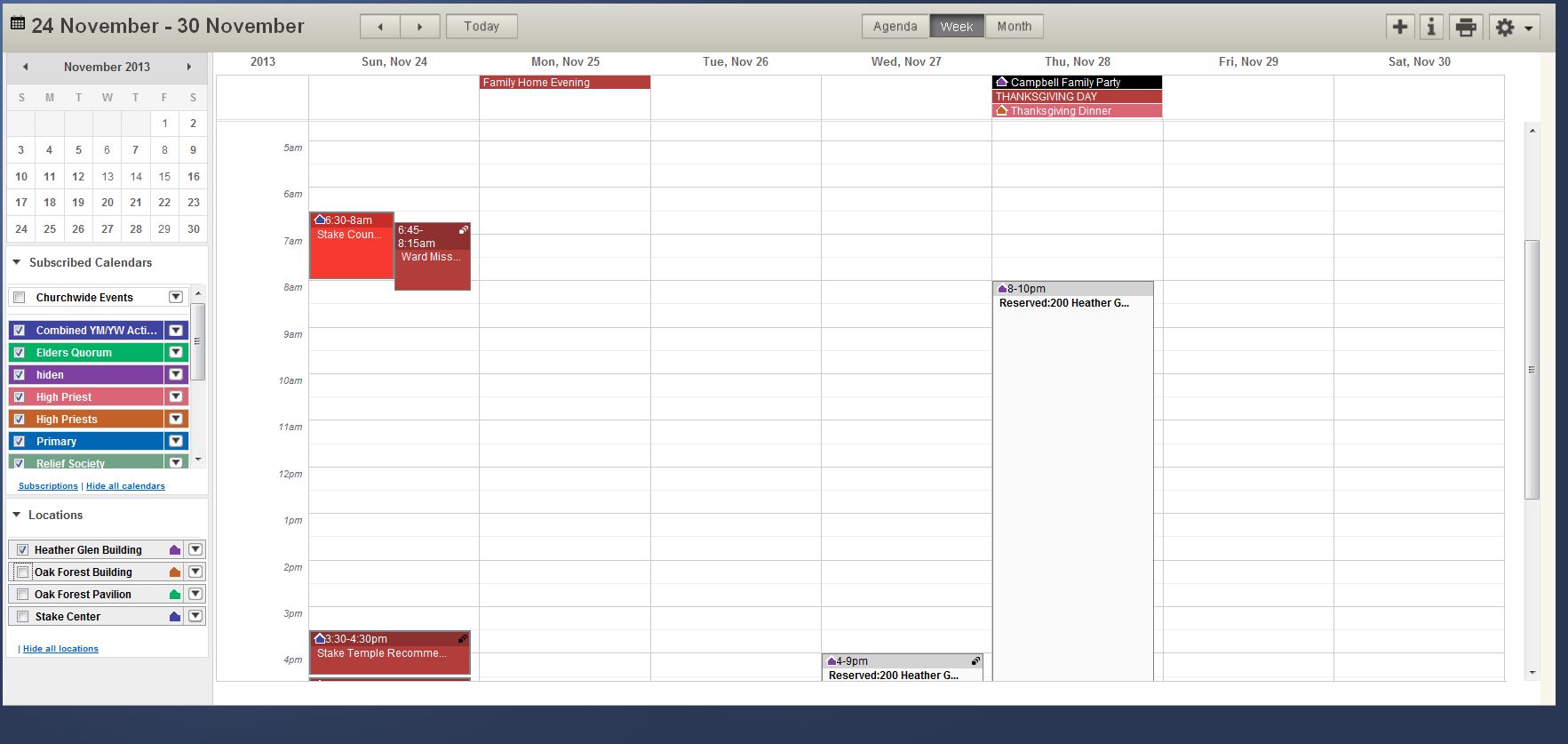
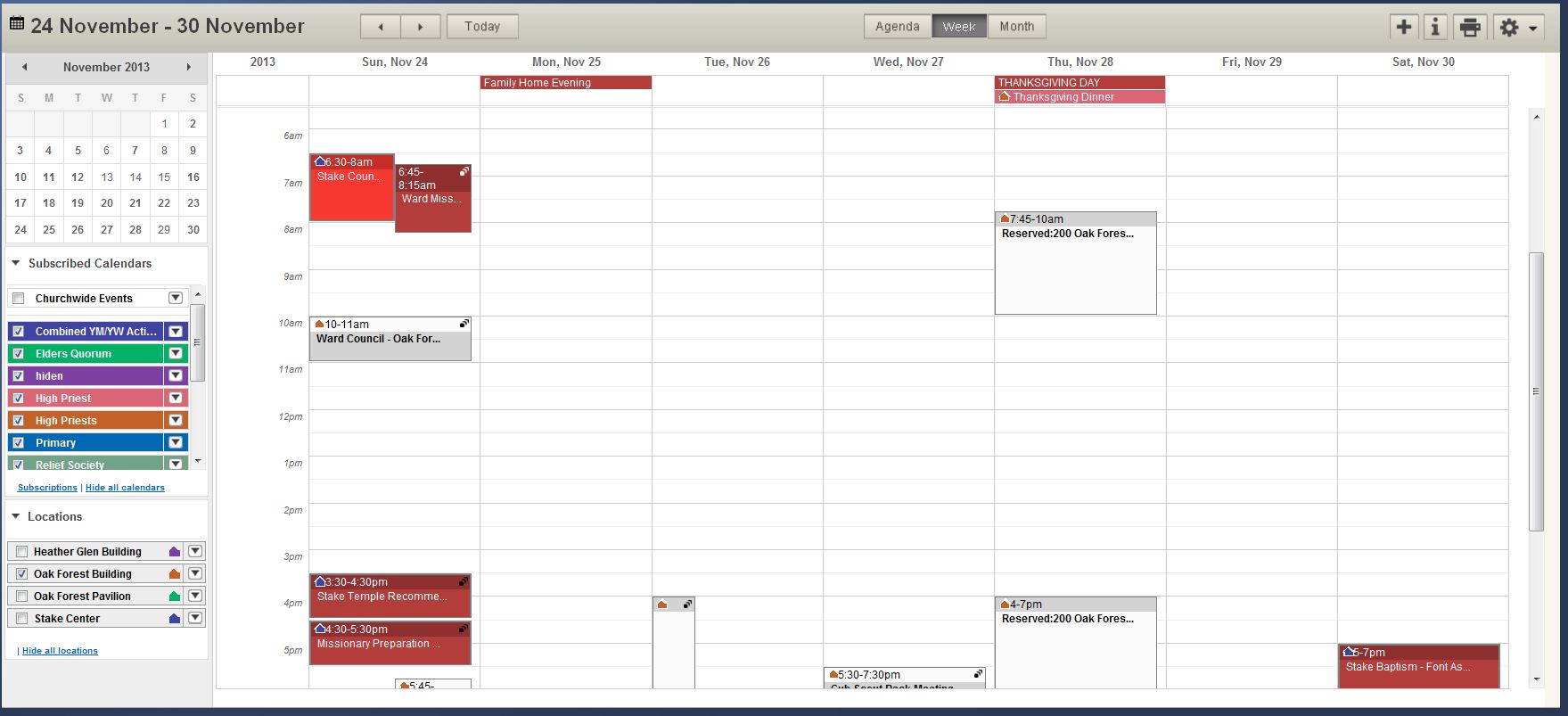
We have 3 buildings in the stake. 2 of the 3 buldings had overlapping events for November 28th. 3 of the events were entered as entire facility for the entire day. 2 other events were entered as kitchen and cultural hall for a few hours on the same day. A total overlap in a system that said it can't happen.

There were no restrictions involved, all 5 were events. How does this happen?
Community Administrator
#12
My first response: are you sure this isn't a case of a duplicate building? My second response: Did they actually book the location and not use "other location" or use a locally-created calendar layer and called it "the building calendar"?

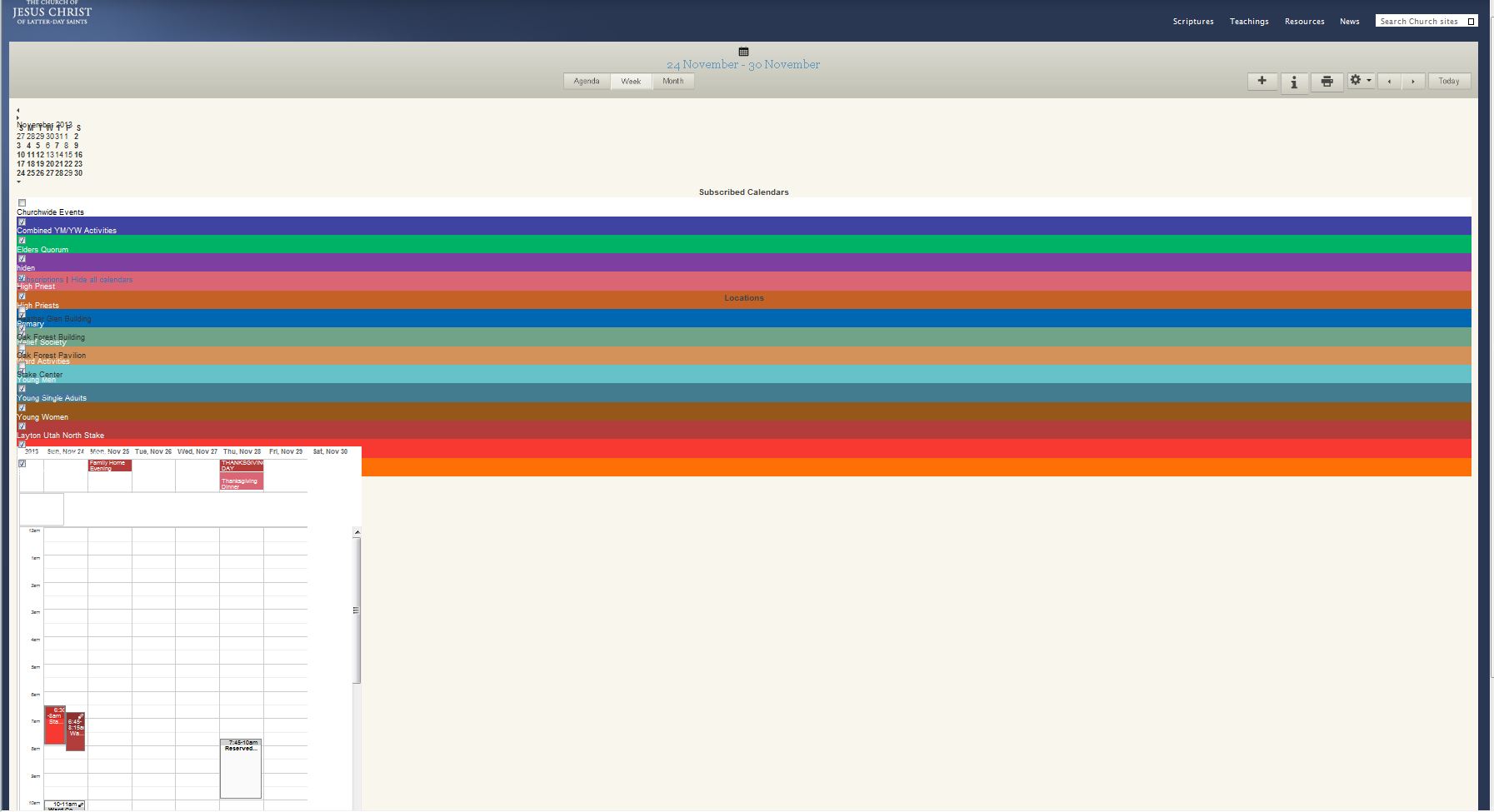
Can you post a screen shot of one of the buildings in week view with all calendars except that location turned off?

There have been isolated cases in the past where conflicts have been allowed, but we have to rule out user error first.
Have you searched the Help Center? Try doing a Google search and adding "site:churchofjesuschrist.org/help" to the search criteria.

So we can better help you, please edit your Profile to include your general location.
New Member
#13
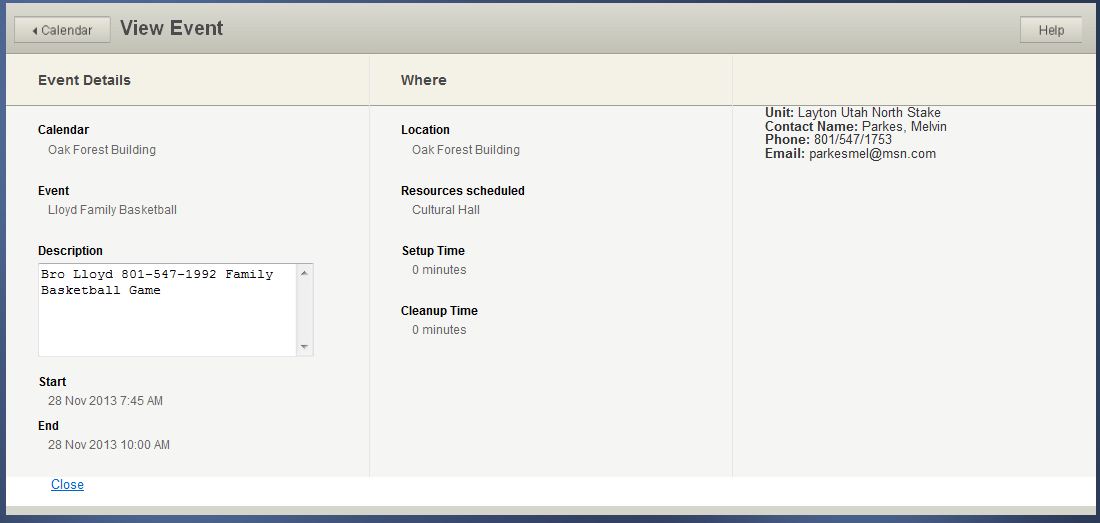
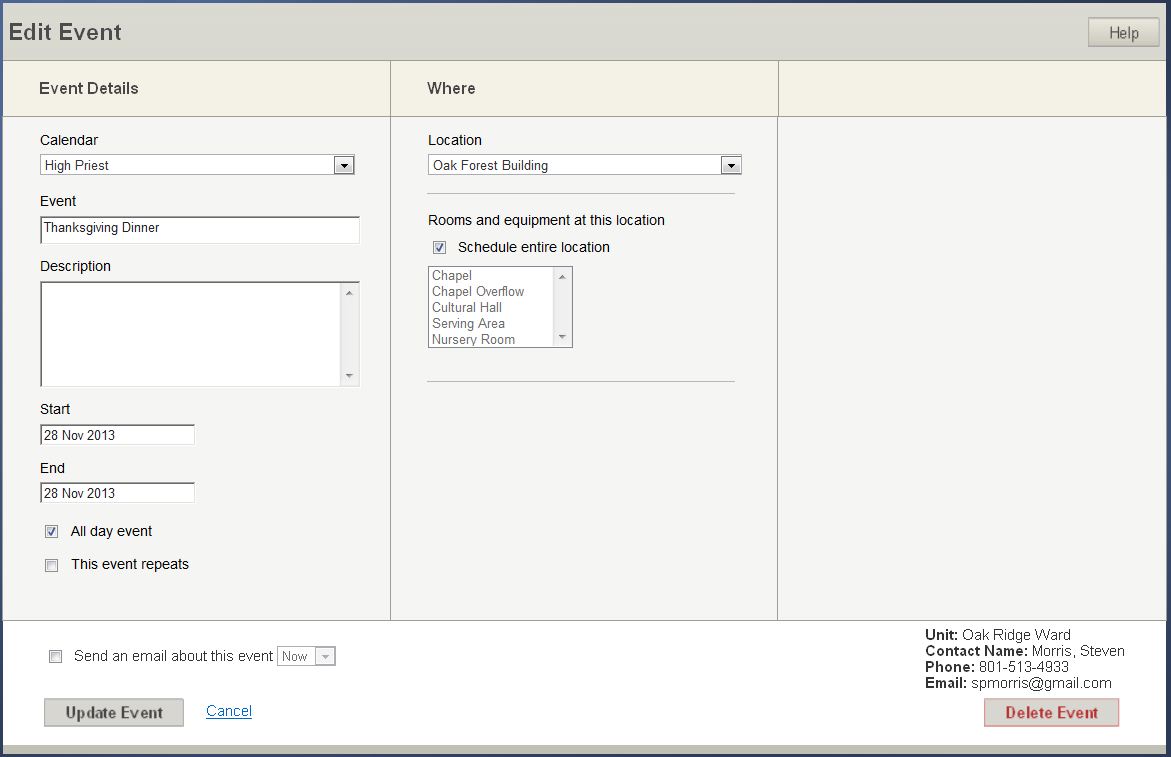
I have attached 5 jpg files using the snippet tool.

I can't see any difference in the events except the color of the event header.

On a separate note, the calendar "crashed" on my again while working on this. It gets a screen collision or overlapping text and you can't tell what you’re looking at. Exiting all browsers and getting back in is the only solution that sometimes works.... This is a different issue for a different forum I suspect.
πŸ“Ž lloyd1.JPG (53.54 KiB)
πŸ“Ž Morris.JPG (74.74 KiB)
πŸ“Ž Calendar errorsJPG.JPG (128.41 KiB)
Senior Member
#14
smorris wrote:I have attached 5 jpg files using the snippet tool.

I can't see any difference in the events except the color of the event header.
Actually the entries with times are in fact restrictions and not events. You can tell because in the details view under Calendar it lists the building and not an actual calendar. The 'View Event' title is used for both events and restrictions so you can't tell by looking at the title. You can also tell because a restriction will say 'Reserved:' in the week view.
Senior Member
#15
smorris wrote:There were no restrictions involved, all 5 were events. How does this happen?
smorris wrote:I can't see any difference in the events except the color of the event header.
Several of what you call events are actually restrictions. A restriction appears as a blank event lacking any color fill and will appear in the week view as a grey header and white body. Where as an event that is not on a calendar layer you have chosen to see or one for another unit will appear with a white header and a grey body.

It appears that when it come to privet events people are being directed to the Building Scheduler who then places an restriction on the calendar. This is due to the building scheduler not being able to put event on any calendar, unless they have editor rights at their wards level or the stake level, which is how the program is now designed. A restriction does not book/schedule the building it only allows for a specific unit to be able to place a event which in turn books/schedules the building.
Community Administrator
#16
Gary_Miller wrote:A restriction does not book/schedule the building it only allows for a specific unit to be able to place a event which in turn books/schedules the building.
Furthermore, a restriction can be placed at any time and there is no warning about any conflict. So unless the Building Scheduler took the time to verify that the facility was really available, they might have been the one who created the conflict.

But it all comes back to using restrictions when it should have been an event.
Have you searched the Help Center? Try doing a Google search and adding "site:churchofjesuschrist.org/help" to the search criteria.

So we can better help you, please edit your Profile to include your general location.
Senior Member
#17
russellhltn wrote:But it all comes back to using restrictions when it should have been an event.
Which consistently seems to be the problem when someone comes on here spouting that events can be double booked.
New Member
#18
As Someone who has been a Building Scheduler for the last year and I have to say the way the system is currently designed is flawed. They assign a building scheduler who really has no ability other than to be a mediator and provide conflict resolution. As already stated a Restriction(Reservation was a better name not sure why they changed it) will hold the spot for that unit to add an event if setup correctly at the stake level you can specify the Unit that has the reservation, but that doesn't stop another auxiliary in that unit from taking their reservation if they don't fill in with the Event.

The Struggle is in getting people properly Trained on how to use the system. I did a handout with screen shots and very clear instructions that I sent to all who had the ability to schedule an event and still have people who don't get it.
Community Administrator
#19
RandomEcho wrote:As Someone who has been a Building Scheduler for the last year and I have to say the way the system is currently designed is flawed. They assign a building scheduler who really has no ability other than to be a mediator and provide conflict resolution.
I think the role works fine, but I'd certainly agree that the title of "Building Scheduler" doesn't fit the role very well. Much of the confusion I see comes from people making incorrect assumptions about what a "Building Scheduler" can or should do, and much of that confusion comes from the misleading title.
RandomEcho wrote:As already stated a Restriction(Reservation was a better name not sure why they changed it) will hold the spot for that unit to add an event if setup correctly at the stake level you can specify the Unit that has the reservation, but that doesn't stop another auxiliary in that unit from taking their reservation if they don't fill in with the Event.
I beg to differ -- the term "Restriction" is far less confusing than "Reservation", since we're not really talking about a reservation in the sense that people often think about in other contexts. If I have a hotel reservation, I assume I can show up and I will have a room. But if I have a "Restriction" on the Calendar on LDS.org, I have no guarantee that I have any room at all -- only an event will provide that assurance. Calling it a "Reservation" was completely misleading.

And trying to use a Restriction to hold a spot for a particular event isn't very effective, anyway. Restrictions work fine for recurring priorities (such as "Ward A gets the cultural hall every 2nd and 4th Tuesday") but there's really no reason to use a restriction for a single event; it's much better to just create the event and be done with it.
RandomEcho wrote:The Struggle is in getting people properly Trained on how to use the system. I did a handout with screen shots and very clear instructions that I sent to all who had the ability to schedule an event and still have people who don't get it.
In my experience, at least one member of a presidency will get it, and it works well to just let that person schedule events. You're certainly right that training is important.
Questions that can benefit the larger community should be asked in a public forum, not a private message.
Community Administrator
#20
RandomEcho wrote:They assign a building scheduler who really has no ability other than to be a mediator and provide conflict resolution.
Correct.

RandomEcho wrote:As already stated a Restriction(Reservation was a better name not sure why they changed it)
You kinda answered your own question. In the "old way" a "Reservation" meant that the building/rooms were set aside for a specific event. It was causing confusion when people thought the building/room was "reserved" only to find out that someone else was able to create a conflicting event. Many of us here lobbied for the change to "restriction" to get people to better understand what the system did. It "restricts" who can schedule an event.

RandomEcho wrote:The Struggle is in getting people properly Trained on how to use the system. I did a handout with screen shots and very clear instructions that I sent to all who had the ability to schedule an event and still have people who don't get it.
It's a bit daunting to set up (what calendars should be created, etc), but once up and running, it's not at all hard to use. I suspect the real problem is motivational. I see two angles on taking care of that. First is building scheduling - "if you don't add an event, I can't guarantee you the room" is pretty motivational.

The second is to advertise the Sync ability of the calendar. Once leaders realize that they can get events into the member's personal calendars, they'd be much more diligent in keeping it up to date.
Have you searched the Help Center? Try doing a Google search and adding "site:churchofjesuschrist.org/help" to the search criteria.

So we can better help you, please edit your Profile to include your general location.
New Member
#21
"RandomEcho", any chance you could share your handout with screenshots? I need to give a training and am looking for materials.
Member
#22
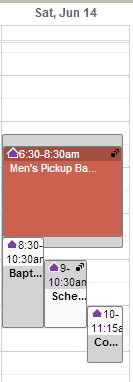
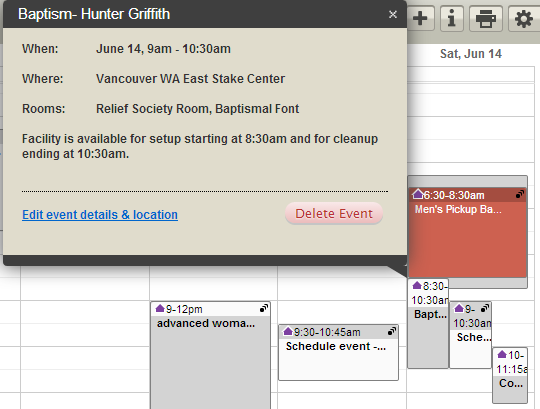
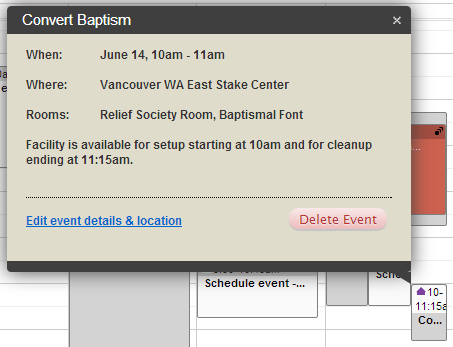
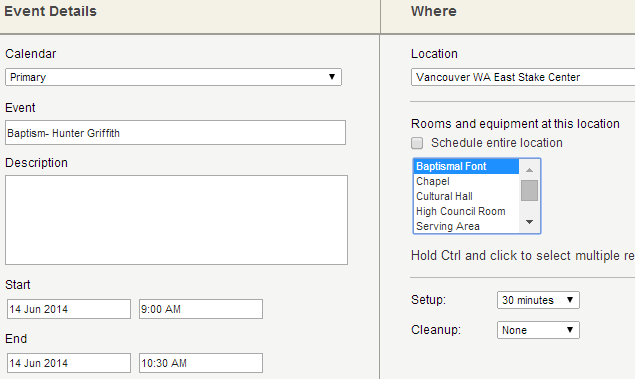
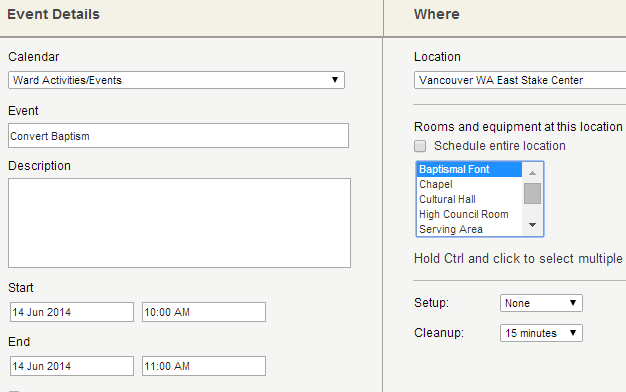
I've not seen a double booking until now, as follows:
CalendarConflict-1.PNG
CalendarConflict-1.PNG (4.71 KiB) Viewed 1555 times
CalendarConflict-2.PNG
CalendarConflict-2.PNG (25.03 KiB) Viewed 1555 times
CalendarConflict-3.PNG
CalendarConflict-3.PNG (18.3 KiB) Viewed 1555 times
CalendarConflict-4.PNG
(14.62 KiB) Downloaded 189 times
CalendarConflict-5.PNG
(14.92 KiB) Downloaded 189 times
Community Administrator
#23
smconvey wrote:I've not seen a double booking until now, as follows:
Any idea how this came about? There was a bug quite some time ago, but I wouldn't expect convert baptisms to be scheduled so far in advance that that could be the cause. Any possibility there are two buildings with the exact same name in the locations?
Have you searched the Help Center? Try doing a Google search and adding "site:churchofjesuschrist.org/help" to the search criteria.

So we can better help you, please edit your Profile to include your general location.
Community Administrator
#24
russellhltn wrote:Any possibility there are two buildings with the exact same name in the locations?
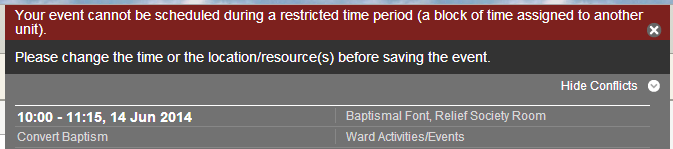
That last question can be answered quite easily. Just edit (without changing anything) and then attempt to save either of the conflicting events. If there is truly a conflict, then attempting to save will show a conflict.
Questions that can benefit the larger community should be asked in a public forum, not a private message.
Member
#25
russellhltn wrote:Any idea how this came about?
No idea.
russellhltn wrote:There was a bug quite some time ago, but I wouldn't expect convert baptisms to be scheduled so far in advance that that could be the cause.
The COR baptism was scheduled near the beginning of the calendar year, but I'm not sure if that was before or after. The convert baptism was scheduled recently.
russellhltn wrote:Any possibility there are two buildings with the exact same name in the locations?
No.
Member
#26
aebrown wrote:
russellhltn wrote:Any possibility there are two buildings with the exact same name in the locations?
That last question can be answered quite easily. Just edit (without changing anything) and then attempt to save either of the conflicting events. If there is truly a conflict, then attempting to save will show a conflict.
I edited the convert baptism's description and saved without a problem. However, when I tried to edit the description of the COR baptism it gave me the following conflict error:
CalendarConflict-6.PNG
(12.91 KiB) Downloaded 166 times
Community Administrator
#27
Is "Primary" a "public" ward calendar?

It's interesting that one sees it and the other does not.
Have you searched the Help Center? Try doing a Google search and adding "site:churchofjesuschrist.org/help" to the search criteria.

So we can better help you, please edit your Profile to include your general location.
Member
#28
russellhltn wrote:Is "Primary" a "public" ward calendar?
Yes, it is.
Member
#29
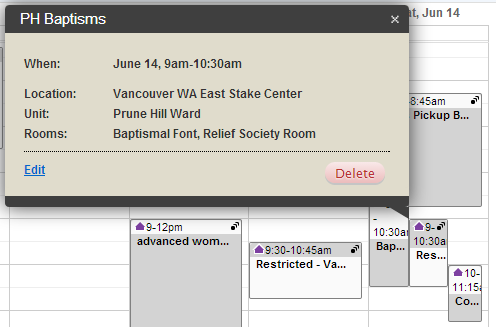
I'm not sure if this makes a difference, but there is a restriction that overlaps both events. The restriction is for the Prune Hill ward and both events are scheduled on Prune Hill ward calendars. Here's some details on the restriction:
CalendarConflict-7.PNG
CalendarConflict-7.PNG (19.13 KiB) Viewed 1531 times
Community Administrator
#30
What happens if you are in week-view and turn off all calendar and look at only that building? I'm guessing you're only going to see the convert baptism.
Have you searched the Help Center? Try doing a Google search and adding "site:churchofjesuschrist.org/help" to the search criteria.

So we can better help you, please edit your Profile to include your general location.
Community Administrator
#31
smconvey wrote:I'm not sure if this makes a difference, but there is a restriction that overlaps both events.
It seems to me that was a old bug along that line - I tried but I can't duplicate that now.
Have you searched the Help Center? Try doing a Google search and adding "site:churchofjesuschrist.org/help" to the search criteria.

So we can better help you, please edit your Profile to include your general location.