Diagnosing performance issue (Counting...)

12 postsstarted by portersb 4,233 viewsoriginal topic

New Member
#1
I'm curious to see if anyone else has experienced this issue, and if anyone can point me in the direction of tools or guides I might follow to ascertain the cause of an annoying performance issue. I'd love to be able to help the developers track down the cause, because as far as I know, I;m the only one affected.

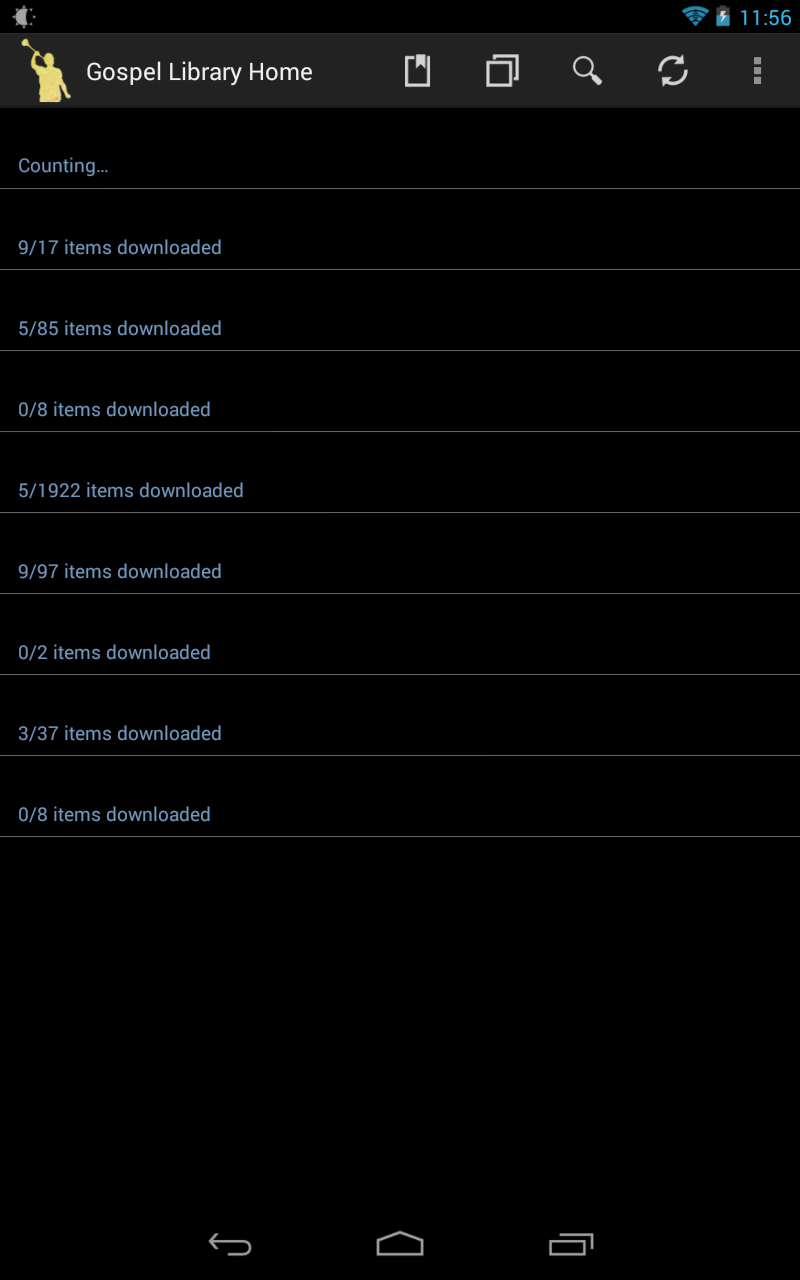
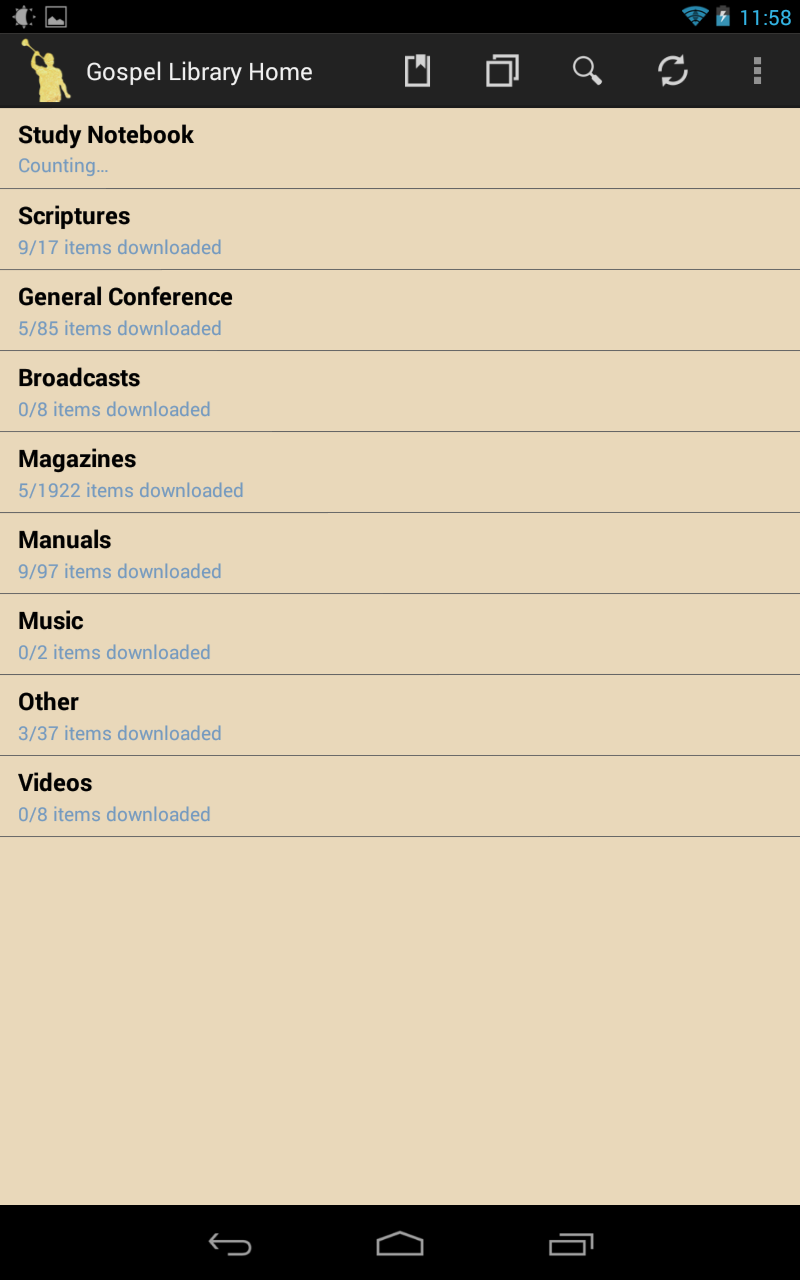
Every time I open a new window, the Study Notebook section displays a "Counting..." message where it would normally display the number of items. This would be an extremely minor concern, except that I use the black background, and the app will display the category titles in black text regardless of background color, until the count finishes:
Screenshot_2013-10-07-23-56-59.png
(64.02 KiB) Downloaded 704 times
Screenshot_2013-10-07-23-58-29.png
(89.12 KiB) Downloaded 704 times
When it finally finishes counting, it switches to the appropriate color (white text for the black background, brown for sepia). And when I say finally, I'm talking about 30 seconds or so.
Clicking on one of the (invisible) categories, then hitting the back button serves as a workaround, resulting in the Study Notebook properly displaying the number of items rather than the count, and the text being the appropriate color for the chosen background.

I first noticed this issue while the 2.6 release was still in beta, and at the time, every section would display "Counting..." rather than just the Study Notebook. So, either the issue has been partially resolved, or something has changed as I have reset my devices and reinstalled the app, but not enough to totally solve the problem.

It occurs on both my Nexus 4 phone, and on my Nexus 7 (2012) tablet, both running Android 4.3. I've reinstalled the app and performed full factory data resets on both devices, but the problem persists.
Community Moderators
#2
portersb wrote:I'm curious to see if anyone else has experienced this issue,
I do not see this issue. I am running Android 4.1.2 on a Samsung Galaxy phone. There is no pause at all or any kind of Counting . . . display that I am able to see as GL starts.
Community Moderators
#3
Edited 1 time, last by techgy on . Reason: Typo
I'm also running Android 4.1.2 and don't see the problem.
In reference to the background color you can click the device "Menu" button and go into "Settings" and change the BackGround Color. The default that I'm set to is white. I didn't see any other configuration settings that would cause any "counting" upon entry.
Have you read the Code of Conduct?
New Member
#4
techgy wrote:In reference to the background color you can click the device "Menu" button and go into "Settings" and change the BackGround Color. The default that I'm set to is white.
The default is white, but I much prefer a dark background.
techgy wrote:I didn't see any other configuration settings that would cause any "counting" upon entry.
I'm sure it's not a configuration problem. It appears as soon as I log in to my account, even after a clean install without changing any other settings at all, such as background color.

It could be unique to my account, or to my devices and/or version of Android.
New Member
#5
I borrowed an older device, an HTC MyTouch 4G running Android 2.3 Gingerbread, and logged in to my account and updated to the latest version of Gospel Library. The issue seems nonexistent here. There is a brief "Counting..." under Study Notebook, but it only appears the first time I open the app. Opening a new window does not cause the count to begin again and hang, as it does on my Nexus devices. So, it could be an issue that only exists with Gospel Library 2.6 on Android 4.3, though there are substantial differences between these devices, so it might not be so simple.

Digging deeper, this "Counting..." issue arose around the same time as another, similar issue. I had been studying in 2 Nephi 9 and annotating as I went. I noticed that only with this and perhaps the previous chapter, it would take a very long time to load any of my highlights. Upon installing the Gospel Library on this Gingerbread device and finding that the "Counting..." issue wasn't there, I decided to test this chapter on it.

That chapter did not load any highlights for several minutes. On my Nexus 4, loading them takes a very long time as well, and they only appeared the first time I tried after I swiped several chapters back, then returned and scrolled up and down a bit. Even after the 2 Nephi 9 torture test, the index page still works properly on the Gingerbread device.

So, I have two, perhaps separate, hanging issues. Is there any sort of software I can use to see what is causing the delay?
Community Administrator
#6
You know, if this was a conventional PC, I'd say you need to run diagnostics on your hard drive. Reading back, I see this is on two different devices, so I guess flash memory may not be an issue. Any common software that might mess with the files? Are the files located anywhere "non-standard" (for GL)?
Have you searched the Help Center? Try doing a Google search and adding "site:churchofjesuschrist.org/help" to the search criteria.

So we can better help you, please edit your Profile to include your general location.
New Member
#7
I decided to stress test the Gingerbread device a bit. After installing 5 general conferences, 10 ensigns, the scriptures, and 4 of the study aids, and allowing all background tasks to complete, the Gingerbread device now has the same counting issue.

On the Gingerbread device, it does not trigger when opening a new window, so it seems to be a once per session issue on this device, for some reason. It only happens if I restart the device and have the focused window when it launches opened to the index page.
russellhltn wrote:Any common software that might mess with the files? Are the files located anywhere "non-standard" (for GL)?
No, since I have tried this immediately after a full device reset, and no, I haven't installed in any unusual way.
New Member
#8
Update: I've found the build where the problem was first introduced!

I went to http://www.ldsmobiletester.com/android/gl/release/ and began testing from the first of the 2.6 releases. In versions 2.6.0.1 to .0.3, there is only a very brief "Counting..." message which isn't a long enough pause to cause any real frustration. In 2.6.0.4, however, the pause becomes severe, as I've seen in all future builds.

I've done extensive testing with 2.6.0.1, and compared earlier builds back to back repeatedly against 2.6.0.4 to verify.
New Member
#9
I installed the 3.0 alpha version, and in its present form, it either fixes or hides the issue. Perhaps the counting is still going on in the background, but there is nothing bleeding into the new interface, as there is no "x/x items downloaded" for each category, and no noticeable delay in displaying each category.

There is no black background available for the index page (which I miss), but perhaps it will make a reappearance as development continues. Hopefully my issue will not...
New Member
#10
portersb wrote:I installed the 3.0 alpha version, and in its present form, it either fixes or hides the issue. Perhaps the counting is still going on in the background, but there is nothing bleeding into the new interface, as there is no "x/x items downloaded" for each category, and no noticeable delay in displaying each category.

There is no black background available for the index page (which I miss), but perhaps it will make a reappearance as development continues. Hopefully my issue will not...
Is there anyway to participate in the Alpha?
New Member
#11
nrothe wrote:Is there anyway to participate in the Alpha?
They haven't publicized it or asked for participation yet. It seems to be a mostly internal project at the moment. The files are available here, but it's so early that I wouldn't recommend playing around with it.

It's highly unstable, and when I tried to reinstall a previous version, I had to do more than just uninstall through Android's app menu. I actually had to install a file manager and delete the gospel library folder, which wouldn't even show up when I hooked up my phone to my computer.
Senior Member
#12
nrothe wrote:Is there anyway to participate in the Alpha?
Just download it from http://www.ldsmobiletester.com/android/gl/next/
Be warned it's _very_ alpha at this point...