Ubuntu 13.04 Installation Problems

3 postsstarted by c2porter 2,355 viewsoriginal topic

New Member
#1
I'm guessing that I'm not the only one with this problem, but I can't find any solutions or answers for my problem. Also, I'm pretty new to Linux and Ubuntu.

When I go to the indexing site and click on the download button, I'm directed to the URL:

https://indexing.familysearch.org/downl ... _3_18_3.sh

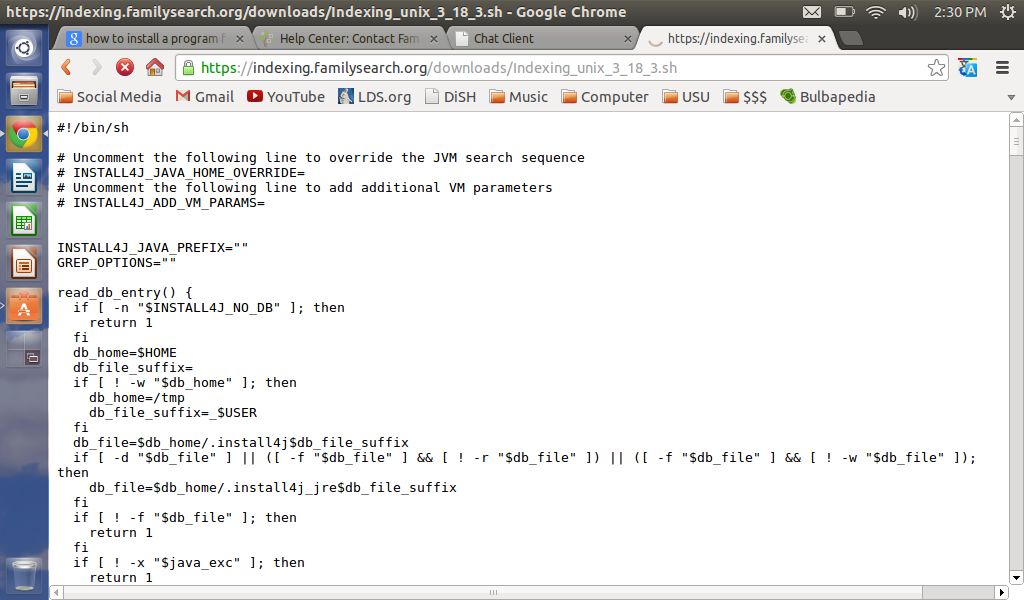
My screen shows a bunch of code. Nothing downloads or installs. In earlier versions of Ubuntu, I remember that I downloaded a file. Can anyone either help me fix the problem, or explain what's happening?

📎 Screenshot.png (113.74 KiB)
Community Administrator
#2
A .sh file is simply a text file with commands in it. That's what you are seeing in your browser. So in one sense, the file did indeed download. But you want it to be saved as a file on your computer. One way would be to use your browser's Save As feature when you're looking at that file in your browser.

Another option is to right click on the link in your original post and choose Save Link As... or Save Contents As... or whatever your browser may call that option. That should initiate a more normal download.

Then you'll have to make sure the permissions are set correctly on your downloaded .sh file so that you can execute it.
Questions that can benefit the larger community should be asked in a public forum, not a private message.
Senior Member
#3
aebrown wrote:Then you'll have to make sure the permissions are set correctly on your downloaded .sh file so that you can execute it.
You can use graphical way, through "nautilus" or with a command line: chmod +x filename; where filename is the name of downloded .sh file.
La vita è una lezione interminabile di umiltà (Anonimo).
Life is a endless lesson of humility (Anonimous).