notebook bookmarks

4 postsstarted by dscamman 1,601 viewsoriginal topic

New Member
#1
How do I find bookmarks after I make them? I don't see anywhere to click for a bookmarked place, just for highlighting and journal entries. Is there a place to click to find where you left a virtual bookmark?

Community Administrator
#2
dscamman wrote:How do I find bookmarks after I make them? I don't see anywhere to click for a bookmarked place, just for highlighting and journal entries. Is there a place to click to find where you left a virtual bookmark?
You posted this in the "Notes and Journal, and Online Scriptures" forum section, which refers to the LDS.org website. Are you asking about the LDS.org, or about Gospel Library? Because on LDS.org, you can just use your browser's regular bookmark feature.
Questions that can benefit the larger community should be asked in a public forum, not a private message.
New Member
#3
This is on LDS.org after I sign in and use the bookmark function with the study notebook and highlighted sections. When I find it it looks like a little red ribbon at the beginning of the chapter I bookmarked.
Community Administrator
#4
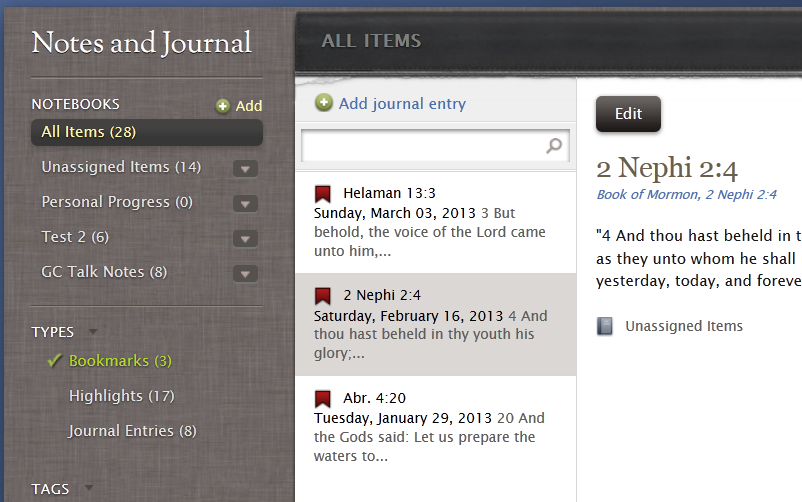
You can choose "Bookmarks" under "TYPES" to see your existing bookmarks. Then you can click on any of the particular bookmarks to show that bookmarked place.

See the image below:
bookmarks.png
(209.94 KiB) Downloaded 242 times
Questions that can benefit the larger community should be asked in a public forum, not a private message.