Running Android apps on a computer

15 postsstarted by sbradshaw 11,846 viewsoriginal topic

Community Moderators
#1
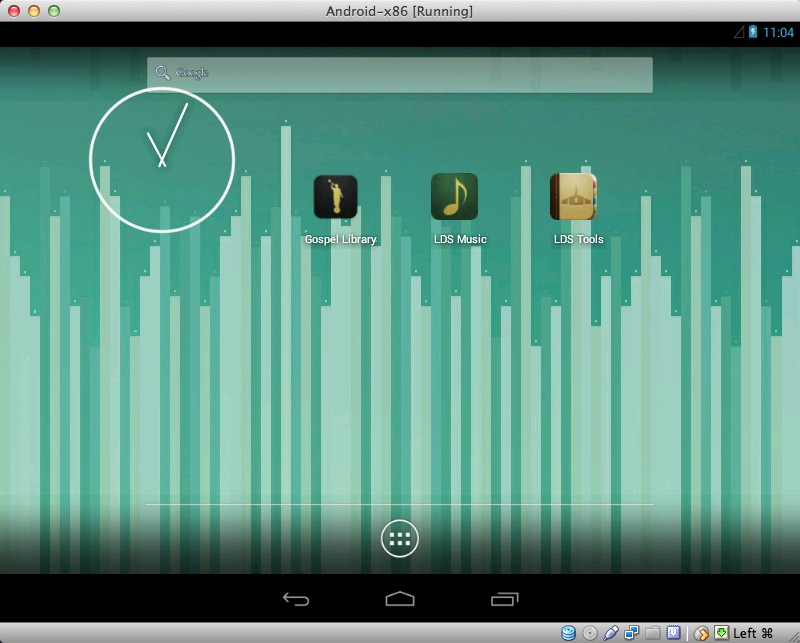
Something I've seen requested from time to time and that I think would be great as well is native computer apps for offline access to the scriptures, hymns, and ward resources... But, in the meantime, I found a great tutorial online for installing Android in VirtualBox that may interest anyone who wants to have access to the apps on their computer.
http://www.howtogeek.com/164570/how-to- ... irtualbox/

I'm on a Mac, and I tried BlueStacks, which is currently in Beta, but it was very limited and it also ate up all of my CPU. VirtualBox works much more reliably. You can install Gospel Library and LDS Tools and anything else you want from the Google Play store or the internet, just like an Android device...
screenshot_88.jpg
(110.35 KiB) Downloaded 1985 times
Samuel Bradshaw • If you desire to serve God, you are called to the work.
Senior Member
#2
sbradshaw wrote: VirtualBox works much more reliably.
And it's available for Linux and Windows too!
La vita è una lezione interminabile di umiltà (Anonimo).
Life is a endless lesson of humility (Anonimous).
Community Moderators
#3
True!
A couple of people have asked me why I need Gospel Library as an offline app on my computer. For people without a smart phone or tablet, it's nice because you don't have to be online to highlight verses and add notes, which can be synced directly to your LDS Account when you connect again. For people with a smart phone (but not a tablet) it provides a bigger screen to read and annotate the scriptures on. For people interested in LDS Tech projects, it provides a way to help beta test the apps or teach others how to use them. The same holds for the other apps (LDS Music, LDS Tools, etc.).
Samuel Bradshaw • If you desire to serve God, you are called to the work.

Member
#4
We have the Adroid version of the Gospel Library connected to our television in the family room and use it for Family Home Evening lesson and for family scripture reading. It has been a great tool for our family.
New Member
#5
Do I need Linux installed in PC to run android apps?
Community Administrator
#6
Marsh85R wrote:Do I need Linux installed in PC to run android apps?
No, but you do need to install a system such as BlueStacks or VirtualBox, which then run the Android operating system.
Questions that can benefit the larger community should be asked in a public forum, not a private message.
Senior Member
#7
Marsh85R wrote:Do I need Linux installed in PC to run android apps?
No! I don't know BlueStacks, but VirtulaBox, as stated before, run on Windows and Mac too.
After installing this VM (Virtual Machine) you can run it and install Android in with it.
VirtualBox can manage several OS (Operating systems): windows, linux, android, BSD, eccetera.
After installind android you can usit always through VirtualBox.
Usually all the Hw is available for new OS. So you can use network, Internet and so on.
La vita è una lezione interminabile di umiltà (Anonimo).
Life is a endless lesson of humility (Anonimous).
Community Moderators
#8
aebrown wrote:No, but you do need to install a system such as BlueStacks or VirtualBox, which then run the Android operating system.
The Android-x86 project and Intel's Android-IA are also up and coming efforts to run Android OS on a PC-based device.
So we can better help you, please edit your Profile to include your general location.
Senior Member
#9
Mikerowaved wrote:The Android-x86 project and Intel's Android-IA are also up and coming efforts to run Android OS on a PC-based device.
In this case, if you dont want to use a VM manager, you need a dedicated Pc or dual (several) boot system.
Tanks for links.
La vita è una lezione interminabile di umiltà (Anonimo).
Life is a endless lesson of humility (Anonimous).
New Member
#10
There so many methods to run the Android OS on PC below is the list of following methods.
  • Run Android On PC using bluestacks
  • Run Android On PC using Remix OS
In future there are lots method and techniques will come to run the Android On PC.
Senior Member
#11
Not to fork the thread, but there is a Win10 app of Gospel Library (GL) that works well on the PC. I run Android GL on my tablet and Win10 GL on my desktop. Highlighting, bookmarks, etc. will syncronize between them once you log in.

I tried Android GL on BlueStacks for a short time - found it did not seem to work very well for me (but that was a couple of years ago on Win7).

Obviously, for apps that are not available as Windows apps at the present time, the above mentioned methods are probably your only option.
Member
#12
There's also the Genymotion Android emulator: https://www.genymotion.com/ which runs on Windows and uses VirtualBox (I think). I couldn't get BlueStacks to work for me, but Genymotion works well and might be easier than doing VirtualBox from scratch yourself, not sure.

I also tried some other "emulator" that I can't remember the name of, but it didn't work at all - could only use their sub-set of apps, or something like that.

FWIW,

Liz
New Member
#13
It is possible to run android apps on a computer, you need to just install ANdorid OS on your computer
but installing Android OS on the computer is the long method but I've found a short and 100% working method on the web, in this case, you need just dual boot windows and android then you'll be able to run android apps on your windows computer.
Hope it will help you ;) ;)
Community Moderators
#14
Chromebooks now allow you to run Android apps natively, with full access to the Google Play Store.
Samuel Bradshaw • If you desire to serve God, you are called to the work.
Senior Member
#15
At least for Windows users, my recommendation would be to use Jide's Remix OS Player (http://www.jide.com/remixos-player). It's standalone and, I think at least, quite a bit simpler to use than the alternatives. And, unlike Bluestacks, isn't bloated with questionable software.
Learn more about Gospel Library for Windows 10 Beta at the link below:
https://tech.lds.org/wiki/Gospel_Library_for_Windows_10