LDS Gospel Library 3 for iphone

40 postsstarted by Magua308 21,659 viewsoriginal topic

New Member
#1
I recently downloaded the new Gospel Library App on my phone, and I like it so far, but I cannot figure out how to unmark a verse that I marked. In version 2.5, you would highlight the verse, select mark, then select unmark. Version 3 does not have the unmark option. How do I unmark a verse?
Member
#2
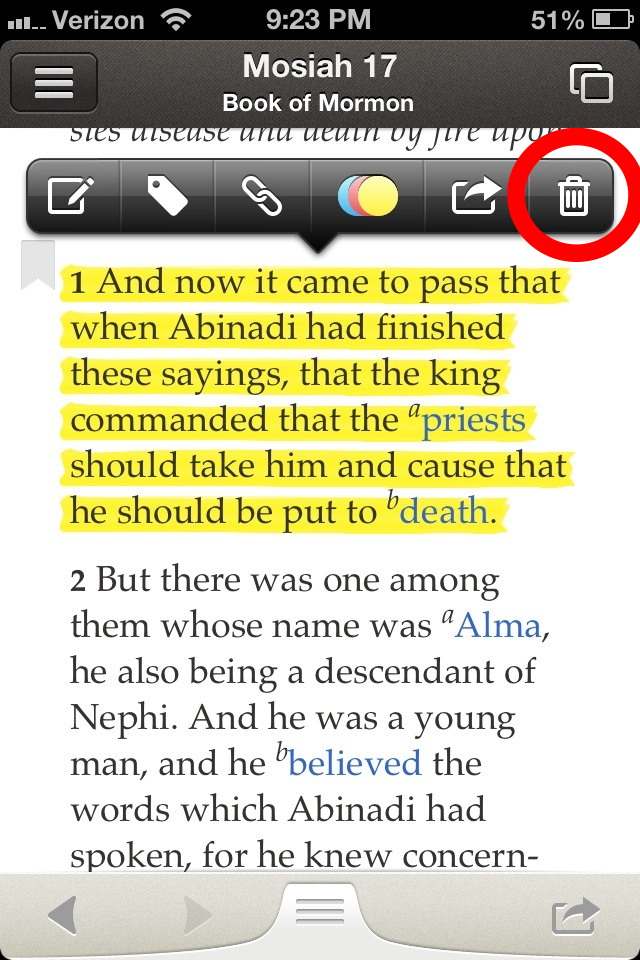
Just tap the highlighted item (in my case there is an entire verse) and the tap the trash can.
DeleteHighlight.png
(826.84 KiB) Downloaded 5945 times
Clicking on the colored circles lets you change the highlight/underline color or type if you don't want to delete it.

I was surprised that the new Gospel Library app only have a brief introduction of new features and no detailed instructions on how to use them in any detail.
New Member
#3
I've been having the same problem, and that "Trash the highlight" hasn't been working for me.
New Member
#4
Same problem. Absolutely incredible tool for members to use, but I need to be able to unmark passages of scripture when I make a mistake. Currently on the ipad version the trash can does absolutely nothing.
Member
#5
I will add that it hasn't been super reliable for me. I find that sometimes it works at designed. Sometimes it doesn't. Can't quite figure out what causes the inconsistency. Will post and update if I do find something.
New Member
#6
The trash can does nothing for me. I think I'll go back to version 2.5.
New Member
#7
I have struggled with this for hours. The garbage icon has never worked for me until now. I suspect it requires just the right touch. Keep trying if it does not work for you the first few times, and see the tip below.
One thing I have noticed is that I used to try and highlight the same area to delete it. What seems to work best is to just click on the highlighted area to be removed and DO NOT EXPAND IT. Then hit the garbage icon. It now works for me every time.
New Member
#8
The highlights and notes are not totally synced into V3 on my iPhone or IPad . Can something be done? Gratefully
New Member
#9
The reason the trash can may not seem to work is because the section may have been highlighted multiple times. You have to remove all of the "layers" of highlight. Continue to hit the trash can until all of them are removed. That worked for me.
Member
#10
Same problem for me on ipad. Trash can does not work to remove highlighted text
New Member
#11
I have the same problem. I have it the trash button over 20 x and it is not working..
New Member
#12
I have the same problem in that the trash button does nothing for me no matter how many times I tap it, even if I try to use it on a new marking just created.

I do find it interesting that if I try to change the color of the marking, it does not outright change the color but rather seems to mesh the colors or better yet, overlap the colors. If I start with a yellow marking but then try to change it to a green, I end up with a blue-like colored marking.

Extremely disappointing.
New Member
#13
In response to #9 Mhoyle
Tried to hit trash can multiple times but on the ipad trash can is not available until you click on the colored circles which just adds another layer of color. The trash can doesn't remain visible to click multiple times. I hope there is a fix in the near future.
New Member
#14
Trash can doesn't work for me either. So far I much prefer v. 2.5. I'm glad I kept it.
New Member
#15
I just found if I just tap (rather than holding and selecting) on a highlight the trash can comes back and works.
New Member
#16
Does anyone know how to scroll down to a verse quickly? GL 2 had a scroll area in the right of the screen. In GL3 I just found that you have to keep swiping until you get there.

Was the quick scroll function taken out so the members with hard copy scriptures can compete with us on speed? :)
New Member
#17
I've been trying to help an older woman in the ward download Gospel Library 3 on her Ipad which has the 2.5 version on it. She isn't familiar with computers, etc. As I'm only used to PC's, it's very frustrating. After about 3-4 hours of trying I've managed to get the Gospel app on there with the introduction but nothing else. Shouldn't the app list the 3 version if it's on there? I can't go any farther on this problem and am trying to find some help for her.

Thx, Connie Follis
New Member
#18
Like several people I have had difficulty with removing highlights. I have tried the trash can as suggested but the highlights are not removed. I suspect that this is because I have multiple highlights in the verse. The ability to effectively delete highlights is critical to an evolving scripture study program.
New Member
#19
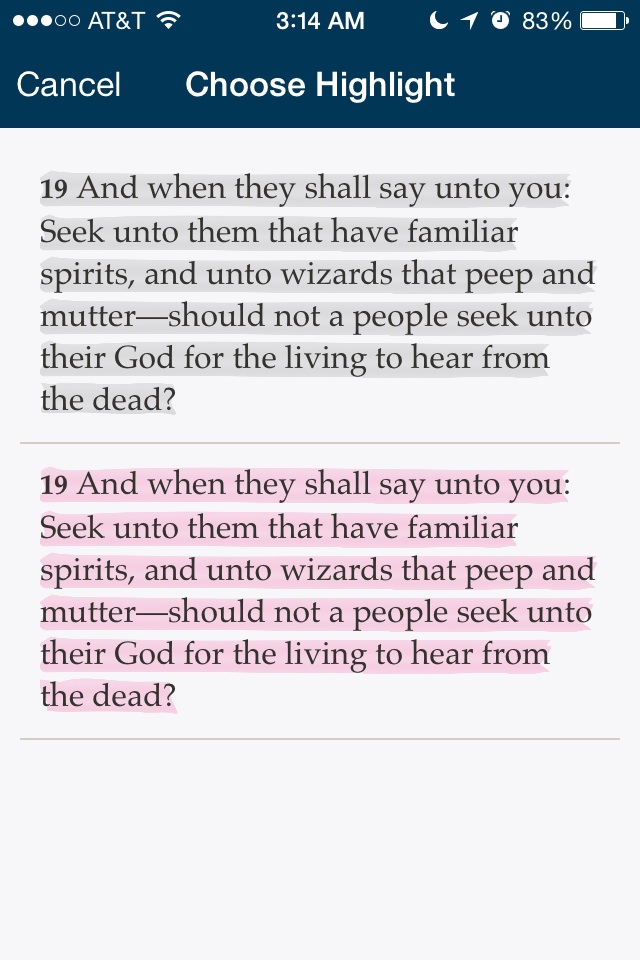
I have the iPhone 5 with Gospel Library 3 and had the problem of multiple highlights. DO NOT select the highlights to remove them. When you briefly tap any area that has multiple highlights, a "Select Annotation" window pops up. You touch which highlight you want and the screen reverts to the original text with the trash can bar, which will then delete that highlight when the trash can is pressed. You can continue to remove highlights in this way until you only have one left. When you only have one highlight remaining and you briefly tap it, the Select Annotation window does not pop up. Instead, the trash can bar pops up and you can delete that highlight. Hope this helps.
New Member
#20
The trash can does not work to unhighlite scriptures. How do I unhighlite?
Church Employee
#21
I just had a similar problem described here as I was trying out a new highlighting plan I'm working on (to highlight based on the nine basic doctrines described in Come, Follow Me and Seminary). I highlighted multiple words in a verse separately and even used different colors on different words. When I went to delete all the highlights in a verse nothing seemed to happen. It did, however, let me select individual highlights and delete them.
Paul Scherbel
New Member
#22
I recently downloaded the app. When I tap to open it it opens a screen that says "UpdatingContentTitle" and then it crashes. So I cant use the app. I'd really like to. I have and i phone 4 with updated ios6 software.... any suggestions? Ive tried reinstalling the app and turning off my phone.
New Member
#23
I found if you do a light tap on the highlighted area a second window showers up under the highlight it will show the text with all the the highlights you have put on that section tap on one of the sections in the second window and the bar will show up again hit the trash can and that color will delete repeat until all the highlights are gone.
New Member
#24

Re: LDS Gospel Library 3 for android

The delete for highlighting does not work. I tried touching the trash can about 20 times and there is no change. This is most frustrating in the middle of my studying. Is there a solution? I would be most grateful.
New Member
#25
Yea! I figured it out. There are little squares ( boxes) off to the side. Touch a box and it or several of the boxes will jump to the left and be faintly visible. Touch on the those faintly visible boxes and hit the trash can. Works!
New Member
#26
No trash can on the Android as well.
New Member
#27
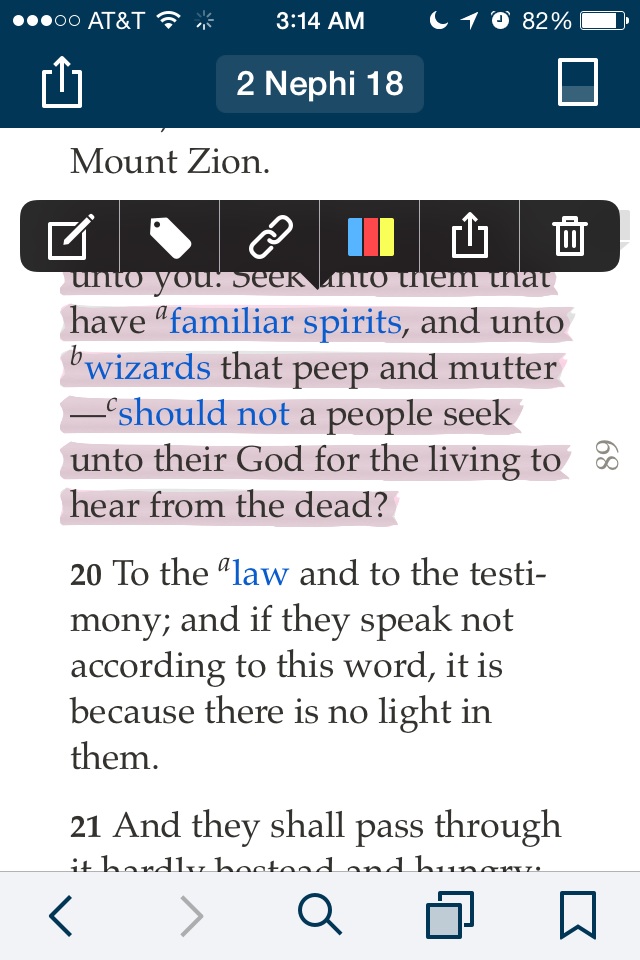
I found that one users suggestion to remove multiple highlights worked on my iphone 4, the others did not. When you tap once on the section you just highlighted, it will come up with a screen that says "Choose Highlight." In that screen, tap the highlight you wish to remove. This will take you to the original screen and the annotation tool bar will be visible. From here tap the trash button. If you have more highlights on the same paragraph, verse etc then you need to get rid of them by repeating the previous instructions.
๐Ÿ“Ž image.jpg (142.81 KiB)
๐Ÿ“Ž image.jpg (153.4 KiB)
New Member
#28
The way it works is that what you originally highlight in its entirety is what can be deleted. If you accidentally highlighted a little more than what you meant to you have to delete all the highlighting then do it again. Also, if you make a note you will highlight then too.

To delete highlighting:
Tap on the highlighted area and then the trash can. If you have highlighted something more than once you will need to tap on the selection that pops up then tap the trash can. That will allow you to delete that highlight.
New Member
#29
I had to touch the highlighted area, then the edit window and then the garbage can several times before I was able to remove all of the layers of highlighting I had inadvertently added as I tried to remove the first layer. Just keep doing this process until you get rid of all of them!
New Member
#30
Version 3.4.4 doesn't have the trash can option, or a remove option. How do I remove a highlight that I put on by mistake?
Community Moderators
#31
Words are used now instead of icons โ€“ so they take up more space, and sometimes are pushed off the edge of the menu. When this happens, a triangle/arrow appears on the right or left side of the menu, indicating that there are more options.
Samuel Bradshaw โ€ข If you desire to serve God, you are called to the work.
New Member
#32
Tap once on highlighted scripture. The edit bar comes up click to the right, hit remove, voila done! Easy peasy.
New Member
#33
Trying to delete marking on a verse that was an accident. I googled answers and everyone is talking about a trash can.... I don't see anywhere there is a trash can.
HELP
New Member
#34
Please, please, please make it more straightforward to unmark text! Sometimes REMOVE comes up when I press on the marked scripture and sometimes it does not. It is making it impossible to remove highlighting done by mistake. This should be really simple. I have an I-Phone 5S with the latest version of gospel library. Can anyone post a screenshot with an I-phone??
New Member
#35
May depend on the text size from settings: In landscape mode "remove" appears without scrolling.... In portrait mode I have to tap the right arrow on the menu to access "remove"
New Member
#36
If you go to lds.org and log in and go to notes you can access all of your highlights and remove them.
New Member
#37
I have not been able to download from App Store. The Wiki indicates a server might be overloaded from better formatted content being downloaded by all apps, but I have been trying for 3 months now. Get message, "Unable to Download App - 'Gospel Library' could not be downloaded at this time." (with a Done & Retry button). iPhone 6s; IOS 9.2.1; 50 Gb available; never loaded any version before; tried removing the app icon and starting over. Any suggestions?
New Member
#38
Same for me. I also noticed that the developer profile is missing from IOS. Did a cert expire?
iPad Air
iOS 9.3
Community Moderators
#39
jwmarrott wrote:Same for me. I also noticed that the developer profile is missing from IOS. Did a cert expire?
iPad Air
iOS 9.3
Yes, the certificate for the Church's beta apps expired over the weekend (iOS only). The developers are working to update the certificate and push new betas.
Samuel Bradshaw โ€ข If you desire to serve God, you are called to the work.
New Member
#40

how do I unlink?

How do I unlink a passage? I linked a bunch of passages and now it's taking up a lot of space on my phone so I need to delete. How do I fix that?