Gospel Library 3.0

36 postsstarted by zaneclark 16,020 viewsoriginal topic

Senior Member
#1
The new version of Gospel Library for iOS, 3.0, (iPads and iPhones) has just been released and is available in the App Store.... This is evidently a new version and not an update, as the previous version 2.5 is still available. I look forward to some discussions on changes, improvements, etc.
Member
#2
Where do we find extensive help on how to use this? I can figure out most things but I suspect there are some features I'm unaware of.
Community Moderators
#3
I am speaking as a user of the Android version. But since the iOS version is ahead in features from Android I suspect the help for both is pretty much the same.

There is a Help menu item in the app. There are four help sections: Online Help, Report a Problem, About Gospel Library, and What's New. Start in the What's New section to see what has been changed or improved. The Online Help provides a comprehensive table of contents, glossary, and video tutorials.
JD Lessley
Have you tried finding your answer on the ChurchofJesusChrist.org Help Center or Tech Wiki?
Member
#4
I don't see any help section in the iOS GL 3.0. I see the User Guide but it just talks about what's new and doesn't give any specifics.

What I really want to know right now is if there is a way to tag & note an entire chapter rather than just verses.

Thanks.
New Member
#5
mprusse wrote:What I really want to know right now is if there is a way to tag & note an entire chapter rather than just verses.
None that I could see.

Anyway, here are my thoughts on Gospel Library 3.0
PROS:
• I like the new interface.
• The page numbers are unobtrusive (displayed in the margin instead of within the body text).
• The ability to hide page numbers, footnotes, and headings are cool.

Things I miss from 2.5:
• The ability to change the body text font from Palatino to another serif or sans-serif font.
• Quick Scrolling and Go To. These are crucial when the pace of a gospel class (i.e. Institute or Sunday school) quickens and spans multiple volumes and/or distant verses of a chapter (e.g. where the teacher would say, "keep your finger in X and go to Y"). In these situations. Opening a new window then navigating to a reference is too time consuming, especially with the slower animations. You'll usually arrive at the verse around the time the one reading it is finished.

Go To could be summoned by tapping on the text in the center of the navigation bar.

Feature request:
Auto scrolling. For those who simply want to read, let the app take care of the scrolling.

In summary, GL3 is more for casual study and reading, but it is not tuned for when a class takes the pace of a scripture chase.
Member
#6
Is there a way in GL 3 to select an entire verse as there was in 2.x by pushing down on the verse?
New Member
#7
No. Text selection appears to work in GL3 as it does through the rest of iOS. That is, tap and hold on a word to select the word, then drag the selection handles to your desired selection. However, I have noticed that it does not allow the device's built-in text to speech system to speak the selection, as it does in other built-in iOS apps.
Member
#8
Do I assume that all marked verses from 2.5 will not be retained in v3?
New Member
#9
dannykos wrote:Do I assume that all marked verses from 2.5 will not be retained in v3?
I would assume the opposite, actually. Didn't 2.5 sync marked verses to lds.org? I was going to check and see for you but lds.org is having some bug where it switches to spanish and it wouldn't let me switch out when in the notes area.
New Member
#10
Is there a way in GL 3 to select an entire verse as there was in 2.x by pushing down on the verse?
Actually, there is! Press and hold your finger down at the END of the verse, and it will select the entire verse. Grabbing the blue circular handles will enable you to then select other verses as well. Pretty awesome. Takes some getting used to, but I'm glad its still possible to do inside of GL3.

I do agree with the above poster: the app could use quick scroll again. Thats the only feature I have been missing. Also, the ability to link to scriptures inside of documents or notes would be amazing. I hope to see those in the future.

Job well done!
New Member
#11
I've created a lot of tags and other links in 2.5. Will they be retained in 3.0 along with verse marking?
Community Moderators
#12
jonathan.ware wrote:
dannykos wrote:Do I assume that all marked verses from 2.5 will not be retained in v3?
I would assume the opposite, actually. Didn't 2.5 sync marked verses to lds.org? I was going to check and see for you but lds.org is having some bug where it switches to spanish and it wouldn't let me switch out when in the notes area.
Yes, all notes will be synced to Gospel Library 3.0 – if they were synced from 2.5 to LDS.org. If you haven't synced to LDS.org, turn on syncing in 2.5 under Settings within the app (the gear icon in the upper-right corner). Then sync back down from LDS.org to 3.0.
Samuel Bradshaw • If you desire to serve God, you are called to the work.
Senior Member
#13
jdlessley wrote:I am speaking as a user of the Android version. But since the iOS version is ahead in features from Android I suspect the help for both is pretty much the same.

There is a Help menu item in the app. There are four help sections: Online Help, Report a Problem, About Gospel Library, and What's New. Start in the What's New section to see what has been changed or improved. The Online Help provides a comprehensive table of contents, glossary, and video tutorials.
Has anyone been able to find a help menu with tutorials for iPad/Gospel Library users?
New Member
#14
I agree that the lack of quick scrolling is a significant omission, as is also the inability to change fonts and, even more importantly for me, the inability to choose full justification (even right margins). These omissions alone will ensure my continued use of the prior version so long as it is available (or the current version is fixed).
New Member
#15
I just downloaded the new Gospel Library 3.0 on my IPad (Version 6.1.3) today. The new layout is nice, but please don't tell me that none of my tags, notes and links that I have set up in version 2.5 aren't going to move across. I've spent a huge amount of time not just in the scriptures, but in the church magazines, handbook etc and will be devastated if these will all be lost in the upgrade. I see that I now have icons for both 2.5 and 3.0 on my Ipad. Everything is still as it should be in 2.5, but I see no instruction set on moving all this information into 3.0.
Senior Member
#16
My notes on 2.5 were linked to my lds.org account. When I downloaded 3.0 I simply went to sync (through settings) and it pulled all my old stuff back over.
New Member
#17
Thanks for your response. I didn't know if I should attempt the sync as I was concerned that I might lose everything in the attempt!
Senior Member
#18
It was my lovely wife that figured it out. All I did was what she told me to do.
Community Moderators
#19
The app went through a lot of beta testing to make sure things like sync work well, so you shouldn't have any problems.
Samuel Bradshaw • If you desire to serve God, you are called to the work.
New Member
#20

Re: Gospel Library 3.0 Search Feature

Search results in GL3 do not bring up a find in the scriptures only conference etc. what happened? or better still what am I missing?
Community Moderators
#21
The search isn't great. I tried to search for "tops of the mountains" then for "mountain" and it wouldn't bring up that Isaiah verse about the mountain of the Lord's house... I had to dig through the index... I wish the index and topical guide were integrated into search.
Samuel Bradshaw • If you desire to serve God, you are called to the work.
New Member
#22
Young women:
How come I can only see lessons till June? It's July now and still only the lessons from jan-June are available.
New Member
#23
Also is there a way to rearrange the library? I would like to be able to put all of the things i use together at the top.
New Member
#24
Nice app!! I do have one question...I can see the audio controls when in the scriptures on my iPad, but can't seem to find them on the iPhone? I don't see the icon that opens the audio controls like the iPad has.
Community Moderators
#25
The audio controls and footnotes on the iPhone are at the bottom of the screen instead of the side. There is a tab that you can pull up from the bottom.
Samuel Bradshaw • If you desire to serve God, you are called to the work.
New Member
#26
gresswell1 wrote:Young women:
How come I can only see lessons till June? It's July now and still only the lessons from jan-June are available.
The link for all the "Come, Follow Me" courses appear to have been removed. Hope it comes up soon since it is Friday....
Member
#27
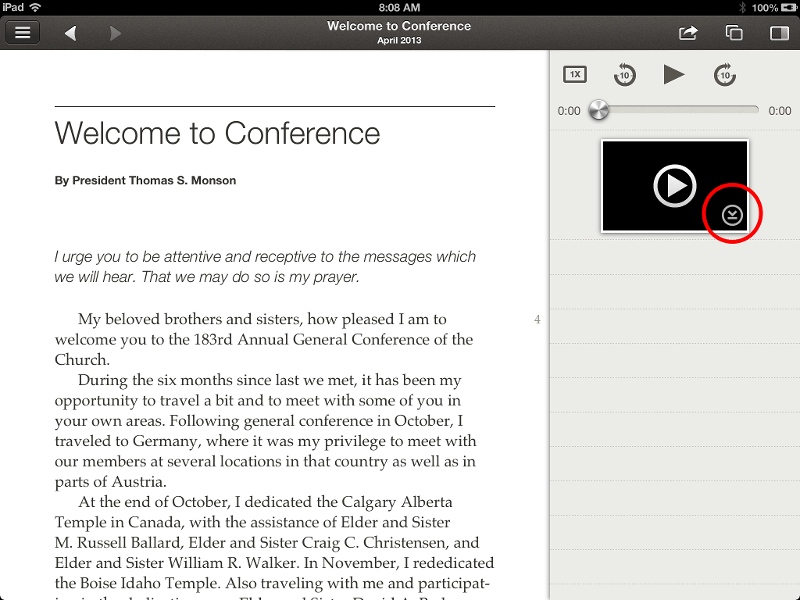
Question about videos in GL 3.x. Are they downloading to the device as they did in 2.5? I assumed I'm downloading them but when I went to class to play them they would not work without internet connection. They played fine at home after downloading. I was curious if I did something wrong.
New Member
#28
gresswell1 wrote:Young women:
How come I can only see lessons till June? It's July now and still only the lessons from jan-June are available.
I too have been frustrated by being unable to pull down the July youth Sunday School lessons. How is this feature supposed to work? Why is there no real support for this application?

I am also frustrated with the subscribe feature. It does nothing on my device. When I select any of the subscribe slider buttons, the buttons are returned to the off position when I next visit the page. No new content is downloaded through this action.

I want to like this application. But it at least has to allow the content I need to be downloaded in a straightforward fashion.
New Member
#29
How do I remove a highlight from highlighted text?

2.5 had a remove button

3.0 does not show a button or any option to remove highlight
#30
mprusse wrote:Question about videos in GL 3.x. Are they downloading to the device as they did in 2.5? I assumed I'm downloading them but when I went to class to play them they would not work without internet connection. They played fine at home after downloading. I was curious if I did something wrong.
That one caught me off guard a little too. I noticed a little down arrow in the lower right and that seems to be the key to downloading videos. I have attached a picture of what I am looking at. It also allows you to remove that download if you want too.
📎 GL3_DownloadVideo.png (202.7 KiB)
"I reject your reality and substitute my own."
New Member
#31
mprusse wrote: What I really want to know right now is if there is a way to tag & note an entire chapter rather than just verses.

Thanks.
You can select the whole chapter quickly by tap and hold on the chapter/section title, then while holding, swipe up. However the options that show up when touching the arrow that appears do not include tagging. The options are print, copy, notebook, bookmark, mail, message, twitter.
New Member
#32

Gospel Library 2.5

I wish gospel library 2.5 was still available for download. I can't afford to upgrade my 3gs, 3.0 runs super slow on it...!!!
New Member
#33
I am having ongoing problems with syncing in version 3.0. The app on my iPhone syncs fine. But on my iPad it originally showed the last sync as two weeks ago. I logged out and logged back into the app to force a sync. The syncing symbol keeps going for 15-20 minutes but doesn't actually sync. I have to kill the app to get the sync symbol to go away. Has anyone else had problems or does anyone have suggestions? One option might be to uninstall and reinstall the app. I hate to do that though.
New Member
#34
Some of the images don't download. For example, none of the images in "the Friend" I just downloaded show up. Is there a way to force the images to download?
New Member
#35
I am running GL3.4 on my ipad mini. How do I remove a highlight? I know there is a "trash can" option when I make the initial highlight, but how do I remove and old highlight?
New Member
#36
If you click on the highlight, as you say, you see a trash can. If there is only one highlight and you click the trash can then the highlight disappears. If the verse has more than one highlight, when you click the trash can and see a small pop up window, you need to scroll down until you see the verses repeated. Click on what you want to delete and It should disappear.