New Member
Does updating the membership record online move the member out of the unit if the address is out of the unit, or do we have to do that solely on MLS?
Unless something new has been added recently, there's no method of changing an address for a member using the on-line system. Address changes must be done using the MLS system.dmay wrote:Does updating the membership record online move the member out of the unit if the address is out of the unit, or do we have to do that solely on MLS?
As I said, you cannot change a member's address using the on-line system. It must be done using the MLS system in the clerk's office. Changing an address for a member will move the record out if that address is out of your ward boundaries.dmay wrote:You can edit their address and when you do a Send/Receive on MLS it makes the change. That's why I want to see if thier address is outside of my ward boundries will transfer out. I guess that I could try one and see what it does.
Yes, you can change a member's address using the Leader or Clerk Resources site. This has been the case for several months now.techgy wrote:As I said, you cannot change a member's address using the on-line system. It must be done using the MLS system in the clerk's office. Changing an address for a member will move the record out if that address is out of your ward boundaries.dmay wrote:You can edit their address and when you do a Send/Receive on MLS it makes the change. That's why I want to see if thier address is outside of my ward boundries will transfer out. I guess that I could try one and see what it does.

Sorry, this is incorrect. Addresses can be modified using the online leader tools.techgy wrote:As I said, you cannot change a member's address using the on-line system. It must be done using the MLS system in the clerk's office.
Also, not quite correct. Currently, the only way to move a record out is using MLS options "Move Individual Records" or "Move Household Records". These functions will be available in the online leader tools soon (they are in the beta).techgy wrote:Changing an address for a member will move the record out if that address is out of your ward boundaries.

That's true of the on-line directory. It will let you change email and phone number, but not addresses.techgy wrote:Unless something new has been added recently, there's no method of changing an address for a member using the on-line system. Address changes must be done using the MLS system.
Perhaps I'm missing something. The Clerk's page is more powerful, but I still didn't see a way of changing an Address except through the use of the MLS program. Am I missing something in the Clerk's Features?russellhltn wrote:That's true of the on-line directory. It will let you change email and phone number, but not addresses.techgy wrote:Unless something new has been added recently, there's no method of changing an address for a member using the on-line system. Address changes must be done using the MLS system.
But the clerk page is more powerful.
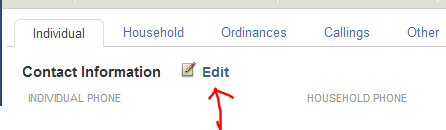
When you are looking at the member information page on the individual tab by contact information there is an edit button. That will let you edit all contact info including addresses.techgy wrote:Perhaps I'm missing something. The Clerk's page is more powerful, but I still didn't see a way of changing an Address except through the use of the MLS program. Am I missing something in the Clerk's Features?russellhltn wrote:That's true of the on-line directory. It will let you change email and phone number, but not addresses.techgy wrote:Unless something new has been added recently, there's no method of changing an address for a member using the on-line system. Address changes must be done using the MLS system.
But the clerk page is more powerful.
Perhaps you're missing the "Edit" link on the Member Information page?techgy wrote:Am I missing something in the Clerk's Features?