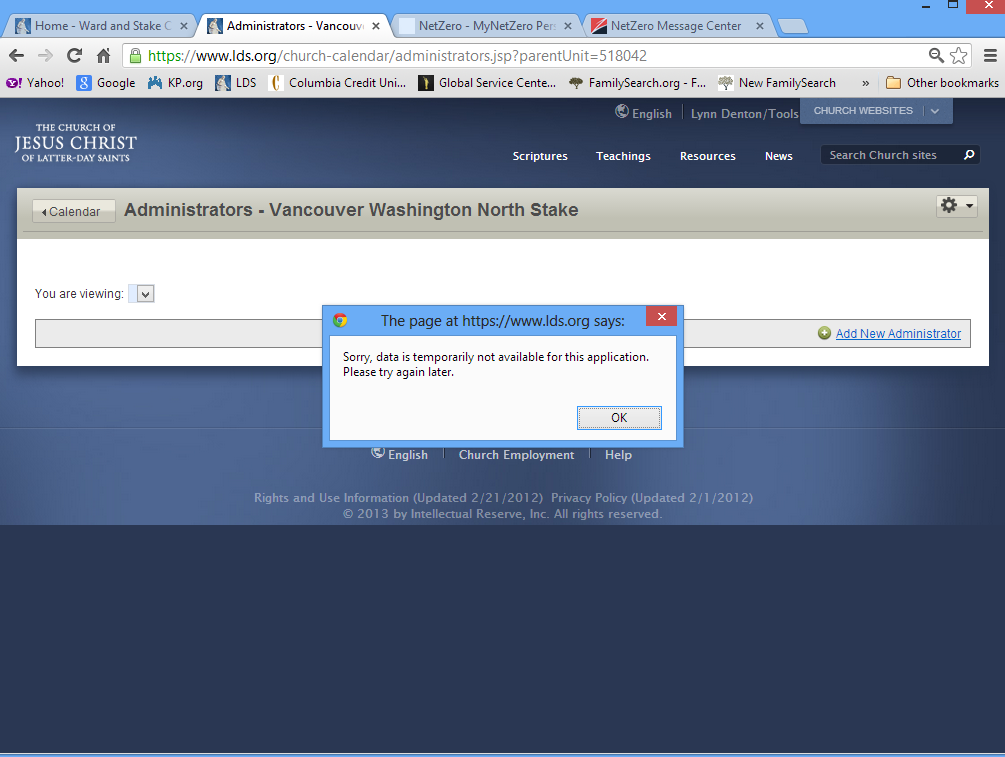
Calendar Administrators application error

20 postsstarted by ldenton0 4,445 viewsoriginal topic

New Member
#1
I am having an issue accessing the Calendar Administrators screen.
Getting an error: "Sorry, data is temporarily not available for this application. Please try again later."

I have been getting this error for the past 3 days.

I have attached a screen shot of the error.

๐Ÿ“Ž Untitled.png (198.59 KiB)
Community Administrator
#2
It's working OK for me in Chrome, but then we don't have any additional administrators.

One oddity I noticed - none of the callings are listed. So I see a list of people, and know that they are admins "by calling" but not what that calling is.
Have you searched the Help Center? Try doing a Google search and adding "site:churchofjesuschrist.org/help" to the search criteria.

So we can better help you, please edit your Profile to include your general location.
Community Administrator
#3
russellhltn wrote:One oddity I noticed - none of the callings are listed. So I see a list of people, and know that they are admins "by calling" but not what that calling is.
Yes, I can confirm that -- the "Calling" column is blank on the Settings > Admin page (prior to v2.5, that column listed the particular callings that gave the listed people their Admin privileges).
Questions that can benefit the larger community should be asked in a public forum, not a private message.
Community Moderators
#4
I have no problem getting to the page on Firefox. The callings are blank for me also.
JD Lessley
Have you tried finding your answer on the ChurchofJesusChrist.org Help Center or Tech Wiki?
Community Administrator
#5
Is anyone else able to display the admin page when you have non-default admins?
Have you searched the Help Center? Try doing a Google search and adding "site:churchofjesuschrist.org/help" to the search criteria.

So we can better help you, please edit your Profile to include your general location.
New Member
#6
I normally use Chrome, but I am using Firefox right now and it is still getting the same error message.
We just released our Stake Scheduler and I was going to remove her from being an admin. But, I cannot get into it.
Community Administrator
#7
russellhltn wrote:Is anyone else able to display the admin page when you have non-default admins?
We have a non-default admin and I can get to the admin page just fine (but with the blank calling column, of course). So that doesn't seem to be a factor.
Questions that can benefit the larger community should be asked in a public forum, not a private message.
Community Administrator
#8
ldenton0 wrote:We just released our Stake Scheduler and I was going to remove her from being an admin. But, I cannot get into it.
By chance, did she move out? Or were the rights "by calling" and she was released?

I'm wondering if the code isn't handling a external "release" situation.
Have you searched the Help Center? Try doing a Google search and adding "site:churchofjesuschrist.org/help" to the search criteria.

So we can better help you, please edit your Profile to include your general location.
New Member
#9
She did not move out and her calling was not a standard calling. Everything in the calendar was by her name.
New Member
#10
I am experiencing this same error: when going to the calendar administrators page, I get the same message, "Sorry, data is temporarily not available for this application. Please try again later." I have tried accessing the page from Firefox (v20.0) and Chromium (v25.0.1364.160) on Ubuntu 12.04, as well as Firefox (v20.0.1), Chrome (v26.0.1410.64 m), Internet Explorer (v8.0.6001.18702) and Opera (v12.15) on Microsoft Windows XP Professional with the same error.

I have been experiencing this issue since the latest major update to calendaring, several weeks ago. I thought it might be a temporary issue that would be corrected as they worked through the issues, so I have waited.

We have a couple of calendar administrators in our stake that are assigned by name rather than by calling, both of whose records are currently still in the unit.
New Member
#11
I am having the same problem on firefox and chrome - The administrator screen shows nothing and reports that the application has an error and unable to display the requested data. The error asks me to try again and I get the same result trying a different date and time.

Any suggestions?
Thanks.
Dave.
New Member
#12
This is now working. The Calling column is missing, but at least I was able to remove the admin.
New Member
#13
I just tested it and received the same error as before. I would like to know what you did to fix it, or what changed.
New Member
#14
The error is still in place for me. All browsers on multiple computers running Win 7. It was working until I tried to add a new admin based on name. Has been over a week in this condition.
New Member
#15
I am still experiencing this issue. I called local unit support. Ironically, they directed me back to this site saying that if I entered my issue here I would be sure to get support for it. So I am re-upping my request for assistance. Does anyone know how to resolve this issue?
Community Administrator
#16
robertoldham wrote:I called local unit support. Ironically, they directed me back to this site saying that if I entered my issue here I would be sure to get support for it.
They were wrong. Ask for a supervisor. This forum is primarily user-to-user support. We try to help, but we can't fix it when it's on the server-side.

Sometimes the developers come and visit, but we haven't seen one in several weeks. Probably working on some other project.
Have you searched the Help Center? Try doing a Google search and adding "site:churchofjesuschrist.org/help" to the search criteria.

So we can better help you, please edit your Profile to include your general location.
New Member
#17
We are still seeing this issue. It has been going on for nearly 2 months without a fix. Does anyone know what the problem is so that it can be fixed?
New Member
#18
We are experiencing similar problems when trying to access the Administrator page. I have been unable to remove (or add) anyone on the Administrator list due to this error. My request to website help sent me back to here. I would be interested if anyone comes to a resolution on this. Thanks
Member
#19
I am having the same problem. It would be nice to be able to add an administrator.
Community Administrator
#20
Can you PM me the unit number of the affected unit?
Have you searched the Help Center? Try doing a Google search and adding "site:churchofjesuschrist.org/help" to the search criteria.

So we can better help you, please edit your Profile to include your general location.