v2.5 select visible calendars issue

53 postsstarted by dshep2020 14,401 viewsoriginal topic

Member
#1
I have had several members from my stake report issues since the v2.5 release regarding selected calendars not persisting across browser sessions. For example, a member is subscribed to six calendars, but only selects one of those to be visible. Logs out of the calendar. Logs back in, all calendars are selected. I can't replicate it but it has been reported by four or five members that regularly use the calendar. All have cleared cache and used different browsers on different computers. Seems tied to their account. Anyone else seeing this issue? Very odd.
Community Moderators
#2
I cannot reproduce this. I am using Firefox 20.0.1 on Windows XP, another system using Firefox on Ubuntu and a third with Firefox on Windows 8. Before the upgrade I had only two calendars set to be visible and subscribed to all 14 ward calendars, 1 stake and the Churchwide calendar. I unchecked all, closed the browser, reopened, signed in and all were still unchecked. I then repeated the process with a number of different combinations of calendars selected. This was repeated on all three systems. The selections persisted across browser sessions.
JD Lessley
Have you tried finding your answer on the ChurchofJesusChrist.org Help Center or Tech Wiki?
Member
#3
Yeah, I can't repeat it either which limits my ability to help. Thanks for checking.
Community Administrator
#4
dshepher wrote:I can't replicate it but it has been reported by four or five members that regularly use the calendar.
Any possibility that this was a one-time issue going from the prior version to 2.5?

Can the users duplicate it?
Have you searched the Help Center? Try doing a Google search and adding "site:churchofjesuschrist.org/help" to the search criteria.

So we can better help you, please edit your Profile to include your general location.
Member
#5
russellhltn wrote: Can the users duplicate it?
Yes. One member (stake exec sec) has been the most willing to work with me to resolve it. He says it isn't a one time thing. He also said it occurs on his wife's account too. He said he has tried it on different computers too. I am going to sit down with him 1on1 to see if I can get a better idea of what may be going on.
Member
#6
I was able to spend a bit more time on this today after talking in person to a few people who have experienced the issue. I quickly realized that I too have the same issue and didn't realize it. Mainly because I don't work in the month view of the calendar, mostly in the week view.

Here is what I experienced and the steps I took to replicate it. I was able to reproduced this regardless of which browser I was using.

1. Log in to the calendar via a few different methods (lds.org, sign-in, then from tools -> Calendar; via https://lds.org/church-calendar/? ; https://lds.org/church-calendar/?lang=eng ; all results were similar)

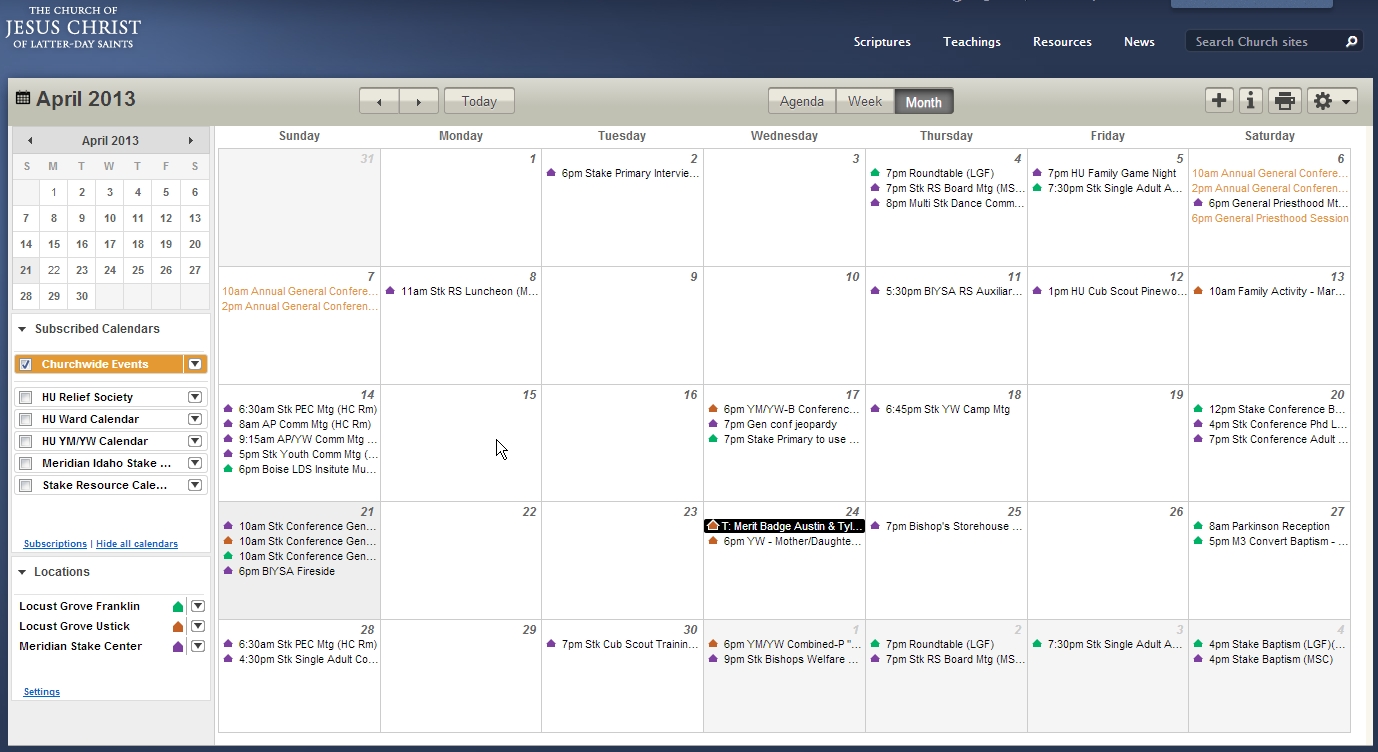
2. Navigated to month view and ensured that "Churchwide Events" was the only "view" selected. This is what I saw:
ScreenHunter_002 21-Apr-13.jpg
Screen Capture initial "Churchwide Events"
(311.16 KiB) Downloaded 1484 times
Notice that only event that should be on the "Churchwide Events" is General Conference. There are other events on the view.

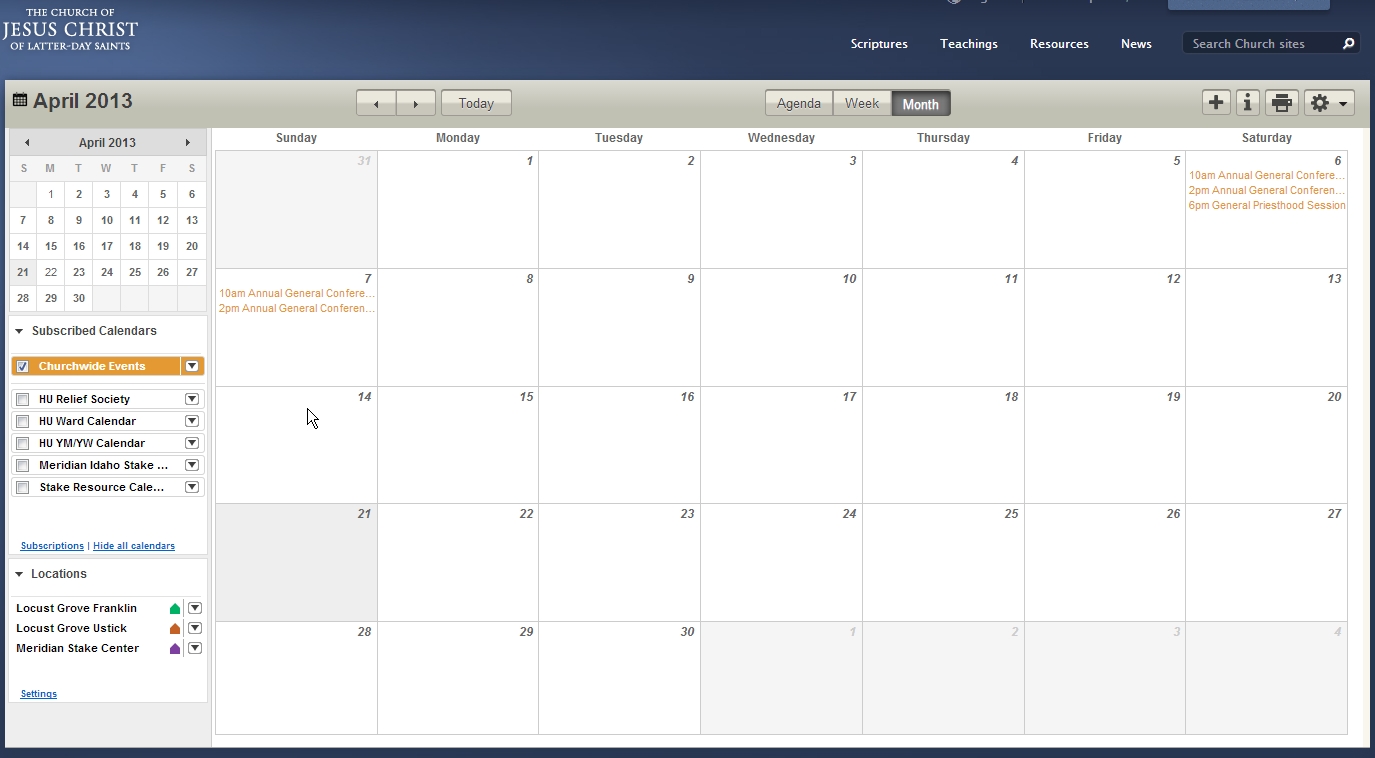
3. To remove all the other views, I had to either manually add and then remove each individual calendar view or select "Hide all calendars", then "Show all calendars" then again "Hide all calendars" and manually add "Churchwide events". This is how it should have appeared:
ScreenHunter_003 21-Apr-13.jpg
Screen Capture after clearing other views
(204.32 KiB) Downloaded 1484 times
This now correctly shows only the "Churchwide Events".

4. Next, I close out of my browser ensuring that no other browser windows are open.

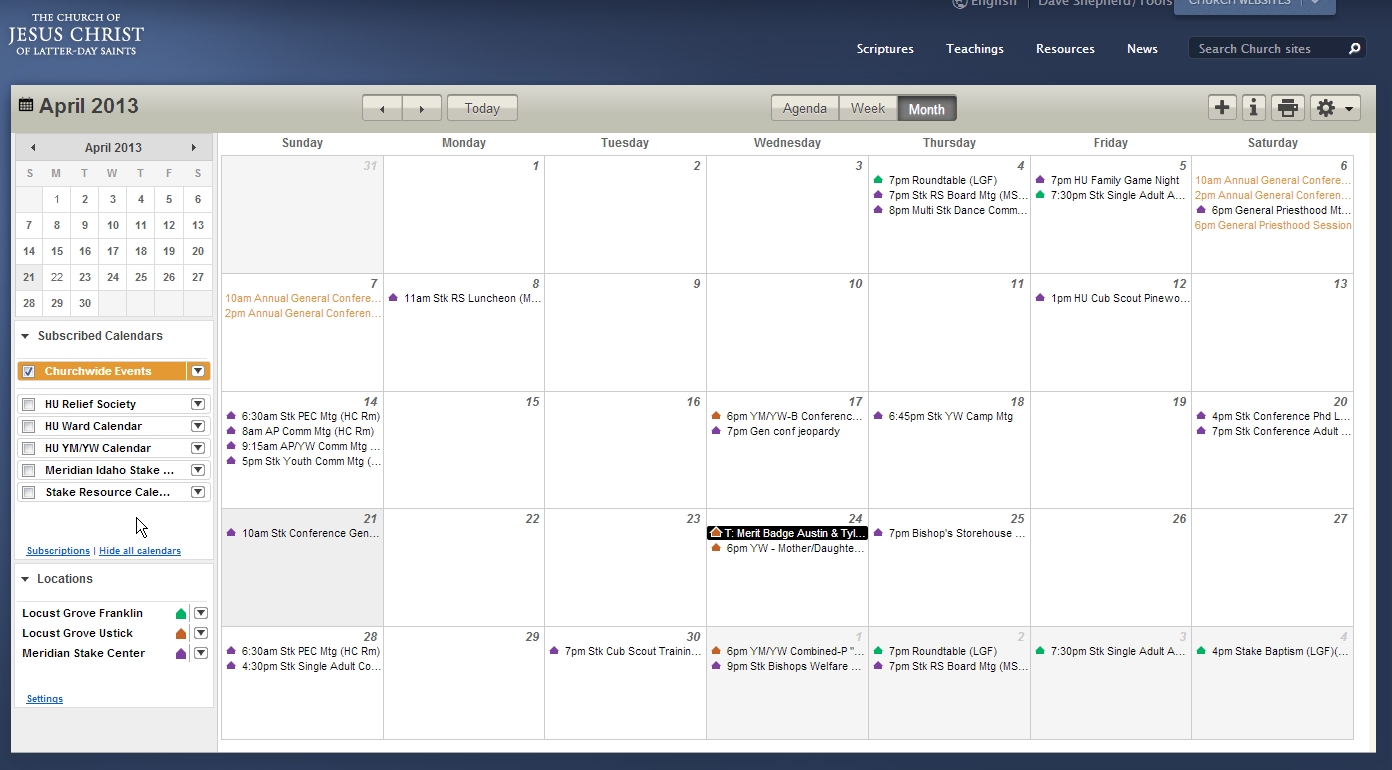
5. Log back into the calendar website which takes me to my last view, month view with the "Churchwide Events" calendar visible, but again, all the other calendars events are being shown:
ScreenHunter_004 21-Apr-13.jpg
Screen Capture "Churchwide Events" only after browser close
(330.89 KiB) Downloaded 1484 times
Again, I did this on IE9, Chrome, and Firefox on my account and all behaved the same way.

Senior Member
#7
dshepher wrote:I was able to spend a bit more time on this today after talking in person to a few people who have experienced the issue. I quickly realized that I too have the same issue and didn't realize it. Mainly because I don't work in the month view of the calendar, mostly in the week view.

Here is what I experienced and the steps I took to replicate it. I was able to reproduced this regardless of which browser I was using.
I've duplicated this as well. I noticed that the events that were shown from unchecked calendars were the ones that reserved a resource. Events without a location are not shown.
Member
#8
eblood66 wrote: I've duplicated this as well. I noticed that the events that were shown from unchecked calendars were the ones that reserved a resource. Events without a location are not shown.
Good catch. That does appear to be the case.

I also confirmed that this issue exists with on my wife's account, on a different computer, different browser. I am pretty sure this is a bug.
#9
I see the same thing when I check and uncheck calendars then log off and log on again - events with a resource scheduled are shown, events without are not
Mac OS 10.7.5 firefox 20.
New Member
#10
As previously stated every event that reserves a resource shows up on my calendar even if I have not selected to show that specific calendar. I was able to get rid of them by unsubscribing to those calendars. This clears up my YW calendar so I am not showing a bunch of unrelated events, but greatly reduces the overall usefulness of the calendar as I cannot simply select a calendar to see what other activities are on scheduled on a certain day.
Community Administrator
#11
I've done some testing on this, and I've determined that none of the reports mention one essential factor (which is why some people have a hard time reproducing the problem). Here is my analysis of exactly what is happening:

When in Week view, you can check the box by one or more locations so that the events taking place at that location will be shown on the main calendar display, even if those events are not on a subscribed calendar which has a check mark next to it to indicate that its events should be displayed. With the update to V2.5 of the calendar, the locations checked in Week view also affect Month view; even though you can't change the state of those Location check boxes when in Month view, if any of those boxes are checked, they will cause events appearing at those locations to appear in Month view as well.

Since some people might not have any locations checked in Week view, they would not be able to see the problem when in Month view -- the Calendar would properly display exactly the same events it always had. Only if some Location check boxes are checked in Week view can you see the problem.

This "bug" is actually a feature that many people have long requested -- it would certainly be helpful to be able to see the events appearing at a location when in Month view. Now we have that "feature" (albeit with an awkward implementation, since you can't change the Location checkboxes while in Month view). We were always told that it would put too much strain on the servers to allow this feature in Month view; if that's still true, I imagine this bug will be fixed and the "feature" removed. :(
Questions that can benefit the larger community should be asked in a public forum, not a private message.
Community Administrator
#12
aebrown wrote:This "bug" is actually a feature that many people have long requested
Not really. I don't see events on calendars I'm not subscribed to. In my case, I confirmed this with a stake YW event. Needless to say, I don't see things happening in other units.

But I did confirm that the location in week view is connected.

I also found that if I leave week view set for a location other then the stake center (where my ward meets), I wouldn't see any problems. (Because I'm not subscribed to calendars outside of my ward.)

And in the process, I found a new but probably related bug - In week view, I'm seeing events on subscribed calendars that take place at a location. I have to toggle the calendar display to get them to disappear.
Have you searched the Help Center? Try doing a Google search and adding "site:churchofjesuschrist.org/help" to the search criteria.

So we can better help you, please edit your Profile to include your general location.
Senior Member
#13
aebrown wrote:This "bug" is actually a feature that many people have long requested -- it would certainly be helpful to be able to see the events appearing at a location when in Month view. Now we have that "feature" (albeit with an awkward implementation, since you can't change the Location checkboxes while in Month view). We were always told that it would put too much strain on the servers to allow this feature in Month view; if that's still true, I imagine this bug will be fixed and the "feature" removed. :(
Good additional info concerning the Location checkboxes but this is not the feature that has been requested. There are two problems. First, it's only showing those events that are on a subscribed calendar at the location. Any events on unsubscribed calendars or on calendars for other units do not display even though they do display in Week view. Second, if you check and uncheck one of the calendars the events for that calendar disappear from the view.
Community Administrator
#14
russellhltn wrote:
aebrown wrote:This "bug" is actually a feature that many people have long requested
Not really. I don't see events on calendars I'm not subscribed to. In my case, I confirmed this with a stake YW event. Needless to say, I don't see things happening in other units.

But I did confirm that the location in week view is connected.
I guess I shouldn't have done down the path on editorializing on whether or not this was a long requested feature. That was purely as side comment, and was not entirely accurate.

The main point I was making was that the state of the Location checkboxes in Week view was an essential element that controls which events unexpectedly appear in Month view, and that point has been confirmed.
Questions that can benefit the larger community should be asked in a public forum, not a private message.
New Member
#15
Despite the discussion, I was unable to duplicate the issue in the month view myself, until I disabled Noscript, which is a utility I use for security reasons to block most Javascript by default.

As soon as I allowed adobetag.com, I saw events from other subscribed, but deselected calendars. I was not able to replicate my unique issue by simply blocking adobetag scripts, but only after I also followed the directions above to select and deselect the calendars.

What adobetag is used for, or how it plays a role in calendar views is beyond me, but might be a helpful observation who know more about development of this tool
New Member
#16
I've been following this thread with interest, as a similar thing seems to be happening with my calendar.

Is this a problem/bug that will get fixed by the powers that be?
Is there anything I need to do?

I know I'll get questions about this from the other leaders in the YW organization I work with. What should I tell them?

Thank you!
~Leann
Community Moderators
#17
leanncarroll wrote:I know I'll get questions about this from the other leaders in the YW organization I work with. What should I tell them?
I'm hoping a developer is reading....
I will tell those that ask me that it appears to be a bug that I hope they fix. Then I will tell them how to fix it: Go to week view, and uncheck the locations checkboxes, then go back to month view. Display now should be as you expect in month view...showing those events for calendars you are currently viewing. This method is easier than toggling all calendars on and then off again in month view to accomplish the same result.
"A soft answer turneth away wrath" works great on LDSTech forum boards!
New Member
#18
I am a stake clerk that administrates our stakes calendars. I log onto the calendar many times each week. I started seeing this issue only last Friday. It did not appear just a few days before that. It is only happening with two of our many stake calendars. When I first log in and am in month view, these two calendar events show up on the calendar (even though I have them hidden). They also are showing up in the color black, and not their regular color. If I un-hide them then they show up in their regular color. Then if I hide them again, they disappear from the calendar. This only works for the current session. If I log out and back in, then this process starts all over again. I am using Google Chrome as a browser. I tried the going to week view and un-checking the buildings, and then back to month view and, Yes, these two calendars do disappear. But then in week view, I don't see several of the events that are in different buildings! (which I believe is the main use of week view!). I hope my experience helps in diagnosing this and I hope it is fixed soon. :)
New Member
#19
I'm having the same problem...unselect subs I don't want to see. They go away as they should. Logoff, and come back, and all subscriptions are visible even though the "box" is unchecked.
New Member
#20

v2.5 Building Events Visibility Issue in Week View

Since the new version of the calendar has been in place I have had several people indicate that they can no longer see ALL events and reservations in the "week" view. I was skeptical at first but have verified this is the case. Previous to the upgrade, I could see ALL scheduled events and reservations whether I was subscribed to a calendar or not. That is no longer possible. I am only able to see the calendars and their events for the calendars for which I am given visibility rights. This makes it impossible to plan events without going through an entire scheduling process and having it rejected for a conflict.
Senior Member
#21

Re: v2.5 Building Events Visibility Issue in Week View

brentafisher wrote:Since the new version of the calendar has been in place I have had several people indicate that they can no longer see ALL events and reservations in the "week" view. I was skeptical at first but have verified this is the case. Previous to the upgrade, I could see ALL scheduled events and reservations whether I was subscribed to a calendar or not. That is no longer possible. I am only able to see the calendars and their events for the calendars for which I am given visibility rights. This makes it impossible to plan events without going through an entire scheduling process and having it rejected for a conflict.
I can still see all reservations and events for locations that are checked on in the location list. Are you sure that you have checked the location in question in the location list on the lower left side in week view?
New Member
#22
Yes, I am sure. I can see reservations for all buildings. But I cannot see scheduled events for calendars for which I do not have rights to view. I am the Stake Executive Secretary and have viewing rights for most calendars; but, not the Ward Calendars. I have a Bishopric member who cannot view the Calendars of the other Wards in his building when in week view.
Community Administrator
#23
brentafisher wrote:I can see reservations for all buildings. But I cannot see scheduled events for calendars for which I do not have rights to view.
That's interesting. Like eblood66, I can still see events from other wards. I haven't done a thorough analysis (which would require detailed work with a member of another ward) to see if I can see ALL events on the calendars of other wards in our buildings, but I most definitely can see plenty of events from other wards.

And to eliminate some theories people might have: I can see reservations, repeating events, non-repeating events, events in buildings for which I am or am not a building scheduler, events which existed many months ago, and events which have been recently scheduled. The one scenario I haven't been able to see an example of is an event on a private calendar, since wards in my stake use those very little.
Questions that can benefit the larger community should be asked in a public forum, not a private message.
Community Administrator
#24
brentafisher wrote:But I cannot see scheduled events for calendars for which I do not have rights to view.
1) Have you verified that those events use that location? If they're not useing a location, or are using a different (duplicate) location, that would explain it.

2) Have you tried unchecking your calendars? When the software is forced to draw too many events, some may get lost. If you limit your checked calendar to just the location in question, then I'd expect to see them all. You might want to look at the Events randomly not showing thread for evidence of this.
Have you searched the Help Center? Try doing a Google search and adding "site:churchofjesuschrist.org/help" to the search criteria.

So we can better help you, please edit your Profile to include your general location.
Senior Member
#25
I too can see everything in week view, all events for all wards in the buildings I have selected.

Like russelhltn stated if there is not building selected in the event you will not see it on the calendar. That would be events where the editor selected "No location" or "Other Location".
New Member
#26
I am going to get a partner with specific calendar viewing and experiment. I think you all have identified the issue. We can't see calendared events that do not have a building resource selected. Thank you.
#27
Looks like it's been a few weeks since there was a posting here, and I just wanted to ask if there were any updates regarding a fix for the issue. I am also seeing this in the calendar and am looking forward to the fix.

(I can replicate this in Chrome, IE, and firefox, WinXP, 7, & 8)

Thank you!
Member
#28
I don't think there has been any "official" communication about when a fix will be released...and until someone from the church development team acknowledge it and provides some indication that it is being worked, we won't know until it is released.

This bug has caused a significant "trust" issue in our stake. Most of it is perception as the reservation and calendaring data is good, but when it doesn't "show up right" it turns people away. The increase of calls directly to me (stake building coordinator/scheduler) has significantly increased because of the confusion this has caused.
Member
#29
It has been nearly 2 months since the last post... any updates to this?

For those that want to see what I'm experiencing, this is what I see:

http://screencast.com/t/WLsuYQPU4PX

Nothing selected in the "Subscribed Calendars" panel and nothing selected in the "Locations" panel, but it acts like Iike something is selected.

TO FIX THIS: In weekly view I repeatedly clicked "Show all calendars" and "Hide All Calendars" (3-4 times) then I did the same with "Show all locations" and "Hide all locations".

Not sure if this is the exact same problem... but at least I got it working for me :D
New Member
#30
I have been able to recreate the bug, at least for the Agenda view. I deselected all the calendars except the Churchwide Events. It worked perfectly until I expanded an event and clicked View event details & location link, then from the event details view I clicked on the close link at the bottom. The calendar Agenda view then showed all events for all my subscribed calendars. I had not signed out nor had my session expired.

If I select a calender and deselect it, that calendar will be hidden until I go into the event details of any event on any calendar and back to the any calendar view with the browser back arrow, the back to calendar button, or the close link at the bottom. Then, all the events of all my subscribed calendars including the deselected ones show again. If all of the calendars are deselected, I select one calender then deselect it again, only that calendar is hidden until I leave calendar views. The deselected items don't show in Week or Month views.

I was using Chrome Version 29.0.1547.57. I tried Firefox 4.0, Firefox 12.0, IE 10.0.9200.16660. I tried every way of signing out and clearing I know. I closed all browser incidences, signed out, deleted cookies for each browser, deselected all calenders and locations, unsubscribed from all calendars, etc. The problem persists that deselected, subscribed calendars show all events if I leave the three calendar views in any way (detail view, going to another Tools option, signing out).
📎 LDS_CalendarBug.jpg (181.6 KiB)
Community Administrator
#31
This should be fixed with the release of 2.5.3. See 2.5.3 Release
Have you searched the Help Center? Try doing a Google search and adding "site:churchofjesuschrist.org/help" to the search criteria.

So we can better help you, please edit your Profile to include your general location.
Member
#32
Still an issue for me. I still see locations and calendars in the week view that are not selected. Still have to show all/hide all to clear out the view and then select only what I need. Also, 2.5.3 post you referenced didn't appear to indicate that this was specifically fixed...
Community Administrator
#33
dshepher wrote:Also, 2.5.3 post you referenced didn't appear to indicate that this was specifically fixed...
Drat. You're right. I got confused on what was fixed in this release. Last email on this topic is they were looking at it.

Sorry for the false hope.
Have you searched the Help Center? Try doing a Google search and adding "site:churchofjesuschrist.org/help" to the search criteria.

So we can better help you, please edit your Profile to include your general location.
Member
#34
russellhltn wrote:Sorry for the false hope.
Hahaha, yeah, I was hoping it was fixed! At the very least you had some interaction with the church developers. Any reason they don't post on the forums (specifically calendar forum) anymore?
Community Administrator
#35
dshepher wrote:At the very least you had some interaction with the church developers. Any reason they don't post on the forums (specifically calendar forum) anymore?
I think you've missed some posts, if you think they're not posting anymore. In particular, jeffevannelson made four posts a couple of days ago, including the very helpful 2.5.3 Release post.
Questions that can benefit the larger community should be asked in a public forum, not a private message.
Member
#36
aebrown wrote:I think you've missed some posts, if you think they're not posting anymore.
I stand corrected once again by aebrown! I just need to adjust my expectation. I just really enjoyed the interaction some of the previous church employees provided. Not saying that what jeff posted wasn't useful. His post(s) are very much welcome. Just miss the early days of development. I'll go back to lurking....
New Member
#37
We are trying to do our calendaring for the stake for next year and this issue (which I have been seeing for 5 months now) is really getting frustrating! :)
Any hope of a resolution soon?
Church Employee
#38
Yes the team is aware of these issues. One of the issues is the consistency between week view and month view which I am trying to get resolved so that we don’t have the "that only works in week view" issues.
LDS.org Team
Member
#39
Thanks for the response on both the visible calendar error and the discrepancy between month and week view. I look forward to a release that will resolve visible calendar error hopefully in the near future. I know the church doesn't communicate future dates, so I won't ask. Just hope it is sometime soon.
New Member
#40
My wife has noticed the same issue on her account, events creeping back on the calendar after she unchecked the boxes. But it doesn't really bother her. Just wanted to let everyone know some are still experiencing this.
Senior Member
#41
1historian wrote:My wife has noticed the same issue on her account, events creeping back on the calendar after she unchecked the boxes. But it doesn't really bother her. Just wanted to let everyone know some are still experiencing this.
If she is in week view she will see everything that is scheduled in building even though she may have that calendar layer unchecked. This is for building scheduling purposes.
New Member
#42
No, that's not the issue. Calendars that are unchecked creep back into the monthly view even though she had not changed views.
Senior Member
#43
1historian wrote:No, that's not the issue. Calendars that are unchecked creep back into the monthly view even though she had not changed views.
I was able to duplicate this.

I unchecked all the calendar layers so that my month view showed no events.

Went to agenda and week view and back still no events showing.

Went back out to LDS.ORG home page and then back into calendars.

When I went back into calendars there were some events showing but only for specific layers.

The font color for those events was also a different color (black) than the color have have chosen for that layer.

The layers remained unchecked.

When I checked the layers the color changed back to what I had chosen for that layer.

I tried it a couple of times and it was always the same layers.
New Member
#44
I have a very similar problem. All the calendars that I subscribe to become visible every time i change screens or login even if i do not have them checked. I have to selected all calendars the unselected all calendars then selected the calendars i want every time i change screens. It gets very old very fast I would love some help to fix this. Also it is only on the stake calendars the other resource and ward calendars don't seem to have this problem.
Community Administrator
#45
goodog wrote:It gets very old very fast I would love some help to fix this. Also it is only on the stake calendars the other resource and ward calendars don't seem to have this problem.
I think you'll find that if you go to week view and uncheck all locations it will stop (or at least minimize the problem). You can also unsubscribe to all the calendars you never want to see.
Have you searched the Help Center? Try doing a Google search and adding "site:churchofjesuschrist.org/help" to the search criteria.

So we can better help you, please edit your Profile to include your general location.
New Member
#46
Thank you. I will unsubscribe from as much as possible. but the problem with the week view is i have to schedule one of the resourses and must see the whole week. I will do my best with the rest. Thanks again.
Senior Member
#47
In the week view you will see everything that is scheduled for the location no matter what calendar it on, ward, stake, church, other wards, restriction, ect. It could be this is what your seeing.
Community Administrator
#48
The visible calendar issue is that events scheduled for the selected location (in week view) and are on a subscribed calendar will show up in month view when they shouldn't. So the workaround is to minimize the number of subscribed calendars and/or remember to uncheck the location in week view when done with it. It's humbug, but not the worst feature. (That prize goes to the hassle it takes to switching between viewing all calendars and selecting what I want for my external sync.)
Have you searched the Help Center? Try doing a Google search and adding "site:churchofjesuschrist.org/help" to the search criteria.

So we can better help you, please edit your Profile to include your general location.
#49
Glad to see I'm not the only one out there with this problem.
I have been experiencing this for about a year now with one calendar item.
It was simple to click and un-click one calendar.
I don't know what happened this week but Holy Cow now I have 4-5 more where I used to only have one.
I have not changed anything in the week view in months so I don't know what changed.

I'll take the advice and try the work around but it is not an easy thing to communicate to everyone else who is using it.

Don't know if you tried to make a fix but if so it made it worse.
(FYI I'm using mac and Safari)

Thanks for all you tech guys out there. Keep up the good work.
Senior Member
#50
jeffreychristensen wrote:I don't know what happened this week but Holy Cow now I have 4-5 more where I used to only have one.
It likely someone added some new calendar layers and you have check auto subscribe to new calendars under "Options".
Church Employee
#51
This should be fixed in 2.6 Unforunately for now you will have to check and uncheck.
LDS.org Team
Member
#52
jeffevannelson wrote:This should be fixed in 2.6
Will there be a beta period of 2.6 where we can flush out any bugs prior to release as has been done in the past?
New Member
#53
It is fixed for me now!!!!! Thanks!!!! This been a long time coming and I am very grateful for the fix since I am on the calendar many times a week. :)