v2.5 odd week view behavior

7 postsstarted by dshep2020 1,413 viewsoriginal topic

Member
#1
Anyone else seeing odd week view behavior since thee v2.5 release? When I first log into the calendar after previously viewing in week view, I don't see the location events. I see my subscribed calendar events, but not all the location events. If I use the arrow navigation to move ahead one week, all location events show up. When I move back, they now show. I first saw this using Chrome. Couldn't get the same results on IE9. I also tried it on my mac. Same issue on Safari.
Community Administrator
#2
dshepher wrote:Anyone else seeing odd week view behavior since thee v2.5 release? When I first log into the calendar after previously viewing in week view, I don't see the location events. I see my subscribed calendar events, but not all the location events.
I'm seeing the same thing.

dshepher wrote:If I use the arrow navigation to move ahead one week, all location events show up. When I move back, they now show.
Clicking "Today" also seems to fix it. But I notice that unchecking/checking the location does NOT fix it.

I tested under Chrome.
Have you searched the Help Center? Try doing a Google search and adding "site:churchofjesuschrist.org/help" to the search criteria.

So we can better help you, please edit your Profile to include your general location.
Community Administrator
#3
russellhltn wrote:
dshepher wrote:Anyone else seeing odd week view behavior since thee v2.5 release? When I first log into the calendar after previously viewing in week view, I don't see the location events. I see my subscribed calendar events, but not all the location events.
I'm seeing the same thing.
...
I tested under Chrome.
Interesting. I cannot duplicate this problem with Calendar 2.5 -- it works for me like it always has. Here's what I did:
  • Used both Firefox and Chrome (on Windows 7)
  • Signed in when my previous mode was Month view, then switched to Week view
  • Signed out and back in again now that my last view was Week view
  • Checked and unchecked boxes by locations
  • Tested all the above, cleared my browser cache, and tried again.
In every case, I saw all the appropriate events at the locations that were checked in Week view.

I can't explain why others have this problem, but I certainly don't. Maybe you need to clear your browser cache?
Questions that can benefit the larger community should be asked in a public forum, not a private message.

Member
#4
Cleared, cache on all my browsers (on Mac and Win7) and still have the issue (except for IE9). Only occurs if I log into the calendar when my previous session was in week view. Very odd.
Community Administrator
#5
aebrown wrote:Signed out and back in again now that my last view was Week view
I killed the window between attempts. In fact, I don't think I logged out. Since I had the forum open in the other tab, I killed the tab and then reopened it and went to https://lds.org and then back to calendar.
Have you searched the Help Center? Try doing a Google search and adding "site:churchofjesuschrist.org/help" to the search criteria.

So we can better help you, please edit your Profile to include your general location.
Member
#6
Using desktop Chrome, my week view was showing stake center events even if I selected "Hide all calendars" and un-selected all locations. However, if I selected and then un-selected the "Stake Center" location, the calendar correctly showed no events. Yesterday, when I tried this same method on my android tablet (using mobile Chrome), I couldn't get the Stake Center events to disappear using this same method.
Member
#7
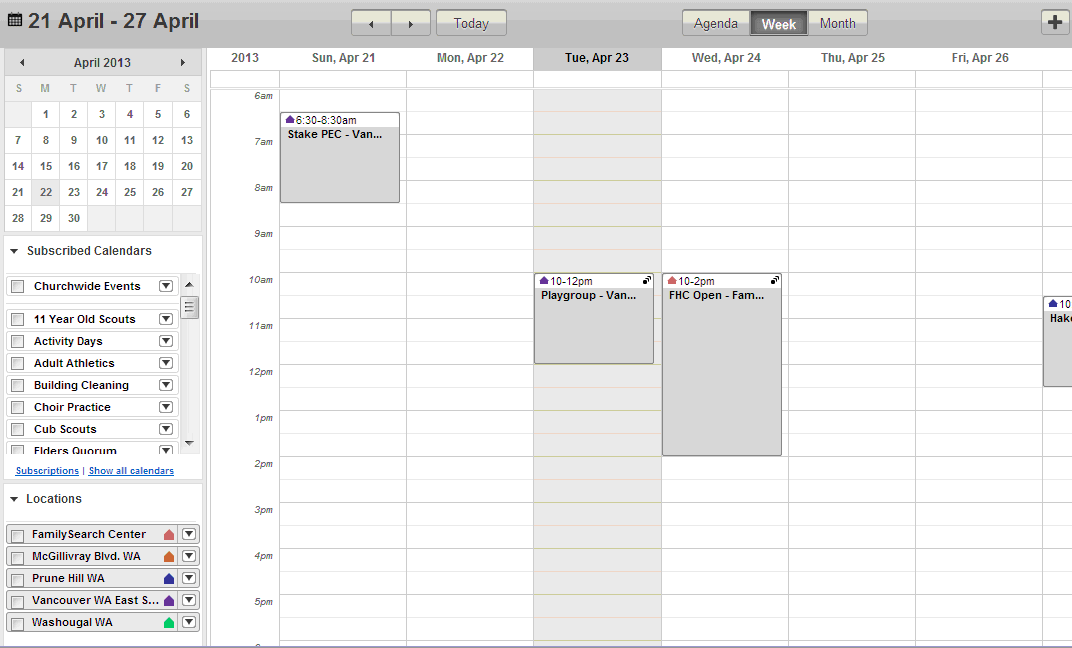
Today, when I un-check all locations in the week view, I see selected events from multiple buildings. If I check and then un-check all or various locations, it does not fix the problem. The behavior is inconsistent from day to day.
Screenshot.gif
(35.74 KiB) Downloaded 72 times