making Resservations

28 postsstarted by gayle01 6,648 viewsoriginal topic

New Member
#1
I am the Stake building scheduler and have been using the down arrow to the right of the Stake Calendar under 'settings' to make reservations for other Ward Buildings as well, as per the Tutorial. A full monthly calendar would always appear, where I could select the location and dates I wanted to enter a new event. Today the settings 'reservations' option is not listed as a choice....I talked with our Stake Clerk about this new problem and he said to just use the plus (+) icon to enter an event. If I reserve a building using that method an event it gets posted on the STAKE calendar with only the color code for the different Wards. I need to put the event on the proper building or every Ward calendar event in the stake will end up on the Stake calendar. I feel it's a setting gliche or change somewhere in my administrator capabilites. Please let me know where or how my clerk (Mel Peterson) can fix this.....Thank You ...Gayle Olsen, Mesquite, NV Stake email: ggolsen@rconnects.com
Community Administrator
#2
gayle01 wrote:Today the settings 'reservations' option is not listed as a choice...
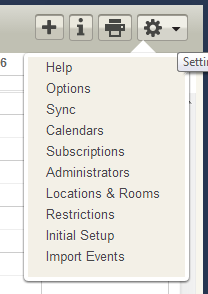
"Reservations" has been renamed to "Restrictions" to better describe how it works. It has never been a "reservation" in the normal sense of the word.

It sounds like you've been using Reservations to schedule events. That's not how that feature is intended to work and can easily result in double-booking an event.

By in large, each ward is going to have to schedule their own events. The system just doesn't function when one person schedules for multiple units.
Have you searched the Help Center? Try doing a Google search and adding "site:churchofjesuschrist.org/help" to the search criteria.

So we can better help you, please edit your Profile to include your general location.
New Member
#3
If it's not broke, then why try to fix it... j/s very frustrating...
Community Administrator
#4
ldsniowa wrote:If it's not broke, then why try to fix it...
It was broke. Too many people where misusing it and then complaining when the building was "double booked".

Renaming was done to move users to a better understanding of the function.
Have you searched the Help Center? Try doing a Google search and adding "site:churchofjesuschrist.org/help" to the search criteria.

So we can better help you, please edit your Profile to include your general location.
New Member
#5
I am the building scheduler for a stake center & I still need to be able to reserve rooms etc. and have been doing this until 4/18/13. While I understand the new change of the reservations being changed to 'restrictions,' I clicked on 'restrictions' but it will not even open. Am I missing a step or an additional change?
Community Administrator
#6
lesleyann wrote:I clicked on 'restrictions' but it will not even open. Am I missing a step or an additional change?
Works fine for me. But I'm also a stake admin.

What browser are you using?
Have you searched the Help Center? Try doing a Google search and adding "site:churchofjesuschrist.org/help" to the search criteria.

So we can better help you, please edit your Profile to include your general location.
New Member
#7
Internet Explorer
Community Administrator
#8
What version? IE8 or higher versions running in "compatibility mode" isn't supported.

I tried it in IE10 before posting.
Have you searched the Help Center? Try doing a Google search and adding "site:churchofjesuschrist.org/help" to the search criteria.

So we can better help you, please edit your Profile to include your general location.
New Member
#9
I have no idea...sadly I'm not a techie. But I was able to access it up until last week. Would the updates have affected this or do you think the problem is something else?
Community Administrator
#10
lesleyann wrote:I have no idea...sadly I'm not a techie.
The Version may show briefly when you start the browser. You should be able to find the version under "about", usually located near help in the toolbar/menu.

lesleyann wrote:But I was able to access it up until last week. Would the updates have affected this or do you think the problem is something else?
The timing is suspicious, but we probably need to narrow this down before the developers can fix it.
Have you searched the Help Center? Try doing a Google search and adding "site:churchofjesuschrist.org/help" to the search criteria.

So we can better help you, please edit your Profile to include your general location.
Community Moderators
#11
lesleyann wrote:I have no idea...sadly I'm not a techie.
If you click on Help, then select About Internet Explorer (near the bottom of the drop down menu), you should see the version number of your browser.
New Member
#12
I did a Google search but found nothing that would help. I am waiting to hear back from our stake exec sec who also normally has the ability to 'view restrictions' to see if he is unable to access it as well.
The screen is there, but when I click on 'view restrictions' nothing happens so I cannot get into the calendar even to view it.
Community Administrator
#13
lesleyann wrote:The screen is there, but when I click on 'view restrictions' nothing happens so I cannot get into the calendar even to view it.
What about the rest of the calendar? Month view, week view, etc?
Have you searched the Help Center? Try doing a Google search and adding "site:churchofjesuschrist.org/help" to the search criteria.

So we can better help you, please edit your Profile to include your general location.
New Member
#14
Yes, I can see the stake calendar week / month view, then i go to settings on the left hand side to click on my building (stake center); next step i usually take to go in to to reserve is the now titled 'view restrictions,' but when i click on that nothing happens.

All the steps work up until the 'view restrictions' ; so i am able to see the stake calender events but cannot get to the screen to reserve room/resources.
Community Administrator
#15
lesleyann wrote:next step i usually take to go in to to reserve is the now titled 'view restrictions,' but when i click on that nothing happens.
You put the words "view restrictions" in quotes. Perhaps you were just writing from an imprecise memory, but I certainly don't see the word "view" in that item in the Settings menu; it simply says "Restrictions."

I'm not trying to be overly picky, but if you are really seeing the word "view" in that context, then that might be a clue as to what is different about your experience.
lesleyann wrote:All the steps work up until the 'view restrictions' ; so i am able to see the stake calender events but cannot get to the screen to reserve room/resources.
I'd recommend that you embrace the new term "Restrictions," which much more accurately describes what is happening here. If you think that you can use that screen (however it may be titled) to actually reserve rooms and locations, you will be disappointed. All you can do there (and all you've ever been able to do there) is to restrict certain units from scheduling events on those dates/times and locations. Events are the key to successfully booking rooms.

The About Reservations help topic has not yet been updated with the new terminology, but if you read it carefully, it will help you understand the essential differences between Restrictions and Events.
Questions that can benefit the larger community should be asked in a public forum, not a private message.
New Member
#16
My screen does say VIEW Restrictions.

I have no issue with the new term of restrictions. My assignment as the stake building scheduler, set out to me by my stake president, is to reserve rooms/schedule events for two wards plus stake auxiliaries that meet in our building. When a ward wants to reserve a room/hold an event, they must contact me to do it. I realize this might not be the best way but it's the only way we have been told to do it.

It is my understanding that the website is set up to have the individual wards do this themselves, but that doesn't happen in my stake. If I schedule an event for a ward, we do not want it to automatically show up on the stake calendar since it is a ward activity so I schedule/reserve the room for the event, the stake exec sec will put the stake events on that calendar and each ward must put their event on their own calendars.

If there is an easier way...I would love the help on how to do it. Again, I am really not technically gifted in any way so this is proving difficult for me to figure out.
Community Administrator
#17
lesleyann wrote:My assignment as the stake building scheduler, set out to me by my stake president, is to reserve rooms/schedule events for two wards plus stake auxiliaries that meet in our building. When a ward wants to reserve a room/hold an event, they must contact me to do it.
Your stake president has given you an assignment based on tradition which cannot be done in the current system. In particular, let me draw your attention to this from the help file:
Reservations take place at the unit level only and do not apply to specific calendars within a ward. Building schedulers can set aside a location or room for an entire ward or stake but not for a particular calendar within that ward or stake.

For example, a building scheduler might reserve the cultural hall for the 3rd Ward. Any calendar editor in the 3rd Ward — from Primary to Relief Society to Scouts and other groups — would then be able to schedule the room. The building scheduler cannot reserve the Relief Society room specifically for the Relief Society calendar.
Furthermore, the reservation will not sync to external calendars. Only events will. So for that RS event, the RS still has to place their event on the calendar. When they do so, then they can set the location. Only THAT will insure that the room is for their exclusive use. And at that point the reservation/restriction is no longer needed, because the room is now blocked off by an event.

And unless there was a blanket restriction in place, that ward could have scheduled the event and blocked off the room by themselves - so your adding of the reservation/restriction is pointless.


If I was in your shoes, I'd arrange a meeting with your stake president and bring him up to speed on the new system so he can adjust your assignment.

The facts are that only events make sense. One person cannot place events on the calendars of multiple wards. The system is designed for each ward to schedule their own events. Restrictions are there to give wards exclusive use of the room at a given time ("ward night"), but isn't a substitute for an event.

Have you searched the Help Center? Try doing a Google search and adding "site:churchofjesuschrist.org/help" to the search criteria.

So we can better help you, please edit your Profile to include your general location.
Community Moderators
#18
lesleyann wrote:My assignment as the stake building scheduler, set out to me by my stake president, is to reserve rooms/schedule events for two wards plus stake auxiliaries that meet in our building.
As a building scheduler (the role defined in the Calendar tool application), you do not have the ability to schedule events. You can schedule events in your ward calendars to which you have been added as an editor. The same is true for stake calendars. But for all other wards you cannot be added as an editor.

These limitations make fulfilling your assignment quite difficult when using the Calendar application.

You can create and manage restrictions. But restrictions only apply to the stake and units. It is not possible to make restrictions for an organization.

You are opening yourself to conflicts if you use restrictions to 'book' rooms, . When you schedule a restriction, you are not alerted about any conflicts with other restrictions. When restrictions are used in place of events on a calendar then, in addition to the limitations russellhltn mentioned, you could inadvertently 'schedule' multiple events for the same rooms, either overlapping in time or at the same time.

Using the Calendar application with a single point of scheduling method is a waste of time. You'd do just as well with a paper and pencil, and you would not get the false sense of security in thinking double booking is not possible. A lot of the added benefits of the Calendar application are not available when using the single point of scheduling method.
JD Lessley
Have you tried finding your answer on the ChurchofJesusChrist.org Help Center or Tech Wiki?
New Member
#19
Thank you for the input. It seems we need to make some adjustments to how we are doing things.
Community Administrator
#20
lesleyann wrote:My screen does say VIEW Restrictions.
Can anyone else share their experience with this?
  • I am most definitely seeing the menu item on the Settings menu as simply "Restrictions" and I can go to that page with no trouble.
  • But lesleyann is definitely seeing the item as "View Restrictions" and she cannot go to that page.
That seems suspicious, and makes me wonder if there is a connection between what you see on the Settings menu and whether you can go into the Restrictions page.
Questions that can benefit the larger community should be asked in a public forum, not a private message.
Community Administrator
#21
Here's what I see.

I wonder if "View Restrictions" is intended for non-building schedulers to see what has been set?
Cal_Restrictions.png
Cal_Restrictions.png (9.75 KiB)
Have you searched the Help Center? Try doing a Google search and adding "site:churchofjesuschrist.org/help" to the search criteria.

So we can better help you, please edit your Profile to include your general location.
Senior Member
#22
russellhltn wrote:Here's what I see.

I wonder if "View Restrictions" is intended for non-building schedulers to see what has been set?
I'm a ward level admin but not a building scheduler and not a stake admin. I don't have a Restriction option at all.
New Member
#23
In the middle of the screen it says "View Restrictions" and when I click on it, it cannot open. However, I went to the HELP section and saw that if I go to settings, the drop down bar does say 'restrictions.' When I clicked on that it did open for me. So, that part of the issue is resolved.
Thank you!
Community Administrator
#24
lesleyann wrote:In the middle of the screen it says "View Restrictions" and when I click on it, it cannot open.
Ah, so that mystery is solved. I was talking about the Settings menu itself, but lesleyann was referring to the "View Restrictions" link in the Locations and Rooms section of Settings. That link appears in the upper right corner of the middle section of a location on that Locations and Rooms page (but it only appears for someone who is a building scheduler for the selected location).

And indeed, the View Restrictions link doesn't work for me, either. So that appears to have been broken in the 2.5 upgrade.
Questions that can benefit the larger community should be asked in a public forum, not a private message.
#25
russellhltn wrote:
gayle01 wrote:Today the settings 'reservations' option is not listed as a choice...
"Reservations" has been renamed to "Restrictions" to better describe how it works. It has never been a "reservation" in the normal sense of the word.
Looks like the online help is still using the word reservations. My wife is the new building scheduler and had me look into why she doesn't have the reservations menu option. Thanks for your post, now she knows to use the restrictions menu option.
Community Administrator
#26
chriswoodut wrote:Looks like the online help is still using the word reservations. My wife is the new building scheduler and had me look into why she doesn't have the reservations menu option.
Yes, but the reason it was renamed is because it was being mis-used. Things need to be scheduled as events, not as a reservation/restriction. By default a building scheduler doesn't have the needed rights to schedule events. Only to deal with conflicts.

The purpose of restrictions is to deal with things like "ward night" that is not a specific event, but where the building is set aside for a particular ward.
Have you searched the Help Center? Try doing a Google search and adding "site:churchofjesuschrist.org/help" to the search criteria.

So we can better help you, please edit your Profile to include your general location.
#27
russellhltn wrote:
chriswoodut wrote:Looks like the online help is still using the word reservations. My wife is the new building scheduler and had me look into why she doesn't have the reservations menu option.
Yes, but the reason it was renamed is because it was being mis-used. Things need to be scheduled as events, not as a reservation/restriction. By default a building scheduler doesn't have the needed rights to schedule events. Only to deal with conflicts.

The purpose of restrictions is to deal with things like "ward night" that is not a specific event, but where the building is set aside for a particular ward.
Yes, exactly. My wife was trying to block out the ward nights. The instructions on the help pages is out of date.
Community Administrator
#28
chriswoodut wrote:The instructions on the help pages is out of date.
Yes, we're aware of that. The team that did the documentation was let go. I'm not sure what the church has arranged to replace them.
Have you searched the Help Center? Try doing a Google search and adding "site:churchofjesuschrist.org/help" to the search criteria.

So we can better help you, please edit your Profile to include your general location.