Calendar 2.5 released

13 postsstarted by jeffevannelson 2,748 viewsoriginal topic

Church Employee
#1
Calendar 2.5 has been released

Release Notes
  • Fixed many out of unit Leader issues.
  • Fixed Time Zone Issues
  • Added Print button
  • UI and performance around Restrictions.
  • Fixed Sync Issues
  • Fixed Problem where leaders were not added as editors on calendars created in their units.
  • Fixed Editors not able to Delete Calendars
  • Added new Callings and fixed some of them.
  • Fixed Some Errors around out of unit stake leaders.
LDS.org Team

Community Administrator
#2
jeffevannelson wrote:UI and performance around Restrictions.
It's implied by the above release note, but it's worth calling out that the feature formerly known as "Reservations" is now called "Restrictions" -- a change that many of us have long hoped for.
Questions that can benefit the larger community should be asked in a public forum, not a private message.
Senior Member
#3
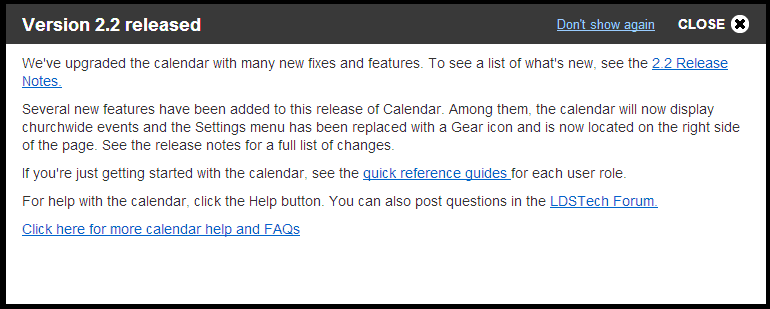
Not to pick a nit with the fine work, but it looks like someone forgot to update the popup that comes up announcing a new release:
Version 2.2 released
We've upgraded the calendar with many new fixes and features. To see a list of what's new, see the 2.2 Release Notes.
Several new features have been added to this release of Calendar. Among them, the calendar will now display churchwide events and the Settings menu has been replaced with a Gear icon and is now located on the right side of the page. See the release notes for a full list of changes.
Community Administrator
#4
aebrown wrote:
jeffevannelson wrote:UI and performance around Restrictions.
It's implied by the above release note, but it's worth calling out that the feature formerly known as "Reservations" is now called "Restrictions" -- a change that many of us have long hoped for.
Most of the changes seem to be bug fixes, but renaming Reservations to Restrictions calls for a update to the Help file.
Have you searched the Help Center? Try doing a Google search and adding "site:churchofjesuschrist.org/help" to the search criteria.

So we can better help you, please edit your Profile to include your general location.
Senior Member
#5
russellhltn wrote:Most of the changes seem to be bug fixes, but renaming Reservations to Restrictions calls for a update to the Help file.
The help file also contains version release notes that need updating. There was another thread somewhere on the forum relating to layoffs of the tech writers in December, so I don't know if that's impacting getting the help updated or not.
Church Employee
#6
mevans wrote: The help file also contains version release notes that need updating. There was another thread somewhere on the forum relating to layoffs of the tech writers in December, so I don't know if that's impacting getting the help updated or not.
Correct Service Missionaries are trying to help us but that might take some time.
LDS.org Team
Member
#7
The pop-up window (when signing into the new version) is referencing the incorrect version:
Version 2.2 released.gif
(15.29 KiB) Downloaded 208 times
Community Administrator
#8
mfmohlma wrote:Not to pick a nit with the fine work, but it looks like someone forgot to update the popup that comes up announcing a new release:
Version 2.2 released
We've upgraded the calendar with many new fixes and features. To see a list of what's new, see the 2.2 Release Notes.
Several new features have been added to this release of Calendar. Among them, the calendar will now display churchwide events and the Settings menu has been replaced with a Gear icon and is now located on the right side of the page. See the release notes for a full list of changes.
That's been fixed. But I have to say that I'm a bit concerned about the way the new pop-up was written. It sounds like the functionality of "Reservations" was changed. It hasn't. It was just renamed to reflect how it has always worked.
Have you searched the Help Center? Try doing a Google search and adding "site:churchofjesuschrist.org/help" to the search criteria.

So we can better help you, please edit your Profile to include your general location.
Senior Member
#9
russellhltn wrote:That's been fixed. But I have to say that I'm a bit concerned about the way the new pop-up was written. It sounds like the functionality of "Reservations" was changed. It hasn't. It was just renamed to reflect how it has always worked.
I agree. The wording is unclear and I think it's going to cause additional confusion.
Community Administrator
#10
eblood66 wrote:I agree. The wording is unclear and I think it's going to cause additional confusion.
Yes. This sentence in particular leaves you scratching your head:
A "reservation" means simply that a specific event is scheduled in a specific building/location and the location is unavailable for other events.
They just finished saying that "reservations" are now called "restrictions" and then they use the term "reservation" again. And on top of that, what they describe as a "reservation" sounds like behavior that can only be attributed to an actual event; that's certainly not how reservations/restrictions have ever worked.
Questions that can benefit the larger community should be asked in a public forum, not a private message.
Community Administrator
#11
aebrown wrote:And on top of that, what they describe as a "reservation" sounds like behavior that can only be attributed to an actual event; that's certainly not how reservations/restrictions have ever worked.
I think they were describing how people thought reservations worked but failed to say that it's not an accurate representation on how reservations in the calender worked - hence the name change.

My suggestion:
An important change for the 2.5 release is Restrictions (formerly Reservations). A "Restriction" is a block of time where a building/location is assigned to a unit. During that time, only the assigned unit may schedule events in that building. Use of the word "reservation" was giving a false impression that the building/location was reserved for a specific organization or event.
There's no point in describing what a reservation is when the calendar "reservation" system doesn't, and never has, done it.
Have you searched the Help Center? Try doing a Google search and adding "site:churchofjesuschrist.org/help" to the search criteria.

So we can better help you, please edit your Profile to include your general location.
Community Administrator
#12
russellhltn wrote:My suggestion:
An important change for the 2.5 release is Restrictions (formerly Reservations). A "Restriction" is a block of time where a building/location is assigned to a unit. During that time, only the assigned unit may schedule events in that building. Use of the word "reservation" was giving a false impression that the building/location was reserved for a specific organization or event.
That's a great start. I would adjust it slightly to avoid giving the false impression that a restriction applies only to an entire location (it can apply to a set of rooms or a location):
An important change for the 2.5 release is Restrictions (formerly Reservations). A "Restriction" is a block of time where a location/room is assigned to a unit. During that time, only the assigned unit may schedule events in that location/room. Use of the word "reservation" was giving a false impression that the location/room was reserved for a specific organization or event.
Questions that can benefit the larger community should be asked in a public forum, not a private message.
Community Administrator
#13
aebrown wrote:That's a great start. I would adjust it slightly to avoid giving the false impression that a restriction applies only to an entire location (it can apply to a set of rooms or a location):
An important change for the 2.5 release is Restrictions (formerly Reservations). A "Restriction" is a block of time where a location/room is assigned to a unit. During that time, only the assigned unit may schedule events in that location/room. Use of the word "reservation" was giving a false impression that the location/room was reserved for a specific organization or event.
Works for me.
Have you searched the Help Center? Try doing a Google search and adding "site:churchofjesuschrist.org/help" to the search criteria.

So we can better help you, please edit your Profile to include your general location.