Blackmagic Design ATEM Television Producer

15 postsstarted by sammythesm 21,283 viewsoriginal topic

#1
So, say you wanted to find a single, magical device that could:
1. Mix up to 6 HD camera signals (both HDMI and SDI)
2. Output a HD signal (to webcast software or PVC)
3. Give you the ability to do lower 3rd titling, chroma keying, and other complex video effects
4. Accept computer inputs for presentations, hymn text scrolling, etc.
5. Control it all via software on a computer over the network (theoretically sitting anywhere in the building)
6. Output a compressed recording in H.264 format directly to an attached computer.

Well, take a look at the Blackmagic Design ATEM Television Producer:
http://www.blackmagicdesign.com/product ... sionstudio

This is a really attractive device! It would take up 1U in an existing satellite rack, and if you invested in a Blackmagic Intensity Pro (or other capture card with a HDMI or SDI interface) you can plug directly from this product into your capture computer.

For church webcasting, it's perhaps a bit on the pricey side - list price at $995 - but compared to other HD vision mixing solutions it's shockingly inexpensive. Sheesh, two years ago I paid $600 for an analog video mixer so I could mix 3 SD cameras for our Stake with none of the desirable features I mentioned above.

The biggest downside to the device is that it's purely HD. There are no SD/composite video input capabilities, so you would have to buy lots of converter boxes (composite to SDI or HDMI) to take advantage of it if you were doing a slower migration to HD. If we could only get a HD PTZ camera down under $1000, this would make a forklift upgrade more feasible.

However, if any of you are keeping an eye on HD solutions, I feel like this is one product to watch.
#2
Sammythesm,

If anyone is considering using the ATEM TVS (Television Studio) for conference, it would most likely be for its high-definition capability but it can do standard definition too, but like you said there are a lot of standard definition special effects generators able to synchronize video on the market that cost far less. In either case, the ATEM TVS is broadcast quality professional special effects generator with synchronizing time base correction.

However, there is a lot more to consider than just purchasing the ATEM TVS unit and analog to digital converters. In order to get this working, several issues must be considered.
  • • Conversion of camera's analog video into digital
    • o All inputs on the ATEM TVS must be either SDI (Serial Digital Interface), HD-SDI (High Definition Serial Digital Interface) or HDMI (High-Definition Multimedia Interface)

      o All video sources for the ATEM TVS output resolutions must be identical

      o The ATEM TVS is currently limited to 480i (SMPTE 259M) or 720p or 1080i (both are SMPTE 292M). The ATEM TVS cannot handle 1080p (SMPTE 372M) video sources

      o Computers with HDMI output ports can be used but must be capable of resolution settings of 1920x1080, 1280x720 or 720x486

      o Inexpensive Analog to Digital Video converters can convert to 720p but remember the 1080p setting will not work with the ATEM TVS. They also do a terrible job correctly converting color, contrast and brightness. However, professional converters do a great job.
    • Audio Sync – The ATEM TVS delays the video (as do most all digital video devices) so a delay device must be employed to delay the sound so the video will not be out of sync with the audio

    • Graphics and Video – The ATEM TVS has the ability to display still media (.jpg) from the computer’s folders but not play video stored on the computer

    • Capture card or Streaming device – If using the Webcast Communicator Software on a computer, a capture device must be used to capture the digital video signal (SDI, HD-SDI or HDMI) as well as either decode AES digital audio from HDMI or decode the AES audio signal from the ATEM TVS

    • Bandwidth – Even though the ATEM TVS has professional quality video (and HD), if you do not have sufficient upload and download bandwidth, picture quality will suffer. It is recommended to have at least 4 Mbps upload and download bandwidth

    • HD playback devices – In order to see high definition at the receiving end, the TV sets or projectors must be HD

    • HD distribution – If the video is displayed on more than one set (projector in chapel and TV sets in overflow rooms), a way to distribute the high definition signal but be addressed

    • Controlling the environment – what good is HD if the light in the chapel washes out all the detail
#3

Review: Blackmagic Design ATEM Television Producer

I had the chance to use a Blackmagic Design ATEM TVS Production Switcher at our last Stake Conference and I wrote a review for those who are interested.
Review - BMD TVS.pps
Production Switcher Review
(3.66 MiB) Downloaded 1069 times
Please feel free to submit questions or comments.
#4
Great review. Thanks for posting the slides.

Your review highlighted my two concerns with this solution:
1) digital-only audio input on the ATEM: Unless you purchased a sound board with a digital audio output, you are going to struggle to get audio sync (and will likely have to use a 3rd device like you pointed out).

2) expense (and latency) associated with converting analog camera signals to digital signals, or expense of HD-SDI cameras. Your experience with the low-cost AD converters is great - thanks for sharing that - because I was tempted by those same converters on Amazon. :)

One small difference I would do is to use a capture card with HDMI input for capturing the direct HDMI program out of the ATEM into the webcast software. This just feels like a cleaner solution, you stay digital all the way to the Webcast transcoder. This assumes you can located a capture card with that feature (I like the Blackmagic Intensity Pro) and are using the church's webcast software rather than hardware solution.

In the end, it looks like you were able to overcome the obstacles, so that is great. Unfortunately, my stake doesn't have the budget (yet) to overcome all the obstacles as you have.

If this unit accomplishes anything, I hope it will just raise the bar (and lower the price) for what other manufacturers can do.
Community Administrator
#5
I take it that you're not feeding screens in the overflow area, right?
Have you searched the Help Center? Try doing a Google search and adding "site:churchofjesuschrist.org/help" to the search criteria.

So we can better help you, please edit your Profile to include your general location.
#6
Nope. It has been suggested, but our gym isn't well-equipped for it though.
#7
Additional information and update on using the Black Magic Design ATEM TVS.

I just had another flawless Stake Conference using the BMD ATEM TVS as our video mixer. However I did notice some minor issues with regards to the laptop set up for HDMI video and color shifting when running through the ATEM. I though I would post these issues in case anyone was considering in using the ATEM TVS for broadcasting.

The TVS has HDMI inputs which can receive the video signal directly from a laptop's HDMI port but it was difficult for me to get working. I also experienced some screen aspect ratio issues. A second laptop was also available for use and I found it just as difficult to set up and it had different aspect ratio issues and even adverse effects on the program color output.

Here are the details:

The ATEM manual (all models) states connection to a laptop requires specific settings
If you’re plugging in a computer to the HDMI inputs of the ATEM switcher, then be sure that the monitor settings on the computer are set to the correct resolution and frame rate. If you’re using 1080i video, then your monitor needs to be 1920 x 1080 resolution. If you’re running 720p on your switcher, then your monitor needs to be set to 1280 x 720 in resolution. If you are using NTSC then your monitor needs to be 720 x 486. The frame rates also need to match.
Laptop 1: Lenovo G580 ($289). We were using Sony EVI-D70 cameras so the laptop resolution needed to be set up for a NTSC monitor, but the manual's recommended settings would not work. The only way I could get the TVS to recognize a valid signal was to set the Lenovo's resolution to 740 x 480 (not 486 as the manual stated), 60 Hz, Interlaced (also worked at 59 Hz). With this setting, everything seemed perfect. Chroma-keying the hymn lyrics and speakers names/callings cropped only 3% off (minor) of the left and right sides of the picture.

Laptop 2: Alienware ($2,000+). Since I had access to an awsome Alienware laptop, I used it on the day of the conference. Again, the resolution settings needed to be 740 x 480 (not 486) and it cropped off about 3% from the top and bottom (instead of sides) during chroma keys. However, I found I had to constantly re-adjust camera's color settings during chroma keying as red was subtracted out of the TVS output. (Probably some H-phase shifting going on, but there was no way for me to adjust it on the laptop)

I know the cropping of the picture was due to the laptop's green background used as the fill signal and the laptop's overscan borders were black. In the future, I may experiment using black as the fill signal and a different color for the key.

All in all, I was very impressed with the performance, quality and functionality of the ATEM TVS and I love it. I just have a few more issues to work out with Chroma Keys. I'd be interested in how professional videographers superimpose images using laptops. Photoshop? Something other than PowerPoint?
New Member
#8
The costs can add up even when doing this on a low budget.

We have been using the BMD ATEM TVS solution($995), along with a neighboring stake. I agree that the cost is not just limited to the TVS switcher.

You also will need at least one Behringer shark ($89) for audio delay, and up to three of these if you need to sync inputs 5 and 6 after using a HDMI to SDI converter($129-$250).

Converting the Audio to digital adds a Behrigner SRC2496($199.99) plus an RCA to BNC cable ($7)

To limit the amount of software and equipment we use Just Macros (pro version estimated at around $500 otherwise free) with the GD library to do our overlays using the downstream keyers and the Media Player and media pool. The only cost here was a XKey 60 Key Macro Keyboard ($199.99) which acts as a control board for the whole solution. Some development time, but we can share our overlay scripts/hymns.

We currently use the USB 3.0 which Livestream picks up both the sound and video directly form the TVS, and the HDMI port for local streaming to projectors and other rooms.

A good desktop Computer with a decent processor for streaming, and control software, for PVC/Webcast it would be helpful to have at least one HDMI capture card in this system. Laptops might get you by, but a desktop would be more solid and last longer. ($800 - $1,500)

Other costs to consider if just thinking of going HD and adding cameras and inputs:
HD Cameras: recommend Sony HDR-CX220 ($260)
- Sony RMVD1 ($39) cable adapter plus remote for zoom/power
- On newer Sony Cameras you might need a cable converter for the above remote ($20)
- Bescor MP101 Video Motorized Pan Head - Pan-Tilt ($129) we rewired for over Cat6
- Camera Mounts
Audio Mixer for the number of inputs you need to include with your stream.
HDMI Splitters ($20)
HDMI Extenders over Cat5e-6 ($50 - $300) Lot of options but found a few that work well
HDMI Cables
Cat6 Cabling
Other Cables for power, remote, tally
HD Projectors - would recommend 5000 Lumens for areas with lighting issues for cameras, otherwise 2500 to 3000 Lumens works fine for most situations.
Lots of volunteer man hours setting everything up.
Working with the local FM Group for anything needing to be installed.
Good internet connections Cable/Fiber from stake center to other buildings, DSL may or may not work for receiving sites so have and audio backup prepared for these buildings as they are most likely to have issues.

Overall the cost has come down a lot if you have looked into what a setup like this would have been just a few years ago, but when designing and proposing a solution to your stake presidency make sure you do your homework and consider the whole picture, including ongoing maintenance, replacement costs for equipment that fails along the way.
#9
Edited 4 times, last by michaelfish on
From your post, you mentioned streaming locally. Isn't your building set up with the standard RF distribution (a TV channel) for the R/S and Primary rooms?
#10
pcardelli wrote:You also will need at least one Behringer shark ($89) for audio delay, and up to three of these...
To save money, I purchased a used 2-channel analog Harmon Pro 400 audio delay for $50, but I found it was not necessary to delay the audio when using Black Magic Design's Analog to Digital (A2D) CONVMAAS converters.

I found that the BMD units convert analog to digital signals VERY quickly and video delay was negligible (probably 1 or 2 frames). I tested with both standard definition cameras and also 1080i video. In addition, for stake conference we pushed HD with one HD camera's signal sent using a HDMI to a 2-CAT5 balun and another HD camera used a HDMI over Coax (RG-6U). I was surprised when these extenders, in series with the BMD A2D converters didn't noticably delay the video, as I was expecting issues.

On the other hand, I have had to delay audio when using the HDMI video from my desktop computer and with other cheap analog to digital converters. Note: I do not use the BMD TVS for audio, only video.

Another thing to consider is using both channels of the delay unit independently. The Harmon Pro 400 unit I use has two channels and both are independently adjustable.

Bottom line: purchasing an audio delay unit may not be required. Fast, professional analog-to-digital converters may be all that is necessary, but for the up-most compatibility, having one in the system is great when you have a delayed video problem.
#11

Boarders cropped with Chroma Key: SOLVED

I found a solution to the problem of a chroma-key cropping the edges of the picture due to laptop's boarders.

Instead of using the chroma-key feature, use the Pattern selection under Upstream Key1 and simply cut a hole in the lower thirds portion of the frame. The laptop's PowerPoint slides will appear crisper and cleaner than a chroma-key and gradient effects can be added with the Softness slider.

This PowerPoint shows how to set this up and has screenshots of the settings.
ATEM Key instructions.pps
keying hymns instructions on BMD ATEM TVS
(821 KiB) Downloaded 758 times
#12

Analog Composite to Digital Encoder, Stabilizer & Audio Conv

Converting an analog composite signal to HDMI for the ATEM TVS requires a converter. These units can cost several hundreds of dollars (for each input) and they require very stable video signals. This weekend I found an alternative, inexpensive solution which had been lying around the house for years.

In working with inexpensive A2D converters, I found most of them were useless since the converters up-scaled to 1080p only (progressive) and the BMD ATEM TVS requires 1080i (interlaced). In addition, the 720p mode produced poor color and a lot of noise was inducted into the picture (grainy).

So I gave up and purchased the BMD CONVMAAS2 analog to SDI mini-converter ($300), which works great. It will convert composite, S-video, component or HD component to SDI but the incoming video signal must be very stable.

This weekend I was converting some old VHS tapes to digital with the CONVMAAS mini-converter, BMD ATEM TVS video switcher and Media Express software but found the unstable video signal from the old VHS tapes caused constantly lost signals whenever the tape went over bad scenes.

Then I discovered a wonderful and inexpensive solution to stabilize the picture, up-convert the analog composite signal to 1080i so it is compatible with the BMD ATEM TVS, and even output stereo audio on the HDMI port!

I simply used an old DVD recorder which had an HDMI output and selected the output option for the HDMI output to 1080i. I am not only pleased with the results of the VHS transfers but for our next stake conference, I will be able to utilize SD cameras AND HD cameras as well.

So if you are looking for an inexpensive way to convert analog composite video and audio to 1080i HDMI as well as stabilize the picture, try using a DVD recorder with 1080i selectable HDMI output. I have found some of these with bad DVD drives selling for $30 on-line. Be warned however, most new HDMI ports incorporate HDCP (stands for High-Bandwidth Digital Content Protection, a copy protection scheme to eliminate the possibility of intercepting digital data midstream between the source to the display) and they will not work with the BMD ATEM TVS unless you can strip the HDCP signal (such as by using an HDMI splitter).
#13

Xkey Panel - A MUST-have for the BMD ATEM Television Studio

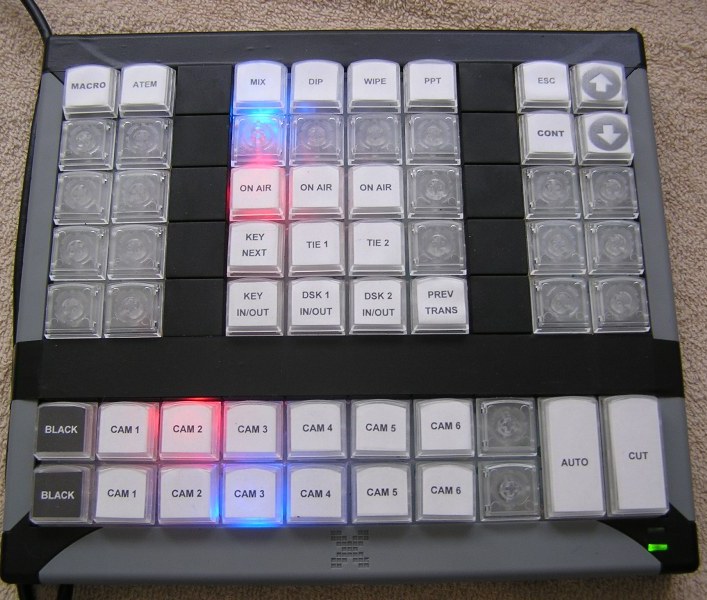
XKeys XK-60 Control Panel.JPG
60-key control panel
(109.78 KiB) Downloaded 891 times
Although the Black Magic Design ATEM Television Studio can be operated via computer keyboard (as well as an Android or iPad device), I consider the Xkeys USB keyboard from PI Engineering a "must have" control surface for the ATEM TVStudio.

Keyboards and touch-screens do not provide tactile and sensory feedback of real control panels (costing $4,995), but the Xkey keypad does - and you can purchase one for $100.

In addition to controlling the ATEM TVStudio, the Xkey panel interacts with the computer keyboard in ways not possible with a regular control panel or standard PC keyboard. For instance, the top-left section of my panel launches programs, the bottom and center sections control the ATEM TVStudio and the top-right section controls the PowerPoint slides - all on the same laptop via the Xkey keypad.

BTW, the HDMI output of this laptop fed the ATEM TVStudio CAM-1 input, so the laptop 2nd display was for lyrics, speakers names, pictures of priesthood advancements and a video. The laptop's main screen was for control.

Here's where it gets really cool...

No matter which program is in the foreground of the laptop, when I press one of the upper-right keys (up, down, CONTinue or ESC), my PowerPoint program is brought to the active window and the key's function is executed. For instance, if I was to ALT-TAB to another program (doesn't matter which), when I press CONTinue, my PowerPoint program is made the active program and the PowerPoint presentation continues from the present slide. The up and down keys manipulate the PPT show properly - no need to ALT-TAB back and forth. (For you programmers out there, "If" statements are used along with IsActiveWindow and WindowToFront commands provide control.) The ATEM TVStudio controls still work, even though I am progressing through the PowerPoint Presentation.

With Macroworks 3.1 (supplied) and JustMacros (free) the Xkey keypad can send information to the correct device or program. JustMacros can record keypresses, populate and configure fields or send commands (such as the lower-thirds lyrics box position, width, PIP box size and source, etc.), all customized into one key. For an example, I was able to create a macro to memorize which camera is on the preview bus, then assign preview to the current camera on air, dissolve in the chroma-key the speaker's name over the camera on air, and restore the preview bus to the camera previously selected (I called this key "KEY IN/OUT").

In addition to the Xkey's tactile feel of a real control panel, the keys light up (red or blue) and provide feedback such as ON AIR or PREVIEW or ACTIVE. You'll notice in the picture above, the bottom of the panel is indicating which camera source is live (CAM2) which source is next (CAM3) and the CHROMA-KEY is active.

The panel can be used concurrently with the laptop's keyboard and functions. Rapid-firing keys still accurately controlled the ATEM TVStudio.

The clear plastic keys can be removed and combined with larger keys (AUTO and TAKE). A software template is also provided to create your own custom labels (one pre-cut sheet was supplied).

..all this for $199.
New Member
#14
dear sir ..did you ever get the computer to play sound from the hdmi to the bmtv.. I get a video but no sound
#15
Some laptops/PC's must be configured to play the sound via the HDMI connector instead of the heaphone jack (or other). In Windows control panel (Win7 and 8), open SOUND, then in the PLAYBACK tab make sure the HDMI output is the default device. Then open the Black Magic Design ATEM software, click on the AUDIO tab (bottom), turn on and adjust the appropriate input. The LED bar graph on the right should reflect the output.

Hope this helps.