StickyUSB Flash setup for Come Follow Me videos on Roku Player

80 postsstarted by rknelson 172,837 viewsoriginal topic

Member
#1
In our stake we are using Roku boxes to play Come Follow Me videos from a USB Flash drive connected to the Roku. While the Roku is capable of streaming video over the internet, playing media from the USB Flash drive is standalone without any requirement for a wireless connection. A YouTube video ( http://www.youtube.com/watch?v=FsF6GlqWvno ) prompted a private message asking how we created the graphical icons for the videos and folders. This post will answer that question and I’m hoping that anyone else who has input can chime in on the topic here too.

The Roku 2 XS is the model that has a USB connector. You need to install the Roku USB Media Player to actually use the USB port. This “channel” is free and easy to install.

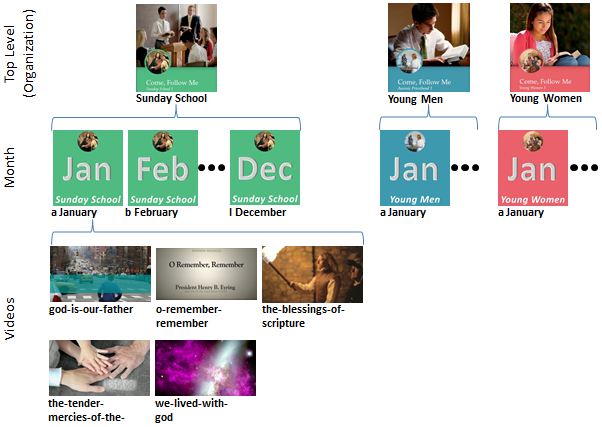
There is very little documentation on how to organize files and provide cover “artwork” for videos. We tried a bunch of things based on what similar media players use. Here is what we found. You can provide .JPG files for each folder and video to provide this artwork. We organized the videos in 4 top level folders: Young Men, Young Women, Sunday School, and Training. To create graphics for folders, you can either place a .JPG file with the same name alongside the folder, or place a file “folder.jpg” within the folder. We used the latter method. Below YM, YW & SS folder, there are folders for each month. If you name the folders January, February, … they will be sorted alphabetically rather than in chronological sequence. To resolve this we named them “a January”, “b February”. We created artwork for each of these months and saved it as a “folder.jpg” file within each months folder. The artwork is color coded to match the top level colors for the each program (YM, YW, Sunday School, Training), and has text with the month abbreviated (“Jan”, “Feb”…) and the program (IE Young Men) on the artwork. Below that level are the media files with an artwork file for each video. We renamed the media files from “2102-06-007-invite-us-to-testify-1000k-eng.mp4” to “invite-us-to-testify”. These filenames are displayed by the Roku USB Media Player below the artwork, so we wanted them to be easily recognized.

Attached are a two jpeg diagrams showing the folder hierarchy and some representative artwork. The black text below each image is what the Roku inserts from the folder/file name:
SS YM YW folder artwork example.JPG
Examples of artwork for Roku USB Flash with Come Follow Me videos
(49.95 KiB) Downloaded 2788 times
Example of artwork for Roku USB Flash with Come Follow Me training videos
training folder artwork example.JPG (46.98 KiB) Viewed 32660 times
This is how we created the artwork – I’m sure those with professional graphics tools would find a better way, but it worked using tools I know. For the folders, we started with pictures from the website, or the pdf documents. These were placed into PowerPoint where we could add text as needed. For the small circular pictures we did some basic graphical editing (in Windows Paint) then placed them on a matching color background. After we had them all in PowerPoint, we used screen captures of PowerPoint at a consistent size to create each piece of folder artwork.

For the media files themselves, we extracted artwork for each video with a screen grab. The most time consuming part was viewing all the videos, deciding on a representative portion of the video for a screen grab, using Widows Snipping Tool to grab the screenshot at the right point and saving it with the name to match the video.

I won’t claim our artwork is professional or perfect, but it is very intuitive and easy to use. We created folders for every month, but only downloaded the first 3 months of videos using the zip files on the website. With 3 months of videos and artwork the total Flash contents is about 3.5 GB in 1080P resolution. We are using 16GB USB Flash drives, so the whole year easily fits.

If anyone wants the artwork, send me a PM. I’m happy to share any of this.

We also downloaded the Hymns (music only and vocals) Children’s Songbook (music and vocals) (580 MB total). We created folder icons for each group (Hymns – Music Only, Hymns – With Vocals, Childrens – Music Only, Childrens – with Vocals). The Roku USB Media Player displays songs by the tagged title when provided. The downloaded music is tagged. We wanted them organized by Hymn number / Songbook page number to make it easier to locate the desired song. We used a free program called Mp3tag to extract the tags and filenames, then imported csv files into Excel, and manipulated from:

Filename: “Hymns_331_OhSayWhatIsTruth_music_eng.mp3”
Original Title: “Oh Say, What Is Truth?”
New Title: “331) Oh Say, What Is Truth?”

In the Children’s Songbook we did similarly changing:
Filename: “CS_023b_HeavenlyFatherWhileIPray_music_eng.mp3”
Original Title: “Heavenly Father, While I Pray”
New Title: “23b) Heavenly Father, While I Pray”

We applied a sequential “#” tag also to maintain the order, and we re-imported the tags to the files. The way you place the files on the flash drive is significant, zip and unzip seems to work best to keep them with the first one at the top of the list in the USB media player. All 1162 mp3 files fit in fewer than 600 MB.

We also downloaded the Gospel Art pictures (210 MB in “print” resolution). I’m not sure how useful they are. If I wanted pictures for a lesson I would put them on my own flash drive and have them in the order I would use them. There are some problems with Roku also displaying “artwork” files for folders as photos, and I’m still working to get a better solution here.
Church Employee
#2
Awesome work. Very impressive.
Member
#3
There have been a few private message requests for the jpeg files we used for the Roku. I've placed a 3.2 MB zip file on dropbox here:
https://www.dropbox.com/s/xyuwkewo5rpti ... 3%20Q1.zip
it contains the jpeg files for the folders, and the jpeg artwork for the January- March downloadable videos from Come Follow Me. To create a usable USB Flash drive, you will have to download the videos and move them into the "empty" folder structure provided. These steps are described in the README.pdf file included in the zip file.

I plan to add other quarters (April-June, and so on) as the compressed zip files are made available for download on lds.org.
New Member
#4
We have Roku systems in our building. I found rknelson’s post just after getting our USB media configured adequately.

With the hope of saving others time, I have written a software utility to automate the process of preparing the curriculum videos for a USB media player. The utility does three things:

1. Renames the video files according to the title string from the video file metadata.
2. Automatically sets video thumbnails using the Windows shell thumbnails. (There is also a way to set the thumbnail interactively if desired.)
3. Copies the month directories to the USB media in the correct chronological order so January precedes February, etc. (There is no sorting by the Roku, files are listed in FAT order, the order they are created.)

The utility requires Windows 7 and .NET 4.0.

This utility is totally unsupported, use at your own risk, but I will welcome any feedback.

Here is the link:
https://dl.dropbox.com/u/94619123/Video ... 130205.zip
New Member
#5
Hey, I need your feedback.

Below are links to a desktop app for preparing the youth curriculum videos for a Roku or WD TV Live box. This app makes the whole process simple.

1. Launch USB Video Manager
2. Select the desired quality level: 1080p, 720p or 360p.
3. Click “Download All”.
4. Click “Export” to copy the videos to a USB drive.
5. Test the USB drive in your Roku or WD TV Live system.

The app is free and versions are available for both Windows and Mac.

Windows: http://glancyfamily.net/USBVideoManager-20130312.msi
Mac: http://glancyfamily.net/USBVideoManager-20130312.dmg

Please let me know what you think. Thanks!
Member
#6
FYI - I got a missing dll error when I tried to run the above "USBVideoManager" on windows -- I needed DirectX on my windows machine, and that resolved it.
New Member
#7
Thanks for the feedback.

I updated the Windows installer with the missing dll. I have also fixed two "Export" command bugs with the Mac version. The new link is:

Mac: http://glancyfamily.net/USBVideoManager-20130314.dmg
New Member
#8
The links below will always be to the current versions of USB Video Manager:

Windows: http://glancyfamily.net/USBVideoManager.msi
Mac: http://glancyfamily.net/USBVideoManager.dmg
Member
#9
I started this thread to share what we had done in our stake. The USB Video Manager application by cglancy is an automated approach to downloading and formatting videos on a USB flash drive for use in a USB Media Player like the Roku or WD Live TV device. This post is about his work, not mine. After using the application he created, I’m scraping my manual approach to update the videos for next quarter. If you are using a USB Media Player to play “Come, Follow Me” videos, you should check this application out! With his permission, I put together this brief demo on YouTube which will give you a chance to see his application in action:
http://youtu.be/nNZMAfnpXLg

The 4 minute YouYube demo starts with installation of the application, using it to select and download Come, Follow Me videos (2 mouse clicks to get 3 months of videos downloaded directly from lds.org !), and then exporting the videos in a clean organized manner to a USB flash drive complete with thumbnails for each video.

This application solves several issues. It is driven by XML files that specify where videos and thumbnails are on lds.org. This automates the download, but does not cause copyright issues because it does not distribute the videos. It allows the user to select low, medium, or high resolution, and shows how big the download will be. When exporting the downloaded videos, it places the videos in organized folders – also as specified in the XML file. It allows the work to be done once, and then have it reused by many people in different locations. The format works with both Roku and Western Digital media players. It can even be used on your windows laptop to download and play the videos.
Community Administrator
#10
rknelson wrote:This application solves several issues. It is driven by XML files that specify where videos and thumbnails are on lds.org. This automates the download, but does not cause copyright issues because it does not distribute the videos.
Sweet! So the only thing that has to be distributed is an updated XML file - which is small and doesn't cause a copyright problem.
Have you searched the Help Center? Try doing a Google search and adding "site:churchofjesuschrist.org/help" to the search criteria.

So we can better help you, please edit your Profile to include your general location.
New Member
#11
The April through June curriculum videos for "Come, Follow Me" are now available with the USB Video Manager. Also, thanks to rknelson, the 2013 Worldwide Leadership videos are available.

You will need to update to today's version of USB Video Manager:

Windows: http://glancyfamily.net/USBVideoManager.msi
Mac: http://glancyfamily.net/USBVideoManager.dmg
New Member
#12
I just want to point out that Roku also has a channel called Roksbox. You have to set a computer up as media server, but there is a simple tutorial to do that with the built-in Windows 7 server. You can essentially just export your files to USB using "USB Video Manger", but just select the directory where your media files are hosted on Roksbox. The only change you have to make is to rename the folder.jpg files to the actual name of the folder they represent and move them up a level so they are at the same level as their folder.

I will see if I can put together a tutorial or something.

Roksbox is a one-time fee of $12.50 for unlimited Roku's. I've looked at plex, but it is much more complicated.

Just wanted to share.
New Member
#13
this is wonderful and will be a huge time saver. It has been a huge learning curve since January, re: how to provide youth teachers with the new learning resources. There was much to learn with the WD media player, especially how to navigate the videos on the flash drives. I hope that everyone who is struggling is able to find this forum.
I do have a question. I am the branch (thus meetinghouse) librarian. I haven't heard anything from a STS. Is it okay that I am taking this project on, or am I to request that the STS (assuming we have one) set it up? (We are part of a large Calgary Alberta stake.)
Community Administrator
#14
lstrom wrote:I do have a question. I am the branch (thus meetinghouse) librarian. I haven't heard anything from a STS. Is it okay that I am taking this project on, or am I to request that the STS (assuming we have one) set it up? (We are part of a large Calgary Alberta stake.)
What do you mean by "set up"? If the branch is going out and getting equipment, I would think the STS should at least be kept in the loop. The stake may have some plans you are not aware of.

If it's the downloading of videos and setting up the flash drive, I would see that as less intrusive into the STS's area. But at the same time, it seems like something that would be nice to be done once and copied for each unit of the stake instead of each meetinghouse having to struggle though it on their own.

It's possible that the STS hasn't gotten involved because no one has asked him to. For all he knows, maybe the teachers aren't using the videos.
Have you searched the Help Center? Try doing a Google search and adding "site:churchofjesuschrist.org/help" to the search criteria.

So we can better help you, please edit your Profile to include your general location.
New Member
#15
Charles,

I am very excited about this application. I was looking into building something, but what you've done is fantastic. Thank you!

I have a quick question. As I'm looking at the content for September, I noticed a couple of things: 1) it appears that all of the videos for the young men are available (as suggested in the learning outlines); 2) the Sunday School is missing one video from the learning outlines: "Let Your Light So Shine"; 3) the young women videos appear to have all from the lesson outlines (including one in the outlines but not in the list under the videos for Come Follow Me: https://www.lds.org/media-library/video ... r?lang=eng); the one from the outlines, but not the youth media page is: "Deep Beauty".

So my question (which maybe isn't super quick) is this: does the list of videos for download get populated dynamically? Why is the Sunday School missing the one video?

A comment/observation/concern. Our stake is late to the game in getting the content on USB drives, but we are excited to roll it out. One concern is giving the teachers confidence that the videos they've looked at online in their lesson preparation will be available when they check out the device on Sunday to teach. I'm not sure how much content is copyright restricted and so it can't be downloaded, but this is something teachers would need to be trained to look for (i.e. knowing that if they watch the video at home and the download link/option is not available that this video will not be on the USB drive). In the case of the missing Sunday School video noted above, this is available to be downloaded, but for some reason isn't showing in the list of videos for Sunday School for September.

In browsing some of the other posts on the digital media forum (and my own observations), as well as me not knowing exactly what to expect in terms of adding new content from time to time, it seems that trying to ensure that our drives have all the videos available that an instructor might want to show (assuming they can be downloaded), is somewhat of a challenge. I have noticed that the video section noted above under the Video, Audio, and Images portion of lds.org doesn't contain every video listed in the outlines. If you have a moment, I would love to get your thoughts on this challenge as well as responding to my question about the missing Sunday School video from September.

Again, thank you so much for your effort and for sharing this. It's a big improvement to what is available on the lds.org site as the zipped files there are only low resolution, etc.
Member
#16
I'm not Charles, but I am a fan of his work and helped put together the "Come, Follow Me July-September 2013" library file which the USB Video Manager uses.
hansene2 wrote: So my question (which maybe isn't super quick) is this: does the list of videos for download get populated dynamically? Why is the Sunday School missing the one video?
No, they are not automatically populated. The "library" file (an XML file with links to each video and associated thumbnail picture), lives on Charles's server and is downloaded to your computer when you run the USB Video Manager. These files are created by hand - using eyes to scan each lesson, make a list of the videos, cross referencing them with the video download page to get the link to the thumbnail image, and then entering the information in the XML file. It is a little tedious, and certainly can have errors. However, the benefit of the USB Video Manager is that the library file only needs to be created once, and can be used by everyone to download from the source without any issues with re-distributing the videos themselves.

I have found inconsistencies between the lessons, and the ones under the link you mentioned above. Sometimes the challenge is the name in the lesson link being different from the name of the video itself (for example in the Sunday School July lesson: "The Sacrament Helps Us Draw Closer to Jesus Christ" is the listed in the lesson, but the file you download is actually named "Special Witness Elder Oaks").

Feedback is welcome and I would love to have someone volunteer to "Check" the files.
hansene2 wrote: A comment/observation/concern. Our stake is late to the game in getting the content on USB drives, but we are excited to roll it out. One concern is giving the teachers confidence that the videos they've looked at online in their lesson preparation will be available when they check out the device on Sunday to teach. I'm not sure how much content is copyright restricted and so it can't be downloaded, but this is something teachers would need to be trained to look for (i.e. knowing that if they watch the video at home and the download link/option is not available that this video will not be on the USB drive).
I completely agree! A teacher must be able to conclusively know during the week while preparing that the video will be available during class. We create a PDF file with a list of all the videos on the USB Flash drive each quarter. This is emailed to Bishop's and Stake YW/YW/SS leaders to forward to all teachers. The file for Q3 2013 is here:
USB Flash Contents 2013 Q3 general.pdf
(49.54 KiB) Downloaded 945 times
.
hansene2 wrote:In the case of the missing Sunday School video noted above, this is available to be downloaded, but for some reason isn't showing in the list of videos for Sunday School for September.
Please send a private message to me with the details (a link to the lesson page and the name of the video) and I will look into this and fix it. It's probably my mistake.
hansene2 wrote: In browsing some of the other posts on the digital media forum (and my own observations), as well as me not knowing exactly what to expect in terms of adding new content from time to time, it seems that trying to ensure that our drives have all the videos available that an instructor might want to show (assuming they can be downloaded), is somewhat of a challenge. I have noticed that the video section noted above under the Video, Audio, and Images portion of lds.org doesn't contain every video listed in the outlines. If you have a moment, I would love to get your thoughts on this challenge as well as responding to my question about the missing Sunday School video from September.
It's a bit of a nightmare to deal with the differences. I suspect some videos are not listed purely because the format (360p, 720p, 1080p vs. 500K, 1000K, 2500K) is different. They are all MP4's, but are seem to be rendered for resolution (360p) or for streaming bandwidth (500K). Practically speaking, I really only care about small, medium and large, but it is clear that the church web pages are somewhat template driven and perhaps that causes some limitations on what appears. I don't doubt there are copyright issues with some videos, but others are available for download in other places on lds.org. That said, I try have EVERY video referenced in the lessons available. To accomplish this we have a separate set of XML files I use for our stake, which reference a few additional files which cannot be downloaded directly from lds.org but which I create on my computer.
For example, the September YM lesson on tithing suggests:
https://www.lds.org/youth/learn/ap/commandments/tithing?lang=eng wrote:Read, show, or tell the story about Elder Pratt’s grandfather from “The Lord’s Richest Blessings.”
So our USB Flash has that 4 minute video clip excepted from his conference talk.
Member
#17
The USB Video Manager library files have now been updated for the Q4 (October - December 2013) "Come, Follow Me" curriculum videos. The "Bible Videos - The Life of Jesus Christ" have also been updated with the new videos released as of today. Attached is a list of the videos we are placing on the 16 GB USB Flash drives in our stake. All videos are Medium resolution (generally 720p), except the Mormon Messages which are Low resolution (360p).

If anyone finds a missing video or problems, please let me know.
Member
#18
cglancy wrote:The April through June curriculum videos for "Come, Follow Me" are now available with the USB Video Manager. Also, thanks to rknelson, the 2013 Worldwide Leadership videos are available.

You will need to update to today's version of USB Video Manager:

Windows: http://glancyfamily.net/USBVideoManager.msi
Mac: http://glancyfamily.net/USBVideoManager.dmg

I just downloaded and attempted to run the Mac version. It crashes every time. I'm running Mac OS X 10.9. Is there a fix?
New Member
#19
Thank you mprusse for the feedback. I believe I have fixed the problem for Mac OS X 10.9. I needed to update a software library and rebuild.

Please download using the same link and try again. Let me know if you have any more problems.
New Member
#20
Thanks to rknelson the January through March 2014 curriculum videos for "Come, Follow Me" are now available with the USB Video Manager.

I have also updated the USB Video Manager with several bug fixes. The new version is 20140102.
New Member
#21
Thanks to all contributing to the program for downloading the videos. It works great. I hope you will continue to support it for a while, at least until other options are available - we are counting on it.

I found that several Samsung TVs at Best Buy will support playing Mpg4 from the USB (none with built-in DVD player though). These TVs have a joystick button on the side to navigate the menus. It is particularly nice to be able to play the videos without having to use the remote. We have purchased some TVs and Blue-ray players and plan to use USB thumb drives to show the videos directly from the TV USB input.

The thumbnail jpeg's for the videos don't show up on the TV menu, but other than that it works great. Maybe Samsung does not use the standard method to show the thumbnails. Does anyone know if there if a fix for this? Not a big deal but it doesn't look as professional.

Thanks!
Member
#22

April - June 2014 Come Follow Me videos added

The April-June Come Follow Me videos are now available in USB Video Manager. One video "Follow the Promptings of the Spirit" (SS, May, Lesson 5) has a bad link on lds.org, so it will not download. However, ALL other videos currently referenced in the lessons are included. The Mormon Messages and Bible Videos libraries have also been updated to include new videos released earlier this year. A list of the videos which we distribute to teachers in our stake is attached.
Community Moderators
#23
Here's a working link for that video: http://broadcast2.lds.org/church-histor ... 0p-eng.mp4
Samuel Bradshaw • If you desire to serve God, you are called to the work.
Member
#24
Thanks, for the link! I just updated the USB Video Manager files to reflect it.

Every video referenced in the Come Follow Me lessons for April-June of 2014 is now supported.

Since this is a long thread, I just want to add that anyone using a media player (Roku, Western Digital, TV's that play mp4's from a USB input, or media servers) to play videos from lds.org should try this free utility. It makes downloading videos easy, and has libraries for Come Follow Me, Bible videos, Book of Mormon Seminary videos, Scripture Stories, Mormon Messages, CES broadcasts, General Conference, and much more. Nearly 2000 videos so far. The tool just automates the downloads from lds.org for you. You can see a brief 4 minute demo of how it works here:
http://youtu.be/nNZMAfnpXLg
The demo was created about a year ago before all the library content was added. We now have 16 Roku's in our stake and use this to provide content for all of them.
Member
#25
Note that 2 videos were added for an Easter lesson in youth Sunday School. They have just been added to the USB Video Manager.
Church Employee
#26
Of note. The Church provides a list of A/V hardware and in particular a list of TVs that are compatible for video playback. We are working on making that list more accessible and easier to find. In the meantime the following TVs are listed and are compatible for USB video playback:

SAMSUNG 28”-(HG28NB670BF)-$378 (Includes Handle & Carrying Case)
LG 32”-(32LY340C)-$319
LG 47”-(47LY340C)-$687
Member
#27
Is there a way to download the Leadership Training Library videos that are within the Gospel Library app ( Leadership > Leadership Training Library ) using this program?

I've downloaded and launched the "USB Video Manager", but I don't see any leadership training library videos.

Thank you~!
Member
#28
In general, most of the "Leadership Training Library" videos are not yet there. The training videos in USB Video Manager now are:
"Worldwide Leadership Training 2013 - Strengthening the Family and the Church through the Priesthood" (9 videos)
"Come Follow Me - Teaching Methods" (23 videos)
"Come Follow Me - Training" (18 videos)

It takes some work to create the library files, but once one person has created the library file, anyone can download the library easily. Anyone wishing to help create library files can send me a private message and I would be happy to provide details on how they are created.
New Member
#29
Is there a library file for Spanish videos?? Or how is it that I can make libraries for Spanish video groups?
Member
#30
joshuafunk wrote:Is there a library file for Spanish videos?? Or how is it that I can make libraries for Spanish video groups?
I played with supporting Spanish. As long as the videos are available, and in the same location as the english videos, it is possible to create spanish library files rather easily. I played with this a little bit and found that it seemed several videos were missing. I would be happy to work with you to try this out. Send me a private message your email and let me know the library you are most interested in. I will create the library file and you can check it out to let me know if missing videos are actually available somewhere else.
Member
#31
Libraries for Q3 (July – August) 2014 “Come, Follow Me” videos are now available in USB Video Manager. All videos referenced in the lessons as of today are included. The training videos for “Come, Follow Me” were updated and now include the training videos for Aaronic Priesthood Quorum and Quorum Presidency meetings. Several other libraries were also updated to add new videos including all currently downloadable videos in: Bible Videos – The Life of Jesus Christ, Mormon Messages, General Conference (2010 – 2014), CES Devotionals (2001 – 2014), I’m a Mormon, and Worldwide Leadership Training (2010 – 2013). A chart is attached
USB Video Manager Libraries 6_29_2014.pdf
(35.53 KiB) Downloaded 1251 times
which shows the currently supported libraries (over 2400 videos total).
Member
#32
I should add that a Spanish library for April - June "Come, Follow Me" was created by Elder Funk (see previous posts above), a full time missionary in South America. He is no longer serving in the office and will not be able to create the Q3 library. I don't know Spanish. The folder icons are available for the entire year if anyone wants to take up the effort I would be happy to support them in it.
New Member
#33
Does anybody know if anyone has updated or will update the USB media library? It doesn't seem to have the Q3 videos loaded.
Thanks.
Member
#34
The Q3 (July - August) video library for "Come, Follow Me" was provided before the end of Q2. If you are using the default library source (use File > Preferences, then click on "Reset") you should see them. Feel free to send me a message if you still don't see them.
New Member
#35
Sorry, I meant Q4.
Member
#36
I won't have Q4 ready until the end of this month.
Member
#37

Q4 Update to USB Video Manager Libraries Available

The libraries have been updated in USB Video Manager to include the current Q4 (October-December) 2014 "Come, Follow Me" videos. All downloadable videos are included. Bible Videos and Mormon Messages have also been updated to include new videos added to date. Attached is the list of current libraries.
USB Video Manager Library Contents.pdf
(35.65 KiB) Downloaded 1274 times
In our stake we provide teachers with an index of the available videos for "Come, Follow Me" which are on the USB flash drives attached to the TV's. For those interested, that index is also attached.
USB Flash Contents 2014 Q4.pdf
(50.94 KiB) Downloaded 1340 times
Thousands of other videos are available to download easily using USB Video Manager. See the posts above to learn more about this free tool.
Member
#38
rknelson, have you thought about sharing the source code in addition to the compiled packages? Then others could help support it, or create their own versions.
Member
#39
justincy wrote:have you thought about sharing the source code in addition to the compiled packages? Then others could help support it, or create their own versions.
The "library" files are XML files that you can edit and anyone can create their own. Send me a PM and I will be happy to help you with that process. If you are asking about the tool itself (USB Video Manager), you should contact the author Charles Glancy. I just help create XML library files.
Member
#40

Q1 2015 Update to USB Video Manager Libraries Available

The libraries have been updated in USB Video Manager to include the current Q1 (January - March) 2015 "Come, Follow Me" videos. All videos are included (the Bible Videos referenced in the March AP lesson 2 & March YW lesson 4 are available in a separate library). Bible Videos and Mormon Messages have also been updated to include all videos available as of today. Attached is the document we supply to teachers listing the videos on the "Come, Follow Me" USB Flash Drive for Q1.

Over 2500 videos are easily downloaded from lds.org using the USB Video Manager tool that runs on Windows or Mac.
Member
#41

Gospel Doctrine 2015 Video Library

The Gospel Doctrine 2015 Video library is now available in USB Video Manager for download. All videos in the "Related Videos" section for each lesson are included. The videos are organized in folders by lesson number. Attached is a document for teachers listing the videos.
New Member
#42
How can we make this work for family history and Mormon channel?
New Member
#43
I would help if you point me in the right direction.
Member
#44
I'll send you a PM and you can give me a call.
New Member
#45
Edited 1 time, last by aebrown on . Reason: Link to topic
Another tool is the Meetinghouse Library. For details and discussion, see this topic: Meetinghouse Library Project.
Member
#46
Libraries for Q4 2015 (October - December) "Come, Follow Me" videos have been added in USB Video Manager. The libraries for Bible Videos and Mormon Messages have also been updated. The free USB Video Manager application (Mac or Windows) will download these libraries with one click and allow you to place them on a USB flash drive with another click.
Member
#47
The "Come. Follow Me" video libraries for USB Video Manager have been updated for Q1 2016 curriculum videos.
Member
#48
The Q2 2016 "Come. Follow Me" curriculum video libraries for USB Video Manager have been added.
Member
#49
The Q3 2016 "Come, Follow Me" curriculum videos libraries for USB Video Manager have been updated. Sorry for being a few weeks late.
Community Moderators
#50
rknelson wrote:The Q3 2016 "Come, Follow Me" curriculum videos libraries for USB Video Manager have been updated. Sorry for being a few weeks late.
Thanks for all your work!
Samuel Bradshaw • If you desire to serve God, you are called to the work.
Member
#51
The Q4 "Come, Follow Me" curriculum video libraries for USB Video Manager are now available.
New Member
#52
I just want to express my gratitude for this project. It sure makes my job easier!
Member
#53
The Q1 2017 "Come, Follow Me" curriculum video libraries for USB Video Manager are now available. An additional level of hierarchy organizes the videos by lesson title within each month.

We have been working on a project to support ALL videos (in all categories) in the media library using an automated method to generate the library files. Automation allows virtually continuous updates. Early versions of this are found by scrolling to the bottom of the library list in USB Video Manager. To automate the process, we needed to make sure each video had a unique and consistent identifier. (There are duplicate ids and titles in the media library, and the same video in different languages compounds the issue.) A side effect of this will cause videos previously downloaded to re-download one more time for the new libraries generated in an automated fashion. You will see this effect in the Q1 2017 “Come, Follow Me” library. There are ways to avoid this with a little shuffling on your computer – send me a private message if you want the details.
New Member
#54
I'm looking forward to the automated ALL Videos updates. I think we would use the export to directory as suggested by mattcragun. He wrote: "You can essentially just export your files to USB using "USB Video Manger", but just select the directory where your media files are hosted...". We have a Plex server and Western Digital TV Media Player hosting videos. Fortunately, there are a few Plex users in our ward that can advise me on it's setup and maintenance. We just need an easy automated way for the files to be downloaded and updated in a timely way and as well as well organized. Am I right that this method does duplicate the needed disk space? Is there a way to avoid doubling the disk space? It would be nice if it had the option to export as softlinks rather than copying the files. I new to all this and exploring all options.
Member
#55
alisonfelt wrote:Am I right that this method does duplicate the needed disk space? Is there a way to avoid doubling the disk space? It would be nice if it had the option to export as softlinks rather than copying the files.
USB Video Manager manages files with a 2 step process. Step 1: Select a library and download the videos to your computer. Step 2: Export the videos to a USB Flash (or for that matter, any disk drive).

There are roughly 5500 unique English videos in the Media Library if you ignore different resolutions of the same video. However, videos are duplicated under different categories and result in about 8500 videos if you traverse all categories in the Media Library on lds.org. For example, the video "Elder and Sister Bednar- Gift of Discernment" can be found in the "Face to Face" area, and found again in a March "Come, Follow Me" Sunday School lesson, and a third time under "Holy Ghost" in the Topics category. If you were to download the Full media library, Step 1 would download the video once. Step 2 would export the video 3 times. USB Video Manager does not support creating links. It does require some extra space.
New Member
#56
alisonfelt wrote:We just need an easy automated way for the files to be downloaded and updated in a timely way and as well as well organized. Am I right that this method does duplicate the needed disk space? Is there a way to avoid doubling the disk space? It would be nice if it had the option to export as softlinks rather than copying the files. I new to all this and exploring all options.
If your exploring all options let me add another to your list. A few years back I had the need to support foreign languages and subtitles, which are not supported by the USB video manager described in this thread. I came up with a custom Roku channel and a different export step that does not duplicate videos for each appearance in the media library. As I am probably still the only user it's not the most beautiful of processes but it gets the job done. You can read up about it at https://github.com/paulwhiting/GospelLi ... /README.md.

I would be astonished is something similar could not be done for your TV/Plex setup.
New Member
#57
I am excited about the Full Library download, but I have tried a few times this morning, and the program keeps crashing? I have even tried just downloading a portion. Has anyone else experienced this? Is there a new version?

Is the download for 2016 October Conference somewhere?

Sorry about all the questions.
Member
#58
bhorsley wrote:the program keeps crashing? I have even tried just downloading a portion. Has anyone else experienced this? Is there a new version?
The full library and many of the subsets are _very_ large and can crash USB Video Manager today. This is still work in progress. Stay tuned...
bhorsley wrote:Is the download for 2016 October Conference somewhere?
I just added October 2016 General Conference as a download library in USB Video Manager. It took less than a minute to generate. Let me know if you have any problems with it.
New Member
#59
I love the USB Video Manager but it no longer exports for me. I am using Windows 10 and when I try to do an export I always get an error that it is unable to copy a *.jpg file. The file it has a problem with is always different. After I get the error the export stops. It seems to setup the folder structure and fails before any videos are copied to that folder structure. I've tried different computers but get the same result. I am using the 20140102 version which I think is the latest.

What am I doing wrong?

Not sure if it matters but I'm using a library from http://paulwhiting.github.io/GospelLibr ... ry_rss.xml
Community Administrator
#60
stephengrigg wrote:I am using Windows 10 and when I try to do an export I always get an error that it is unable to copy a *.jpg file. The file it has a problem with is always different.
As a test, you might want to disable any anti-virus. I've see AV cause a file to "disappear" while it's being scanned.
Have you searched the Help Center? Try doing a Google search and adding "site:churchofjesuschrist.org/help" to the search criteria.

So we can better help you, please edit your Profile to include your general location.
New Member
#61
No such luck. I'm only using Windows Defender and I turned it off but still see the same thing. I've also tried compatibility mode just in case the problem is with Windows 10.
Member
#62
stephengrigg wrote:I love the USB Video Manager but it no longer exports for me.
Not sure if it matters but I'm using a library from http://paulwhiting.github.io/GospelLibr ... ry_rss.xml
Let me know the specific library within that list and I will take a look at it.
New Member
#63
stephengrigg wrote:I love the USB Video Manager but it no longer exports for me. I am using Windows 10 and when I try to do an export I always get an error that it is unable to copy a *.jpg file. The file it has a problem with is always different. After I get the error the export stops. It seems to setup the folder structure and fails before any videos are copied to that folder structure. I've tried different computers but get the same result. I am using the 20140102 version which I think is the latest.

What am I doing wrong?

Not sure if it matters but I'm using a library from http://paulwhiting.github.io/GospelLibr ... ry_rss.xml
I looked into this issue over the weekend and discovered that the program was unable to download the video thumbnails, causing the error you are seeing. I fixed this problem so it should work for you now. (XML as of 2017-02-05) To be honest I don't really use the export functionality of USB Video Manager so I didn't test it as well as I should have.

The unfortunate downside to all of this is that depending on which library you're using the USB Video Manager may very well crash. As mentioned by rknelson, the larger "full library" XML files are crashing the USB Video Manager and that issue is still unresolved. The English libraries in my XML files will do this, so hopefully you're using one of the smaller non-English languages that won't crash. For now with English you may want to stick with what rknelson provides in the default libraries, especially if mine crash.
Member
#64
The Q2 2017 "Come, Follow Me" curriculum video libraries for USB Video Manager are now available. All videos listed in the online youth lessons as of today are included.
The current version of USB Video Manager works fine on these files.

Also, there is a updated version of USB Video Manager which will be available shortly (Paul and I have tested it) which works with the huge library files for downloading the entire LDS.org video library. There will be a post in this thread when it is available for download.
New Member
#65
For those interested, the newer version of the USB video manager can be downloaded from http://www.glancyfamily.net/USBVideoMan ... 170305.zip. Note that this is the zipped version and not the windows MSI installer version, so you'll have to manually update your start menu shortcut, or perhaps even uninstall the old version so you don't accidentally run the wrong one and then wonder why it crashes. I don't know when the installer version will be available.

From my testing it uses about 3gb of memory when loading the full library, so if you have an older system with limited resources you should keep that in mind.
Member
#66
The Q3 2017 "Come, Follow Me" curriculum video libraries for USB Video Manager are now available. All videos listed in the online youth lessons as of today are included.
The Mormon Messages video library was also updated.
Member
#67
The Q4 2017 curriculum video libraries have been updated in USB Video Manager and now include Priesthood / Relief Society (Teachings of the Presidents of the Church: Gordon B. Hinckley), Gospel Doctrine (Doctrine and Covenants) along with Youth lessons (Come. Follow Me). All videos referenced in the lessons are included.
Member
#68
The Q1 2018 youth "Come, Follow Me" video libraries (AP, YW & youth Sunday School) have been updated. All videos referenced in the lessons are included. Mormon Messages is also updated with all videos released as of today.
New Member
#69
Is there a possibility you would share the code? I would like to modify it a little to fit my needs better. This is amazing and I love it!
New Member
#70
If you're referring to the USB Video Manager code you can find that at https://github.com/cglancy/USBMediaManager.

If you're referring to code to generate the XML library files that the USB Video Manager uses you can find code that I use at https://github.com/paulwhiting/GospelLibraryVideos. Rknelson uses a different method so if that's what you're interested in then he'll have to speak to that.
Member
#71
The code I use to created the XML library definition files (XML formatted files listing the video name, along with a link to the video, a link to the thumbnail file, etc) is written in Python. It searches through the video library on lds.org to create the files. I'm happy to share what I have if you want it, just send me a private message. It's not what I would call production quality and takes a little hand holding to run it.
Member
#72
The Q2 2018 "Come, Follow Me" video libraries (April through June) are now available - all of the videos referenced in the lessons are included. Mormon Messages and Feature Films were also updated.
Member
#73
The Q3 2018 "Come, Follow Me" video libraries (July though September) are now available - all of the videos referenced in the lessons are included.
New Member
#74
I just want to say thank you for creating this and keeping it updated! Great job.
Member
#75
The Q4 2018 "Come, Follow Me" video libraries (October through December) are now available - all of the videos referenced in the lessons are included. The Mormon Messages libraries (I suppose that name will be changing!) were also updated with all videos present as of today.
#76
Hi. My wife is our ward librarian and asked for my help in getting the library organized to help teachers with videos for the coming 2019 changes. I just discovered this thread, which is awesome.

Are you guys working on updating the USB Media Library program and the XML files to support the new 2019 curriculum and whatever else will be affected by the 2-hour block change?

Thanks, Nathan
Member
#77
Nathan, I hope to continue to support them, but have not spent much time to figure out a way to automate the collection of video links. Stay tuned...
New Member
#78
Is there an update to this project?
Member
#79
The full year of 2019 New Testament video library ("Come, Follow Me: New Testament Learning and Teaching Resources") for 720p (medium) resolution was just added.

Is this what you were looking for?

Forgive the whining, but it is a non-trivial task to manually adjust for all the errors in the media library web pages, and even more work to report them and get them fixed on the church media library web page (which I have not done in this case). For example, try playing the video "Patterns of Light: Spirit of Revelation" in the April 1-14 page in the media library.

I have not fully verified this library, but it looks correct at first glance. Let me know if you find any mistakes.

There are 278 videos in the library. The 7 videos below are not downloadable, and therefore not included in the library:
"For the Beauty of the Earth - Mormon Tabernacle Choir"
"More Holiness Give Me - Mormon Tabernacle Choir"
"Celestial Marriage"
"Love One Another"
"To Learn, to Do, to Be"
"Fast Offerings: Are We Not All Beggars"
"Infant Holy, Infant Lowly (Music Video) - Mormon Tabernacle Choir"
New Member
#80
This is great! Thanks for the update. Any chance there will be an update for the general conferences, both current (2019) and past? I know Mormon Channel goes back to to 1970s. It would be great to have those.