New Meetinghouse Locator on LDS.org - Beta Release

90 postsstarted by barkeraj 46,163 viewsoriginal topic

Church Employee
#1
Copied from http://www.ldsmediatalk.com/2008/06/19/ ... a-release/
LDS.org has a Meetinghouse Locator application that allows users to enter an address to find the nearest LDS meetinghouse. We are pleased to announce the beta release of an upgraded version of the meetinghouse locator application on LDS.org at maps.lds.org.
This application provides many new features not available in the existing application, including:
  • A dynamic user interface. (No more drop-down lists!)
  • The ability to identify the closest meetinghouses and congregations worldwide.
  • The ability to enter address information or simply point at a location on a map to get information.
  • The ability to switch between map providers Google and Microsoft to get the best map for a given location.
  • The ability to switch between map and aerial/satellite views.
  • The ability to see all congregations at a location, not just the residential unit (for example, Young Single Adult wards and language wards).
  • The ability to select a ward/branch and get additional information, go to the unit Web site, or get driving directions.
  • The ability to provide robust feedback that can identify a variety of issues that can be tracked more easily.
  • The ability to send a link to a friend of a location.
Please feel free to try this new application and share it with your friends and neighbors. Feedback, suggestions, and corrections are welcomed and encouraged by using the Feedback link on the application.
Definitely submit your feedback through the appropriate channels as mentioned above, but I would love to hear any feedback here as well.
Aaron Barker
Front-end Development Lead for LDS.org (content portions, not apps) and Ward Executive Secretary.

Senior Member
#2
Way cool! I think it is a MUCH improved application. Thanks for the hard work on it!

I do wish it returned results a little quicker than it did, but it certainly was worth the wait!
Community Administrator
#3
Nice! A few comments:

- It only displays the Sacrament Meeting time in the main view on the left. You have to go into detail view to find out the first meeting time.
- Use of the term "Worship Service" seems a little confusing to this member (probably more comfortable to non-members).
- I like the differentiation between "closest" and "assigned".
- The location of the meeting houses in my area are STILL off by a few blocks. I sent email that appeared to have gone up the chain with proper GPS coordinates (that I verified that solved the problem) but that still hasn't been fixed. My home location that I entered did translate correctly.
- I found "country" field in the location entry to be odd. When I entered "US" showed me countries that contained "us" in the name, not starting with 'us". I had to hunt to find that I'm in the "United States of America". I believe nFS simply uses "USA", so there's a consistency issue.
Have you searched the Help Center? Try doing a Google search and adding "site:churchofjesuschrist.org/help" to the search criteria.

So we can better help you, please edit your Profile to include your general location.
Member
#4

Way Cool!

Great job, Aaron & teammates! Pretty slick.

Some minor suggestions:
- I suggest listing Assigned Wards before Closest (It accurately figured out my home ward, YSA ward and Spanish ward - cool!)
- About half the meeting times were wrong (2am, etc.) - that's not your fault, it's a data issue, but where does that come from?
Community Administrator
#5
bcpalmer60 wrote:Great job, Aaron & teammates! Pretty slick.

- About half the meeting times were wrong (2am, etc.) - that's not your fault, it's a data issue, but where does that come from?
The same place as the Ward Website. (Remind me not to visit the Standley Lake Ward Sacrament meeting) :D

It in turn gets it from the ward's settings in MLS. However, there has been a number of issues in getting the meeting times from MLS to the ward web sites. So I'm not surprised.
Have you searched the Help Center? Try doing a Google search and adding "site:churchofjesuschrist.org/help" to the search criteria.

So we can better help you, please edit your Profile to include your general location.
Community Moderators
#6
RussellHltn wrote:(Remind me not to visit the Standley Lake Ward Sacrament meeting)
Wow. If that is an am/pm error, it points to at least a four-hour period for Sunday meetings.

In most of our meetinghouses, units meet at 9:00 am or 1:00 pm. We used to have a number of units each year that moved to 1:00 am or 9:00 pm meeting times. Lately, however, the clerks have been pretty good at setting the correct time in MLS, since there only seems to be one shot at getting it to the LUWS.
#7

Mini-map and boundaries

Three comments for now:

1. Thank you for a great application, already a vast improvement over the current locator and a great start to map-based tools for the Church I'm sure. :)

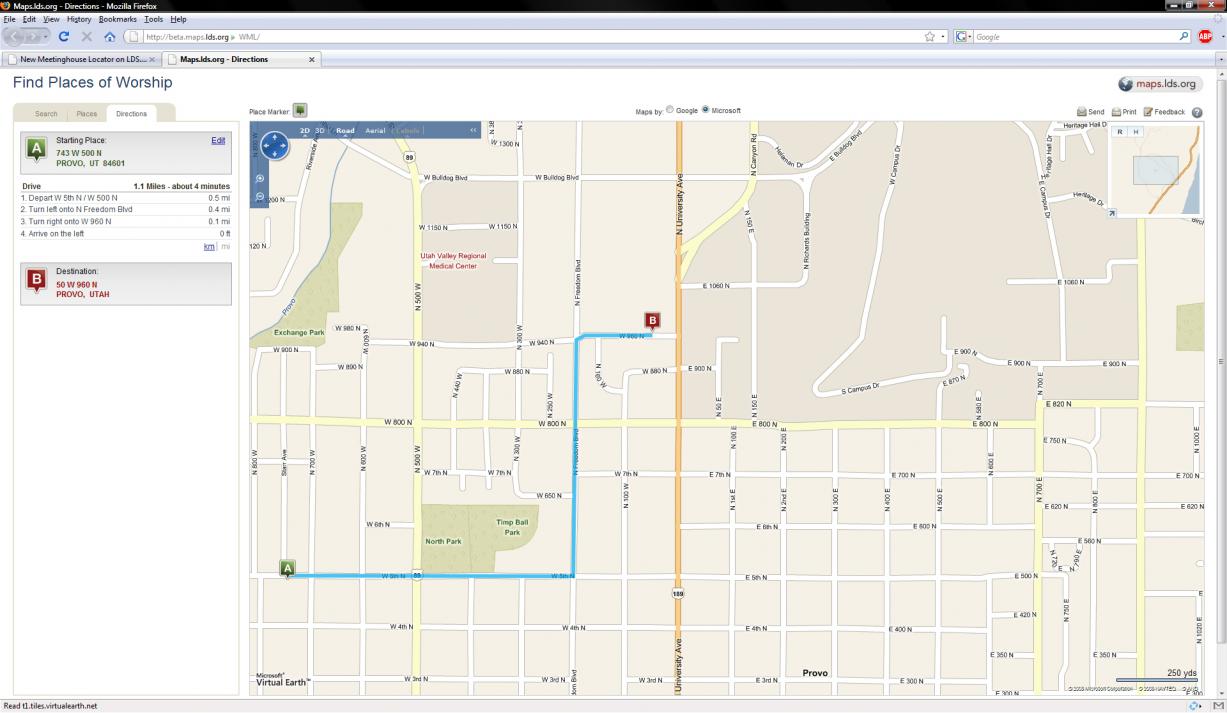
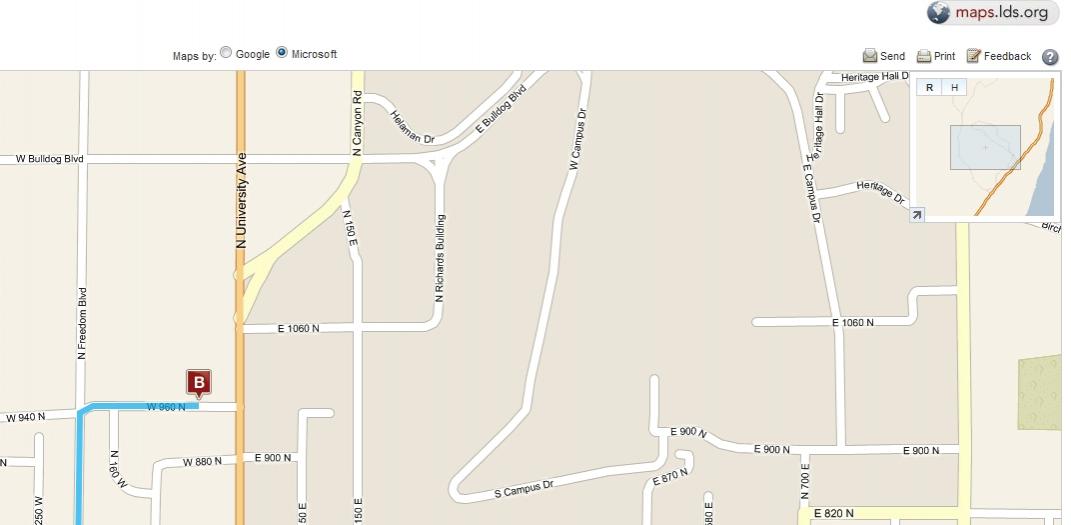
2. I've attached a screenshot of the app. I did a search in Provo and the mini-map in the top corner showed a road by some body of water which doesn't sync.

3. A potential addition - A layer of ward/stake boundaries to more easily find and support units. Especially on my mission in rural areas, no one knew where exactly units technically ended and it caused confusion and some minor contention over who had stewardship over specific individuals and neighborhoods. Sure I could click each street to manually/mentally find the boundaries, but a visible layer of shapes would be so much quicker. :rolleyes:
📎 maps_example.jpg (96.97 KiB)
#8

Mini-map and boundaries

Four comments for now:

1. Thank you for a great application, already a vast improvement over the current locator and a great start to map-based tools for the Church I'm sure. :)

2. I've attached a screenshot of the app. I did a search in Provo and the mini-map in the top corner showed a road by some body of water which doesn't sync.

3. A potential addition - A layer of ward/stake boundaries to more easily find and support units. Especially on my mission in rural areas, no one knew where exactly units technically ended and it caused confusion and some minor contention over who had stewardship over specific individuals and neighborhoods. Sure I could click each street to manually/mentally find the boundaries, but a visible layer of shapes would be so much quicker. :rolleyes:

4. Three other "unit" types to potentially add long-term: missions, temple districts, institutes/seminaries
📎 maps_example.jpg (43.89 KiB)
Community Administrator
#9
kgthunder wrote:I've attached a screenshot of the app. I did a search in Provo and the mini-map in the top corner showed a road by some body of water which doesn't sync.
It looks like you've requested directions. What did you enter for the starting address? I went to the same spot on Live Search Maps, but couldn't reproduce the problem.
Have you searched the Help Center? Try doing a Google search and adding "site:churchofjesuschrist.org/help" to the search criteria.

So we can better help you, please edit your Profile to include your general location.
New Member
#10

Rural routes

This is a big improvement over the current meetinghouse locator, the membership will enjoy it. It did have issues with rural route / box addresses. Then again I am assuming they are using a standard geocoder to find addresses. Most rural routes will never geocode using standard fair street data.

To help those that do have rural routes and or places where they do not have a street files, and/or the geocoder source data is not robust they should include a layer to view the boundaries of the units. I searched for a few rural routes in our unit and none of them even came close to being properly geocoded. I also tried some less developed countries and the application would tell me to please wait while it searched but never continue.

If they set up multiple geocoders the application could try each in turn until it had a match, for those areas that it could not find a good match it could return the boundaries of the units/stakes based on city, state equivalent, or even country.
#11
RussellHltn wrote:It looks like you've requested directions. What did you enter for the starting address? I went to the same spot on Live Search Maps, but couldn't reproduce the problem.
Well, I can't reproduce it myself. When I first brought up the app and searched for my location, that is what I got. :p
New Member
#12
great to see this finally come to pass! i remember the prototype i did a while back (http://tech.lds.org/forum/showpost.php? ... ostcount=8) which added boundary information -- any chance that is planned? i.e., select a ward once you see the meeting house and it highlights the geography served?
New Member
#13

Boundaries

There are apparently some security concerns about posting ward and stake boundaries, at least until we can authenticate users on the site. (Think like a burglar out on a Sunday drive in Utah and you'll get the idea.) So for now, there won't be ward boundaries on any public mapping sites.
Senior Member
#14
borenmt wrote:There are apparently some security concerns about posting ward and stake boundaries, at least until we can authenticate users on the site. (Think like a burglar out on a Sunday drive in Utah and you'll get the idea.) So for now, there won't be ward boundaries on any public mapping sites.
At the present, your best option is for LUWS to house the ward boundry info, since it is authenitcating users.
New Member
#15

Elsewhere

Senior Member
#16
borenmt wrote:More discussion going on at http://www.ldsmediatalk.com/2008/06/19/ ... /#comments
And if you follow one of the comment links over to Joel Dehlin's blog comments, you will see that Joel hinted at ward boundry lines "coming soon".
Community Administrator
#17
mkmurray wrote:And if you follow one of the comment links over to Joel Dehlin's blog comments, you will see that Joel hinted at ward boundry lines "coming soon".
True, but Joel posted that on June 22, and yet the following post from borenmt came later (on June 23).
borenmt wrote:There are apparently some security concerns about posting ward and stake boundaries, at least until we can authenticate users on the site. (Think like a burglar out on a Sunday drive in Utah and you'll get the idea.) So for now, there won't be ward boundaries on any public mapping sites.
So I wouldn't get my hopes up.

However, although I can really stretch and try to imagine the security concerns, I think that the concern is misplaced. The vast majority of burglars aren't aware of this mapping capability or smart enough to use it. For those who are aware and smart enough, the absence of boundary lines won't make one bit of difference. There is already enough information on the site to identify what streets (and even which precise houses, if they're patient enough) are in each ward. So because of a security concern which would have no more effect than locking every other door in a meetinghouse, we deny a significant benefit to all the members who can use it in helpful ways to help move the work forward. I don't get it.
Questions that can benefit the larger community should be asked in a public forum, not a private message.
Senior Member
#18
Alan_Brown wrote:True, but Joel posted that on June 22, and yet the following post from borenmt came later (on June 23).
I'm actually refuting borenmt's post with Joel's post because I believe borenmt is not in a position to say for sure the comment he made. I think he was just making an assumption based on evidence he gathered. I'm simply trying to show evidence to the contrary (especially from someone who is definitely in a position to say).

EDIT: No offense intended to borenmt; I just now saw that he is an Interaction Designer for the Church, so perhaps there is some knowledge he has that we don't (or doubtfully, that maybe even Joel doesn't have). However, from my understanding of the roles of Interaction Designers from the Tech Talks here in Utah a year and a half ago, I still hold that perhaps Joel might have the more sure knowledge. It appeared that the Interaction Designers were kind of the UI contractors for the various IT departments around the Church, chiefly responsible for UI design, layout, and interaction (mostly web too); I also got the impression that they were not involved in back-end implementations nor policy decisions.

Just trying to justify my assertion, but perhaps I am digging myself deeper...? :(
Senior Member
#19
I see no conflict between borent's comments and those of Joel Dehlin. The former said there were perceived problems with publishing boundaries "at least until we can authenticate users on the site." Joel essentially confirmed that boundaries are "coming soon."

My reading of these comments together is that I hope and expect boundaries will be published in LUWS, where users are authenticated.

FWIW, I also agree with Alan_Brown -- I think the burglar scenario is a red herring. There is no real security in obscurity, only the illusion of such. Besides, to mix my metaphors even further, that horse has already left the barn. A Wasatch Front burglar casing a given street or house can already punch in the address to the new Meetinghouse Locator app, and learn directly about meeting schedules.

I suggest that people just lock their doors when they go to church.. :)
Senior Member
#20
boomerbubba wrote:I see no conflict between borent's comments and those of Joel Dehlin. The former said there were perceived problems with publishing boundaries "at least until we can authenticate users on the site." Joel essentially confirmed that boundaries are "coming soon."

My reading of these comments together is that I hope and expect boundaries will be published in LUWS, where users are authenticated.
Good point.
Member
#21
boomerbubba wrote:
FWIW, I also agree with Alan_Brown -- I think the burglar scenario is a red herring. There is no real security in obscurity, only the illusion of such. Besides, to mix my metaphors even further, that horse has already left the barn. A Wasatch Front burglar casing a given street or house can already punch in the address to the new Meetinghouse Locator app, and learn directly about meeting schedules.

I suggest that people just lock their doors when they go to church.. :)
Seems like a silly concern, when simply driving a neighborhood (casing, as buglers do) would tell you more information than the boundaries and meeting times. I can tell you who is going to church / who is not just by standing on my porch on Sunday morning, regardless of religious affiliation.

We seem to have more trouble here with people going through the parking lot during meetings than breaking into houses. It isn't that hard to figure out when the meetings are going on from the cars parked out back.

As you move out of heavily LDS areas, the concern becomes even less, as it gets harder to correlate membership and address.

I agree that 'security concerns' is a non-issue for me.
Member
#22

Misdirection

boomerbubba wrote: ... burglar casing a given street or house can already punch in the address to the new Meetinghouse Locator app, and learn directly about meeting schedules.
Ahhh, now I understand why those wily ward clerks don't keep the meeting times in MLS (and thereafter in LUWS) up to date! It is to confuse the "enemy" so they won't know when we are actually in our meetings. :D
JLR
Community Moderators
#23
JLRose wrote:Ahhh, now I understand why those wily ward clerks don't keep the meeting times in MLS (and thereafter in LUWS) up to date! It is to confuse the "enemy" so they won't know when we are actually in our meetings. :D
Yeah. We have to work really hard at it and plan ahead, since we only get one crack or two each year to pull it off. [grin]
New Member
#24
Hey mk -- refute away ;-) I liked boomerbubba's characterization of the situation. Nuff said.
#25

Searching for meetingplaces in other countries-

I just put in a search for the following locations and was impressed to find that in general they all got about the same result:

Moscow, Russia
Moskva, Russia
Москва, Россия

I was concerned that putting in the name of a city or country in the native language (or accepted transliteration thereof) would not result in the correct results. Obviously, this tool is intended to cover the worldwide church and this issue should be addressed.

When I try to enter the country Suomi (which is the Finnish name for Finland) I get one location in Finland, so it looks like it got the right country using the native name. YAY! Hopefully this is a policy and not an happy accident.

I try some other countries and it looks like I get the closest unit to the geographic center of the country entered. It might be nice if there was the possibility to get a list of the next-smaller geographic entity or a breakdown of Missions if the country only is entered as long as there is a number of units greater than a certain threshold within that search parameter. If there are only a few units in the whole country, it doesn't make a lot of sense to not display them all, but if there are more than, say, 6 or 10, perhaps I could get a region breakdown by mission or something that the church has a little more control over. Generally, the Mission names are good indicators of geographical coverage.

Perhaps the geographic center of the county is just fine too. It certainly has the advantage of being programmatically simple , but it leaves a lot to be desired if the country is small and the vast majority of visitors will be aiming for the population center or just want to know where the church is established in their country.
Community Administrator
#26
I recently used the beta tool too visit while I was traveling. I ran into a couple of issues. I don't have time right now to write up the full experience, but I'll outline the problems:

1) The closest buildings seems to be done by "crow flies" distance, not driving distance or driving time. Unfortunately the 3 "closest" buildings may not be the quickest ones to get to due to minor details like mountains, rivers, etc.

2) The directions is using GPS coordinates - this can result in the directions sending me to the wrong street. I realized the problem when I was being directed to a street that was different then the address. That's assuming the GPS coordinates are correct to begin with. Unfortunately most of the buildings in my stake are incorrect resulting in totally bogus directions. As such this tool can't be rolled out in it's present form until the building coordinates are corrected.
Have you searched the Help Center? Try doing a Google search and adding "site:churchofjesuschrist.org/help" to the search criteria.

So we can better help you, please edit your Profile to include your general location.
New Member
#27

Thanks for the feedback!

@dobrichelovek : For now, this is for the most part an English release, though as you've discovered, there is some language support for queries. It is intended as a replacement of the existing meetinghouse locator, which has map coverage only in the US and Canada (though you can get lists of meetinghouses without a map internationally) and no language support at all. So while we know we have a ways to go, international support is much better in this release than it has been previously. Thanks for your patience as we strengthen our weakness!

Thanks also for your feedback on the "geographic center" issue we'll take it into consideration.

@RussellHltn : You're right about the crows fly issue. It boils down to both performance and cost. Doing what is essentially a "drivetime zone" is expensive and time-consuming (both to develop and calculate). But are trying to figure out some ways to improve that.

Concerning the meetinghouse locations, we rely on latitude and longitude because matching to street address will result in too many "not found" situations, especially internationally. Even in the US, a match rate of 80% or so is common, leaving 20% not found. For those that are found, the algorithms for placing an address at the correct point along a stretch of road is always approximate, and can result in errors of many feet or even miles in rural areas. Algorithms can also not reliably place the meetinghouse on the right side of the street, not yet anyway. So... we rely on local employees, clerks, and members to help us gather accurate lat/long coordinates. You're right that many need to be improved; please let us know via the feedback link when you find a meetinghouse out of place or missing. You can even click on the right spot with the Place Marker tool to send us the corrected coordinates. So far during the beta period, many, many people have submitted corrections which should soon be incorporated into the database, once they are verified. I hope you submitted the problems you found yourself through the Feedback mechanism.

Thanks again everybody for your comments!
Community Administrator
#28
borenmt wrote:So... we rely on local employees, clerks, and members to help us gather accurate lat/long coordinates.
Do you have any details on how this was done? Was it the FM group?

But there's still an issue with GPS coordinates - if the spot measured happens to be closer to another street, then the directions are going to route the user to that street - even if there's no driveway there. In the case of the chapel on 1515 SW Cherry Park Rd, TROUTDALE, OREGON; the GPS coordinates may be "correct" in that it's on church property, but just too far back from the main entrance and it's created erroneous directions.
Have you searched the Help Center? Try doing a Google search and adding "site:churchofjesuschrist.org/help" to the search criteria.

So we can better help you, please edit your Profile to include your general location.
New Member
#29
Russell, I don't have a lot lot of specifics on how locations are initially entered, but the FM groups certainly play a role in keeping things accurate. Many FM employees have submitted feedback during the beta period to improve locations in their area. But we hope that everybody who uses the site will help as well.

Can you give some specific cases of the problem you are seeing with the building sitting far off the road and the streets for directions being consequently off? I think I know what you mean but I want to be sure.
New Member
#30

I like the new beta map but...

The old set up and the new beta maps do not have the capability to search for entire areas. For example looking at all of the meetinghouses in Washington or in a specific county or country. Or to have the funtion with a search by mile radius.

This is only to be able to see the number of meeting houses in any given area and to see where the church is strong. I mainly like to see how big the church has been growing.

This results in big search results any might make things messy but i'm sure you can figure out a way to keep it clean. Thanks
Senior Member
#31
borenmt wrote:Concerning the meetinghouse locations, we rely on latitude and longitude because matching to street address will result in too many "not found" situations, especially internationally. Even in the US, a match rate of 80% or so is common, leaving 20% not found. For those that are found, the algorithms for placing an address at the correct point along a stretch of road is always approximate, and can result in errors of many feet or even miles in rural areas. Algorithms can also not reliably place the meetinghouse on the right side of the street, not yet anyway. So... we rely on local employees, clerks, and members to help us gather accurate lat/long coordinates.!

I am a little surprised at the 80% match rate for meetinghouses. Are the 20% problems concentrated in rural locations? For cities and suburbs, I would expect the rate to be much higher, approaching 100%, especially since the church presumably has clean street-address data for its meetinghouses. (Perhaps the geocoder is tuned to be too reliant on postal address validation, and meetinghouses typically do no receive mail service, even though their street addresses are perfectly valid on the local street map?)

If there are this many problems mapping a few thousand meetinghouses with good addresses, imagine the problems developers will face trying to map a few million members with the relatively dirty street-address data harvested from MLS.

As for the solution of using clerks to send in corrected coordinates, I think that is generally doable. But this beta site does not come close to mobilizing the army of clerks. Only a tiny fraction are even aware of it. I think you need to broadcast a message through the MLS system, explicitly tasking the clerks to validate their locations and giving precise instructions on how to capture correct coordinates if need be and communicate them back to you.
Community Moderators
#32
RussellHltn wrote:Do you have any details on how this was done? Was it the FM group?

But there's still an issue with GPS coordinates - if the spot measured happens to be closer to another street, then the directions are going to route the user to that street - even if there's no driveway there. In the case of the chapel on 1515 SW Cherry Park Rd, TROUTDALE, OREGON; the GPS coordinates may be "correct" in that it's on church property, but just too far back from the main entrance and it's created erroneous directions.
Russel brings up a valid point. Perhaps custom geocoders should be encouraged to favor pinpointing the main driveway leading to the building, rather than targeting the center of the roof. I remember one case that I used strictly lat/lon to find a remote location (Amateur Radio Field Day site). Having them target the entrance of the dirt road leading off the main highway was far more helpful than if they had geocoded the actual site itself.
So we can better help you, please edit your Profile to include your general location.
New Member
#33
As long as new streets are being paved and new homes (and chapels) are being built, address matching will be incomplete. My neighborhood didn't show up on maps until a year ago. So although matching is tougher in rural areas where data may be incomplete, it's also a problem in suburban areas where there is growth.

On another topic referenced above, I think I remember fuzzily someone telling me that the goal was to put the marker on the steeple or part of the chapel nearest the road... but I could be wrong. If the biggest data problem we have is that we are on the lot, but not on the right part of the building, I will be very happy :-)
Senior Member
#34

Zip Codes

I have noticed that if you leave off an address and just enter a City, State and Zip Code you can get strange results. Zip Code pin points are not consistant with what you get with just a City and State without a Zip Code. Try Fillmore Utah then Fillmore Utah 84631 and see the difference. You get a pin point in the middle of the desert when the zip code is included.
Gary Turner
If you haven't already, please take a moment to review our new
Code of Conduct
Senior Member
#35
Mikerowaved wrote:Perhaps custom geocoders should be encouraged to favor pinpointing the main driveway leading to the building, rather than targeting the center of the roof.

That should be configurable in the geocoder, by the application implementer at runtime.

I don't know of any geocoders that actually target rooftops,despite the misleading moniker of "rooftop-level" geopcoding. This usually is based on parcels from county tax records, linked back to street addresses. The geocoder then reports a centroid for the parcel. For small single-family lots, this is likely on the house. For sprawling apartment complexes or five-acre spreads, it is somewhere else.

And the coverage of parcel-based geocoding is quite incomplete, even in the United States.

Having recently experimented with commercial parcel-level geocoding for our ward -- which produced only a handful of parcel-based coordinates for apartments mixed in with the more typical coordinates interpolated from street-address ranges -- I concluded that it was more confusing than not. It is easier to explain dots on a map that are uniformly offset a few feet back from the road.
Community Administrator
#36
If I'm not mistaken, the geocoders in use simply plot things based on the idea that "if 1500 is at that intersection and 2000 is there, then 1750 must be half way in-between on the even side of the street."

I suppose there might be a database that will take an address and do look up on that parcel, but it would be a big honkin database. (But then computers have become so big and fast, I could be wrong.)

I'll have to look at Troutdale more closely, but the coordinate might be for the FM Group's shed - great to tell the new guy where to find the tools, but not so good when "directions" point you to a driveway that doesn't exist.
Have you searched the Help Center? Try doing a Google search and adding "site:churchofjesuschrist.org/help" to the search criteria.

So we can better help you, please edit your Profile to include your general location.
Senior Member
#37
RussellHltn wrote:If I'm not mistaken, the geocoders in use simply plot things based on the idea that "if 1500 is at that intersection and 2000 is there, then 1750 must be half way in-between on the even side of the street."

I suppose there might be a database that will take an address and do look up on that parcel, but it would be a big honkin database. (But then computers have become so big and fast, I could be wrong.).

The interpolation method you are describing is the way most geocoding processes work. However, there are leading-edge geocoders that also incorporate parcel-level databases, which have far from complete coverage but are being expanded.

The geocoders used in the church's application may be the former, or the addresses you are testing may have no parcel-level coverage. (I do note that the address of my father's house in El Paso TX, which most interpolated geocoding sytems miss by a noticeable distance, is mapped precisely in the beta app. But my own address in Austin is obviously interpolated.)

In any event, if the capability exists here, that would be an internal property of the Google Maps and Microsoft Virtual Earth systems employed by the church, which possibly are also controlled by the API calls made by this application.
Senior Member
#38
I just looked at Russell's example in Troutdale OR. The only problem is with the street directions. If the icon were mapped closer to the curb of the street -- the street with the main address -- this problem would not occur.

Obviously, when generating the directions, the back-end has to jump from the lat/lon coordinates to a street, and compute directions from there.

I don't know how those coordinates got into the database, but if they were produced by parcel-level geocoding, which then stored a parcel centroid, that could explain how this happened.

This is similar to the problems I experienced when experimenting with parcel-level geocoding of my own ward's addresses. It can produce more confusion than useful information, as Mikerowaved commented above. I think the ideal use of parcel-level geocoding is if it can be confugured to resolve addresses precisely along the main street -- a significant improvement over interpolated addresses. But I think all addresses are best plotted at a modest, uniform setback from the street.

I don't know if this is possible using the APIs to the two services (Google Maps and MS Virtual Earth) employed in the church's app.
Community Moderators
#39
borenmt wrote:...
So... we rely on local employees, clerks, and members to help us gather accurate lat/long coordinates. You're right that many need to be improved; please let us know via the feedback link when you find a meetinghouse out of place or missing. You can even click on the right spot with the Place Marker tool to send us the corrected coordinates. So far during the beta period, many, many people have submitted corrections which should soon be incorporated into the database, once they are verified. I hope you submitted the problems you found yourself through the Feedback mechanism.

Thanks again everybody for your comments!
Are you also looking at reports of incorrect meetinghouse location (or directions) on the old meetinghouse locator? I think it was at least two years ago, perhaps three years ago, that I reported that the location of the Newberg, Oregon meetinghouse was incorrect. I was disappointed to see the same location error in the beta. I did report it again.
RussellHltn wrote:...
I'll have to look at Troutdale more closely, but the coordinate might be for the FM Group's shed - great to tell the new guy where to find the tools, but not so good when "directions" point you to a driveway that doesn't exist.
You might be on to something there. The (incorrect) location for the Newberg, Oregon meetinghouse is pretty close to where the storage shed is sitting on the far back corner of the lot.
Community Administrator
#40
Checking the aril photo for Troutdale, the location is a corner of the building - it's what I'd expect if someone used a hand-held GPS since they usually don't work too well inside. ;) However the corner marked is a back corner away from the street.
Have you searched the Help Center? Try doing a Google search and adding "site:churchofjesuschrist.org/help" to the search criteria.

So we can better help you, please edit your Profile to include your general location.
Member
#41
1) Using the Microsoft map, a city and standard 2 letter state abbreviation yields---a very long search that doesn't seem to find anything. (I gave up!) I searched on cities that should have meetinghouses, such as Indianapolis, IN. Google finds the city and state.
2) The Google map showed the US with a pin on the appropriate part of the country. Clicking on the + to zoom to a local view on the Google map focused on Nigeria instead of the US city found in the search. There is no center on the pin feature that I use all the time on normal Google maps.
3) Why isn't there an option for street view? That would be particularly helpful in rural and/or wooded areas.
4) While this version of Google places the chapel on a different, but nearby, street, the same address on googlemaps.com precisely and accurately places the chapel.
Member
#42
borenmt wrote:So far during the beta period, many, many people have submitted corrections which should soon be incorporated into the database, once they are verified.
@borenmt: How long do you anticipate it will take to review and verifiy the submitted corrections? I sumbitted corrections (June 23) for all the buildings in the stake where I live and so far none have been changed.
New Member
#43
scion wrote:1) Using the Microsoft map, a city and standard 2 letter state abbreviation yields---a very long search that doesn't seem to find anything. (I gave up!) I searched on cities that should have meetinghouses, such as Indianapolis, IN. Google finds the city and state.
2) The Google map showed the US with a pin on the appropriate part of the country. Clicking on the + to zoom to a local view on the Google map focused on Nigeria instead of the US city found in the search. There is no center on the pin feature that I use all the time on normal Google maps.
3) Why isn't there an option for street view? That would be particularly helpful in rural and/or wooded areas.
4) While this version of Google places the chapel on a different, but nearby, street, the same address on googlemaps.com precisely and accurately places the chapel.
@Scion and others -- the chapel locations are marked not according to address, but according to whatever lat/long has been recorded for that location. It's true that many of those lat/longs might have been derived by a geocoder at some point, but we can place the pin for a meetinghouse anyplace we want. So when you find one that is suboptimal, please submit feedback and they will check it out. I can't speak to the feedback process on the old meetinghouse locator because I wasn't involved. But I do know they really are checking the feedback for the new locator and are making changes based on it. Timing of changes appearing in production will depend on a number of factors, including the volume of feedback, which right now is pretty high because of the novelty.
New Member
#44
@Scion -- just tried city=Indianapolis and state=IN on both Google and MS maps and could not reproduce the problems you described. Is it fixed for you too?
Member
#45
borenmt wrote:@Scion -- just tried city=Indianapolis and state=IN on both Google and MS maps and could not reproduce the problems you described. Is it fixed for you too?
No. After more than 5 minutes of searching it MS maps is still going. 10 minutes later, and no Indianapolis.
New Member
#46
Scion, I just tried again, this time from home outside the Church network. Still can't reproduce. I get results in less than 10 seconds... for indianapolis, IN. It has been a week since your last post though -- maybe something has settled out. Let me know if you continue to see this, and give any addtl info you can -- browser, type of connection, OS, etc. -- so we can try to reproduce and fix it. Thanks for your feedback.
Member
#47
No, it is still a problem. With Microsoft it just searches & searches--I can leave it running & walk away for several hours without results.

My computer is just a year old. It is well used in a household full of teenagers, but has plenty of memory for digital images. Only LDS church websites give it problems. I typically use Netscape 7.2, but sometimes Firefox 2.0.0.9. It works fine on Firefox, but not Netscape. The Google option works on both programs in a reasonable length of time.
Community Moderators
#48
scion wrote:Only LDS church websites give it problems. I typically use Netscape 7.2, but sometimes Firefox 2.0.0.9. It works fine on Firefox, but not Netscape.
When the beta of the current lds.org site came out, I was using NS 7.2 and had trouble accessing the site. I went (with another browser) to the support pages and learned that the Church did not intend to support NS any longer. I have not seen anything to the contrary since.

A few sites still work for many functions. The LUWS, for example, will do most Admin updates, but not all. I use NS at work and usually wait to access Church sites until I get home and use Firefox (At home I am up to version 2.0.0.16).

I had enjoyed NS so much that it was very painful for me to switch to Firefox. I do understand the Church's position with such a small percentage of folks using NS anymore, but I had thought up until that time that there were actually standards and protocols that browsers were supposed to be following, and that those browsers that followed the standard should work for any site.

I learned about that time that standards in the browsing world did not seem to matter.
Member
#49
Firefox is similar enough to Netscape, but for some reason mine won't remember passwords. It keeps on referring me to ask admin something-or-other. I don't recall seeing anything about the church websites not bothering to be compatible with Netscape. It would be nice if they came out and TOLD us. It is odd that it's only the CHURCH websites that don't work for me. Banking, libraries, research, news, music, videos, shopping, and tons of non-profit websites all work just fine.
Community Moderators
#50
The fancier the website, the greater the risk of something not working. [grin]
#51

Beta linked to from live site?

So, as I understand it, the beta of the new meetinghouse/meeting website is still in beta, right? Has anyone noticed, or are you aware that although the link from lds.org still points to the previous version, the link from mormon.org that is titled "Worship With Us" points to this new beta website? I don't have a problem with it, but I wanted to make sure that this was an intended result and not just an accident. I am guessing it's probably the latter.

I have shared the new beta site with some friends in Russia, so I anticipate that some corrections will be coming through for the building locations there, since I couldn't find one that was fully accurate.

I am curious. Has a request gone out to the Missions to verify international meetinghouse locations? I know that one of the Missions in Chile has been doing some map work and was fully aware of the beta. That would probably get a lot of the meetinghouses accurate quickly if they are all attuned to such a need.:rolleyes:
New Member
#52

No accident...

It's not an accident that Mormon.org points to the beta and lds.org points to the older system. There are still a few approvals pending for the links from lds.org, which has entry points not only under "Meetinghouse Locator" but also from stake and ward websites. Also, it has made sense to keep the old system running in production on lds.org while the beta was going on from mormon.org, as a backup measure in case something went awry.

Regarding asking missions to help verify meetinghouse locations, there has not been an explicit request, but we have gotten a good deal of feedback from members and missionaries worldwide, and are acting on the feedback.

Regarding Netscape, I'll just quote from the official Netscape blog by AOL at http://blog.netscape.com/ :
"As announced previously, as of March 1st, all official support for Netscape browsers has ceased, including all security updates. Early next week, users of Netscape Browser 8 will be presented with an update that will allow them to migrate directly to the current version of Flock. Since Netscape Browser 8 no longer receives security updates, the Netscape team at AOL strongly recommends that those still using Netscape upgrade to a safe browser alternative. Flock is just such an alternative, based on a strong Firefox core with many additional features that allow you to manage your webmail and social networks. Plus, the core team that originally built Netscape Browser 8 is largely still intact, and is the same team that builds Flock."

Regarding standards, they actually do matter, and standards-compliant browsers tend to be far less buggy than non-compliant browsers. That's why IE7, Safari, and Firefox all render pages so much more consistently than IE6 and earlier IE incarnations. I honestly can't speak to how standard compliant Netscape is; it's been a while since it has been on the radar. But no browser (unfortunately) is 100% standards compliant yet, which results in some inconsistencies between browsers or even incompatibility. Please do submit these issues via the feedback mechanisms on Church sites, and we'll see if something can be done.

Thanks for all the feedback everybody.
Community Moderators
#53

How often is meetinghouse location punted?

In the new http://maps.lds.org (now featured with a paragraph and link at http://lds.org), the location of meetinghouse in Newberg, Oregon, USA appears to have been punted. The location shown is near the center of the old part of the city, about a full mile away from the correct location. The old meetinghouse locator had the location wrong by maybe a hundred yards or so, but the new one is off by much more. I submitted feedback about the new location.

Are there a significant number of other meetinghouses where the location isn't even close, where the site appears to show the default location for the approximate center of the city?
Member
#54
The problem in the post before this isn't the only problem. Here in our stake we have six wards with four meetinghouses and one rented house that serve as meetinghouse for a ward. The New Meetinghouse Locator show only tree meetinghouses, with incorrect address, telephones and other informations. The meetinghouses address are so distant from their true location on the online maps, in the Google map and in the Microsoft ma too.
A good sugestion is to merge the latitude and longitude informations of meetinghouses with the "Church Property Number" that we can see at CDOL, to help best the results and the correct of the meetinghouses address.
New Member
#55
@MorettiDP -- make sure to submit this feedback on the website via the Feedback link. Since there are multiple kinds of problems (wrong location, missing location, some meeting time issues), you might get the best response if you submitted a separate issue for each problem. That way different teams can be working on each issue simultaneously and don't have to remember to forward it on to someone else when they do their bit. If you submit everything as one issue, some fixes might be delayed, or could fall through the cracks. Thanks for the feedback!

@rmrichesjr -- I'm not sure we have defaulted to the center of town, but if you have submitted feedback, that's the best way to get it resolved. Thank you!
Member
#56

My experience

When the beta of maps.lds.org was first released in June all the pins for the meetinghouses in the stake where I live, were sited near the centre of town and not on the meetinghouses themselves. So I clicked on the actual locations of the buildings and submitted feedback and eventually they have all been corrected. A simple an effective process. I'm more than pleased with this improved locator tool and look forward to the future developments that have been hinted at.
Member
#57
borenmt wrote:@MorettiDP -- make sure to submit this feedback on the website via the Feedback link. Since there are multiple kinds of problems (wrong location, missing location, some meeting time issues), you might get the best response if you submitted a separate issue for each problem. That way different teams can be working on each issue simultaneously and don't have to remember to forward it on to someone else when they do their bit. If you submit everything as one issue, some fixes might be delayed, or could fall through the cracks. Thanks for the feedback!

I sent ward to ward problems to feedback when the site are on beta level. Need I send again these problems???

Thanks borenmt!!! (sorry for my bad English)
New Member
#58
@MorettiDP -- Your English is much better than my Portuguese! If it has been over a month since you submitted your feedback and the locations are still wrong, it is possible that some other issue interfered with the team's ability to implement the changes during beta. I would submit them again if they are still wrong. Thanks for your patience while we irons these things out!

If your changes deal with ward meeting times or other unit information besides location, those changes must be made by a local bishop or clerk in MLS, which is where we are drawing the information from.
Community Administrator
#59
I've heard there is a problem locating wards that meet in a Institute of Religion. Anyone know if that's been fixed yet? If it has, then I need to re-submit a prior fix.
Have you searched the Help Center? Try doing a Google search and adding "site:churchofjesuschrist.org/help" to the search criteria.

So we can better help you, please edit your Profile to include your general location.
Member
#60
borenmt wrote:@MorettiDP -- Your English is much better than my Portuguese! If it has been over a month since you submitted your feedback and the locations are still wrong, it is possible that some other issue interfered with the team's ability to implement the changes during beta. I would submit them again if they are still wrong. Thanks for your patience while we irons these things out!

If your changes deal with ward meeting times or other unit information besides location, those changes must be made by a local bishop or clerk in MLS, which is where we are drawing the information from.

OK, I go try again!!!
Thanks!
New Member
#61

Institutes as meetinghouses

@Russell -- I checked with "those who know" on the Institute-as-meetinghouse issue. We have been fixing these on an on-going basis as people let us know which institute (and in a few cases, seminary) buildings are also being used for Sunday services. It sometimes does take a week or two to get these updated in the right systems, but if it has been longer than that, I would re-submit the issues. Thanks!
Community Moderators
#62
rmrichesjr wrote:In the new http://maps.lds.org (now featured with a paragraph and link at http://lds.org), the location of meetinghouse in Newberg, Oregon, USA appears to have been punted. The location shown is near the center of the old part of the city, about a full mile away from the correct location. The old meetinghouse locator had the location wrong by maybe a hundred yards or so, but the new one is off by much more. I submitted feedback about the new location.

Are there a significant number of other meetinghouses where the location isn't even close, where the site appears to show the default location for the approximate center of the city?
Oops. My error. I had misunderstood the meaning of the hieroglyphics. I had thought the TV screen with the orange newscaster in front of a green background represented the sought-for meetinghouse. (I wonder how many other visitors might make the same mistake.) I really need to find my Egyptian-to-English dictionary... :-)
Community Moderators
#63
rmrichesjr wrote:I had thought the TV screen with the orange newscaster in front of a green background represented the sought-for meetinghouse. (I wonder how many other visitors might make the same mistake.)
Well, what does the TV screen with the orange newscaster in front of a green background represent? It took me a while to figure out that he did not count. It was the numbers that showed where the meetinghouses were located.
Senior Member
#64
lajackson wrote:Well, what does the TV screen with the orange newscaster in front of a green background represent? It took me a while to figure out that he did not count. It was the numbers that showed where the meetinghouses were located.
It's the actual address or location you searched for. The numbers are the nearest meetinghouses to that location. So if you just enter a city, the green and orange icon will be at the center of the city.
Community Moderators
#65
eblood66 wrote:It's the actual address or location you searched for.
Ok. I see that now. Makes sense.
Member
#66

Enhancement suggestion

I have been using the new maps.lds.org, and it has been great! I have been traveling lately and thought that it would be nice to include the temples on the maps so that members (and non-members) can also see where the temple is located relative to their location and see if there is a visitor's center or not, and add the information found on the site about temples @ lds.org.
Community Administrator
#67
opee wrote:I have been traveling lately and thought that it would be nice to include the temples on the maps so that members (and non-members) can also see where the temple is located relative to their location
Let's not stop there - how about any church site with a visitor's center? :)
Have you searched the Help Center? Try doing a Google search and adding "site:churchofjesuschrist.org/help" to the search criteria.

So we can better help you, please edit your Profile to include your general location.
New Member
#68
Opee and Russell--thanks for the ideas...
Member
#69

Other possibilities

What about including a "layering" of additional locations such as Church Area Offices? Mission offices? SLC Headquarters? Just another thought...
New Member
#70

Bishop's Phone Number

Does anyone know the source for the bishop's primary and alternative phone numbers in the meetinghouse locator?

As a new bishop I've found that my wife and children are starting to pick up crank calls with inappropriate language on our home phone. I'm not sure if the map is where my phone number is being found, but I'd like to replace my home phone with another number.

I've got to admit that when I learned that my home phone was openly published on the Internet that I wasn't all that pleased.
Community Administrator
#71
I'm not sure about elsewhere, but in my area the Bishop's phone numbers are published in the white pages along with the ward's phone number.

To answer your question, my suggestion would be to call clerk support and see what can be done. If I had to guess, it may come from some stake paperwork.
Have you searched the Help Center? Try doing a Google search and adding "site:churchofjesuschrist.org/help" to the search criteria.

So we can better help you, please edit your Profile to include your general location.
Community Moderators
#72
userid333 wrote:Does anyone know the source for the bishop's primary and alternative phone numbers in the meetinghouse locator?

As a new bishop I've found that my wife and children are starting to pick up crank calls with inappropriate language on our home phone. I'm not sure if the map is where my phone number is being found, but I'd like to replace my home phone with another number.

I've got to admit that when I learned that my home phone was openly published on the Internet that I wasn't all that pleased.
After doing some quick checking it appears that the primary phone number provided in the meetinghouse locator is the telephone number entered into the ward web site as the office phone. This number can be changed by the ward web site administrator. Most units put the bishop's office telephone number there. The alternate phone number appears to be the ward bishop's home phone number. If that is correct then it is most likely the telephone number entered in MLS for the bishop's household.

I agree - your home telephone number should not be published on the internet without your permission. By posting on the forum this will be brought to the attention of those at Church headquarters who can make the changes necessary to get your home telephone number removed from the meetinghouse locator. I cannot tell you how long it will take for them to correct the situation. But because it involves disclosure of privacy information it should get priority attention.
JD Lessley
Have you tried finding your answer on the ChurchofJesusChrist.org Help Center or Tech Wiki?
Community Administrator
#73
jdlessley wrote:After doing some quick checking it appears that the primary phone number provided in the meetinghouse locator is the telephone number entered into the ward web site as the office phone. This number can be changed by the ward web site administrator. Most units put the bishop's office telephone number there. The alternate phone number appears to be the ward bishop's home phone number. If that is correct then it is most likely the telephone number entered in MLS for the bishop's household.

These theories are plausible, but I don't think either one is correct.

The primary phone number is indeed the ward office number, but I don't think it comes from the local unit web site for one big reason: not all stakes participate in the LUWS program. Rather, in the Church Directory of Organizations and Leaders, there is a phone number associated with each unit. This number is available independent of LUWS participation, so I think it is much more likely the source.

The alternate number is the bishop's home number, but I am certain it does not come from MLS. The reason I can say this confidently is that we have a bishop who has one number in the CDOL, but another number in MLS. It is the number in the CDOL that appears in maps.lds.org. I suppose it's conceivable that there is another source, but it's not MLS. In any case, it's nice that it is independent of MLS so that the family's home number can be in MLS so that ward members can contact the family in the most straightforward way, but the bishop can specify a different number for CDOL and maps.lds.org.

So if my theories are correct, you would not be able to change either number through local efforts, but would have to work with CHQ to get the CDOL entries changed.
Questions that can benefit the larger community should be asked in a public forum, not a private message.
Community Moderators
#74
Alan_Brown wrote:...It is the number in the CDOL that appears in maps.lds.org. I suppose it's conceivable that there is another source, but it's not MLS.
...
So if my theories are correct, you would not be able to change either number through local efforts, but would have to work with CHQ to get the CDOL entries changed.
Are you saying that the bishop gave authorization to have his home phone number released to the general public without knowing it? Or is this an error on part of the Church?
JD Lessley
Have you tried finding your answer on the ChurchofJesusChrist.org Help Center or Tech Wiki?
Community Moderators
#75
I just called my bishop and told him that his home phone number was published by the Church on the meetinghouse locator and that it was available to the entire world. He was not happy. He also does not recall giving permission to have it published in that manner.
JD Lessley
Have you tried finding your answer on the ChurchofJesusChrist.org Help Center or Tech Wiki?
Community Administrator
#76
jdlessley wrote:Are you saying that the bishop gave authorization to have his home phone number released to the general public without knowing it? Or is this an error on part of the Church?

I never said anything on this topic. All I addressed was the source of the information displayed on maps.lds.org.

I have no knowledge of what permission any bishop gave or did not give, and I am certainly not going to jump to the conclusion that it is an error on the part of the Church. That would be a topic for concerned bishops to take up with appropriate authorities.
Questions that can benefit the larger community should be asked in a public forum, not a private message.
Community Moderators
#77
jdlessley wrote:Are you saying that the bishop gave authorization to have his home phone number released to the general public without knowing it? Or is this an error on part of the Church?
Alan_Brown wrote:I never said anything on this topic. All I addressed was the source of the information displayed on maps.lds.org.

I have no knowledge of what permission any bishop gave or did not give, and I am certainly not going to jump to the conclusion that it is an error on the part of the Church. That would be a topic for concerned bishops to take up with appropriate authorities.
These were merely questions. Nothing more.
JD Lessley
Have you tried finding your answer on the ChurchofJesusChrist.org Help Center or Tech Wiki?
Community Moderators
#78
The CDOL receives information from the stake. The stake provides the bishop's phone number (presumably obtained from the bishop) and sends it to CHQ to put in the CDOL.

If the CDOL is, in fact, the source of phone numbers for maps.lds.org, the Church has a problem that should be rectified very quickly.

That said, I do not know the source of the maps.lds.org phone numbers, but whatever the source is, it should be located quickly and bishops advised on how to get the number changed.

Isn't it sad that we live in a world where this is such a problem. But we do.
Community Moderators
#79
Ok, I just did a quick check. The primary phone number is the phone number of the bishop's office at the meetinghouse. I do not believe this number came from CDOL. I do not remember that the stake ever sends that number to CHQ.

I also know in our case that the number did not come from the LUWS, because the office number is not recorded there. I do not remember if it is in MLS or not, but I doubt it.

The alternate phone number is the bishop's home phone number. This number did not come from LUWS either, because LUWS does not include the area code of the bishop's phone number. For the same reason, this number did not come from MLS, because MLS does not include area codes, either.

My guess, and this is only a guess, is that both the primary number (bishop office at meetinghouse) and the alternate number (bishop phone with area code) came from CHQ, possibly the facilities records for the primary and the CDOL for the alternate.

I do not believe any bishop would have a problem with the office number (although it is never answered). But almost every bishop would be upset that his home phone, provided in private for use by other Church leaders, has been posted publicly at the maps site.

As I also said, this is not the world we used to live in. Things have changed. Someone has forgotten that.
Community Administrator
#80
lajackson wrote:Ok, I just did a quick check. The primary phone number is the phone number of the bishop's office at the meetinghouse. I do not believe this number came from CDOL. I do not remember that the stake ever sends that number to CHQ.

I made no statement about how the office number gets to the CDOL, but I absolutely guarantee that it is there. Anyone with CDOL access can verify that.

It may get into the CDOL from the FM Group; in fact that seems likely. It could be that there is some other central database of office numbers. I consider the CDOL to be most likely (why go to two different databases when one has both pieces of information), but it doesn't matter much.

In any case, I don't think anyone has a problem with the office number being on maps.lds.org. That number is generally listed in the local phone book, and for stakes with a local unit web site, it is very often listed there. That seems only helpful, and not a significant target for abuse.
Questions that can benefit the larger community should be asked in a public forum, not a private message.
Community Administrator
#81
I beliver that the address and office phone in LUWS comes from some FM group database.

Any other phone number has been added by the LUWS admin.
Have you searched the Help Center? Try doing a Google search and adding "site:churchofjesuschrist.org/help" to the search criteria.

So we can better help you, please edit your Profile to include your general location.
Community Administrator
#82
RussellHltn wrote:I beliver that the address and office phone in LUWS comes from some FM group database.

Any other phone number has been added by the LUWS admin.

I can't recall with certainty if the office phone, other phone, and address fields were prepopulated when we first got our local unit web site. My dim recollection is that the address fields were prepopulated, but the phone numbers were not, but I wouldn't swear to that by any means.


In any case, the following is certainly true now:
  1. Each ward admin can enter both the office number (called "Office") and one other number (called whatever you specify).
  2. The ward cannot enter an address; I assume that it comes from an FM Group database or from the CDOL.
  3. The stake admin can enter both the office number (called "Office") and one other number (called whatever you specify).
  4. The stake can specify the entire address of the stake center.
I can't explain why the stake and ward would be different in adding the address, except that perhaps the database for LUWS address information is tied to property number, not to unit number, so the addresses must be synchronized for all units in a single building. But the office phone number is definitely under local control.
Questions that can benefit the larger community should be asked in a public forum, not a private message.
Community Administrator
#83
My memory is that the office phone was filled in.

Interesting about the stake address. That might explain why the "map" link in LUWS doesn't work.
Have you searched the Help Center? Try doing a Google search and adding "site:churchofjesuschrist.org/help" to the search criteria.

So we can better help you, please edit your Profile to include your general location.
Community Moderators
#84
RussellHltn wrote:My memory is that the office phone was filled in.
I do not recall that any unit phone numbers were there. We do not have any of them at our LUWS, and I know I never had to remove them. I do not believe they were there in the first place.

I know that the address was there, and that it came from the FM database. The standard procedure is to have the FM group update a meetinghouse address if it is correct or if the unit moves (we had one go from a temporary to a new building.

I also believe that if you send feedback often enough, they will change the address for you without waiting on the FM group, especially when folks cannot find the building based on LUWS information.
Community Moderators
#85
userid333 wrote:Does anyone know the source for the bishop's primary and alternative phone numbers in the meetinghouse locator?

As a new bishop I've found that my wife and children are starting to pick up crank calls with inappropriate language on our home phone. I'm not sure if the map is where my phone number is being found, but I'd like to replace my home phone with another number.

I've got to admit that when I learned that my home phone was openly published on the Internet that I wasn't all that pleased.
While I understand the crank calls are a problem, and I agree that posting home phone numbers without communication/permission is not the best situation, there can be a positive side. At the time I read the email notification of this posting, my wife was asking me to get contact information for the Church unit closest to a hospital about an hour away where a dear friend of our family just got out of brain surgery, not breathing on his own, in a coma, after a traffic accident. We're trying to get missionaries or someone there to give him and/or family members blessings.
Member
#86
rmrichesjr wrote:While I understand the crank calls are a problem, and I agree that posting home phone numbers without communication/permission is not the best situation, there can be a positive side.

I agree that there is a positive side to having the Bishop's number available. Most churches don't have an answering machine and if there is a need to contact a local leader in an area, it can be hit and miss (usually miss) if you are trying to call the unit building number. Sometimes the phone the is posted is ringing in the Bishop's/clerks office and no one can answer it either. We've joked before that for being a church that welcomes people to participate with us, we make it hard for them to contact us by phone... ;)

I personally like the Bishop's numbers being accessible.
Senior Member
#87
opee wrote:I personally like the Bishop's numbers being accessible.
Me too...but with their permission. :)
Member
#88
userid333, the new bishop, did not seem to be against having a personal number listed, he just wanted to be able to specify what the number was and not have it be his family home number.

As a stake clerk, I submit the Informattion Change requests that are used to populate the CDOL. The form has fields for home and work phones (but surprisingly no field for an email address). Bishops/stake presidents can provide any "home" number they wish. And this form can be resubmitted with updated info at any time. So for any bishops following this thread that would like something other than their family number listed, just contact your stake clerk and let him know.
JLR
New Member
#89
FYI, the Meeting House Locator is now down. Searches aren't working, at all.
Community Moderators
#90
McKenzie wrote:FYI, the Meeting House Locator is now down. Searches aren't working, at all.
Verified. Hopefully just a temporary outage.
So we can better help you, please edit your Profile to include your general location.