Community Moderators
This issue applies to adding viewers/editors to a calendar. When the drop-down list of names (by name) or position (by calling) is displayed the list alternates row background colors, white and a light brown (the color is actually hard to tell because it is so light or transparent). The white color has a high transparency that shows the underlying text beneath the drop-down text. When a white row of drop-down text overlays the underlying text it makes it hard to differentiate the drop-down text from the underlying text.
As an example, I have a Young Women calendar that I need to add another calendar editor. There are currently four positions listed with permissions. I want to add another editor by calling. As I begin to type the calling position the drop-down list appears as the letters I type match in some manner to available positions. Some transparent rows overlay a row of currently listed positions making the transparent row position unreadable.
While this issue can be worked through, it makes the drop-down list a bit difficult to use.
Reducing the transparency of the drop-down list, or even eliminating the transparency, would make the names or postions on the drop-down list readable.
Edit: I have tested this in Firefox and Chrome with the same issue appearing.
As an example, I have a Young Women calendar that I need to add another calendar editor. There are currently four positions listed with permissions. I want to add another editor by calling. As I begin to type the calling position the drop-down list appears as the letters I type match in some manner to available positions. Some transparent rows overlay a row of currently listed positions making the transparent row position unreadable.
While this issue can be worked through, it makes the drop-down list a bit difficult to use.
Reducing the transparency of the drop-down list, or even eliminating the transparency, would make the names or postions on the drop-down list readable.
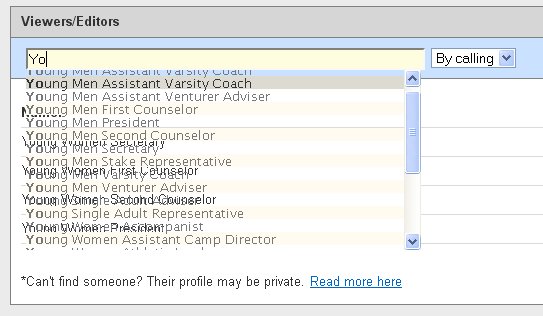
- Add_editor_drop-down_list.jpg (39.64 KiB) Viewed 688 times
JD Lessley
Have you tried finding your answer on the ChurchofJesusChrist.org Help Center or Tech Wiki?
Have you tried finding your answer on the ChurchofJesusChrist.org Help Center or Tech Wiki?