Unable to view calendar for 3 weeks

10 postsstarted by slivey 1,375 viewsoriginal topic

New Member
#1
I have not been able to view the calendar for the last 3 weeks. I just get colored lines across the screen every time I log in. I do the program for our branch and it is hard to post the announcements if I can't see them. Any help? Never had problems with this before.
Community Administrator
#2
You must be using IE8 (or IE7). See the thread Calendar View Distorted with New Update.
Questions that can benefit the larger community should be asked in a public forum, not a private message.

Member
#3
Might it be a good idea to put a message in the pop up that comes up announcing the update to the 2.2 version? That pop up seems to come up okay if you are viewing it with a now obsolete browser or not. That is kind of an important new feature of the 2.2 version:

NEW with 2.2! You can no longer view the calendar on most of the browsers on Church computers...


Something like that.
Community Administrator
#4
Seems like we used to have a warning when we used a unsupported browser. I wonder how hard it would be to add that back in?
Have you searched the Help Center? Try doing a Google search and adding "site:churchofjesuschrist.org/help" to the search criteria.

So we can better help you, please edit your Profile to include your general location.
Community Administrator
#5
RussellHltn wrote:Seems like we used to have a warning when we used a unsupported browser. I wonder how hard it would be to add that back in?
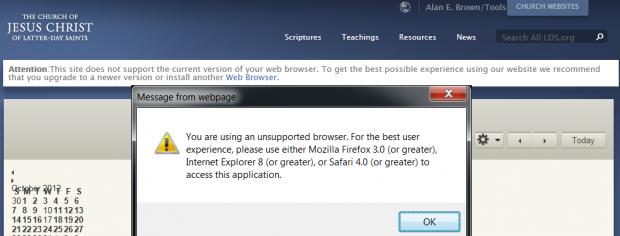
That message still appears if you are using IE7. The message comes in two parts:

A banner is displayed as part of the header; because the header is part of most pages on LDS.org, the banner message is displayed on just about every page. In that banner, the phrase Web Browser is a link that takes you to a page that tells you to upgrade your IE and provides links for upgrading IE or installing another browser.

Additionally, a popup warning is displayed when you go into the calendar in IE7. It specifically says to use Firefox 3.0+, Safari 4.0+, or IE 8+. Interestingly, it doesn't mention Chrome. Even more interesting, it specifically says to use IE 8 or greater, when we know that IE 8 doesn't work. It seems like it shouldn't be all that difficult to adjust the browser version detection script for the Calendar to display the popup warning for IE8 (and adjust the wording, of course).

Here's a screen shot that shows both the banner and the popup:
IE7-cal.jpg
(22.78 KiB) Downloaded 46 times
Questions that can benefit the larger community should be asked in a public forum, not a private message.
Member
#6
IE8 must be the problem I am having. I tried to access the calendar on the computer in the clerks office on Sunday, and got the pretty colored bands. But no browser warning.

IS IE8 the highest you can go with Microsoft XP? Because I know our ward computer is running XP.
Community Administrator
#7
TinMan wrote:IS IE8 the highest you can go with Microsoft XP? Because I know our ward computer is running XP.

Yes. You'll have to use another browser like Chrome.
Have you searched the Help Center? Try doing a Google search and adding "site:churchofjesuschrist.org/help" to the search criteria.

So we can better help you, please edit your Profile to include your general location.
Member
#8
Yeah. We added Firefox several months ago, so that is what we use to look at the calendar. It is just hard to remember.

Old habits, and all that...
Member
#9
Thanks for the suggestion to add a warning note for incompatible browsers. I added this suggestion to the bug tracking tool for the calendar, to be implemented in a future release.
Community Moderators
#10
TinMan wrote:We added Firefox several months ago, . . .

So far, Firefox has worked for us. For the calendar.