sync won't work for Google Calendar or Apple iCal

48 postsstarted by david.dunston 12,947 viewsoriginal topic

New Member
#1
I've been trying for weeks to get the sync to work with either Google Calendar or Apple iCal but I just can't get it to work. (I have an apple desktop computer for work, a laptop, and a home desktop.) Every once in a while I can randomly get one computer to work, but eventually, even the one that seemed to work won't refresh, even when forced.
Community Administrator
#2
Note that your sync is throttled. Your collection of devices can not collectively sync more often then every 9 minutes. Make sure your refresh frequency is long enough that all three can get in without hitting that limit.
Have you searched the Help Center? Try doing a Google search and adding "site:churchofjesuschrist.org/help" to the search criteria.

So we can better help you, please edit your Profile to include your general location.
New Member
#3
Well, that makes sense, and I'm sure that my computers have tried to access the subscription within 9 minutes of each other, but it does not solve the problem or explain all of the symptoms.

For instance, since my post this morning, I deleted my subscriptions from my Google account, and then waited and hour. I then regenerated my URL link and tried to subscribe to the new address (only one computer).

After trying to add the subscription, this is the error message I received. "Settings Error - Failed to import calendar from "http://www.lds.org/church-ca...(full address hidden for post)".

This result seems to be typical for the many times attempted over the past few weeks.

Any other thoughts? - I truly appreciate your help.
Community Administrator
#4
Someone else reported sync problem in the Issues Synchronizing Calendar thread that has not yet been resolved. The only thing I could find different is his "id" was 32 characters long. Much longer then mine which does work.

You may want to try some of the troubleshooting in that thread (such as manually downloading the file then importing into Google) and see if yours is exactly the same.
Have you searched the Help Center? Try doing a Google search and adding "site:churchofjesuschrist.org/help" to the search criteria.

So we can better help you, please edit your Profile to include your general location.
New Member
#5
Interesting. I have seen an associates url that did work, and his character length was less than mine too. (You would think that wouldn't matter, but I thought I would mention it just to add to the technical trial.)
Community Moderators
#6
david.dunston wrote:I'm sure that my computers have tried to access the subscription within 9 minutes of each other, but it does not solve the problem or explain all of the symptoms.

But it will keep you from syncing. So if any of your computers/devices are trying to sync more often, sync will not be successful.

Remember that it is the attempt to synchronize that starts the clock, whether or not you are successful. So, for example, if your work desktop is going out every 5 minutes to try to update the calendar, you are out of luck. Be sure to check those settings on each device.
New Member
#7
Well, I have done tests, and I am not experiencing problems syncing because of the 9 minute throttle. I have tried to sync several times after waiting over 9 minutes and it just won't sync. I utilized an iCalendar Validator and it verified that something is wrong with the calendar.

This is the error it gave me...

http://www.lds.org/church-calendar/services/lucrs/ical/subscribe/<key>
Your calendar is using an invalid newline format. Make sure to use \r\n to end lines rather than just \n (RFC 2445 §4.1).
Sorry, your calendar could not be parsed.
Error: Error was: Error at line 1: Expected [-3], read [-1]

(I will leave this calendar url active for a brief time.)
Community Administrator
#8
david.dunston wrote:Well, I have done tests, and I am not experiencing problems syncing because of the 9 minute throttle. I have tried to sync several times after waiting over 9 minutes and it just won't sync. I utilized an iCalendar Validator and it verified that something is wrong with the calendar.

This is the error it gave me...

http://www.lds.org/church-calendar/serv ... ribe/<key>
Your calendar is using an invalid newline format. Make sure to use \r\n to end lines rather than just \n (RFC 2445 §4.1).
Sorry, your calendar could not be parsed.
Error: Error was: Error at line 1: Expected [-3], read [-1]

(I will leave this calendar url active for a brief time.)
It's not wise to publish your URL on a public forum, especially for this purpose, so I removed the key from your sync URL in your post. For one thing, it makes public items on your calendar that you have no right to make public. But the biggest problem is that anyone can hit the URL at any time, so you then have no control over the throttling limit.

As for the specific error, that's what a validator will typically report when it is given an empty file, which is what is generated when you run up against the throttling limit. So I don't think you've proven anything.

If you want to determine if there truly is bad data in the iCal feed from your sync URL, then I'd recommend that you enter your sync URL in your browser's address bar at a time you are sure the throttling limit has passed since your last access of the sync URL. Then save the resulting file. At your leisure you can then pass that file to a validator to determine if there really is a problem with the data.
Questions that can benefit the larger community should be asked in a public forum, not a private message.
Community Administrator
#9
david.dunston wrote:This is the error it gave me...

http://www.lds.org/church-calendar/services/lucrs/ical/subscribe/<key>
Your calendar is using an invalid newline format. Make sure to use \r\n to end lines rather than just \n (RFC 2445 §4.1).
Sorry, your calendar could not be parsed.
Error: Error was: Error at line 1: Expected [-3], read [-1]
Note that if you fail to wait 9 minutes from the last attempt, you'll get that same exact error. It sucks, but the validator has a very convoluted way of saying "it's a blank file".
Have you searched the Help Center? Try doing a Google search and adding "site:churchofjesuschrist.org/help" to the search criteria.

So we can better help you, please edit your Profile to include your general location.
New Member
#10
aebrown wrote:It's not wise to publish your URL on a public forum...

Yes. I understand. Sorry. That's why I mentioned that I would only have the url remain active for a brief moment, but I understand I still shouldn't do that.
New Member
#11
RussellHltn wrote:Note that if you fail to wait 9 minutes from the last attempt, you'll get that same exact error. It sucks, but the validator has a very convoluted way of saying "it's a blank file".

Strangely enough, I get the same error even if I wait for more than 9 minutes. (multiple times)
New Member
#12
RussellHltn wrote:Note that if you fail to wait 9 minutes from the last attempt, you'll get that same exact error. It sucks, but the validator has a very convoluted way of saying "it's a blank file".

Strangely enough, I get the same error even if I wait for longer than 9 minutes. (multiple times)
Community Administrator
#13
Are you able to download the file by pasting the URL into your browser?

Have you turned off syncing for ALL of your devices using this URL?
Have you searched the Help Center? Try doing a Google search and adding "site:churchofjesuschrist.org/help" to the search criteria.

So we can better help you, please edit your Profile to include your general location.
New Member
#14

Continued lack of sync ability from church to google calendars

I have followed the thread and removed all but the churchwide calender.
I have used a new url link
I have waited more than 9 minutes between attempts.

The error is that the url does not contain a valid ical or gdata calendar.
Community Administrator
#15
That seems to narrow down the possible problems. Is the ID 32 characters long?
Have you searched the Help Center? Try doing a Google search and adding "site:churchofjesuschrist.org/help" to the search criteria.

So we can better help you, please edit your Profile to include your general location.
New Member
#16
RussellHltn wrote:That seems to narrow down the possible problems. Is the ID 32 characters long?

Yes the final number is 32 characters long. Also pasting it into the address bar returns a blank page.
Community Administrator
#17
bbennion wrote:Yes the final number is 32 characters long. Also pasting it into the address bar returns a blank page.

Now, assuming you've let 9 minutes elapse since the last attempt, you should get something in your browser. The prior complaint was that the URL wouldn't sync with Google even when the file downloaded via the browser could be imported to Google.

Note that the symptom of attempting to sync too soon is a blank file. You will get a http error, but may not notice that.
Have you searched the Help Center? Try doing a Google search and adding "site:churchofjesuschrist.org/help" to the search criteria.

So we can better help you, please edit your Profile to include your general location.
New Member
#18
just pasted in the link again and nothing but a blank screen in my browser (firefox).
Member
#19
bbennion wrote:just pasted in the link again and nothing but a blank screen in my browser (firefox).

Just an FYI suggestion - I have the same problem where syncing does not work. You many want to try Windows Start Button, Computer, and paste your link in there at the top. That has worked for me in the past to get it to download a file. You may need to create a new sync URL.
New Member
#20

Please help!!

The Sync function for Outlook is not working for me - I get a message back that tells me that the link isn't valid. I need this to work ASAP. Please, what is wrong??!!?
Community Moderators
#21
Welcome mas288 to the forum. If you read this thread from the beginning you can see that the issue is a bit allusive and is proving to be difficult to track down. Keep an eye on this thread for possible answers. You can subscribe to the thread by clicking the menu item "Thread Tools" and then "Subscribe to this Thread..." near the top of this thread window. You will get an email each time a new post is made to the thread.
JD Lessley
Have you tried finding your answer on the ChurchofJesusChrist.org Help Center or Tech Wiki?
New Member
#22
ramonc wrote:Just an FYI suggestion - I have the same problem where syncing does not work. You many want to try Windows Start Button, Computer, and paste your link in there at the top. That has worked for me in the past to get it to download a file. You may need to create a new sync URL.


tried it with several new urls. Still nothing.
It appears that there are users that are successfully syncing. Can you tell us what your setup is?
what browser, device, OS. It would be nice to narrow this down a bit.

I have tried it on windows XP, windows 7, fedora core 17 all using firefox. Maybe that is the issue...
This is the error that I have been receiving for the last two days.

Settings Error
The address that you provided did not contain a calendar in a valid iCal or GData format.

New Member
#23

Additional testing with xp and internet explorer fails as well

I attempted to the sync by url again. This time by using windows XP and internet explorer. Again, the same error as described above. This is just the church wide calendar, I am unsubscribed to all other calendars.
The test this morning was with a new sync url. any more ideas :confused:
Community Administrator
#24
My sync which has been working isn't working from a browser either. I've PMed Lisa to ask if the sync system is down.
Have you searched the Help Center? Try doing a Google search and adding "site:churchofjesuschrist.org/help" to the search criteria.

So we can better help you, please edit your Profile to include your general location.
Church Employee
#25
Yeah, we know and it's in the queue to be worked on. We are just a wee bit swamped right now. Thanks for your patience.
QA Engineer
New Member
#26

queue priority

Thank you for your response. What could be more important than a sync'd calendar on my phone? :)
Seriously though, is there anything that I can help test?
New Member
#27

Any idea on the timing of it?

I am happy to be patient, but just wondering if you would be able to forecast when you expect to get the syncing issue fixed?

At present, I am successfully able to 'sync' the calendar framework into my google calendar, but unable to sync the actual events of my lds.org calendar aren't coming with it.

Thanks for everything.
Andrew
Member
#28
ramonc wrote:Just an FYI suggestion - I have the same problem where syncing does not work. You many want to try Windows Start Button, Computer, and paste your link in there at the top. That has worked for me in the past to get it to download a file. You may need to create a new sync URL.
This no longer works for me. I am really out of luck until it gets fixed. It was good while it lasted. :mad:
Member
#29
Just thought I would chime in and add my voice to the chorus - I am unable to sync to iCal and have been for several days.

Using an iMac. Tried downloading with both Safari and Chrome.

I also have a 32 digit character at the end of my sync URL.
New Member
#30
Ditto here. I use iCal and iCloud on a Mac to sync with the Stake Calendar and then have it on my iPhone and iPad - something that has been working for many months and which is a wonderful feature of the new Church technologies. Like many others are reporting here, however, synchronization stopped several days back and I haven't been able to get it going again since. Just waiting patiently for a fix.... :)
Member
#31
Thank you for all the updates and continued testing that you have all put into this feature. We realize this is a feature that many, many people rely upon and count as one of the critical pieces to the calendar technology. We know right now that it is not working very well if at all. And to be frank we haven't had a chance to dig into it yet as we are working to resolve other issues related to stability and performance scaling of the directory and lds tools products. We do not have a scheduled time frame for working on calendar again. It is most certainly in our queue and we are continuing to test the issues listed here in the forum and log them in our tracking system.

As we move forward we will keep you updated here in the forum when we have updates that need testing. Thank you again for all your help and hard work. It makes a very big difference to us and to the many, many users of these products.
New Member
#32
I will just add my voice to the chorus of users that rely on this feature. Is there any way to raise the priority of getting this fixed?

Our Stake is in the middle of finalizing the calendar for next year in order for Wards to begin their planning. We usually have this done by the first of November but there have been numerous outages with the calendar on lds.org that have prevented the completion.

I would have to think we are not the only Stake trying to finalize our yearly calendar. It would be helpful to at least know what time frame we can expect a fix. Are we talking days, weeks or months?
Community Administrator
#33
jedware wrote:I will just add my voice to the chorus of users that rely on this feature. Is there any way to raise the priority of getting this fixed?

Our Stake is in the middle of finalizing the calendar for next year in order for Wards to begin their planning. We usually have this done by the first of November but there have been numerous outages with the calendar on lds.org that have prevented the completion.

I would have to think we are not the only Stake trying to finalize our yearly calendar. It would be helpful to at least know what time frame we can expect a fix. Are we talking days, weeks or months?

This thread deals only with the sync, and that's what LisaAn was talking about in the post that preceded yours. Yet you seem to be talking about the calendar on LDS.org in general. Yes, there have been a couple of outages, but nothing that should have any significant impact on whether your stake can finalize its yearly calendar. I am the main calendar administrator for my stake, and no outage has stopped me from completing the stake calendar.

Are you saying that your ability to finish your calendar is hampered by:
  • the sync problems (which are very real);
  • the small number of brief outages of the calendar on LDS.org; or
  • some other problem with the calendar on LDS.org
I wouldn't think that sync would be an essential element to finalizing your calendar, but if it is, it would be helpful to understand how sync is integrated in your stake's calendaring process.
Questions that can benefit the larger community should be asked in a public forum, not a private message.
New Member
#34
kyleq wrote:Thank you for all the updates and continued testing that you have all put into this feature. We realize this is a feature that many, many people rely upon and count as one of the critical pieces to the calendar technology. We know right now that it is not working very well if at all. And to be frank we haven't had a chance to dig into it yet as we are working to resolve other issues related to stability and performance scaling of the directory and lds tools products. We do not have a scheduled time frame for working on calendar again. It is most certainly in our queue and we are continuing to test the issues listed here in the forum and log them in our tracking system.

As we move forward we will keep you updated here in the forum when we have updates that need testing. Thank you again for all your help and hard work. It makes a very big difference to us and to the many, many users of these products.

Since we are unable to sync, can there be a way to export the calendar as file that can be imported to our devices?
Community Administrator
#35
murrayhr wrote:Since we are unable to sync, can there be a way to export the calendar as file that can be imported to our devices?
Unfortunately, the only way that currently exists to export the calendar relies on the sync service. So when sync is unavailable, export is unavailable.
Questions that can benefit the larger community should be asked in a public forum, not a private message.
New Member
#36
aebrown wrote:This thread deals only with the sync, and that's what LisaAn was talking about in the post that preceded yours. Yet you seem to be talking about the calendar on LDS.org in general. Yes, there have been a couple of outages, but nothing that should have any significant impact on whether your stake can finalize its yearly calendar. I am the main calendar administrator for my stake, and no outage has stopped me from completing the stake calendar.

Are you saying that your ability to finish your calendar is hampered by:

  • the sync problems (which are very real);
  • the small number of brief outages of the calendar on LDS.org; or
  • some other problem with the calendar on LDS.org
I wouldn't think that sync would be an essential element to finalizing your calendar, but if it is, it would be helpful to understand how sync is integrated in your stake's calendaring process.

We just have experienced outages for the past several Sundays and some weekdays and were unable to make edits or changes.

Likewise we use the sync\export to feed into our Stake Newsletter\Bulletin as a way for sending communication to the wards.
Member
#37
Sync has worked for me again starting yesterday. Did a refresh this morning with no problems. Keeping my fingers crossed that it holds up.

(Mac OS X, Safari, iCal)
New Member
#38
Sync is also working again for me as well. It's been working for a little more than a day now. :)

However, for some reason I can't get the calendar items to show up on my iOS devices. They show just fine on the Mac in iCal and the subscribed calendar shows in the list of calendars on my iOS devices (iPhone, iPad) but no items show in the calendar. This happened once before and syncing between the Mac and iPhone via usb cable made the calendar events magically appear but that hasn't worked this time. If anyone has an idea or fix for this issue, I'd love to hear it.
Community Administrator
#39
talbotje wrote:However, for some reason I can't get the calendar items to show up on my iOS devices. They show just fine on the Mac in iCal and the subscribed calendar shows in the list of calendars on my iOS devices (iPhone, iPad) but no items show in the calendar. This happened once before and syncing between the Mac and iPhone via usb cable made the calendar events magically appear but that hasn't worked this time. If anyone has an idea or fix for this issue, I'd love to hear it.

The sync service is limited to provide the synchronization data for a particular person no more than once every 9 minutes. So, for example, if your Mac's iCal is set to request the sync data every hour on the hour, and your iPhone does it every hour at 2 minutes after the hour, and your iPad does it every hour at 4 minutes after the hour, the request by the Mac would succeed, but the other two requests would fail, since they are happening less than 9 minutes after the previous request.

That's just one possibility, but it might be worth looking into.
Questions that can benefit the larger community should be asked in a public forum, not a private message.
New Member
#40

It Works!

Got it to work for connecting to my google calendar.

Now all I need it to do is connect to my ipad.

Thanks for the work on this everyone!

- Andrew
New Member
#41

Error message I get after I try to add the new link to calendar for Mac (iCal)

First of all sorry for my poor english. :o
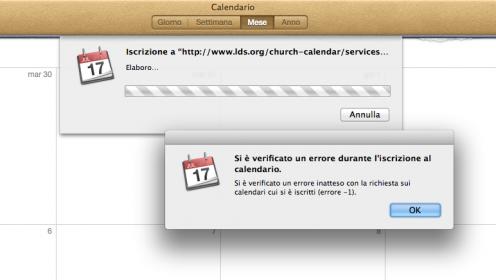
After generating a new address in the form "http://www.lds.org/church-calendar/serv ... ribe/xxxxx etc." and inserting it in ical (calendar) for Mac I got a new error that prevents me from closing the procedure of re-registration in a calendar. The message says: "There was an unexpected error with the request on subscribed calendars (error -1)". I read on google that you get this message if a request encountered an error in the Name secure connection part.
I hope it can help you understand the problem. After several attempts I was able to subscribe to the calendar on ipad and iphone even if I had to wait nine minutes for synchronization, but there's no way to subscribe to the calendar on desktop (iMac + OSX 10.8.2)
Sergio
See attached screen shot. (Sorry, is in italian!)
Schermata 2012-11-15 alle 10.56.32.jpg
Schermata 2012-11-15 alle 10.56.32.jpg (16.69 KiB) Viewed 1856 times
Member
#42
sergio.giolitto wrote:First of all sorry for my poor english. :o
After generating a new address in the form "http://www.lds.org/church-calendar/serv ... ribe/xxxxx etc." and inserting it in ical (calendar) for Mac I got a new error that prevents me from closing the procedure of re-registration in a calendar. The message says: "There was an unexpected error with the request on subscribed calendars (error -1)". I read on google that you get this message if a request encountered an error in the Name secure connection part.
I hope it can help you understand the problem. After several attempts I was able to subscribe to the calendar on ipad and iphone even if I had to wait nine minutes for synchronization, but there's no way to subscribe to the calendar on desktop (iMac + OSX 10.8.2)
Sergio
See attached screen shot. (Sorry, is in italian!)

Your English is very good! :)

I get the same thing on my Mac sometimes. Just keep trying, sometimes it works and sometimes it doesn't.
New Member
#43
Since some of you are now saying that you can get Google Calendar to work, I guess I must be doing something wrong. In Google Calendar I try to add the calendar by pasting the URL and I get this message:

"The calendar athttp://www.lds.org/church-calendar/services/lu ... d35a94will be indexed by Google Calendar"(I've chaned the characters to x's for privacy).

That message displays for about 3-5 minutes, and no events are imported into the calendar.

Evenutally this message pops up:

"Settings Error
Failed to import calendar from "http://www.lds.org/church-calendar/serv ... c8fd35a994".


I'm not sure what a "settings error" is, I've checked all the potential settings in Google Calendar and can't figure out why the calendar from lds.org doesn't come in. I've regerated my URL links a bunch of times, I've waited for hours in between syncs, and I still can't get it to work. Any ideas as to what more I should be doing?
Community Administrator
#44
Note that you can only use that URL once every 9 minutes. That includes all devices you own that may be trying to sync.
Have you searched the Help Center? Try doing a Google search and adding "site:churchofjesuschrist.org/help" to the search criteria.

So we can better help you, please edit your Profile to include your general location.
New Member
#45
RussellHltn wrote:Note that you can only use that URL once every 9 minutes. That includes all devices you own that may be trying to sync.

Thank you, yes I've tried waiting hours in between and the calendar still doesn't populate in Google Calendar.
Community Administrator
#46
murrayhr wrote:Thank you, yes I've tried waiting hours in between and the calendar still doesn't populate in Google Calendar.

We may be back to an older problem where long IDs (32 characters) won't sync with Google for some reason. You can download the iCal and import it to Google, so we know the URL works and that the data is good, but Google is unable to talk to the church servers for some reason.
Have you searched the Help Center? Try doing a Google search and adding "site:churchofjesuschrist.org/help" to the search criteria.

So we can better help you, please edit your Profile to include your general location.
New Member
#47
Well this is very unscientific, but here's what worked for me. I generated a new URL, went to lunch for an hour (Carl's Jr.), and came back and added the URL to Google Calendar. The calendar populated perfectly into Google Calendar. Maybe when you generate a new URL it doesn't become active for an hour?
Community Administrator
#48
murrayhr wrote:Maybe when you generate a new URL it doesn't become active for an hour?
I wonder if that's considered a URL access and so it doesn't become active until 9 minutes later?

Then again, we've been told it's by URL. But if it's really by user - then the new URL won't be available until 9 minutes since the last access to your old URL.
Have you searched the Help Center? Try doing a Google search and adding "site:churchofjesuschrist.org/help" to the search criteria.

So we can better help you, please edit your Profile to include your general location.