Administrators not visible

13 postsstarted by craiggsmith 1,864 viewsoriginal topic

Senior Member
#1
I am a stake administrator, and when I go to the administrators section of the calendar nothing shows up. It was fine last I made a change there (a few weeks ago). I've tried both IE and Chrome. Anyone else?
Craig
Saint George, UT
Community Administrator
#2
I just tried it and it worked fine for me on IE9 and Firefox, but indeed on Chrome the list of administrators is empty. Since I primarily use Firefox I can't give you any data as to when it may have stopped working for me on Chrome.
Questions that can benefit the larger community should be asked in a public forum, not a private message.
Senior Member
#3
I tried Firefox and had the same problem. So I thought that I lost my permissions as we got a new Stake Presidency yesterday, but I still have the other administrator permissions. So I tried to add a new administrator, and get the following error:

Sorry, data is temporarily not available for this application. Please try again later.

I got this message earlier today on the main calendar page, when it was being really slow. Is this related to the performance problem they had yesterday?
Craig
Saint George, UT
Community Moderators
#4
Several Church servers are experiencing difficulties. I tried to order from the online store but got the down for maintenance message. I occasionally and randomly get a down for maintenance message for LDS.org Tools applications.
JD Lessley
Have you tried finding your answer on the ChurchofJesusChrist.org Help Center or Tech Wiki?
Community Administrator
#5
I see elsewhere that the Amazon cloudis having serious problems. That in turn is affecting FamilySearch. I can't help but wonder if some "church servers" are actually running on the Amazon system and are likewise being affected.
Have you searched the Help Center? Try doing a Google search and adding "site:churchofjesuschrist.org/help" to the search criteria.

So we can better help you, please edit your Profile to include your general location.
Senior Member
#6
I'm sure I recall that the Church does use Amazon servers, but for the life of me I can't find the reference! Shoot me down in flames, if I've got this wrong. :)
Church Employee
#7
No, the church does not use Amazon's cloud. We host our own servers.
QA Engineer
Community Administrator
#8
LisaAn wrote:No, the church does not use Amazon's cloud. We host our own servers.
And by "the church" LisaAn means ICS, which represents just about everything the Church does in the technology area outside of temples and family history.

But FamilySearch most definitely does use Amazon's cloud for multiple purposes.
Questions that can benefit the larger community should be asked in a public forum, not a private message.
Senior Member
#9
But FamilySearch most definitely does use Amazon's cloud for multiple purposes.
That's where I was getting the idea, that the Church used Amazon from.

Thank you for putting me straight!
Senior Member
#10
I've been testing out various web browsers to see what works and what doesn't on the calendar. I haven't gone through Mac web browsers yet, but in my tests of Windows web browsers, I found that Firefox and Chrome both had problems with the Administrators page. IE and Safari for Windows both worked fine.

I found the Firefox and Chrome were intermittent. Many times the page showed up with an empty drop-down box and no content. Occasionally it worked fine and was pretty quick. Generally, the administrators page seemed like it took a moment to populate the content. I don't know if the problem lies in a particular web browser or in some method being called to get the data required for the page. I'd have to dig into this a little more to see what's happening.
Community Moderators
#11
mevans wrote:I found the Firefox and Chrome were intermittent.
I use Firefox as my primary browser. I have never noticed any problems with the administrator page. All I am saying is my experience is different. I add this only as a data point. All of our administrators are default administrators. We have not added any other administrators.
JD Lessley
Have you tried finding your answer on the ChurchofJesusChrist.org Help Center or Tech Wiki?
Community Administrator
#12
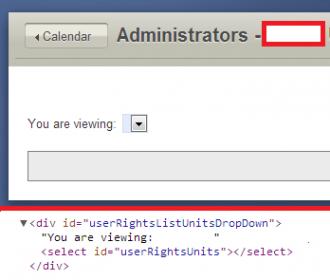
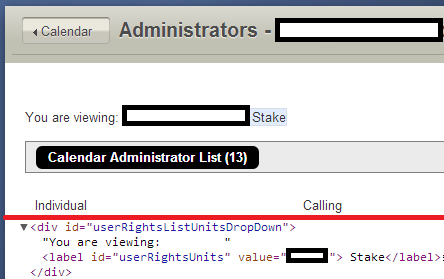
Some more information that might be helpful. I found that in any browser I choose, if I go to the administrator page and just keep hitting the refresh/reload button, I eventually see the problem happen. In Chrome it seems to happen about half the time (but with no consistent pattern) and in Firefox it happens about 20% of the time.

When the problem happens, I see something like this:
CalAdmin1.jpg
CalAdmin1.jpg (13.18 KiB) Viewed 427 times
When the screen is displayed properly, I see this:
CalAdmin2.png
CalAdmin2.png (16.7 KiB) Viewed 426 times
So it appears that some script does not run properly to adjust the contents of the userRightsListUnitsDropDown div (and other divs also are not updated as well).
Questions that can benefit the larger community should be asked in a public forum, not a private message.

Senior Member
#13
Thanks aebrown for your pictures and observations. Yes, that's what's happening. I appreciate your observations about how often you have difficulties with Firefox and Chrome. I did a little more playing around on the Mac browsers and I also experience difficulties on Firefox Mac and Chrome Mac. For Safari Mac it seems to work just fine.

I'm kind of surprised to see difficulties on Firefox, as I believe Firefox Win is the primary testing platform for the dev team. I'm not sure why this problem would be different between browsers. I haven't looked to see if contents are returned, but not updated, etc. It's also strange that jdlessley has never seen a problem, but it's not too hard for me to reproduce (and apparently aebrown can reproduce it fairly easily, too).