Family History Center Dialog Box

4 postsstarted by harddrive 2,001 viewsoriginal topic

Senior Member
#1
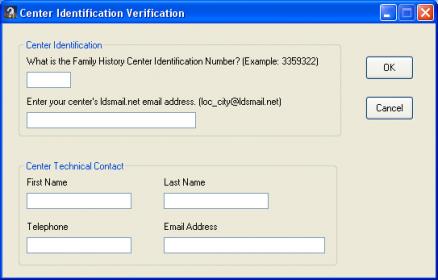
Today, I got a call from one of my units that gets that attached dialog box popping up. This is on the clerk's computer. Also the family history center that is there is "unauthorized."

So I'm wondering what software has been installed that is causing this dialog box?

Thanks for letting me know.
Center Indentification Verification Dialog.jpg
Center Indentification Verification Dialog.jpg (17.99 KiB)
Community Administrator
#2
My guess is that LANDesk from FamilySearch was installed. That in turn installed some other things.
Have you searched the Help Center? Try doing a Google search and adding "site:churchofjesuschrist.org/help" to the search criteria.

So we can better help you, please edit your Profile to include your general location.
Community Moderators
#3
The dialog box you see is the information needed by FamilySearch support for official family history centers. Someone installed the the FamilySearch Support Tools for an official family history center. I can't tell you how they got the software because the support tools should only be available for download online using FamilySearch Support remote access install through TeamViewer.

Edit: I saw RussellHltn's post and rechecked the website. I forgot you can bypass TeamViewer and download LANDesk for family history centers on the same page.
JD Lessley
Have you tried finding your answer on the ChurchofJesusChrist.org Help Center or Tech Wiki?
Senior Member
#4
That box pops when installing the version of LANDesk used by official FHCs. Was the machine intended for that use, or was it something that was brought over from having been used at an FHC? If it had been used in an FHC, it was not supposed to have been removed from the FHC to be repurposed for something else as I doubt clerk PCs are 'cascaded' down when some FHCs get newer machines and these 'cascaded' machines are used to replace even older equipment at other FHCs.