Photos are Poor Quality when Export Directory

11 postsstarted by josh_day 2,454 viewsoriginal topic

New Member
#1
Hi, Does anyone know why the photos looks so poor (pixilated) when you save the Ward Directory with household photos included?
If there is a way to fix this, please let me know.
If this is done intentionally, I would like to recommend that we increase both the resolution allowance of uploaded photos, and ensure photos can be printed, or exported to pdf with resolution of 200+ ppi.

Community Administrator
#2
Regardless of the resolution at which photos are uploaded, they are stored at no greater than 375x500 pixel resolution. That won't produce fantastic print quality. I'm not sure why that decision was made, but total storage size may have been a factor.
Questions that can benefit the larger community should be asked in a public forum, not a private message.
Church Employee
#3
It's true; storage space is an issue. With the next release of Directory we are moving to a much bigger server that should allows us to save higher resolution photos. Thanks for your patience.
QA Engineer
Senior Member
#4
LisaAn wrote:With the next release of Directory we are moving to a much bigger server that should allows us to save higher resolution photos.
Since existing photos have been downsized to no more than 375 x 500, will there be any easy indicator or report for administrators to find the resolution of current photos so we can work to get better photos uploaded after a better resolution is available?
New Member
#5
I think I can live with 375 x 500 limit for now, but can we improve the pdf compression? I think the problem is the pdf converter is over-compressing the images.
#6
Has this function been removed from the print option for Organisations? I can see that the Household will show the photo that is linked to the household, but when printing from the Organisation/Adults for example I can select to include Individual Photo but it does not show on the PDF.

Is there any way of printing individual names with photos from Directory? We just acquired a new unit that is 6hrs drive from the stake centre so we are trying to bring everyone up to speed in the Stake as quick as possible and viewing photos of the leadership is helpful but can't find any way of viewing other than directly in the directory.
Community Administrator
#7
chris_hazeldine wrote:Has this function been removed from the print option for Organisations? I can see that the Household will show the photo that is linked to the household, but when printing from the Organisation/Adults for example I can select to include Individual Photo but it does not show on the PDF.

Household photos and individual photos are two different things. A member can easily have one but not the other.
Have you searched the Help Center? Try doing a Google search and adding "site:churchofjesuschrist.org/help" to the search criteria.

So we can better help you, please edit your Profile to include your general location.
Community Moderators
#8
chris_hazeldine wrote:I can see that the Household will show the photo that is linked to the household, but when printing from the Organisation/Adults for example I can select to include Individual Photo but it does not show on the PDF.
I am using Firefox and did a test of three wards in my stake. For each organization within a ward the PDF included the pictures for individuals with pictures.
chris_hazeldine wrote:Is there any way of printing individual names with photos from Directory?
The closest to this is the Adults list in the Organizations group with only "include individual photo" checked. This prints just the name and a photo.

This worked fine in the test I ran.
JD Lessley
Have you tried finding your answer on the ChurchofJesusChrist.org Help Center or Tech Wiki?
#9
jdlessley wrote:I am using Firefox and did a test of three wards in my stake. For each organization within a ward the PDF included the pictures for individuals with pictures.

The closest to this is the Adults list in the Organizations group with only "include individual photo" checked. This prints just the name and a photo.

This worked fine in the test I ran.

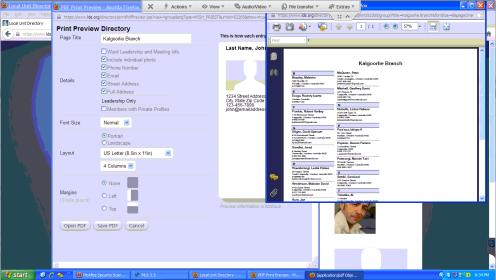
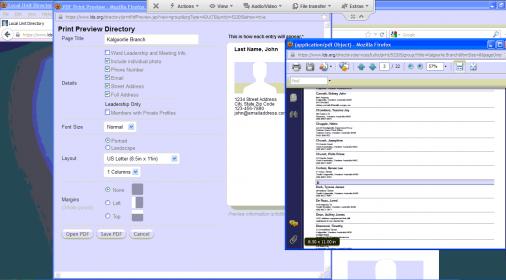
So what is different? I have tried IE9, Google Chrome 22 and now Firefox and all of them will not create a PDF with pictures. I have added 2 images showing the settings and the PDF without any pics. I have even shown an image for a member that is in the system.

What am I doing different to you?
DirectoryPrint1.jpg
DirectoryPrint1.jpg (23.63 KiB)
DirectoryPrint.jpg
DirectoryPrint.jpg (22.81 KiB)
Community Administrator
#10
chris_hazeldine wrote:So what is different?

There's a separate problem that has started occurring recently where photos simply don't appear in the PDF. That issue is discussed in the thread Household photo not being shown on ward directory print out.
Questions that can benefit the larger community should be asked in a public forum, not a private message.
#11
aebrown wrote:There's a separate problem that has started occurring recently where photos simply don't appear in the PDF. That issue is discussed in the thread Household photo not being shown on ward directory print out.

Thanks, looks like I got in first - didn't see any posts when I had the problem and looks like that thread kicked off 1-Nov a couple of days after I saw the issue first :-)