Calendar View Distorted with New Update

26 postsstarted by dcrockett3 5,185 viewsoriginal topic

New Member
#1
Within the last week (perhaps due to calendar update on 26 Sept) the calendar view has become distorted when I view it, to an almost unusable level. I have logged in to view the calendar similar to what I have done in the past and I get a different view of the calendar. This has been verified on two different computers and two different accounts (my wife logged in also and got the same results).

Previous view:
The original view that I am used to had the main calendar occupying the majority of the screen. On the left side of the calendar, there was a small sub-panel that contained "Subscribed Calendars" and "Locations".

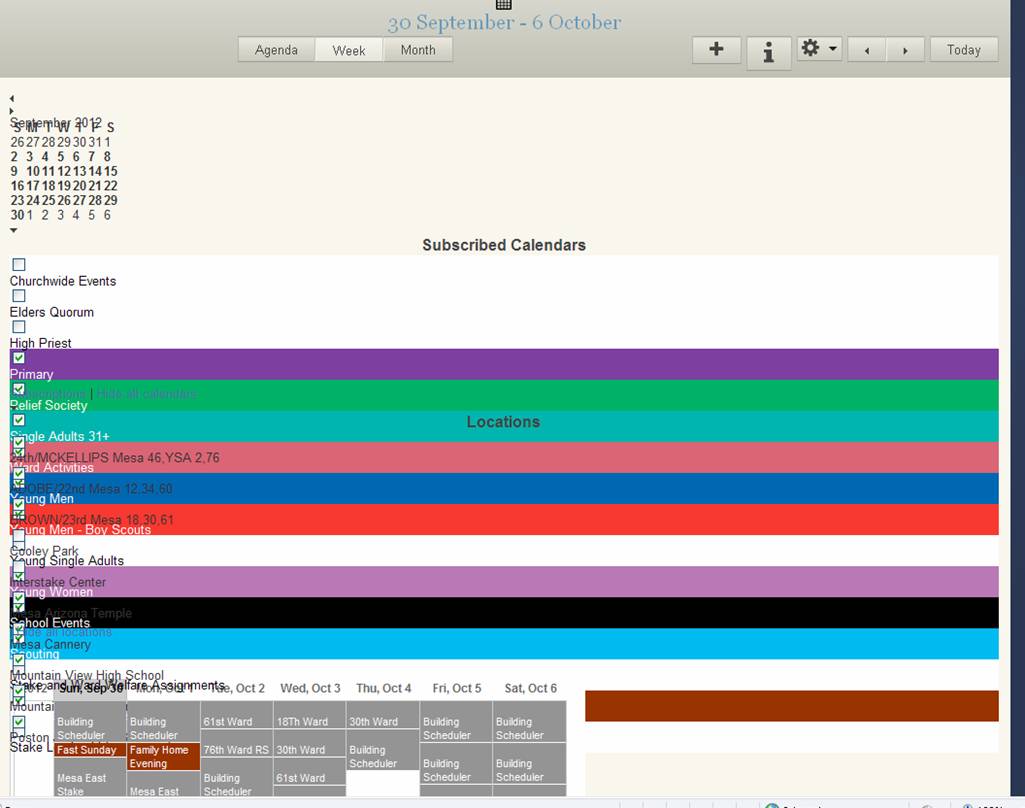
Distorted View (see screen capture below):
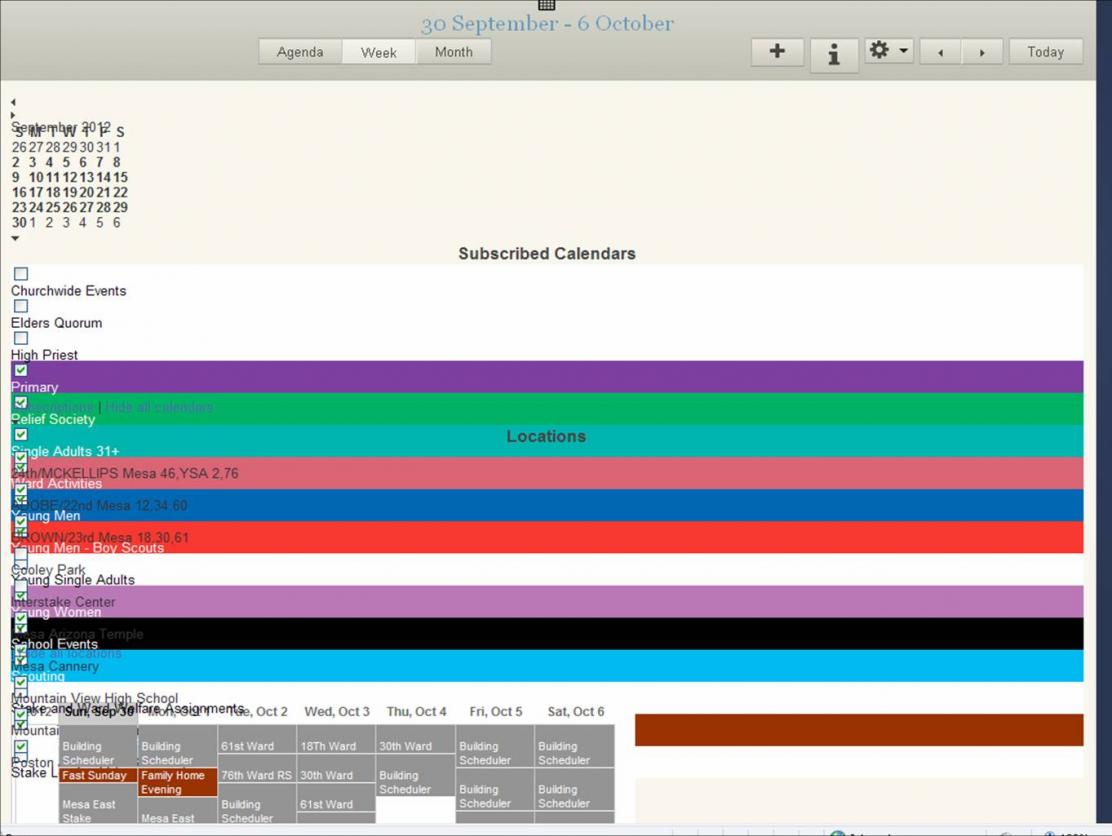
The current distorted view has text overlapping, making it hard to read and unusable, especially the "Subscribed Calendars" and "Locations". The basic calendar at the top of the screen has the month name overlapping the days of the week. Below this basic calendar, "Subscribed Calendars" and "Locations" occupy the full width of the window, and overflow onto each other and into the main calendar. Because of this overlap of text, subscribed calendars cannot be turned on or off.
Calendar_Screen_Capture.jpg
(73.47 KiB) Downloaded 217 times

Has anyone else seen similar problems and do you know how to fix the problem?

Thank you.
Don Crockett.

๐Ÿ“Ž Calendar_Screen_Capture.jpg (85.75 KiB)
Community Administrator
#2
I believe there's a known problem if you use "zoom" to make the page larger. Try pressing Ctrl-0 to reset it to 100%.
Have you searched the Help Center? Try doing a Google search and adding "site:churchofjesuschrist.org/help" to the search criteria.

So we can better help you, please edit your Profile to include your general location.
Community Moderators
#3
dcrockett3 wrote:Within the last week (perhaps due to calendar update on 26 Sept) the calendar view has become distorted when I view it, to an almost unusable level.
This is a known problem for IE. It has been reported in several other threads all named the same thing.
calendar problems
Calendar problems
Calendar problems

In this post we are directed to an LDSTech announcement of recommended web browsers. You may want to consider using Firefox or Chrome to view the calendar until the issue is resolved.
JD Lessley
Have you tried finding your answer on the ChurchofJesusChrist.org Help Center or Tech Wiki?
Community Administrator
#4
This looks like the known problem with Internet Explorer 8 (the same thing happens with IE7 or with IE9 in compatibility view). Try a different browser (or if you are in compatibility view, turn off compatibility view).
Questions that can benefit the larger community should be asked in a public forum, not a private message.
New Member
#5
The Chrome Frame Plugin might resolve this glitch for Internet Explorer 8 on Windows XP. The solution would be:

1. Prompt legacy browsers to install the plugin. (Template code here.)

2a. And add this server header: X-UA-Compatible: chrome=1
2b. Or add this page tag: <meta http-equiv="X-UA-Compatible" content="chrome=1">

For the user, this is good because installing a plugin is less disruptive than changing browsers. Most people won't think twice.

For the developer, this is good because it is a nearly zero cost way of supporting IE 6, 7, and 8.
New Member
#6

Calendar View Distorted

I also have the same problem on my computer. I have Mozella Foxfire on my computer and so I tried getting to the calendar from that internet. It works fine using Mosella. But I don't understand why it should have changed in the first place.
Community Administrator
#7
pewade wrote:But I don't understand why it should have changed in the first place.
One of the mysteries of the kingdom. I can only speculate that they were not able to roll back for some reason and wanted to put the effort into the next version then to fix a soon-to-be-replaced version.
Have you searched the Help Center? Try doing a Google search and adding "site:churchofjesuschrist.org/help" to the search criteria.

So we can better help you, please edit your Profile to include your general location.
New Member
#8

My calendar is very distorted also.

I see huge lines for each of the calendar subscriptions and a very little blurry calendar in the upper right corner and then a little version of the actual calendar that is very hard to read.
Community Administrator
#9
jvanskiver wrote:I see huge lines for each of the calendar subscriptions and a very little blurry calendar in the upper right corner and then a little version of the actual calendar that is very hard to read.
You must be using IE8 (or IE7). That is not recommended for using the tools on LDS.org, as seen in the article LDSTech announcement of recommended web browsers.
Questions that can benefit the larger community should be asked in a public forum, not a private message.
Member
#10
dajhorn wrote:The Chrome Frame Plugin might resolve this glitch for Internet Explorer 8 on Windows XP.
I've added your suggestion to the bug report and included a link and suggestion to look into to using GCF as a relatively simple fix to the issue. Thanks for finding this and suggesting it!
New Member
#11

Leadsleader

Try looking here, they are changing everything as of 2013 but have started changes now.
https://tech.lds.org/blog/486-from-loca ... e-of-tools
Community Moderators
#12
adrianbeazer wrote:Try looking here, they are changing everything as of 2013 but have started changes now.
https://tech.lds.org/blog/486-from-loca ... e-of-tools
This thread is about the calendar not displaying correctly after the most recent update. The issue occurs for IE8 and earlier versions of IE.
JD Lessley
Have you tried finding your answer on the ChurchofJesusChrist.org Help Center or Tech Wiki?
New Member
#13
aebrown wrote:You must be using IE8 (or IE7). That is not recommended for using the tools on LDS.org, as seen in the article LDSTech announcement of recommended web browsers.

I understand the need to move forward with available technologies but there are problems with progress for its own sake. For example our meetinghouse system is XP with IE8. We have a local account but the policies planted on the system prevent us from installing an alternate browser. So we now have a ward system that is constrained to XP and IE8. The result is a meetinghouse system we cannot use to leverage the leadership tools online. That seems an odd thing to have been overlooked.

So in the rush to make information more available more people with existing systems are losing access to tools and functions. This is easily remedied, as you have stated, for an individually owned system.

As an Exec Sec I can no longer use the ward system for calendaring. I have to take my Android tablet with me to do any scheduling while at the meetinghouse. It would seem that as more and more capability and content is put online that the critical need to fill is that meetinghouse systems can reach and use the leadership tools.

We have tithing settlement coming up. I am will bring my own system with me as a workaround for scheduling. It just seems that usability on meetinghouse systems would be a major consideration.

Or maybe our system is uniquely constrained and this is just my problem. :-)

Thanks for all you do to help us.
Member
#14
Nope, not just your problem. But we got permission from the Stake President to put Firefox on our ward computers.

Now. If we had reliable WI-FI, we might bring our own devices. A related, but different discussion we are having with the Stake.
:)
Senior Member
#15
moberle wrote:I understand the need to move forward with available technologies but there are problems with progress for its own sake. For example our meetinghouse system is XP with IE8. We have a local account but the policies planted on the system prevent us from installing an alternate browser. So we now have a ward system that is constrained to XP and IE8. The result is a meetinghouse system we cannot use to leverage the leadership tools online. That seems an odd thing to have been overlooked.

So in the rush to make information more available more people with existing systems are losing access to tools and functions. This is easily remedied, as you have stated, for an individually owned system.

As an Exec Sec I can no longer use the ward system for calendaring. I have to take my Android tablet with me to do any scheduling while at the meetinghouse. It would seem that as more and more capability and content is put online that the critical need to fill is that meetinghouse systems can reach and use the leadership tools.

We have tithing settlement coming up. I am will bring my own system with me as a workaround for scheduling. It just seems that usability on meetinghouse systems would be a major consideration.

Or maybe our system is uniquely constrained and this is just my problem. :-)

Thanks for all you do to help us.

I think you will find that Chrome is now an approved browser. Its listed as an application for installation on Clerk computers, but double check with your STS first, in case there are local policies in force against doing this.

Your firewall may need to be using LDSAccess to download certain software, so again check with your STS!
New Member
#16

Distorted calendar site

We have the same issue up here in the Northwest states. Not sure where you are or if all servers are in SL. It is very frustrating because we cannot print a decent calendar for meetings etc.
dcrockett3 wrote:Within the last week (perhaps due to calendar update on 26 Sept) the calendar view has become distorted when I view it, to an almost unusable level. I have logged in to view the calendar similar to what I have done in the past and I get a different view of the calendar. This has been verified on two different computers and two different accounts (my wife logged in also and got the same results).

Previous view:
The original view that I am used to had the main calendar occupying the majority of the screen. On the left side of the calendar, there was a small sub-panel that contained "Subscribed Calendars" and "Locations".

Distorted View (see screen capture below):
The current distorted view has text overlapping, making it hard to read and unusable, especially the "Subscribed Calendars" and "Locations". The basic calendar at the top of the screen has the month name overlapping the days of the week. Below this basic calendar, "Subscribed Calendars" and "Locations" occupy the full width of the window, and overflow onto each other and into the main calendar. Because of this overlap of text, subscribed calendars cannot be turned on or off.


Has anyone else seen similar problems and do you know how to fix the problem?

Thank you.
Don Crockett.
Community Moderators
#17
mbrennan23 wrote:We have the same issue up here in the Northwest states.
This is a browser issue. See post #9. The only near term solution is to use a supported browser.
JD Lessley
Have you tried finding your answer on the ChurchofJesusChrist.org Help Center or Tech Wiki?
Member
#18

Calendar View Distortion in IE

Since most, if not all of our Wards use Internet Explorer (IE), and our stake used IE9, do we have any idea of a time frame when this distortion will be fixed. I realize that everyone is saying use Google Chrome or Firefox, but really, are we expecting wards to convert over when IE is what is loaded on everyones machines. Are we also saying that we are not supporting IE explorer anymore. So again, do we have a timeline for this fix?
Community Moderators
#19
mmkids6 wrote:Since most, if not all of our Wards use Internet Explorer (IE), and our stake used IE9, do we have any idea of a time frame when this distortion will be fixed.
There has been no other word other than the LDSTech News article.
mmkids6 wrote:I realize that everyone is saying use Google Chrome or Firefox, but really, are we expecting wards to convert over when IE is what is loaded on everyones machines.
Installing one of the two supported browsers is relatively simple. The only additional step that may take time is to get the stake president's approval.
mmkids6 wrote:Are we also saying that we are not supporting IE explorer anymore.
The problem with IE 8 and earlier versions is their lack of support for web browser standards. IE 8 is better than IE 7 and earlier versions but still has issues. It is this lack of support of the standards that forces website developers to use code hacks to accommodate these browsers when possible. I am only guessing that the code hacks needed to make some of the LDS.org tools, such as the calendar, work require more development resources than can be spared at this time. It is also possible that the hacks needed are just not possible.
JD Lessley
Have you tried finding your answer on the ChurchofJesusChrist.org Help Center or Tech Wiki?
Community Administrator
#20
jdlessley wrote:Installing one of the two supported browsers is relatively simple. The only additional step that may take time is to get the stake president's approval.

After reviewing the approval policy alluded to, I don't see why the stake president's approval is required in this case. I don't have to get the stake president's approval to install MLS, or Adobe Reader, or CutePDF, or any of the other approved software. That would be a waste of his time and my time.

The official policy allows all "authorized" "applications" to be installed without additional approval (only "other software" requires approval by the stake president). And according to the Third-Party Software and Tools article on ClerkSupport.LDS.org, both Firefox and Chrome are authorized. So I am 100% comfortable installing either of those browsers without wasting my stake president's time on a needless approval process.

And that simply strengthens the point that the burden of installing a new browser on an administrative computer is very minor -- it takes well under 5 minutes to install it and copy bookmarks from IE, at which point you're up and running with a faster, more standards-compliant browser.
Questions that can benefit the larger community should be asked in a public forum, not a private message.
New Member
#21

Calendar is missed up.

I'm having the same problem with the calendar and unable to work with it. Is this going to be fixed anytime soon? Thank you.
Glenn Lake
Community Moderators
#22
gblake wrote:I'm having the same problem with the calendar and unable to work with it. Is this going to be fixed anytime soon?
I would not plan on it. Making the announcement that there are supported browsers for LDS.org Tools and that IE 8 is not one of them indicates there are significant issues that may take some time to work out, if they can be worked out at all.
JD Lessley
Have you tried finding your answer on the ChurchofJesusChrist.org Help Center or Tech Wiki?
Community Administrator
#23
gblake wrote:I'm having the same problem with the calendar and unable to work with it. Is this going to be fixed anytime soon? Thank you.
Glenn Lake

It's possible it might be fixed in the next version (whenever that comes out), but the fact they posted a Recommended Browsers for LDS.org Tools suggests that there will be no fix anytime soon or IE8 or earlier.
Have you searched the Help Center? Try doing a Google search and adding "site:churchofjesuschrist.org/help" to the search criteria.

So we can better help you, please edit your Profile to include your general location.
New Member
#24

Latest/Greatest is Not Always the Best

I note that the recent update of the calendar no longer supports IE8, which many people with Windows XP use as their default browser. It works well with most if not all websites and is often the system available in the homes of older members and members without the latest technology. I am concerned that in our haste for the latest and greatest that we forget the effect changes such as this have on our rank and file members. We encourage members to live within their means-this may mean that their technology is not the latest, but works just fine. We also forget that not all of our members can install alternative browsers. The older members, widows and others are often not able to do this. As a recently-released bishop I wonder whether upgrading to a system than only works with the newest technology does a disservice to members who are trying to do their best, to live within their financial means, and serve faithfully within the Church. I think of the good members of our ward who are now not be able to see events on our ward/stake calendar. I think that we would do well to keep in mind the missions and purposes of the Church as applications are developed. Yes, it is great for the young, financially well-off, and the tech savy. How does it impact others? Are the needs of all our members being met? These are questions we should ask as we work to advance the Savior's work in the area of technology.
Church Employee
#25
@acroft: thanks for your comments. I have forwarded them on to those who make these types of decisions. Thanks again.
QA Engineer
New Member
#26
I understand that the calendar application is again working for Windows XP users with IE8. Many thanks to all those who were instumental in fixing this problem.