Move/Edit Links Don't Appear

14 postsstarted by ggconrad 4,253 viewsoriginal topic

New Member
#1
When my parents and other family try to move their location marker to the correct location, the "Move" and "Edit" links don't ever show up. I think this is a new issue (new as in a month or two), so I think it may have to do with the big update the system just had.

For the record, when I try to move my own location marker, the links work just fine, but that is because I'm the website administrator and membership clerk in my own (separate) ward--it's a YSA unit.

They have expressed frustration over their inability to correctly map their own address and would greatly appreciate timely assistance on this matter.

Thank you for all you do.
Community Moderators
#2
The only time a head of household or the HoH spouse can move the location marker is before it has been verified by an administrator. After a household location has been verified it can no longer be moved by anyone except an administrator.
ggconrad wrote:For the record, when I try to move my own location marker, the links work just fine, but that is because I'm the website administrator and membership clerk in my own (separate) ward--it's a YSA unit.
You can move your household marker because you are an administrator by virtue of your clerk calling. Website administrators cannot verify a household location. Moving a household location is a function of verification.
JD Lessley
Have you tried finding your answer on the ChurchofJesusChrist.org Help Center or Tech Wiki?
Community Administrator
#3
jdlessley wrote:The only time a head of household or the HoH spouse can move the location marker is before it has been verified by an administrator. After a household location has been verified it can no longer be moved by anyone except an administrator.

Check their current status in the maps. If it says "unverified" or maybe even "member verified" then they should be able to move it. But if it's "verified", they can't.
Have you searched the Help Center? Try doing a Google search and adding "site:churchofjesuschrist.org/help" to the search criteria.

So we can better help you, please edit your Profile to include your general location.
New Member
#4
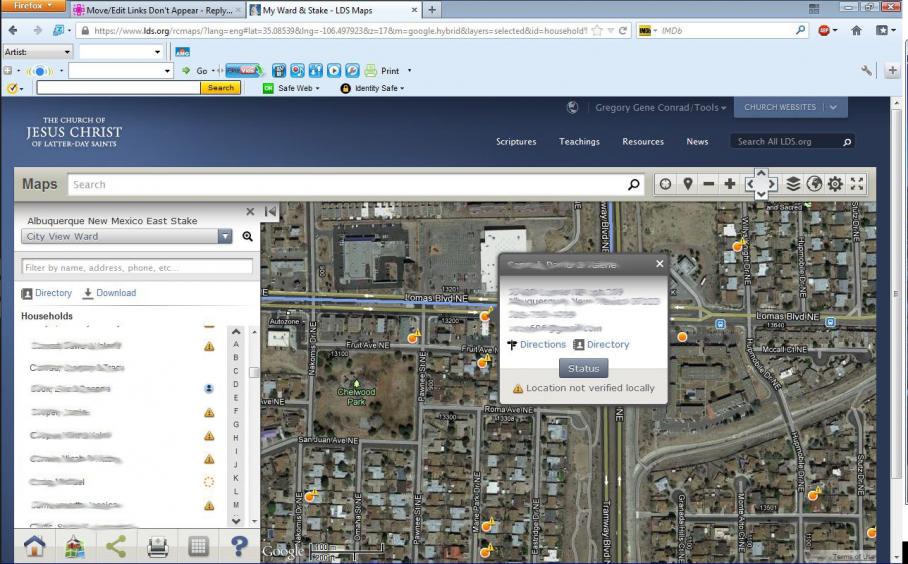
My parents don't have a Status button. My brother has one but when you click on it, it does nothing. The cursor doesn't even change to the hand icon with finger extended like it does for the Directions and Directory links that do function. It does say "Location not verified locally" with the exclamation mark next to it.
Community Moderators
#5
ggconrad wrote:My parents don't have a Status button.
An unmapped household will not have a household location marker (what you refer to as a Status button). In the directory listing in the left pane there will be a Image icon displayed after the household name. If the household is not displayed in the directory listing and there is not a household location marker on the map then the visibility setting for the household is "Private - Leadership Only".
ggconrad wrote:My brother has one but when you click on it, it does nothing. The cursor doesn't even change to the hand icon with finger extended like it does for the Directions and Directory links that do function. It does say "Location not verified locally" with the exclamation mark next to it.
That household location marker indicates the household location has not been verified. What happens when you click on your brother's household name in the directory listing?
JD Lessley
Have you tried finding your answer on the ChurchofJesusChrist.org Help Center or Tech Wiki?
New Member
#6
jdlessley wrote:An unmapped household will not have a household location marker (what you refer to as a Status button). In the directory listing in the left pane there will be a Image icon displayed after the household name. If the household is not displayed in the directory listing and there is not a household location marker on the map then the visibility setting for the household is "Private - Leadership Only".

In the directory listing in the left pane there is no icon. And in the directory application's Edit Visibility Settings, Show on Map has the Stake option selected. (This is also the option selected for every other Visibility Setting in their household account.)
jdlessley wrote:That household location marker indicates the household location has not been verified. What happens when you click on your brother's household name in the directory listing?
Their household information shows the same as when you look at anyone else's. It has his last name, phone number, address, and household photo. And below that is the Head of Household information for both him and his wife (with their individual phone and e-mail addresses). And below that is Other Household Members with their child's name.
New Member
#7
I have run into the same problem. I tested my suspicions by having a ward level administrator verify someone's household after moving it to the correct location and submitting it. After that is done, that households' marker does not show any secondary icon next to it and the household listing has no icon at the end of the line for that listing.

So, I surmise that having no icon and not having the ability for a member to relocated a marker means that someone of ward or stake level authority, whether intentionally or while experimenting with the maps function, has "verified" that household.

I NEED TO FIND A WAY TO OVERRIDE THAT INCORRECT VERIFICATION AND RELIST THAT NAME AND MARKER AS UNVERIFIED so that ward members can move their own icons and get the "member verified" icon next to their name. I need to do this as Ward Emergency Preparedness Specialist to satisfy Stake requirements of printing out maps to everyone's houses.
Community Administrator
#8
krustyart wrote:So, I surmise that having no icon and not having the ability for a member to relocated a marker means that someone of ward or stake level authority, whether intentionally or while experimenting with the maps function, has "verified" that household.

That's correct.
krustyart wrote:I NEED TO FIND A WAY TO OVERRIDE THAT INCORRECT VERIFICATION AND RELIST THAT NAME AND MARKER AS UNVERIFIED so that ward members can move their own icons and get the "member verified" icon next to their name. I need to do this as Ward Emergency Preparedness Specialist to satisfy Stake requirements of printing out maps to everyone's houses.

If I understand you correctly, you want all household markers in the ward to be reset. Is that correct, and if so, why is that a requirement? It seems like it will be a challenge to get a high percentage of members to verify their own marker; most wards have struggles getting even 50% of the members to get an LDS Account, let alone to use that account to do a particular task such as moving a marker. I also doubt how accurate members will be. When I've looked at member-verified locations, I've seen markers in the street and other places that leave ambiguity. You certainly won't have the consistency that could come from a clerk doing the job.

I understand why the stake might require that locations all be verified, but I cannot begin to imagine how making all those locations member-verified could be superior to clerk-verified locations. (Yes, I could see how members could be more accurate for some locations, but for every location in the ward? I don't believe that.)

That said, there is a way to change a household status to "unverified". It's a bit tedious, so I certainly wouldn't recommend that anyone embark on doing this for an entire ward, but if there are a few exceptions where you'd like to do this, it can be done. A clerk or leader just needs to edit the address using the Leader and Clerk Resources tool on LDS.org. That will "unverify" the address (see this post).
Questions that can benefit the larger community should be asked in a public forum, not a private message.
Community Moderators
#9
ggconrad wrote:In the directory listing in the left pane there is no icon. And in the directory application's Edit Visibility Settings, Show on Map has the Stake option selected. (This is also the option selected for every other Visibility Setting in their household account.)
What happens when you click your parent's household name in the directory listing in the left pane of the Maps application? Also, have your parents moved from another ward to their current ward in the past year? The reason I ask these questions is that there is a bug in the Maps application in which a household location marker does not move from a verified location in previous ward. Even though the directory application and MLS show a current address in the new ward the Maps application household location marker is still at the previous address location with a display status of verified. This does not happen for every household when they move. I do not get enough move-ins with this issue for me to evaluate what conditions are common to those households that remain located at their previous ward's location.
ggconrad wrote:
jdlessley wrote:That household location marker indicates the household location has not been verified. What happens when you click on your brother's household name in the directory listing?
Their household information shows the same as when you look at anyone else's.
I am sorry I was not clear. I wanted to know what happens when you click the household name in the directory listing in the left pane of the Maps application page and not what happens in the directory application. You were talking about your brother's household location marker not being responsive to mouse clicks. There are two methods to get the household information box to appear. Clicking the household name in the directory listing in the left pane should cause the map to move to display the household location marker (if not currently displayed) as well as cause the household information box to appear. If clicking the household name in the directory listing on the Maps application page does nothing and clicking the location marker on the map does nothing then there is a problem. What exactly, I am not sure.
JD Lessley
Have you tried finding your answer on the ChurchofJesusChrist.org Help Center or Tech Wiki?
Community Moderators
#10
jdlessley wrote:I NEED TO FIND A WAY TO OVERRIDE THAT INCORRECT VERIFICATION AND RELIST THAT NAME AND MARKER AS UNVERIFIED so that ward members can move their own icons and get the "member verified" icon next to their name. I need to do this as Ward Emergency Preparedness Specialist to satisfy Stake requirements of printing out maps to everyone's houses.
It is the clerk(s) having membership responsibilities in a ward who maintain membership records. It is the responsibility of members to inform those who maintain those records of any errors or changes to their records. The Maps application reflects these responsibilities. Heads of household and their spouses are given the ability to member verify their household location to assist the clerk(s). Until a household location is verified by a clerk responsible for maintaining membership records the location is not considered official.

In my opinion, reverting an verified location to a member verified location is a step backwards. While there may be errors introduced at a levels of the system I find that correcting those errors is more productive than introducing a procedure with more probability for error than the current procedure.
JD Lessley
Have you tried finding your answer on the ChurchofJesusChrist.org Help Center or Tech Wiki?
New Member
#11
jdlessley wrote:If clicking the household name in the directory listing on the Maps application page does nothing and clicking the location marker on the map does nothing then there is a problem. What exactly, I am not sure.

This is exactly the problem that I'm struggling with the most.

In the pop-up, the Directions link works, as does the Directory link. But the Status button doesn't. It produces a text insertion cursor when over the Status button.


And in the directory pane, there is a yellow triangle with an exclamation mark in it sitting to the right of their household name.
Community Moderators
#12
It took me a while to figure out that you are referring to the Status button on the household location information callout (popup). I had previously assumed there was no callout displayed and you were referring to the household location marker.
ggconrad wrote:In the pop-up, the Directions link works, as does the Directory link. But the Status button doesn't. It produces a text insertion cursor when over the Status button.
The mouse pointer changes to the I-beam when over the Status button because the status of the household is what is selected and displayed (default when a callout is first displayed) in the gray area below the Status and Category buttons. If you click the Category button the display in the gray area below the buttons will show any emergency response information, if any has been entered by an administrator. If no information has been entered then the area will be blank. When viewing the Category information clicking the Status button will change the display in the gray area back to the status information for the household.

So the behavior you are experiencing is as programmed.
ggconrad wrote:And in the directory pane, there is a yellow triangle with an exclamation mark in it sitting to the right of their household name.
The status icon in the directory pane is a visual representation of the text information you see in the household location callout box when the Status button is clicked. The yellow triangle with an exclamation mark in the directory pane will also be displayed in the callout box with the text "Location not verified locally".

For those households with no icon in the directory pane you will only see the visibility information in the gray area when the status is displayed. The assumption here is that a verified location needs no explanation. I personally would like to see the text "Location verified locally".
JD Lessley
Have you tried finding your answer on the ChurchofJesusChrist.org Help Center or Tech Wiki?
New Member
#13
jdlessley wrote:The mouse pointer changes to the I-beam when over the Status button because the status of the household is what is selected and displayed (default when a callout is first displayed) in the gray area below the Status and Category buttons. If you click the Category button the display in the gray area below the buttons will show any emergency response information, if any has been entered by an administrator. If no information has been entered then the area will be blank. When viewing the Category information clicking the Status button will change the display in the gray area back to the status information for the household.

There is no Category button. I must not be doing a very good job at describing what I'm looking at, so I attached a screen snapshot picture of what I'm seeing to this message. (I smudged out all personal information: their names, address, phone number, and e-mail, as well as all names in the left directory pane. I left everything else the same.)
Community Moderators
#14
I had to log on using my wife's account to see how things should be displayed for someone who does not have administrator rights. What I am seeing is that if there is no emergency response information for the household then the Category button will not be displayed. I also noted that if a household has been verified (by an administrator) then there will not be a Status button either.

Only those households that have a status other than verified will display the Status button with appropriate status information displayed in the gray information area .

Without any emergency response information for the household the Category button is not available and the Status button has no function. The Status button is only functioning as a title for the information displayed in the gray information area.

If a household has emergency response information and has been verified then only the Category button will be displayed. For this situation the Status button will not be displayed and the Category button will not be functional.

It appears the household information callout is functioning as it should for the situations you described for your parents and for your brother. Your calling as website administrator does not give you move or edit rights for moving households. As such you will not see a Status button when the household location has been verified and you will not see a Category button if there is no emergency response information for the household.
JD Lessley
Have you tried finding your answer on the ChurchofJesusChrist.org Help Center or Tech Wiki?