Webcast to multiple rooms in a building

40 postsstarted by barkeraj 9,110 viewsoriginal topic

Church Employee
#1
I'll soon be doing my first webcast. The building it is going to will have three units in it, and so will be very packed. We would like to have TV's setup in additional rooms (RS, Primary, etc) so we have more space for people.

The building does not have any Video ports (coax, composite) in any rooms.

My question is, what are my options for getting video into these additional rooms? The easiest solution is to have a laptop in each room receiving the broadcast as well, but that will heavily tax the internet connection and reduce the quality for all connections.

I would think that doing a screen sharing option would be good (having only one machine actually receiving the feed) but then what would be a good way to share to multiple machines that would stay on the internal network. I do have two mac laptops and machines, so could do the built in screen sharing. Just wondering if there are better options out there.
Aaron Barker
Front-end Development Lead for LDS.org (content portions, not apps) and Ward Executive Secretary.
Community Moderators
#2
BarkerAJ wrote:My question is, what are my options for getting video into these additional rooms? The easiest solution is to have a laptop in each room receiving the broadcast as well, but that will heavily tax the internet connection and reduce the quality for all connections.

Even if you have enough internet bandwidth, the laptops will not stay in sync. This may be okay if the rooms are individual and separated from each other, visually and aurally. At least until the intermediate hymn.

I wish I had an answer and not just more of the problem. We would like to do the same simply to show the broadcast in both the chapel and the cultural hall at the same time. We can use the chapel laptop to feed building sound for both, but cannot sync up the video. So the chapel stays just fine but the cultural hall video gets interesting.
Senior Member
#3
This is interesting. There is one potential solution, but it is ugly. I assume that the laptop will have VGA out port. What you can purchase is VGA to composite converter. This will allow you to show the screen on a TV. You will also need a plug that will split the sound into two lines. Then you will need to get 2 Composite video and stereo balum. Then you will need to get a Cat5e cable to run from where the laptop is to the room you want to put the first TV in. Then I would say run it into the VCR in and there is the first TV. Then use the video out for the next room. You will have to use the coax cable from the VCR to the TV.

You continue to "daisy" chain this until you get all the rooms done, but if you have the bandwidth at the building, the multiple laptops would be good. One other thing that you can look at using, if possible, is personal video conferencing. It doesn't use as much bandwidth and it works just fine.
Community Administrator
#4
harddrive wrote:Then I would say run it into the VCR in and there is the first TV. Then use the video out for the next room. You will have to use the coax cable from the VCR to the TV.
If it's a TV that's fine. But all the projectors I've seen can't accept a RF input. You'd have to use the video out for the projector and send the RF to the next room.


harddrive wrote:You continue to "daisy" chain this until you get all the rooms done, but if you have the bandwidth at the building, the multiple laptops would be good.

Only if the associated screens are out of sight of each other (such as separate rooms), as they will not likely be in sync. Especially toward the end of the broadcast.
Have you searched the Help Center? Try doing a Google search and adding "site:churchofjesuschrist.org/help" to the search criteria.

So we can better help you, please edit your Profile to include your general location.
Church Employee
#5
As of now it would be going to TV's as I don't know where I'd get more projectors and screens. I would likely need to get some VGA to composite adapters or something. They would be in different rooms, so out of sight of each other.
Aaron Barker
Front-end Development Lead for LDS.org (content portions, not apps) and Ward Executive Secretary.
Senior Member
#6
I'm not sure the situation you are in, but if this will be an ongoing requirement, think about the long haul. Invest some money for an item that might take VGA input or a computer with an RCA output --> engage FMG to make some kind of permanent or semi-permanent (hide in a drop down ceiling until needed, etc...) cabling installs to the different rooms. You'll probably need some cable amplifiers that are powered as well. If your building has an attic it might not be that hard to get done in a short time frame. I just think trying to manage multiple web feeds would be harder than a single feed that is distributed through the building.
“A long habit of not thinking a thing wrong, gives it a superficial appearance of being right, and raises at first a formidable outcry in defense of custom.”
― Thomas Paine, Common Sense
Church Employee
#7
This is a 6-7 yr old building in Utah County. We missed all the fancy AV upgrades by a year. Our High Councilor over FM has talked with the FM group and they have stated they aren't able (or allowed, or won't... not positive which) to drop AV stuff into those rooms. Not sure of the reasons, I was just told it wasn't happening so am looking to figure out something else.

Yes it will be an ongoing requirement as our stake is too big to fit in our stake center
I just think trying to manage multiple web feeds would be harder than a single feed that is distributed through the building.
I wholeheartedly agree. Not looking forward to it.
Aaron Barker
Front-end Development Lead for LDS.org (content portions, not apps) and Ward Executive Secretary.

Senior Member
#8
BarkerAJ wrote:As of now it would be going to TV's as I don't know where I'd get more projectors and screens. I would likely need to get some VGA to composite adapters or something. They would be in different rooms, so out of sight of each other.

The VGA to Composite Adapters that you gave here won't work. I have tried it. The signaling is different. You need to get what I showed you for it to work correctly. Don't waste time or money on this because it doesn't work.
Senior Member
#9
BarkerAJ wrote:This is a 6-7 yr old building in Utah County. We missed all the fancy AV upgrades by a year. Our High Councilor over FM has talked with the FM group and they have stated they aren't able (or allowed, or won't... not positive which) to drop AV stuff into those rooms. Not sure of the reasons, I was just told it wasn't happening so am looking to figure out something else.
Hearing this is a large disappointment, though it echos my own experiences.
“A long habit of not thinking a thing wrong, gives it a superficial appearance of being right, and raises at first a formidable outcry in defense of custom.”
― Thomas Paine, Common Sense
Church Employee
#10
harddrive wrote:The VGA to Composite Adapters that you gave here won't work. I have tried it. The signaling is different. You need to get what I showed you for it to work correctly. Don't waste time or money on this because it doesn't work.

Can you be more specific? You said VGA to Composite Converter in your previous post so figured Adapter was along the same lines. Does it need to be more something along these lines?
Aaron Barker
Front-end Development Lead for LDS.org (content portions, not apps) and Ward Executive Secretary.
Church Employee
#11
I'm a little hesitant to post this, because (and this is a key disclaimer) we have not officially tested and verified this product, so it is not an "official" solution from our team.

However, it is made by the same company who manufactures the Meetinghouse Webcast Communicator, and I know there are a few STS's who found out about this product and have installed it.

Basically, it allows you to split and extend a VGA + audio signal over cat 5 or cat 6 cables to multiple locations in the building. So your cable runs will be easy and inexpensive, and allow you to have multiple viewing locations with only a single incoming stream.

http://iocorp.com/vga-over-cat5-or-6.html

I do plan to get one of these units in-house over the next few months and do some testing of our own.

Kurt
Kurt Olsen - Product Manager at Church HQ for Digital Presentation (Personal Video Conferencing, Meetinghouse Webcast, Conference Rooms, Video Conference Endpoints, Meetinghouse Digital Content)
Senior Member
#12
Kurt!!! This company does HDMI over Cat 5/6 also.... that is wonderful... need to start thinking about that in meetinghouses... VGA is now standard at pulpits, and interestingly the 7 projectors I got with my new building all have HDMI capabilities.
“A long habit of not thinking a thing wrong, gives it a superficial appearance of being right, and raises at first a formidable outcry in defense of custom.”
― Thomas Paine, Common Sense
Member
#13
We tried several VGA to Composite converters and settled on the "StarTech VGA2VID" unit. It had the best picture quality of the units we tested.

Getting the signal to various unwired rooms is not too difficult if the rooms have windows. Just temporarily run RG6 coax along the outside of the bldg. At each window, insert a 2-way splitter with a short coax through the window to the TV. Run the coax to the chapel (pulpit area) and connect it to a Radio Shack VHF CH3/4 RF Modulator (or VCR output). Connect the Modulator's audio input to the laptop, and the video input to the StarTech. If the picture at the TV is noisy, insert an RF amplifier on the coax line.
Community Administrator
#14
BarkerAJ wrote:Can you be more specific? You said VGA to Composite Converter in your previous post so figured Adapter was along the same lines. Does it need to be more something along these lines?
From the link given:
"Your video card MUST be able to support s-Video or Composite out through it's VGA port. This is known as a TV out function. If you don't know if your video card can do this, then call the card manufacturer and ask them "Does my video card support S-Video or Composite Video out through its VGA port?" If it does, then buy this adapter. If not, then use Product # 4724 http://www.monoprice.com/products/searc ... yword=4724"
Considering the adapter is less than $2, it's only wires.

As for the link you gave, I think it's going to the wrong direction.
Have you searched the Help Center? Try doing a Google search and adding "site:churchofjesuschrist.org/help" to the search criteria.

So we can better help you, please edit your Profile to include your general location.
Community Administrator
#15
JohnShaw wrote:VGA is now standard at pulpits, and interestingly the 7 projectors I got with my new building all have HDMI capabilities.

Lucky! I don't have either of those.
Have you searched the Help Center? Try doing a Google search and adding "site:churchofjesuschrist.org/help" to the search criteria.

So we can better help you, please edit your Profile to include your general location.
Church Employee
#16
JohnShaw wrote:the 7 projectors I got with my new building all have HDMI capabilities.

You got 7 projectors with your new building? Are they just skipping the TV's now?
Aaron Barker
Front-end Development Lead for LDS.org (content portions, not apps) and Ward Executive Secretary.
Church Employee
#17
JohnShaw wrote:Kurt!!! This company does HDMI over Cat 5/6 also.... that is wonderful... need to start thinking about that in meetinghouses...
HDMI over cat 6 definitely holds some promise. However, I can tell you that it's problematic at times. We deal with it quite a bit in the conference rooms that we build here at Church HQ. All products are definitely not created equal. The Gefen HDMI extenders we've tried were definitely not reliable.

That's why I want to test this IO Corp VGA extender and make sure it carries the signal properly without loss or degradation.
Kurt Olsen - Product Manager at Church HQ for Digital Presentation (Personal Video Conferencing, Meetinghouse Webcast, Conference Rooms, Video Conference Endpoints, Meetinghouse Digital Content)
Senior Member
#18
Smart TV's (vga, hdmi, rca)
1 32 In. LCD TV
3 20 In LCD TV/DVD

2 Projectors for Viewing broadcasts (chapel and cultural hall)
1 Projector for Wards to share
4 Projectors for Seminary (1 per room designated by SP as a seminary room - these rooms also got pull-down screens and double chalk boards)

HD Camera for the Building
PTZ Camera mounted in the Chapel
Tech closet with all the tech coming to a centralized point, correct line level in for the webcaster, etc...
“A long habit of not thinking a thing wrong, gives it a superficial appearance of being right, and raises at first a formidable outcry in defense of custom.”
― Thomas Paine, Common Sense
Church Employee
#19
JohnShaw wrote:4 Projectors for Seminary (1 per room designated by SP as a seminary room - these rooms also got pull-down screens and double chalk boards)
Ahh, there's the key difference
Aaron Barker
Front-end Development Lead for LDS.org (content portions, not apps) and Ward Executive Secretary.
Church Employee
#20
OK, here's my current (crazy) line of thinking. Let me know what I am missing.

1 - Laptop in chapel gets video stream via network cable plugged into port at podium. Only one use of the internet to retain quality.
2 - Output VGA to Composite using this converter, that we already have for doing quick and dirty hymn text to projectors.
3 - Use a couple of Composite splitters to give me 4 feeds (one for chapel, 3 for other rooms). Would love a better option for splitting here, but haven't found one.
4 - Use these Composite to CAT5 Baluns to send 3 of them to other rooms.
5 - Connect cat5 to each of the balun and run them to the 3 clerk offices off of the chapel, since they are already wired into the building network.
6 - At the central hub for all the networking, use a short network cable to go from the clerk office to the desired room. I know the AV signal can't go through a network hub/switch, but I'm hoping they can make the jump at a dumb port. Else this whole crazy idea is dead in the water and I just have to run mega long cables down the hallway or outside and through the windows.
7 - Network cable from the wall to another balun at the TV
8 - Balun into TV
9 - Hope the video got here quick, since I'd like to use the church speakers for the audio. Otherwise I'll need to send audio too, which jumps the units up to the $45/each range and I have to use tiny tv speakers or get multiple crabs to go into mic ports for room speakers.
(yes there may be some male vs female issues in here, will rectify at purchase time)

Yes, that is a lot of hoops to jump through, but at the moment it seems the best bet in the cost versus quality department.

I have tested the mac screen sharing in my home, and the picture drops in quality a good chunk and does't stay in sync. I contacted iogear and they are many hundreds of dollars (not sure they want prices listed, else they would put them on their site, PM me if you want to know), so that's pretty pricey. A quick sumation of the above parts (network cables, adapters, 6 baluns, etc) comes to around $150 (or $300 for audio supporting balluns).

Thoughts?
Aaron Barker
Front-end Development Lead for LDS.org (content portions, not apps) and Ward Executive Secretary.
Community Administrator
#21
BarkerAJ wrote:Use a couple of Composite splitters to give me 4 feeds (one for chapel, 3 for other rooms).

That's not going to work. You can't split a video feed. Not without messing up the quality. You'll need a distribution amp. Something like this.

BarkerAJ wrote:Hope the video got here quick, since I'd like to use the church speakers for the audio. Otherwise I'll need to send audio too, which jumps the units up to the $45/each range and I have to use tiny tv speakers or get multiple crabs to go into mic ports for room speakers.
Not sure as I understand the issue. There's no delay in the composite video system. (But there may be one in the TV.) I assume you'll be taking the audio off the laptop and feeding the main chapel. Hopefully that will feed the other rooms as well through the existing sound system. But you should be able to test that now and not wait for your order to arrive. Just have your laptop play some music, feed it into the chapel and see if you can get it everywhere.

You can probably test for TV delay by connecting a video feed to the TV composite and sending the audio direct to a speaker. See if it's in sync.

If you do need to distribute the audio, then you'll probably want a amp like the one I linked to that can do the audio as well.
Have you searched the Help Center? Try doing a Google search and adding "site:churchofjesuschrist.org/help" to the search criteria.

So we can better help you, please edit your Profile to include your general location.
Community Moderators
#22
BarkerAJ wrote:5 - Connect cat5 to each of the balun and run them to the 3 clerk offices off of the chapel, since they are already wired into the building network.
6 - At the central hub for all the networking, use a short network cable to go from the clerk office to the desired room. I know the AV signal can't go through a network hub/switch, but I'm hoping they can make the jump at a dumb port. Else this whole crazy idea is dead in the water and I just have to run mega long cables down the hallway or outside and through the windows.
As you mentioned, you REALLY have to know your network topology to pull this off. For example, I happen to know one of our buildings has a network switch in the overhead that connects to several clerk's offices.
So we can better help you, please edit your Profile to include your general location.
#23
I strongly recommend NOT using RCA splitters for additional video feeds. The proper way to get more video feeds is by using a video distribution amplifier.

Another way to feed audio to additinal locations in the building can be accomplished by using the hearing impared receivers and connect them to an amp
and speakers.
Community Administrator
#24
michaelfish wrote:Another way to feed audio to additinal locations in the building can be accomplished by using the hearing impared receivers and connect them to an amp
and speakers.

As long as you are sure it's reliable. I've been plagued by a flaky transmitter in the past.
Have you searched the Help Center? Try doing a Google search and adding "site:churchofjesuschrist.org/help" to the search criteria.

So we can better help you, please edit your Profile to include your general location.
Church Employee
#25
Thanks for the tips on the distribution amplifier. Not knowing the proper terminology makes it difficult to search for proper tools. Will add that to the list
Aaron Barker
Front-end Development Lead for LDS.org (content portions, not apps) and Ward Executive Secretary.
Church Employee
#26
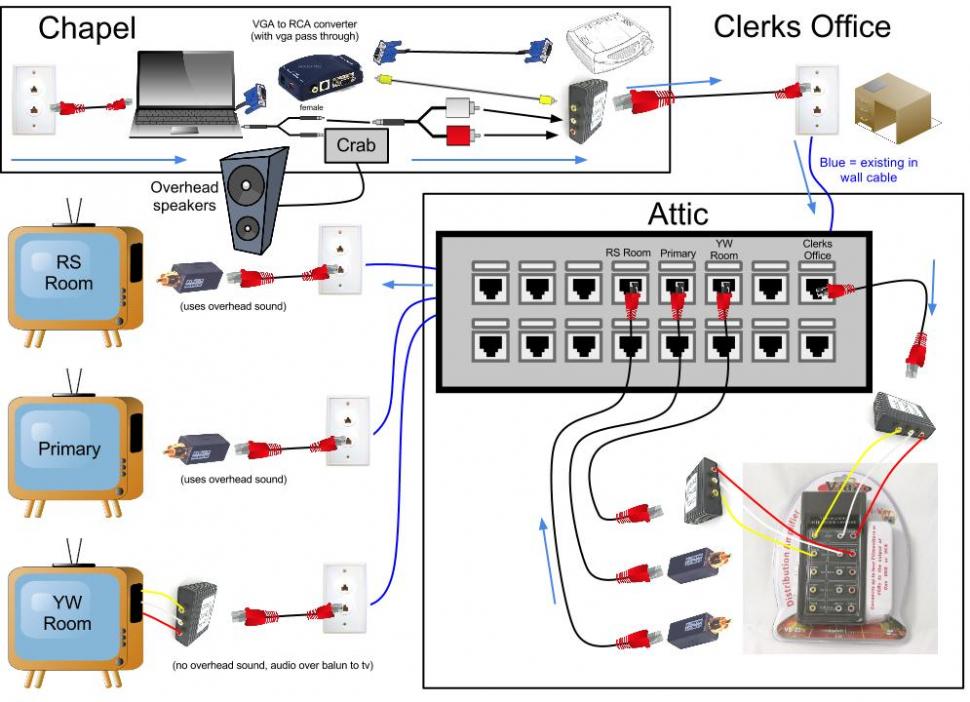
We did a full test of my crazy configuration tonight. It all worked great. Got the needed AV to the RS, YW and Primary rooms.

Here is a "schematic" of how everything is setup. I made this to make sure I thought through everything I needed, ordered the right stuff, and received it as well.

Hopefully it is of help to anyone else that needs to do something along these lines. I can come up with the specific items I ordered on Amazon if someone specifically wants it.

Here is the google drawing I made this on. https://docs.google.com/drawings/d/1US6 ... a2OhQ/edit
Video to non-AV rooms.jpg
(95.14 KiB) Downloaded 110 times
Aaron Barker
Front-end Development Lead for LDS.org (content portions, not apps) and Ward Executive Secretary.
#27
Great diagram and very logical to me. Since you are using CAT5 for distribution, you will be able to use the cables for other types of distribution.

One thing to check for...when I connect the VGA signal from the laptop to the scan converter, and from the scan converter to the projector, I loose quality on the projected image.

I found the solution to this was to connect the projector directly up to the laptop (VGA) and use the VGA output port on the projector to feed the signal to the scan converter.
Church Employee
#28
michaelfish wrote: I found the solution to this was to connect the projector directly up to the laptop (VGA) and use the VGA output port on the projector to feed the signal to the scan converter.

Good tip. I'll have to give that a try. Thanks!
Aaron Barker
Front-end Development Lead for LDS.org (content portions, not apps) and Ward Executive Secretary.
Member
#29
BarkerAJ wrote: Hopefully it is of help to anyone else that needs to do something along these lines. I can come up with the specific items I ordered on Amazon if someone specifically wants it.

Here is the google drawing I made this on. https://docs.google.com/drawings/d/1US6 ... a2OhQ/edit
I'm in this EXACT situation for an important broadcast this month. Can you send me the list of things you bought on Amazon? Also, what is a "CRAB" and where can I buy one?

Thanks~!
Community Administrator
#30
nathangg wrote:Also, what is a "CRAB" and where can I buy one?

"Crab" is the common term for the EJ-10 or EJ-8 Multi-Input Adapter. As far as I know, each building should have one. They are supplied by the FM Group.
Questions that can benefit the larger community should be asked in a public forum, not a private message.
Member
#31
aebrown wrote:"Crab" is the common term for the EJ-10 or EJ-8 Multi-Input Adapter. As far as I know, each building should have one. They are supplied by the FM Group.

Ah yes... unfortunately the one in our building has gone missing. Hmmm... I hate having to borrow one (that is probably why ours is missing... it is still being "borrowed")... but we may have to given the short amount of time we have to put things together.

THANK YOU!
Church Employee
#32
I'll try to get a list together. May take a while as Amazon broke my two big orders into multiple orders and they don't have an easy way of just sharing them. I'm guessing the cables are pretty obvious, so I'll focus on the other stuff.
Aaron Barker
Front-end Development Lead for LDS.org (content portions, not apps) and Ward Executive Secretary.
#33

Ah yes... unfortunately the one in our building has gone missing. Hmmm...
If you cannot locate a Crab to borrow, you may want to purchase an Audio Direct Box like this one from Pyle (link). I have never had success using the Crab boxes because they attenuate audio to the point that the gain of the building's microphone input must be turned up all the way (which only our FM group can change).

These direct boxes are sold under a variety of brands and have 2>1/4 inch phone style line level inputs (paralleled) and a balanced XLR microphone level output. There is also a 3 position attenuation switch allowing 0, 20 and 40 db of attenuation so it is easy to match various levels of outputs from different devices.

We use the Audio Direct Box any time we need to plug a headphone level output (laptop, iPod, boombox, cell phone, etc.) in to the building audio system through a microphone jack.

At only $15, we purchased one for each of our buildings and they've worked out GREAT, the crab now just sits in the closet. Note: you will probably need a couple of RCA to 1/4 inch adapters (link).
Community Administrator
#34
michaelfish wrote:I have never had success using the Crab boxes because they attenuate audio to the point that the gain of the building's microphone input must be turned up all the way (which only our FM group can change).

The EJ-10 can be like that, but I find the EJ-8 works just fine.
Have you searched the Help Center? Try doing a Google search and adding "site:churchofjesuschrist.org/help" to the search criteria.

So we can better help you, please edit your Profile to include your general location.
Member
#35
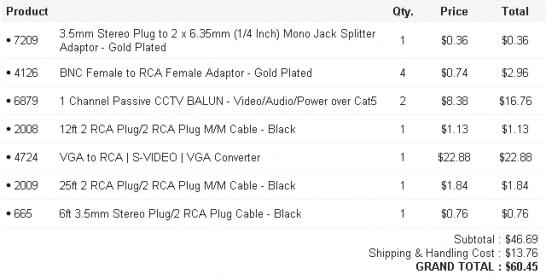
I'm so excited to get this working I ended up spending $75 last night for everything I needed. Here's my shopping List:

monoprice.jpg
monoprice.jpg (26.15 KiB) Viewed 2400 times
7209 3.5mm Stereo Plug to 2 x 6.35mm (1/4 Inch) Mono Jack Splitter Adaptor
4126 BNC Female to RCA Female Adaptor - Gold Plated
6879 1 Channel Passive CCTV BALUN - Video/Audio/Power over Cat5
2008 2 RCA Plug/2 RCA Plug M/M Cable - Black
4724 VGA to RCA | S-VIDEO | VGA Converter
2009 25ft 2 RCA Plug/2 RCA Plug M/M Cable - Black
665 6ft 3.5mm Stereo Plug/2 RCA Plug Cable - Black


I also bought a Radio Shack 15-1172 4 Way Distribution Amplifier for $15 on ebay, AND I already have a big spool of ethernet cable, so we'll see how this goes ($75 doesn't seem so bad).

One thing to note that makes my shopping list cheaper is the Baluns. These audio/video ones on monoprice were $9 for a pair (so about $4.50 each). I'll let everyone know if they work :-)
Member
#36
michaelfish wrote:If you cannot locate a Crab to borrow, you may want to purchase an Audio Direct Box like this one from Pyle (link
Is the PYLE PDC21 okay for this? Or did you buy the bigger PDC22?
#37
The Pyle PDC21 is what we use.
#38
This is the one we got from the local Radio Shack, and it worked pretty well. We split the signal at the chapel projector, and ran a composite line to the cultural hall and split it there. It worked perfect. I guess in theory you could split it yet again for the RS and Primary rooms, but it would require significant testing and creative cable hiding methods.
Member
#39
I thought I'd chime in and go over what we have done in our Stake Center. Like some others have mentioned in this thread, we are doing HDMI over cat-6. We are using converters from Kanex. It takes in a single HDMI signal, and splits it to 4 ethernet runs. In our building, we feed output from our video switcher to an HDMI splitter, which feeds two of these Kanex transmitters, and the webcast box. In the building, we have run cat-6 to a number of overflow locations, including 1 to the pulpit (more on this in a minute), one at the back of the chapel (feeds to a projector in the center of the cultural hall), 2 to the cultural hall (for projectors on the sides of the cultural hall), the Relief Society Room, Primary room, and another overflow location. The run to the pulpit is fed to a smaller tv (22 inch) that shows the Stake Presidency what is being broadcast. The Kanex hardware works great, even exceeds their specifications. We have a number of runs close to 200 ft, and the video signal is clear and solid. We ran all of our cables (both for these runs, and our camera signal/control) through the crawlspace under the building.

We use the building PA for audio, which I may amend later. Part of the problem is an audio shift that occurs. We feed our camera outputs into a computer with a software video switch. Because of this, the video lags behind the building PA. While not a big deal, it was a bit distracting for those observing in the overflow locations and on the projectors in the cultural hall.

http://www.ramelectronics.net/product.aspx?zpid=1987 - This is the Kanex product we are using. It says distances up to 100 ft, but we are pushing 200 ft with ours and have no issues.
#40

Proper use of Splitter and Taps


Getting the signal to various unwired rooms is not too difficult if the rooms have windows. Just temporarily run RG6 coax along the outside of the bldg. At each window, insert a 2-way splitter with a short coax through the window to the TV. Run the coax to the chapel (pulpit area) and connect it to a Radio Shack VHF CH3/4 RF Modulator (or VCR output). Connect the Modulator's audio input to the laptop, and the video input to the StarTech. If the picture at the TV is noisy, insert an RF amplifier on the coax line.
The signal is noisy (needing an RF amplifier) because a SPLITTER was used instead of a TAP.

The first splitter puts 1/2 signal on each line (a 4-way splitter outputs only 1/4 signal). The next splitter takes the 1/2 signal and splits it again, yielding 1/4 of the original signal and so on down the line. So if you used four 2-way splitters, daisy-chained down the line, the last leg would only have 1/8th of the original signal (even less because of line loss).

The proper way to distribute RF signals in a daisy-chain configuration is to use TAPs. A 7-db tap will allow a typical RF Distribution Amplifier to have 4-6 equally balanced outputs over 300' of RG-6U cable.