Edit Reservation Navigation

12 postsstarted by dshep2020 1,832 viewsoriginal topic

Member
#1
Calendar acting very odd tonight (8/14). Slow navigating, very slow updates. Got a "not available" at one point.

Waited for a bit and it seemed ok but having an issue updating a reservation.

Went to update an pre-existing reservation series. Clicked on entry and clicked on "Edit". Full details appeared but there is no navigation back to the reservation calendar. I updated the details. Click on "Update Reservation" and it appears to save. Because there is no navigation, I have to go back to the main calendar and back into reservation. The update didn't save.

Is this a bug or is there some issue with the calendar?
Community Moderators
#2
dshepher wrote:Calendar acting very odd tonight (8/14). Slow navigating, very slow updates. Got a "not available" at one point. . . .

Is this a bug or is there some issue with the calendar?
I have not been able to get into the calendar this evening. They also had unanticipated problems on Sunday. I suspect it is not a good time to pray for more patience.
Community Moderators
#3
I have not been able to get into the Calendar for over two hours.
JD Lessley
Have you tried finding your answer on the ChurchofJesusChrist.org Help Center or Tech Wiki?
Community Administrator
#4
Seems to be working for me.
Have you searched the Help Center? Try doing a Google search and adding "site:churchofjesuschrist.org/help" to the search criteria.

So we can better help you, please edit your Profile to include your general location.
Community Moderators
#5
It is working now for me but slow to load.
JD Lessley
Have you tried finding your answer on the ChurchofJesusChrist.org Help Center or Tech Wiki?
Community Moderators
#6
jdlessley wrote:It is working now for me but slow to load.
Same here. It's taking anywhere from 15 to 60 seconds to finish loading the page.
So we can better help you, please edit your Profile to include your general location.
Member
#7
Can any confirm that they don't see the navigation button to return back to the reservation calendar view after editing reservation details?
Church Employee
#8
We had an outage last night so we appreciate your patience as we work through the issues and find solutions. Thank you.
QA Engineer
Member
#9
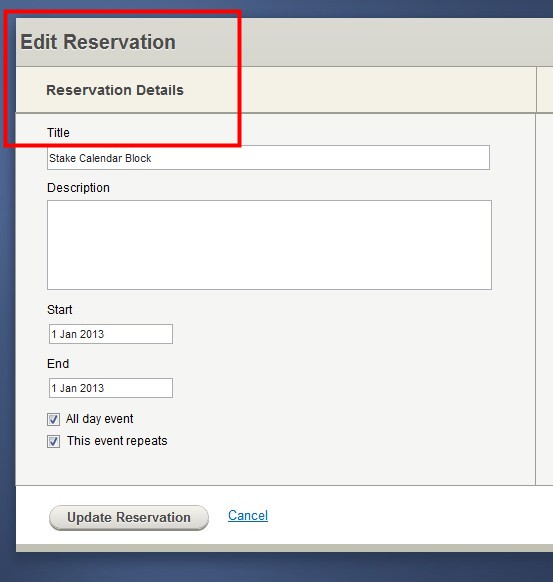
I can understand the outage, but is that contributing to the missing navigation when editing a reservation detail? Here is the item in question.
ScreenHunter_049.jpg
ScreenHunter_049.jpg (28.7 KiB) Viewed 1151 times
Community Administrator
#10
dshepher wrote:I can understand the outage, but is that contributing to the missing navigation when editing a reservation detail? Here is the item in question.

I don't see anything missing. Are you thinking there should be a "<Calendar" button, as there is with Settings screens? There is no such button for either the "Edit Reservation" or "Edit Event" screens. If you want to save your changes, click the "Update Reservation" button; if you want to discard your changes, click the "Cancel" link. Either option will return you to the page you were just on.

On your original post in this thread, you said that you clicked "Update Reservation" and nothing happened. I'm guessing that was because of the sluggishness of the site. But if it had been working properly (and it seems to be working properly now), clicking the "Update Reservation" button will both save your changes AND return you to the previous page. There's no need for any other navigation button (but I can understand why you might think one was necessary if the system was unresponsive yesterday).
Questions that can benefit the larger community should be asked in a public forum, not a private message.
Member
#11
Thanks for setting me straight. After changing reservation details and clicking "Update Reservation" it doesn't kick me back to the calendar view. I guess that is why the changes are not updating.

Looks like the calendar is again running slow. I guess I will sit tight and hope that they get the issues resolved.
Member
#12
I was able to edit my reservations finally. I think there were several things fighting me:
1) The calendar availability issues
2) An odd behaving reoccurring reservation
3) the lack of conflict notifications when setting up reservation

Had to delete and recreate one reservation to get it to stick. Not sure why. I had another that had a conflict on a reoccurrence, but just wouldn't update. No feedback on what was causing the issue. Had to hunt it down and work around it.
