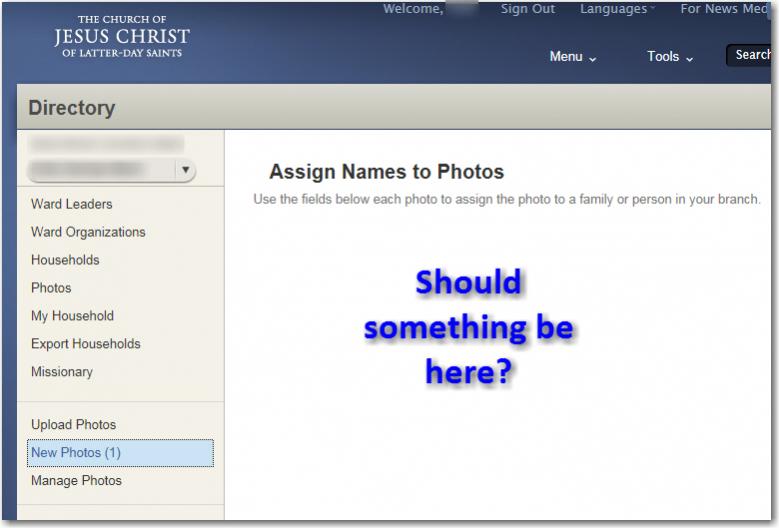
New Photos (1) - but no photo to approve

5 postsstarted by sasgrw 1,228 viewsoriginal topic

Member
#1
I had several photos to approve the other week and took care of that but after approving them all, "New Photos (1)" still appears, as if there is still one more picture to approve but nothing shows up to approve.
lds.jpg
(39.83 KiB) Downloaded 23 times
Image
Senior Member
#2
I had that problem last year once. In my case, I could see different icon for our Bishop's picture which indicated a broken link. I could only see it by scrolling through the Ward Photo List, it was not visible in the area of your screenshot. Something did not go well when he tried to upload his photo. After talking with him, I deleted it and he tried again - worked the 2nd time.
Member
#3
davesudweeks wrote:I had that problem last year once. In my case, I could see different icon for our Bishop's picture which indicated a broken link. I could only see it by scrolling through the Ward Photo List, it was not visible in the area of your screenshot. Something did not go well when he tried to upload his photo. After talking with him, I deleted it and he tried again - worked the 2nd time.

I'm not sure I follow. You had the same problem, seeing a note that one photo was to be approved but no photos showed up, as in my screen shot above? It sounds like you had a broken link issue and could see something. For me, I know no idea if there really is a photo to approve (because nothing shows up) or if an upload failed or if there's a broken link.

BTW, we have a Sudweeks family in our ward. Probably not related but kind of neat to see.
Member
#4
I have a similar problem. Whatever the amount of photos there are to approve, the number is always +2 of what it should be. When the queue is clear, there's nothing there. I can't see any broken links either.
Senior Member
#5
sasgrw wrote:I'm not sure I follow. You had the same problem, seeing a note that one photo was to be approved but no photos showed up, as in my screen shot above? It sounds like you had a broken link issue and could see something. For me, I know no idea if there really is a photo to approve (because nothing shows up) or if an upload failed or if there's a broken link.

BTW, we have a Sudweeks family in our ward. Probably not related but kind of neat to see.

Yes. Nothing showed in the "New Photos" screen. When I looked at the "Manage Photos" screen, the Bishop's photo looked like a broken photo link (empty box with a red X in the center). I hadn't known he had tried to upload a pic so queried him, then had him delete his photo and try again. It worked the second time.

For your BTW, I am probably related to all the Sudweeks families, though some are distant. My line used to be Sedgwex back in England many, many years ago.