Suggestion: Show Home Ward in Stake Information -- Search Stake Membership

23 postsstarted by veehb 6,170 viewsoriginal topic

Member
#1
As a stake executive secretary, I'm often asked to contact members of the stake and am only given a name and do not know which ward in which they reside. I go to LDS.org and to "Stake Information" and select "Search Stake Membership". When given a name in the stake (even a last name works) it brings up a listing of those in the stake with that name and you can click on the name and go to their family listing. But, it does not tell you which ward they are in.

Could the ward name be added to either the list of names returned in "Search Stake Membership" or in the family or individual record itself. That information is found in the membership listings in MLS. It would be helpful to see it also in LDS.org.

I find LDS.org to be more and more useful as you add features and as I learn how to use it.

Thanks,

Vee
Bennion Utah East Stake

Community Administrator
#2
veehb wrote:... it brings up a listing of those in the stake with that name and you can click on the name and go to their family listing. But, it does not tell you which ward they are in.

I agree that this would be a very helpful addition.

One workaround in the meantime: you can click on the "Show on Map" link in the household profile. That will popup a box that contains a link titled "Display in Ward Map". That link "should" take you to that member's ward.

I said "should" because it appears there is a bug in that link. It contains the unit number of the member's ward, but somehow in the recent change to the mapping client, the parameters were not properly adjusted. See the thread "Display on Ward Map" link doesn't work properly for that particular issue.
Questions that can benefit the larger community should be asked in a public forum, not a private message.
Member
#3
Another possible way to get the number is to use LDS Tools on you smart phone or pad. Select the Stake and you have everyone.
Member
#4
Yes, this works. LDS Tools will tell you the ward when searching members in the stake. But at home I much prefer using LDS.org. Hope this can be added here also.

By the way, I tried the suggestion above to go to the Ward Map and as described in the link it takes me to my home ward, not very useful.

Hope someone can spend some time on this and get the links working right. And will add the members ward to the membership information display. It would be most helpful.

Thanks,
Veehb
Senior Member
#5
When you use leader.lds.org member lookup and search for the name, clicking on the name gets you the phone number and unit. That might work with about the same amount of steps. When working online, and while I have access, I prefer that site as my 'dashboard'
“A long habit of not thinking a thing wrong, gives it a superficial appearance of being right, and raises at first a formidable outcry in defense of custom.”
― Thomas Paine, Common Sense
Community Administrator
#6
The use of LDS Tools or Leader Resources are certainly helpful suggestions, but they don't apply to every member. And yet there are clearly cases where a person who is not a leader/clerk or who does not have a mobile device would like to find out which ward a member of their stake lives in. For such people, the Directory on LDS.org is the only online option. The name of the ward is very easily accessible for the part of the application that is displaying a household. It's simply a matter of a little bit of UI redesign to display that piece of information.
Questions that can benefit the larger community should be asked in a public forum, not a private message.
Member
#7
JohnShaw wrote:When you use leader.lds.org member lookup and search for the name, clicking on the name gets you the phone number and unit. That might work with about the same amount of steps. When working online, and while I have access, I prefer that site as my 'dashboard'

Yes, this works and it does give the phone number and unit name. But if I want the address or members of the household, I still need to go back to the directory to see it.

I posted this is late May. I'd hoped to see this simple change implemented by now (Mid July). Guess even simple changes take a long time to implement.
Community Administrator
#8
I don't see any evidence that the developers have seen this suggestion.

Such a change would likely come when the next version of the directory is rolled out.
Have you searched the Help Center? Try doing a Google search and adding "site:churchofjesuschrist.org/help" to the search criteria.

So we can better help you, please edit your Profile to include your general location.
Member
#9
How do you call the suggestion to their attention? Don't they monitor this forum?
Community Administrator
#10
veehb wrote:How do you call the suggestion to their attention? Don't they monitor this forum?

To some extent, yes. But I noticed no posts by any of them. They may have simply missed it.

The official method is to use the feedback link on the main lds.org website.
Have you searched the Help Center? Try doing a Google search and adding "site:churchofjesuschrist.org/help" to the search criteria.

So we can better help you, please edit your Profile to include your general location.
Member
#11
Thank you. I have posted my suggestion there. I'd like to see the unit name appear in the LDS.org Directory simalarly as it does on the LDSTools app. From now on I'll be using the member search function under Leadership and Clerk functions.
Member
#12
JohnShaw wrote:When you use leader.lds.org member lookup and search for the name, clicking on the name gets you the phone number and unit. That might work with about the same amount of steps. When working online, and while I have access, I prefer that site as my 'dashboard'

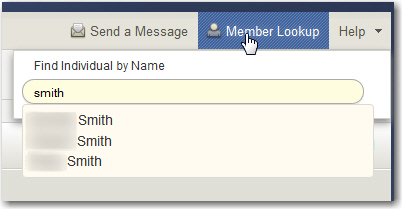
If I try 'member lookup', it only finds people in my ward. Is there a way to do a stake search? It sounds like that's what you're doing.

In the screen shot below, I typed 'smith' and it's only showing 3 people (all in my ward - first names blurred) instead of the 20 or so in the stake.
smith.jpg
smith.jpg (43.71 KiB) Viewed 1893 times
Member
#13
It could be that your privileges are restricted because you have a ward calling (your profile says you are a ward clerk) and not a stake calling. I'm guessing here and need to test my theory. I am a stake executive secretary and maybe that lets me do member searches throughout the stake. My wife is a ward relief society president. I'll test this theory by having her log on and try to find someone in another ward.

I just found that when in Directory and doing a Stake Information search it will return the household information for the person being searched. If you select the option to "Show on Map" it brings up a map showing their home. Further select "Display on Ward Map" and it brings up another map with ward boundaries and a window with the name of the ward and directory listing for that ward. So, this does work. But it seems like a simple thing for the developers to add the unit name to the household information, like is done on the LDSTools app.
Member
#14
It could be that your privileges are restricted because you have a ward calling (your profile says you are a ward clerk) and not a stake calling. I'm guessing here and need to test my theory. I am a stake executive secretary and maybe that lets me do member searches throughout the stake. My wife is a ward relief society president. I'll test this theory by having her log on and try to find someone in another ward.

I just found that when in Directory and doing a Stake Information search it will return the household information for the person being searched. If you select the option to "Show on Map" it brings up a map showing their home. Further select "Display on Ward Map" and it brings up another map with ward boundaries and a window with the name of the ward and directory listing for that ward. So, this does work. But it seems like a simple thing for the developers to add the unit name to the household information, like is done on the LDSTools app.
Member
#15
veehb wrote:It could be that your privileges are restricted because you have a ward calling (your profile says you are a ward clerk) and not a stake calling.
Yeah, that's probably it.
veehb wrote:I just found that when in Directory and doing a Stake Information search it will return the household information for the person being searched. If you select the option to "Show on Map" it brings up a map showing their home. Further select "Display on Ward Map" and it brings up another map with ward boundaries and a window with the name of the ward and directory listing for that ward. So, this does work. But it seems like a simple thing for the developers to add the unit name to the household information, like is done on the LDSTools app.

I've been doing that for a while but just now got tired of it enough to finally search the forum to see if anyone else had posted about it.

I also submitted feedback via lds.org. The more feedback they get about a requested feature, hopefully the more likely it'll be considered.

The old stake website used to return the ward of the individual so it's a feature that's been lost with the transition to the new websites.
Church Employee
#16
Thank you for the suggestion. I have added it to our list of proposed features for future releases of Directory. If you would like to participate in testing the next version of Directory before it's release keep an eye on the "Beta Directory" forum where we'll post notices about when it's available. It's good way to add your input about features and functionality to the process of creating and maintaining Directory before we release the final version. Thanks again.
QA Engineer
Member
#17
Thanks for the idea. I just subscribed to the beta directory forum. Just to make sure I'm at the right place, there are no posts on that forum yet, right?
Community Moderators
#18
sasgrw wrote:Just to make sure I'm at the right place, there are no posts on that forum yet, right?
That is correct.
JD Lessley
Have you tried finding your answer on the ChurchofJesusChrist.org Help Center or Tech Wiki?
Senior Member
#19
Just wanted to add my wish for this feature as well. Along with the calling.

Where is the member lookup in the leader tools?
Craig
Saint George, UT
Community Moderators
#20
craiggsmith wrote:Where is the member lookup in the leader tools?
Both Leader and Clerk Resources and LDSTools have been thrown about in this thread. So I am guessing you are referring to the Leader Resources link on LDS.org. Both the Leader Resources and Clerk Resources page have a menu item "Membership". A sub-item is "Member List". Only those with stake callings will be able to look up members within the stake. Ward leaders are restricted to ward members.

If you are referring to LDSTools then someone else will have to give you that information since I do not use it.
JD Lessley
Have you tried finding your answer on the ChurchofJesusChrist.org Help Center or Tech Wiki?
Senior Member
#21
I was referring to the web site. I guess I don't have permissions as an STS even though I am an asst. stake clerk.
Craig
Saint George, UT
Community Moderators
#22
craiggsmith wrote:I was referring to the web site. I guess I don't have permissions as an STS even though I am an asst. stake clerk.
The STS is not listed in the access table. This is that situation that has been discussed in numerous other threads where the STS and the finance clerk, while assistant stake clerks, are not granted the permissions of an assistant stake clerk.
JD Lessley
Have you tried finding your answer on the ChurchofJesusChrist.org Help Center or Tech Wiki?
Senior Member
#23
Thanks, yes, I was aware of the limited permissions but I just didn't know where this member lookup was -- whether it was part of the membership functions or just a general leader tool.
Craig
Saint George, UT