Unable to modify/delete repeating events

18 postsstarted by kyleq 4,052 viewsoriginal topic

Member
#1
We have identified an issue related to modifying or deleting an event that is part of a series of repeating events.

You will know you are seeing this issue if the event you are trying to modify does not have an end date or number of occurrences and if you get the "Sorry data is temporarily not available..." error when you try to save changes. If you try to delete you may just see the spinner icon that never goes away.

We are actively working on a solution to the issue. As part of the solution we will be converting all problematic repeating events into one time events. This will allow users to modify/delete the events. I will post on this thread once we have run the database change.
Community Administrator
#2
kyleq wrote:As part of the solution we will be converting all problematic repeating events into one time events. This will allow users to modify/delete the events. I will post on this thread once we have run the database change.

Speaking for myself, I'd prefer to keep them as repeating events. Changing them to one-time events may not be detected by the users and lead to problems when someone else comes in and schedules the facilities believing it's not in use. Would it be possible to make them a repeating event with a valid end date? Or if not possible, then notify someone about the change?
Have you searched the Help Center? Try doing a Google search and adding "site:churchofjesuschrist.org/help" to the search criteria.

So we can better help you, please edit your Profile to include your general location.
Member
#3
This conversion has been run in the production database. Those who were seeing problem with modifying or deleting repeating events should be able to work with the events now as individual instances.

I should clarify the issue a bit more. By the time we see the problem in the database we have lost all recurrence info for the event. It is essentially a one time event trying to be a repeating event at that point. The app cannot work with the event when it is in that state so we are left with the options of either converting them all the way to one time events or deleting them from the database.

The individual instances of repeating events will still appear however they will not be linked to each as a normal recurring event would be. For example an event that was originally set up to repeat every Tuesday will still show events every Tuesday. However the individual Tuesday events will not be linked to each other so modifying one will not give you the option to modify all the other in the series.
Community Administrator
#4
kyleq wrote:The individual instances of repeating events will still appear however they will not be linked to each as a normal recurring event would be. For example an event that was originally set up to repeat every Tuesday will still show events every Tuesday. However the individual Tuesday events will not be linked to each other so modifying one will not give you the option to modify all the other in the series.

Good to know. I'm sure we'll see questions on this.
Have you searched the Help Center? Try doing a Google search and adding "site:churchofjesuschrist.org/help" to the search criteria.

So we can better help you, please edit your Profile to include your general location.
New Member
#5
This has been a problem for 5-6 months now for me and now it is fixed!!!! It works! Bless your hearts! Thanks!
Member
#6
One other note about this issue. We have not yet implemented a permanent solution. We are still working on that. The database change is a temporary solution to the issue. When we do implement a permanent solution we will most likely need to run this database change one more time. It will only affect those events that are in a problematic state.
New Member
#7

I also am enable to delete events

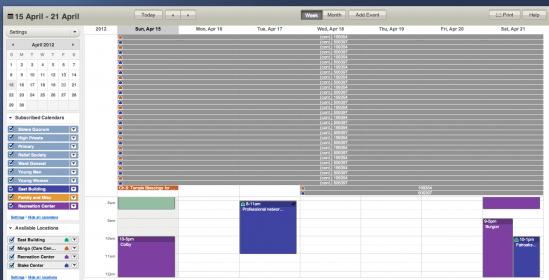
I am unsure how to deal with this. In our week view, we are seeing a ton of repeating unknown calendar items, that as the STS, and calendar editor, I am unable to delete. Not sure who to contact, but would love some direction on how to get it resolved, and cleaned up.

I suspect they came from way back when we attempted to implement Reservations, but am unsure.
Screen Shot 2012-04-15 at 9.53.01 AM.jpg
Screen Shot 2012-04-15 at 9.53.01 AM.jpg (29.04 KiB) Viewed 2034 times
Senior Member
#8
kyleq wrote:One other note about this issue. We have not yet implemented a permanent solution. We are still working on that. The database change is a temporary solution to the issue. When we do implement a permanent solution we will most likely need to run this database change one more time. It will only affect those events that are in a problematic state.
I'm also having a problem in deleting a repeating event. I think we have the same scenario as in NateDavis (Quote below) where early experimentation with the Calendar probably caused an unwanted repeating event.

"I am unsure how to deal with this. In our week view, we are seeing a ton of repeating unknown calendar items, that as the STS, and calendar editor, I am unable to delete. Not sure who to contact, but would love some direction on how to get it resolved, and cleaned up.

I suspect they came from way back when we attempted to implement Reservations, but am unsure."
Member
#9
What happens when you try to delete the event? Can you list out the steps you take and the results?
Senior Member
#10
kyleq wrote:What happens when you try to delete the event? Can you list out the steps you take and the results?

Select Week view in Calendar
Left click brings pop up event details:-

When: May 13, 10:00-13:00
Location: WATFORD
Calendar: None
Rooms: Entire Facility

Schedule event

I've just noticed that it shows Calendar: None

Maybe this is why it wont let me delete the event as it has no reference point?

Entering into the Schedule Eventdialogue box the following it displays

Event Details
Where - Watford
Repeating - Weekly
Calendar - Clerks Calendar

Event

Description - No description

Start - 13 May 2012

End - 13 May 2012

All day event - N/A
This event repeats

Location - Watford

Rooms and equipment at this location
Schedule entire location - Selected


Do you need time for setup and cleanup? - N/A
Setup:
Cleanup:
Repeats

Occurs every 1 weeks on:
Sun
Repeats until

End Date 24 Oct 2013

End date or number of occurrences cannot exceed two years.


Right clicking on the event a pop up brings up various options including Delete this event only. Clicking on this option brings up a notice about a problem with authentication and to contact the support team.

I'm the Ward Clerk and also the STS.
Member
#11
What you have described is a reservation that was entered by the building scheduler for the Watford location. It is not an event but more of a place holder to ensure that only members of your ward can schedule that location during that time. There are a few different help sections you could review at https://tech.lds.org/wiki/Calendar that may give you more insight to how the reservation system works.
Senior Member
#12
kyleq wrote:What you have described is a reservation that was entered by the building scheduler for the Watford location. It is not an event but more of a place holder to ensure that only members of your ward can schedule that location during that time. There are a few different help sections you could review at https://tech.lds.org/wiki/Calendar that may give you more insight to how the reservation system works.

Since it's a reservation he shouldn't be able to delete it but I'd say there is still a bug. Either the Delete This Event Only menu item shouldn't be visible for reservations for non-building schedulers or the error message should specifically say that the user must be a building scheduler to delete the reservation. I've verified that I get the same behavior (as a Ward Clerk) if I right click on a reservation and use that menu item.
New Member
#13
I was un-aware that you could right click on those and choose delete this event only. That was awesome. I am the STS, and gave myself rights as a Building schedular for a time, and then deleted each one. Took a while, but I was able to remove my bogus reservations from a botched import. Strange bug, but I was able to clear it out knowing I could right click. Thanks for the help.
Senior Member
#14
kyleq wrote:What you have described is a reservation that was entered by the building scheduler for the Watford location. It is not an event but more of a place holder to ensure that only members of your ward can schedule that location during that time. There are a few different help sections you could review at https://tech.lds.org/wiki/Calendar that may give you more insight to how the reservation system works.
Your scenario about the building scheduler doing a reservation sounds good. One small problem, we have never had a building scheduler!

This repeating event was created in the early days of the calendar, when we were all experimenting. I've since spoken to the individual who created the entry and he recalls creating a calendar putting some entries on it and then deleting the whole calendar. Is this possibly where the event came from and didn't get deleted with the calendar when it was removed?

I had already checked the wiki, for possible solutions, before posting in this thread. Perhaps I should follow NateDavis course of action and temporarily make myself a building scheduler!

I think at the end of the day as eblood66 mentions the menu selection is a bug. My conclusion is that this event didn't get removed with the deletion of the original calendar.
Senior Member
#15
Just to update my post above. I made myself a building scheduler and can now delete individual entries for the problem entry. I cannot delete the entire time line of this entry, which is my intention.
New Member
#16
Our stake has a repeating event on our calendar that we cannot modify or delete. When we try to delete the event we get the error: "Sorry, the data service has failed." We cannot modify the event details either. I am still able to add, remove and modify other events without a problem so to me it appears we have an issue with just this one specific event. I have had no luck contacting local technical support or by providing feedback via the lds.org feedback form. I have read multiple posts on here that others are also having this issue and that for one such user a developer had to contact them to help fix their issue. We would appreciate any help that could be offered.
Community Administrator
#17
grwils wrote:Our stake has a repeating event on our calendar that we cannot modify or delete.
Just as a thought, is there a conflicting restriction? There have been some recent changes in that area. I wouldn't think it would prevent you from deleting a event, but it's possible.

Failing that, please go to https://www.lds.org/header, and PM me the results along with which event is causing the problem. The results from "header" should be multiple lines of text. If it's a single line, you may need to try a different browser, or complete exit all sessions and try again.
Have you searched the Help Center? Try doing a Google search and adding "site:churchofjesuschrist.org/help" to the search criteria.

So we can better help you, please edit your Profile to include your general location.
Community Administrator
#18
grwils wrote:Our stake has a repeating event on our calendar that we cannot modify or delete. When we try to delete the event we get the error: "Sorry, the data service has failed." We cannot modify the event details either. I am still able to add, remove and modify other events without a problem so to me it appears we have an issue with just this one specific event..
One technique that has worked in some situations is to delete each instance of the event. This is done by going into Month view, and for each instance, right click on the event and choose Delete This Event Only. Obviously if there are a large number of instances of the event, this could be quite tedious, but it might be a workaround for you.
Questions that can benefit the larger community should be asked in a public forum, not a private message.
