VLyriC: new software for displaying hymn lyrics on video at stake conference

15 postsstarted by cboling 7,961 viewsoriginal topic

New Member
#1
When the computer for the setup I've been using since 2004 died a couple of weeks before conference and I had trouble recreating it, I decided it was time for a new, more universal, way of doing the display. I ended up writing VLyriC, which uses VLC as the display engine, and is a easier than a Powerpoint-style slide show -- esp. when making last-minute changes on the fly during the meeting. I also added camera selection to it (since my previous method wasn't available on Linux).

All that's required is VLC and this program (and one or more video sources for VLC to use -- a dummy source if you don't want video) and you're in business. The program and source code are available at the above link. It saved my weekend, and I hope it helps someone else.
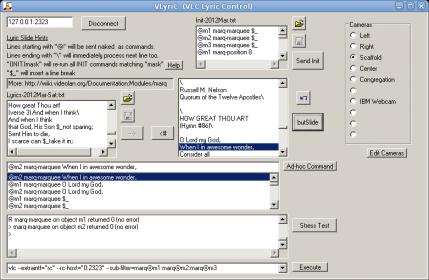
VLyriC.jpg
VLyriC.jpg (25.38 KiB) Viewed 5400 times
(How nice! The forum image uploader turned my 23k png into a crummy-looking 25k jpeg. Guess it was too big...:rolleyes:)
Church Employee
#2
Very impressive! I love it.
Kurt Olsen - Product Manager at Church HQ for Digital Presentation (Personal Video Conferencing, Meetinghouse Webcast, Conference Rooms, Video Conference Endpoints, Meetinghouse Digital Content)
#3
I'd like to see what the text-over-video looks like.

Can you upload a sample? For instance, where is the text overlayed (bottom, middle, etc.)? What font did you decide to use? How is the overlay quality, etc? What is the resolution factor (low, medium, 720, HD)?

Thanks
Member
#4
How does this interact with the Webcast software? Does it show up as another video source that sits in the middle between the capture card and the Webcast software, or does it require extra hardware to do Chroma-keying?

Thanks

Aaron Z
New Member
#5
michaelfish wrote:What font did you decide to use?
The VLC plugin doesn't appear to give a choice of typeface (anyone know differently?); it uses a basic sans-serif typeface that is probably system-dependent.
I'd like to see what the text-over-video looks like.
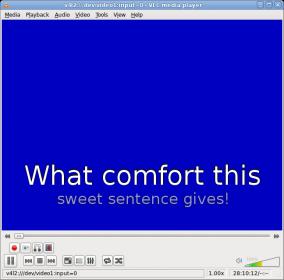
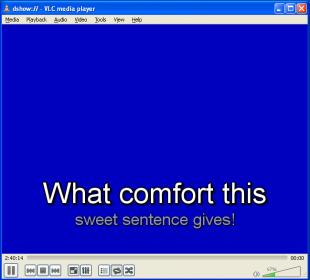
The project page shows a picture of the screen (click for larger version) with a custom title on it.
where is the text overlayed (bottom, middle, etc.)?
Totally flexible. I choose to have it at the bottom, but you can change the init strings to place it wherever you want. Put every line in a different place if you really want to drive your audience batty! :eek:
How is the overlay quality, etc? What is the resolution factor (low, medium, 720, HD)?
VLC will play your video at whatever resolution you desire (limited, of course, by the native resolution of your source). As the project page mentions (really -- it's hidden in there!) VLC 1.x seems to render the text at the same resolution as the video, but 2.0 appears to use full display resolution (which is nice if you're displaying 640x480 video on a 1024x768 projector). I updated that paragraph with links to a pair of screen shots that compare the same pair of lines displayed in both versions. (Note that both the VLC version and OS differ between the two shots. The basic font is OS-dependent; the rendering style is VLC-dependent.) I'd put the samples right here for you, but I can't figure out how to attach a picture without it transcoding it to jpeg. (if anyone knows how, I'd appreciate an education!)
lyrics-vlc1.1.9-linux-.jpg
lyrics-vlc1.1.9-linux-.jpg (12.19 KiB)
lyrics-vlc2.0.0-windows.jpg
lyrics-vlc2.0.0-windows.jpg (12.1 KiB)
New Member
#6
Aczlan wrote:How does this interact with the Webcast software? Does it show up as another video source that sits in the middle between the capture card and the Webcast software, or does it require extra hardware to do Chroma-keying?
VLC doesn't create a new V4L2/DirectShow device or anything fancy like that; it relies strictly on your display output. Unless someone knows of a display plugin for VLC that does that (it's certainly possible to make one), you'll need to use one computer to produce the display, and feed the video into a capture device of a 2nd computer in order to webcast it.

Even if you use VLC's built-in transcode/broadcast capabilities, you'll only get the original video without the text overlays; the overlay takes place after that step and is applied directly to the display module. I know because I tried it, and was disappointed -- it would've been great to have it broadcast on the LAN with nothing more needed!
Member
#7
cboling wrote:Even if you use VLC's built-in transcode/broadcast capabilities, you'll only get the original video without the text overlays; the overlay takes place after that step and is applied directly to the display module. I know because I tried it, and was disappointed -- it would've been great to have it broadcast on the LAN with nothing more needed!
Looking online turned up http://forums.adobe.com/thread/538563 which pointed me to http://www.e2esoft.cn/news/pages/vcam_vlc_plugin.html which appears to be a way to have the VLC output to a virtual device that looks like a camera to that computer.
May have to play with this...

Aaron Z
New Member
#8
Aczlan wrote:vcam_vlc_plugin
Outstanding! I tried it out, and it indeed works. I updated the project page w/ the full scoop.
Member
#9
cboling wrote:Outstanding! I tried it out, and it indeed works. I updated the project page w/ the full scoop.
Glad to hear it. Will have to experiment with it next time I am testing the webcasting setup.
Am I correct in thinking that I should be able to setup a signal chain as follows: Camera video/building audio > VLC (for overlay) > VCAM to merge the stream > Webcast software

Thanks

Aaron Z
New Member
#10
Aczlan wrote: Camera video/building audio > VLC (for overlay) > VCAM to merge the stream > Webcast software
Precisely.

You could also wait and add the audio with the VCam device; that should decrease CPU usage slightly (not having to process audio twice), but could further increase the temporal disparity between the audio and video streams. If the webcast software doesn't allow you to adjust the A/V sync, adding the audio sooner (as you suggested) would allow you to use VLC to tweak the audio delay.
Member
#11
cboling wrote:Precisely.
Thanks
cboling wrote:You could also wait and add the audio with the VCam device; that should decrease CPU usage slightly (not having to process audio twice), but could further increase the temporal disparity between the audio and video streams. If the webcast software doesn't allow you to adjust the A/V sync, adding the audio sooner (as you suggested) would allow you to use VLC to tweak the audio delay.
We haven't had any issues with audio/video sync yet, but time will tell if we have any in the future. CPU horsepower shouldn't be an issue as we have a 6 core AMD which currently sits at under 20% when running a webcast.
Will VLC allow you to switch sources (ie: choose from multiple cameras) midstream?
Also, will it let you use the same source more than once? We have a PCI capture card which has both S-Video and Composite inputs and it would be nice to be able to use both inputs.

Aaron Z
New Member
#12
The method that VLyriC is currently using to switch cameras is to add a new item to VLC's playlist, essentially restarting the stream. When the old & new "cameras" point to the same capture card, just different inputs, VLC may not actually fully init the device, though. In any case, adding the additional VCam layer would hopefully insulate the webcase software from that and e.g. stopping the broadcast just because you switched cameras.

I also noticed that when I switched between inputs on the same card, my text overlays were preserved, but each time I switched between the capture card and another device (I had a USB webcam strapped to the back leg of my central camera's tripod, giving me a view of the congregation) it reset the marquee parameters to default and I had to resend the init strings. I don't know whether or not the behavior of the marquee plugin is reflective of any of the rest of VLC or not. I didn't really notice a difference in the delay between inter-device and intra-device switching.
I did notice, however, that VLC does seem to have a little more (but still tolerable) delay when switching cameras this way than I see if I use a "3rd party" program (Osprey control panel on Windows, and v4l2-ctl on Linux) to switch inputs on the capture card while VLC's playing it. I didn't run any objective tests; this was just my impression.
New Member
#13
Funny this shows up recently, I was just about to email Jacob Stark and ask what the church's solution for text-overlay was. I see what looks to be a great product- still have yet to play around with it. Still, I would like to know if the webcasting software could implement this. It has been about a year since the last software update, maybe something could be in the works? I love that others come up with solutions where there is a need, but for future-proofing against my calling not always being STS I would like to see the simplest solution possible, and therefore would love to have this implemented in webcaster 4.0!
Church Employee
#14
Later this year, we will be beginning a Meetinghouse Webcast strategy project to determine what our future webcast products will be. Text overlay is a very frequent feature request, so it will definitely be taken into consideration. Today, of course, you can share your PC's screen using Meetinghouse Webcast Software v3.0, and that screen can display a PowerPoint with the hymn text, for example. It's a complete switchover from a camera view, so obviously it's not a true overlay on top of the existing video stream, but it would do the trick.
Kurt Olsen - Product Manager at Church HQ for Digital Presentation (Personal Video Conferencing, Meetinghouse Webcast, Conference Rooms, Video Conference Endpoints, Meetinghouse Digital Content)
New Member
#15

Re: VLyriC: new software for displaying hymn lyrics on video

I've made a new topic regarding the update, but I thought I'd post here, too. I've rewritten VLyriC and have it hosted on Source Forge. You can find it here.
Enjoy!