craiggsmith wrote:Well, I can see them there but not in the reservations screen. The problem with the regular week view is it's hard to tell what's a reservation and what's an actual activity (isn't it?), and you can't see all the details.
You can tell exactly what is a reservation and what is an actual event, as long as you know what they look like.
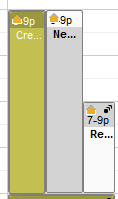
- weekview.png (2.46 KiB) Viewed 1115 times
In the image I attached (which comes from Week view), you see three bars. The one on the left is in a color, so it is an actual event, either in my ward or stake. The one in the middle is gray with a white bar at the top containing the time and building icon; that one is an event for some other ward. The one on the right is white with a gray bar at the top; that one is for a reservation.
And for all three items, I can click on them to see the first level of details in a popup, and then click on the "View event details and location" link on the popup to see all the details. The one odd thing is that for reservations the "event" title is the unit number of the unit for whom the building is reserved, rather than the unit name. But other than that, you can see all of the details. And when I say "you" I mean anyone in the stake who can see that building.
Questions that can benefit the larger community should be asked in a public forum, not a private message.
