Member
Util a few weeks ago, I have always been able to display and manipulate the Calendar on LDS.org on my iPad without any difficulty. I have even conducted training classes in my Stake using my iPad connected to a projector.
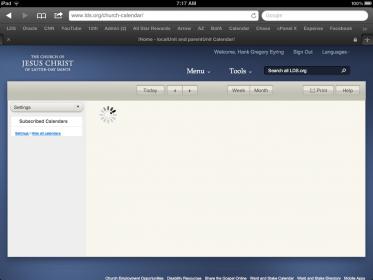
Recently, when I bring up the calendar and sign in to my LDS account, I get the top frame of the calendar with the left side partially rendered. But in the main body of the calendar all I get is the spinning progress indicator which spins forever and ever and the calendar is never displayed.
When I go to the settings portion of Calendar, I am able to see everything normally.
I am the Stake admin over technology, Calendars and facilities so I really need this to work.
I have the same issue on my iPhone 4
I have changed every setting possible, cleared cache and restarted the iPad. The only thing left really is to wipe out the entire OS image and reset the device. But I have a feeling that wouldn't help.
Has anyone else experienced and overcome this issue?
Recently, when I bring up the calendar and sign in to my LDS account, I get the top frame of the calendar with the left side partially rendered. But in the main body of the calendar all I get is the spinning progress indicator which spins forever and ever and the calendar is never displayed.
When I go to the settings portion of Calendar, I am able to see everything normally.
I am the Stake admin over technology, Calendars and facilities so I really need this to work.
I have the same issue on my iPhone 4
I have changed every setting possible, cleared cache and restarted the iPad. The only thing left really is to wipe out the entire OS image and reset the device. But I have a feeling that wouldn't help.
Has anyone else experienced and overcome this issue?