Front Page View

7 postsstarted by dvenus 3,268 viewsoriginal topic

New Member
#1
Hi!

It would be really nice on the front page to show that days lesson underneath the title of the manual and to the left of the view calendar link. You are already showing the date so why now the lesson title for the selected classes? This is what people are going to want to see. It would also save a lot of time for people who are in several classes or have family members in many classes.

Thanks!

Dave
Church Employee
#2
I'm not sure what you are asking for. Would you mind clarifying?

Right now, the main display lists each class like this:

Name of Class
Chapter #: Chapter title

Are you suggesting we add the title of the manual as well? Something like:

Name of Class
Manual Title
Chapter #: Chapter Title
New Member
#3
I am not sure if this is the same problem, but over the last week, sometimes when I log in all you see is the name of the class without the chapter no or chapter title being listed.

It has been fine for me since the weekend, but before this it was a frequent problem.
New Member
#4
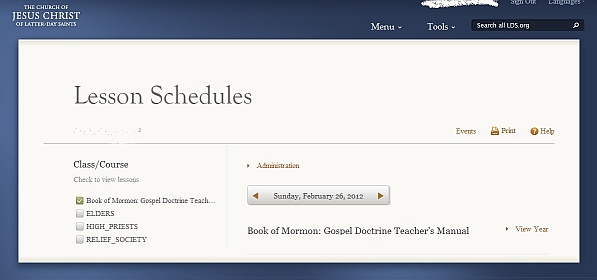
Here's what I see. I think this is the same problem you're describing. It lists the manual, but not the lesson.
Clipboard01.jpg
Clipboard01.jpg (58.12 KiB) Viewed 2832 times
New Member
#5
yes that is the exact problem.

Strangely enough when I checked the application last night, the problem was back again but it is fine for me now.
Church Employee
#6
Thanks howardmay for the additional info, and ctbarrett for the screenshot (and dvenus for the original report). It seems there is indeed a bug at play here. Now we just need to track it down.

I have not been able to reproduce this issue, so my guess is it is dependent on some particular combinations of data. Can you investigate the following:

- How your classes are configured. Is there a commonality between the classes that have this problem?
- Is there only one particular class that exhibits the behavior, or do you see the bug for all classes in your list at the same time?
- When you see the problem, does it go away if you do a page refresh in your browser (click the refresh button, or hit F5)?
New Member
#7

Thanks!

Hi!

Sorry for being gone so long. Thanks for looking into this issue and also to the others who responded. That's what makes working on projects like this so cool!

Dave Venus