Any demand for a new webcast receiver?

57 postsstarted by darcy.morrissette 17,774 viewsoriginal topic

#1
I'm currently working on making a purpose built appliance for receiving webcasts, and was wondering if there is any kind of demand for this? I could make several of them for others to use.

I noticed the church no longer has the Meetinghouse Webcast Receiver and even a re-purposed PC isn't all that great. I've noticed with using a computer to receive webcasts there is a learning curve for local units (even with a single click .bat file that opens the broadcast in fullscreen) due to inevitable video out issues with switching between satellite and internet feeds, or maybe its just our setup.

It's also getting harder, and more expensive to retrofit computers with composite video out. Instead I plan on building (work has already begun) a Linux based appliance that has composite and HDMI connections. It automatically starts receiving the broadcast once its powered on and will automatically re-connect if the stream dies. It should cost under $100 when completed.

Our buildings still only have coax ran throughout the building so composite to coax has been what we use, however these devices are credit card sized so they could be plugged in right by the projector with HDMI or HDMI -> DVI adapter for better quality - just need a network connection.

Anyways, just thought I would see if other stakes may benefit from this or not.

---
Darcy
Community Administrator
#2
It would be interesting to see what you come up with. I imagine that interest will pick up once it's a proven device.
Have you searched the Help Center? Try doing a Google search and adding "site:churchofjesuschrist.org/help" to the search criteria.

So we can better help you, please edit your Profile to include your general location.
Senior Member
#3
I'd be interested.

And if you can come up with a better webcast appliance I'd be interested in that as well - we just bought one, it failed after eight minutes of working - and the resolution process is they charge us full price again, send us a refurbished one then make a decision if they will honor the warranty.

The only troubleshooting they performed was have me hook up KVM and verify that MSIE 6.0 works.
#4
I'm interested, too. Would be good if there were some kind of VNC server in it as well for remote troubleshooting and management.
Senior Member
#5
Linux-based, please. Make it much cheaper than anything windows-based.

And it would be harder for well-meaning people to mess with it.
Community Administrator
#6
aclawson wrote:And it would be harder for well-meaning people to mess with it.

Or re-purpose it.
Have you searched the Help Center? Try doing a Google search and adding "site:churchofjesuschrist.org/help" to the search criteria.

So we can better help you, please edit your Profile to include your general location.
#7
I was wondering how the curent 40' limit of an HDMI signal may impact implementation once the project is complete. Although there are HDMI to CAT5 and Coax now available (at additional cost), I was wondering what inputs and outputs are you plan to have in the design?
Senior Member
#8
Isn't the team working on a ROKU channel for this? Seems a bit cheaper and a purpose-built device... although to it would need to support broadcasts from a webcast software, PVC, and all church media streams if it's going to scale.
“A long habit of not thinking a thing wrong, gives it a superficial appearance of being right, and raises at first a formidable outcry in defense of custom.”
― Thomas Paine, Common Sense
#9
I would be interested as well. Our projectors have VGA, one even has HDMI, so the better quality, the better.
Church Employee
#10
Hi guys - good discussion. I'm the product manager for webcast here at Church HQ. I know the Meetinghouse Webcast Receiver was reasonably popular while we offered it, so I have been looking at possible replacements. I've seen a proposed box in the $320-400 range that could be either Windows or Linux based that I thought looked pretty good. At this point, still evaluating what our overall strategy should be and gauging interest - sounds like there is some, not only from this forum posting but also in talking to others.

@aclawson: if your newly-purchased Meetinghouse Webcast Communicator failed in the first 8 minutes, it is absolutely covered under warranty. The product actually has a 3-year warranty. There shouldn't be any question about warranty coverage unless you drove a truck over it. :)

We've looked into the Roku channel idea as well. I would love it if we could make it work - it's a great, inexpensive device. However, we've run into a couple of issues:
1) Channel management - the Roku uses channels that you subscribe to. In theory, we'd need to create a new channel for every single new stake conference broadcast (definitely not feasible), or combine broadcasts onto a single channel (also probably not a great idea)
2) Lack of live streaming support - from what we've seen, it appears that Roku will only stream a saved file, and does not stream live content. So that really wouldn't work in the webcasting environment.

We certainly didn't do an exhaustive study of Roku, so I'm sure there are people out there with more knowledge and experience, but those factors caused us to stop spending any more time with it. If you have other ideas, let me know.
Kurt Olsen - Product Manager at Church HQ for Digital Presentation (Personal Video Conferencing, Meetinghouse Webcast, Conference Rooms, Video Conference Endpoints, Meetinghouse Digital Content)
Community Moderators
#11
For us, the receive end was the simplest. Almost any notebook connected to a projector & local sound system, with a separate notebook tied to a TV in the overflow area and we were done. It was especially easy being able to use the test feed from CHQ to set it all up. (Thanks for that!) It was the encode/upload end that took the most time to get working correctly.
So we can better help you, please edit your Profile to include your general location.
Community Administrator
#12
ksolsen wrote:If you have other ideas, let me know.

How does the newer incarnations of the Western Digital box look?
Have you searched the Help Center? Try doing a Google search and adding "site:churchofjesuschrist.org/help" to the search criteria.

So we can better help you, please edit your Profile to include your general location.
#13
Wow, didn't expect that many responses so quickly.

@RussellHltn:
I'll keep everyone posted once I get the actual devices, right now I'm building everything in a virtual appliance that's the same OS as will be running on the devices.

@aclawson:
I was thinking about making a lower cost Webcast Communicator (~$200) too but the church software runs on Windows. VLC media player will broadcast no problem but I don't know if the church servers would support relaying broadcasts from it. Church units could stream directly from the stake without even using the church headquarters server (less latency). That would require either a firewall rule (stake firewall) or a VPN connection for each unit and enough bandwidth to handle several units at once though.

@sammythesm:
I never thought of VNC, I can add that as well. So far I've installed Webconsole and the HTTP Remote Control for VLC media player (the player I'm using for streaming). You can also always plug in a keyboard and manage it directly. I haven't enabled SSH, I figured with Webconsole you won't need any software to manage it, just a browser. I have a script that simply asks for your Unit ID and Event ID then it automatically loads the broadcast URL on next reboot.

@JohnShaw:
The Roku would be nice if it did MMS streaming. The Revue 2 may work though.
http://forums.roku.com/viewtopic.php?p= ... cc761c9927

As a side note, these devices are capable of running XBMC (Boxee is based off of XBMC) and decode 1080P, so it could be used for other things as well. I just wanted something that was so simple all you had to do was plug it in, and it would automatically re-connect to interrupted feeds, which is another problem with Windows Media Player (anyone know how to fix that?).

---
Darcy
Senior Member
#14
That could be a good idea. My plan is to use the clerk computers as the receiver and tie the audio/video into the closed circuit TV system so that you can be in any room watching the feed. I also see this as a benefit that if we lose our satellite, we can stream conference and no one knows the difference. I can see this saving the church a lot of money, by getting rid of the satellite system.

Just a thought.
New Member
#15
Just adding my +1 for a dedicated receiver.
Senior Member
#16
I would be interested in this, if it were cheaper than a basic laptop. I assume you wouldn't need much of a laptop.
Craig
Saint George, UT
New Member
#17
Right now we are just using the clerk computers for the receivers. One of the buildings is completely packed, but doesn't have a satellite, so we had facilities run a video input from the Clerk's office into a video distribution amplifier and run outputs to the primary and relief society rooms. We had to get a video card that output to rca video.

We are using the clerk computers to reduce cost and because the clerk computers are replaced every 5 years, so we wouldn't have to budget to replace the device in the future.

@radioactive73
I do like the features being proposed in a new receiving device(just plug and play). What version of linux are you thinking of using? I'd be interested in helping you with this.

-Bryson
harddrive wrote:That could be a good idea. My plan is to use the clerk computers as the receiver and tie the audio/video into the closed circuit TV system so that you can be in any room watching the feed. I also see this as a benefit that if we lose our satellite, we can stream conference and no one knows the difference. I can see this saving the church a lot of money, by getting rid of the satellite system.

Just a thought.
New Member
#18
I too would be interested in something that could be dedicated to receiving the broadcasts. Computers work, but we do this often enough that something should be dedicated for it.
#19
@bshepher

I was planning on using the ARM port of Debian Linux but I may change that to a Fedora ARM port as it appears to be the default and better supported distro of the device. I have a couple on back-order, I was hoping to have them already but they just came out and are having trouble filling demand. Any help, and or ideas is always welcome, I don't want any trade secrets and will probably release plans on how to make your own. I want to use the RaspberryPi, some of you may have heard of it.

The other mentioned idea may be nice as well, that is, using media software such as Boxee or XBMC and putting in the stream URL manually. Then it could be used with downloaded conferences, playing Mormon messages, etc. I still like the idea of having it dedicated and automatic though, so maybe I'll work on both versions for the same price when I finally get the devices.

--
Darcy
New Member
#20
ksolsen wrote:We've looked into the Roku channel idea as well. I would love it if we could make it work - it's a great, inexpensive device. However, we've run into a couple of issues:
1) Channel management - the Roku uses channels that you subscribe to. In theory, we'd need to create a new channel for every single new stake conference broadcast (definitely not feasible), or combine broadcasts onto a single channel (also probably not a great idea)
2) Lack of live streaming support - from what we've seen, it appears that Roku will only stream a saved file, and does not stream live content. So that really wouldn't work in the webcasting environment.

We certainly didn't do an exhaustive study of Roku, so I'm sure there are people out there with more knowledge and experience, but those factors caused us to stop spending any more time with it. If you have other ideas, let me know.

1. I see only a need for one "LDS Meetinghouse Webcast" channel. When you launch the channel, prompt the user to enter the unit number and webcast session ID, with the option to save the unit number and maybe even the event ID.

2. I watch general conference live on our roku at home. Granted, I'm sure there is a minute or two delay, but that exists with the meetinghouse communicator today.

I don't see this as a reason to not look into this further. The roku would also be able to facilitate as a backup for when there are sattelite issues or primary for units without a sattelite.

-Landon, Sioux Falls, SD - aka - Large stake boundry...
#21
Well I finally got my Raspberry Pi and have been testing it, I've been able to implement everything to my liking except for one fairly major issue - there is no hardware decoding support for anything other than h.263 and h.264. The Raspberry Pi foundation didn't license the ability to hardware decode anything else in order to reduce cost, even though the GPU can handle it. Whats worse is in its current state it cannot handle software decoding the WMV stream Church HQ uses. There is work being done to offload other portions of the decoding to the GPU, hopefully leaving enough power to satisfactorily decode WMV with the CPU. It also looks like the RPi foundation is planning on offering hardware decoding for other codecs for a fee, which would be minimal and perfectly fine, the problem is I don't know when, if they even go ahead with it.

I'm going to contact the church to see if they can encode with h.264 though on a new URL, because not only would it save them bandwidth while streaming, but would also allow this low cost device to be used. It can handle decoding up to 1080p, it just has to be h.264. I have also been able to transcode the WMV MMS stream to h.264 and decode it on the RPi no problem, but this requires an additional transcoder (I just used VLC media player which is Open Source).

If that's not an option, my second attempt will be to use the A1000/A2000 set top devices which can hardware decode MPEG-2 and WMV as well as h.264 and a slew of other codecs. The current issue with these allwinner a10 devices is there isn't any software that takes advantage of these hardware decoding features in Linux. I want to test it with Android though and see if that would suffice. The good news is, linux is already ported and XBMC is nearing completion.

If anyone can put me in contact with someone from the Church about h.264 encoding I would love to test it out!

--Darcy
Senior Member
#22
I found an android app that streams the webcast --> Wondershare Player (used to be called Daroon) Been streaming now for 15 minutes. If the A1000/A2000 works out, that is a cheap Android device that could be integrated into the internal audio/video system installed in meetinghouses. Let me know if you're going down that path, I'd love to work on it with you.
“A long habit of not thinking a thing wrong, gives it a superficial appearance of being right, and raises at first a formidable outcry in defense of custom.”
― Thomas Paine, Common Sense
New Member
#23
What about Google's new Nexus Q?
#24
JohnShaw wrote:I found an android app that streams the webcast --> Wondershare Player (used to be called Daroon) Been streaming now for 15 minutes. If the A1000/A2000 works out, that is a cheap Android device that could be integrated into the internal audio/video system installed in meetinghouses. Let me know if you're going down that path, I'd love to work on it with you.

I ordered one today ($92 from Dealextreme with shipping), I'll try that app you mentioned on it once I get it. I figured I might as well start testing it because who knows how long it will be for RPi foundation to sell licenses.

I've tried a few apps on my phone with mixed results, they don't seem to do hardware decoding, the lower quality stream works ok but the standard definition still struggles (Galaxy Nexus). Your help is appreciated, I would like to test both native Android and Linux. With Linux there are more options, and I can fully automate things. I'll see if there is a way to install a webserver with php on android, and hopefully a way to autolaunch an application and start streaming. What I have setup on my RPi is basically this:

1. User goes to http://receiver
2. User enters in Unit # and broadcast ID
3. Reboot and stream starts automatically.

If the url changes, rinse and repeat, otherwise it automatically starts when powered on, restarts the feed on failure and requires no Linux knowledge to operate.
kevin.fairchild wrote:What about Google's new Nexus Q?

I hadn't seen this before, looks like a very nice device, a bit pricey though.

--

More good news, XBMC is now available on Android! The only thing I don't like about XBMC is I don't see the ability to automate video on startup. I would at least like the option to fully automate, even if it isn't used. Hopefully they'll port omxplayer as well (the command-line version of XBMC which was released for RPi)

--Darcy
Senior Member
#25
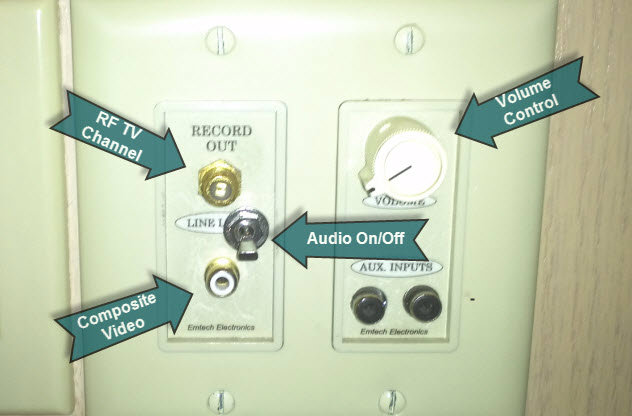
One of my imperatives in the stake is to place a device in-line with the already existing video system running from the Satellite. Many members of the church can hook up a VCR to a TV or Projector from the internal RF signal, we've been doing that for years. If I had a device that could output the video signal through the already existing RF signals in the church that is my ideal scenario. I'd like to mimic the Audio/sound override at the podium (in most meetinghouses) that switches the audio feed to the satellite. I want a similar situation for the video signal. It would also be great to have as the ad-hoc item, but I can typically get someone with a laptop to get that done, but the quality of the broadcast usually depends on something getting messed up by the human (batter runs out, laptop sleeps, etc...). So having a specific device is a great idea, I hope these work out.
“A long habit of not thinking a thing wrong, gives it a superficial appearance of being right, and raises at first a formidable outcry in defense of custom.”
― Thomas Paine, Common Sense
#26
It's been awhile since my last update so I thought I would share some progress, all good news but in my mind still not an ideal solution. The mele A2000 will work decoding WMV3 MMS streams without hardware acceleration (progress is slow on hardware decode) but requires performance tweaking, I can create an SD card image for testing if anyones interested.

As far as the Raspberry Pi goes, they finally have a codec available for hardware decoding WMV3 (VC-1 codec), the only problem is omxplayer doesn't seem to work with mms streams and decoding wmv3. I'm not a developer so I'm not able to debug the program, it's open source so anyone with the know-how can go right ahead and see if they can add support.

OMX Player:
https://github.com/huceke/omxplayer
Church Employee
#27

Roku Live/VOD

ksolsen wrote:We've looked into the Roku channel idea as well. I would love it if we could make it work - it's a great, inexpensive device. However, we've run into a couple of issues:
1) Channel management - the Roku uses channels that you subscribe to. In theory, we'd need to create a new channel for every single new stake conference broadcast (definitely not feasible), or combine broadcasts onto a single channel (also probably not a great idea)
2) Lack of live streaming support - from what we've seen, it appears that Roku will only stream a saved file, and does not stream live content. So that really wouldn't work in the webcasting environment.
The Roku presents some interesting challenges being it is a consumer device. We currently approve the Roku for use but we are not supporting it. You can access the Mormon Channel, the Live Channel, and BYUtv but it has its limitations in that we can not create our own user interface. It is a consumer device. You must have the available bandwidth to access the media from the Internet unless you download it to a USB device and plug it into the Roku.

On the other hand. The Roku does do live streaming. You can watch CES Devotionals and Conference on both the Mormon Channel and Live Channel. We currently have 55 sites testing the box for accessing Conference. The Roku does both Live and Video-on-Demand. We actually tested the box as a streaming box and found that with the proper programming it can play a stream you enter from a URL. The issue is that the current communicator boxes we use only create a WMV file which the Roku Box does not support. We successfully tried it with an MP4 file.

The biggest issue we have with the box is that we cannot white label it. For the now you can use the Roku box to access LDS Media and live events and just set it up on your own account. I would suggest putting a pass code on it so others cannot add additional channels. We are looking at other alternatives that will provide us additional control over the interface and management of the media.
New Member
#28
I was also looking at the Raspberry Pi for streaming opportunities but also MUCH more.

But really I think that whichever solution gets the "blessing" should also be used for in house media too. My Vision??? All pictures, Music, Conference Talks etc. be stored and or streamed and maintained by a xml fed repository hosted at lds.org. all media will be meta tagged and referenced to topics and lessons. So If was preparing a lesson on Baptism for CTRB I could "check out" a tv with an appliance (like the raspberry pi) and via menus select the correct topic or class lesson and Whalla. I have videos, pictures and music to my class. OH and don't forget an option to access streaming media such as church or meetinghouse broadcasts.

Reason for raspberry Pi? for one cost under 50$ two, Open source Three, Very customizable and also should be able to "White Label" it. Downside. For linux developers (sorry windows), no real time clock (solved by using NTP in Code) Few issues to consider mentioned by Radioactive73 (but certainty doable with some changes on streaming at HQ.

Any XMBC Pros out there? Can you customize and build your menus and content based off of a xml feed? I haven't dug in that deep yet to test out. but I like the fact that it can be skinned and white labeled.
Church Employee
#29
crees wrote:But really I think that whichever solution gets the "blessing" should also be used for in house media too. My Vision??? All pictures, Music, Conference Talks etc. be stored and or streamed and maintained by a xml fed repository hosted at lds.org. all media will be meta tagged and referenced to topics and lessons. So If was preparing a lesson on Baptism for CTRB I could "check out" a tv with an appliance (like the raspberry pi) and via menus select the correct topic or class lesson and Whalla. I have videos, pictures and music to my class. OH and don't forget an option to access streaming media such as church or meetinghouse broadcasts.
Yes, Yes, Yes, and Yes. Thank you for the thought on Raspberry Pi too. We were discussing that last week and are going to look into it. Video, Pictures, audio, quotes, and access to Mormon Messages, Conference talks, and additional media is all in the plan. Space and necessity will also help determine what content would be available as well. I especially like the thought of having a single unit that could work as a live streaming device for broadcasts. Thank you and keep the feedback coming. It helps us get additional insights into features that are wanted and lets us know we are on the right track.
New Member
#30

RasberryPi

I have also been looking into the RasberryPi - I just haven't gotten my hands on one yet due to the 12 week lead time so everything I say is just conjecture.

However, I really like the Pi because of XBMC and the support for AirPlay (I believe similar functionality is supported for Android as well). Basically, my thinking was that if someone were to bring in video or content on their device they could then "beam" it to the Pi for play. Then there's all the other things mentioned as well that would be beneficial.

Right now I'm buying and testing different media cables for different devices and trying to figure out how to train people to use them as well as let people know their available. A single device that could support USB, Airplay (or like), streaming or samba would be perfect (btw, I'm a Windows dev and I don't mind digging into Linux a little).

The downside is that the Pi doesn't currently support Wifi w/o another $10-15 adapter, so you're looking at probably $55 or having people find a ethernet port to plug into.
Member
#31
We have found that using a laptop on the receiving end provides better results then the church receiver box does. Each Ward in our Stake has a Ward Multimedia Specialist who is trained and responsible (agent ward) for providing the laptop and setting up the building to receive Stake Conference Broadcasts originating from our Stake Center.

The main issue with a Church Issued piece of hardware is that technology advances very rapidly. As new broadcasting technology becomes available, the church would likely be more hesitant to utilize those new technologies if there is a broad user base of machines out there that use 3 year old technology. But the membership always has the latest greatest hardware around.

Just another angle to think about in the broad scheme of things.

No matter how you slice it - isn't it wonderful that we are having this discussion? The technology will go forth boldly and nobly till it has penetrated every building..
New Member
#32
When we first started relaying stake conference to other buildings over the internet, we used a Slingbox, but our internet pipe as pretty narrow, so we switched to Meetinghouse Communicator. We now have church-provided internet and lots of it, so I'm thinking of trying Slingbox again -- much better picture/sound.

Does anyone have experience or thoughts on Slingbox?
Community Administrator
#33
kwinpete wrote:Does anyone have experience or thoughts on Slingbox?

Isn't Slingbox point-to-point? You'd need a box at the stake center for each remote site and upload bandwidth for each stream.
Have you searched the Help Center? Try doing a Google search and adding "site:churchofjesuschrist.org/help" to the search criteria.

So we can better help you, please edit your Profile to include your general location.
New Member
#34
RussellHltn wrote:Isn't Slingbox point-to-point? You'd need a box at the stake center for each remote site and upload bandwidth for each stream.

Yes, I have two Slingboxes and two Sling Catchers. The stake center should have enough bandwidth now to send two streams.
Member
#35
kwinpete wrote:Yes, I have two Slingboxes and two Sling Catchers. The stake center should have enough bandwidth now to send two streams.

Why not just bump the Audio/Video quality on the Meetinghouse Communicator?

Aaron Z
Member
#36
We are still using Slingbox and a Slingcatcher for our stake conference. We have five buildings in the stake but only use two buildings (both are "stake center" buildings) for stake conference. It would take a very large upload bandwidth to support 2 remote buildings on slingbox at the highest resolution which takes around 3Mbps per stream. We have plenty of download capacity, but for us, the upload capacity is the limiting factor. We actually use 2 Slingbox Pro's and 2 Slingcatchers so we can go both directions. It's not interactive - we have about 6 seconds of delay each direction--but does allow us to mix the video from the remote building in before the meeting starts to help the remote audience feel more included in the meeting, and we have the stake presidency view the remote building on a small TV on the stand. We use 4 remotely web-controlled cameras, 3 in the main building and one in the remote building and can control them all from the main building.

We have also used webcasting on laptops for regional meetings.

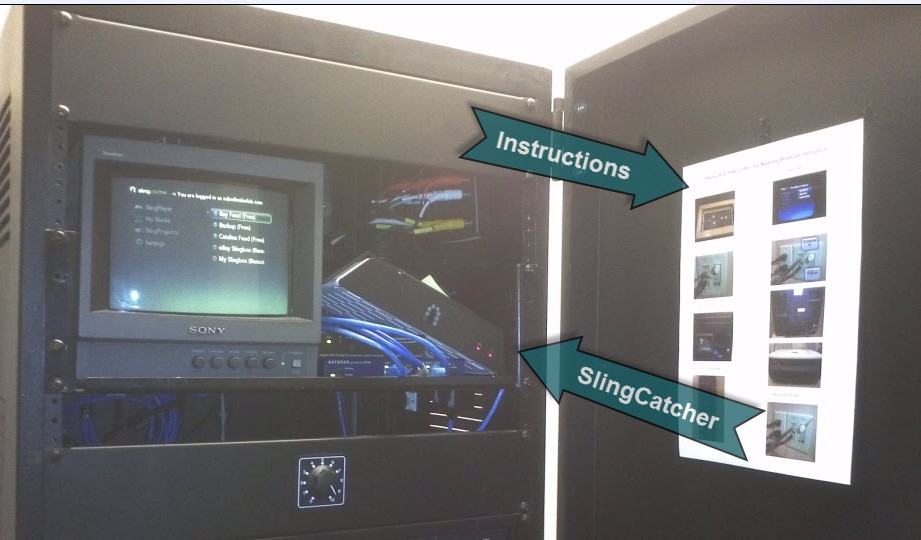
One of the things I really like about the slingbox is the composite video output which we feed into the existing satellite rack (into the video amp) to feed the whole building which is typically 2 projectors, and 2 or 3 TV's. The cabling is already present and it supplies composite video to the chapel and cultural hall, plus modulated TV feeds to all the other jacks in the building. While composite video can be produced from VGA/HDMI using a scan converter, that usually results in loss of some video quality.
#37
Our stake has also been using Slingboxes for many years now. They have proven to be reliable and the quality has been great. We send from the stake center to two additional ward buildings with two Slingboxes.

When both are streaming, they eventually train up to around 3 Mbps each but we still get great quality at 1.5 Mbps. I permanently installed a SlingCatcher in the audio rack at one of the buildings so, just as with the Satellite receiver at the stake center, all we need to do is power it on, select the stream, turn on the building sound and with in 30 seconds, we are receiving. No muss, no fuss.
📎 SoundBox.jpg (87.43 KiB)
📎 Podium.jpg (41.72 KiB)
Senior Member
#38
These upload speeds seem pretty unattainable for many of us... not that I wouldn't want them myself, but if the slingbox drove the ISP decisions, potentially before the Church had a solution in place. Why not switch to the Church solution and reduce the speeds required? Maybe some of these installs that pre-existed the FMG takeover are a reason that the rest of us have to struggle to find something better than 1.5 Down and .384 Up. Which is what my stake center has and which is what we do our broadcasts at. We have at least 3 sometimes 4 receiving buildings and we all do OK. I'm pushing for better and better because the picture quality on the receiving ends... our Stake Center serves it's purpose. If you are getting these speeds for under $50 a month I'd eat my HAT!!! I would enjoy eating my hat, however, if you truly are under $50 a month, what a gift and a blessing for your stake if so.
“A long habit of not thinking a thing wrong, gives it a superficial appearance of being right, and raises at first a formidable outcry in defense of custom.”
― Thomas Paine, Common Sense
Member
#39
Our FM group is working on switching the stake over to Cable internet and that is putting us at 10x1, MUCH better than 4x384 that we were getting with DSL.

Aaron Z
Senior Member
#40
If you review the new https://www.lds.org/callings/melchizede ... o?lang=eng post - there are 4 or 5 national accounts there that have pre-negotiated rates. I'm not sure why the rates and speeds are not published, but the minimums are the 10/1 you've referenced here and the prices are under $50. If you are lucky enough to be in a Time Warner, Comcast, Century Link, and Sprint (the sprint is a mobile wireless), contact your FMG to see if you can get better speeds at a better rate. The fine print is that if there are captial build-out costs to bring in the product to your meetinghouse that is not part of the deal. Our 3 meetinghouses that are in Time Warner neighborhoods we could not cut over because the build-out costs averaged about $5000 each. No way that was coming out of anyone's budget (at least that is what we were told). So here we sit with 1.5D and .384 Up.... Our Century Link meetinghouse also didn't qualify because not all Century Link is part of the deal for some reason. Some of the acquisitions for Century Link, apparently, are not part of the program, So I'm batting 0 for 4 with national contracts.

I only wish we could get an AT&T uVerse contract... then I could be told no again for several other meetinghouses :)

For a couple of years I had been asking our FMG about these national contracts to get blank stares, I'm glad that they have been posted now so that the Stakes and STS can hold the FMG accountable about it. We only discovered it after appealing to our FMG about increasing our speeds and as justification for telling us 'NO' our FMG had attached the (at the time) internally published only matrix of Internet Speeds showing us where the Church required us to spend under $50 a month. What were we asking? That we consider moving to a 10U/1D speed connection in 3 meetinghouses from Time Warner for $79.... can you all see the irony here... It was lost on my FMG what that matrix was, and how it applied to the situation. I nearly fell out of my chair. The justification for the 'NO' proved a 'YES' - although that eventually turned out to really be 'NO' because of the build-out costs.

To say the least, it has been an interesting roller-coaster ride.
“A long habit of not thinking a thing wrong, gives it a superficial appearance of being right, and raises at first a formidable outcry in defense of custom.”
― Thomas Paine, Common Sense
Member
#41
What I don't understand is why when they build the building, they don't drop in 3-4 2-4" conduits to go from outside the parking lot to the chapel. Yes, there isn't much else that goes in after the fact, but if an animal chews through a the phone line under the parking lot, you have to dig up the parking lot to fix it vs dropping a new cable in the conduit.
Cost (while things are already torn up during the initial construction) would probably be under $1000 and it could save many times that down the road.

Aaron Z
Senior Member
#42
Aaron,

I'm the Choir on this one.... I asked about this when we built our new stake center last year, like other items, this is a cost saving measure that the meetinghouse department has chosen. All Temples are built with several of these for the sole purpose of the Dedication.
“A long habit of not thinking a thing wrong, gives it a superficial appearance of being right, and raises at first a formidable outcry in defense of custom.”
― Thomas Paine, Common Sense
Community Administrator
#43
Aczlan wrote:What I don't understand is why when they build the building, they don't drop in 3-4 2-4" conduits to go from outside the parking lot to the chapel.

At the time our buildings were built, the Internet, even cable TV for that matter was unknown. Wire can be restrung in existing conduits.
Have you searched the Help Center? Try doing a Google search and adding "site:churchofjesuschrist.org/help" to the search criteria.

So we can better help you, please edit your Profile to include your general location.
Senior Member
#44
RussellHltn wrote:At the time our buildings were built, the Internet, even cable TV for that matter was unknown. Wire can be restrung in existing conduits.
Inside the buildings, generally, are not a problem, running Ethernet after-the-fact should have existing conduit. It's the outside building or parking lot - Utility pole that is on the other side of the parking lot where Time Warner, Comcast, Uverse or one of the regional cable providers are stuck. it costs thousands to bring the cable in if not existing conduit exists.
“A long habit of not thinking a thing wrong, gives it a superficial appearance of being right, and raises at first a formidable outcry in defense of custom.”
― Thomas Paine, Common Sense
Community Administrator
#45
JohnShaw wrote:Inside the buildings, generally, are not a problem, running Ethernet after-the-fact should have existing conduit. It's the outside building or parking lot - Utility pole that is on the other side of the parking lot where Time Warner, Comcast, Uverse or one of the regional cable providers are stuck. it costs thousands to bring the cable in if not existing conduit exists.

Understood. I was talking about conduit from the outside. Back then it didn't make any sense. If the wire got damaged, it was easy enough to run new wire.
Have you searched the Help Center? Try doing a Google search and adding "site:churchofjesuschrist.org/help" to the search criteria.

So we can better help you, please edit your Profile to include your general location.
Member
#46
JohnShaw wrote:Inside the buildings, generally, are not a problem, running Ethernet after-the-fact should have existing conduit. It's the outside building or parking lot - Utility pole that is on the other side of the parking lot where Time Warner, Comcast, Uverse or one of the regional cable providers are stuck. it costs thousands to bring the cable in if not existing conduit exists.
My thoughts exactly. I was referring to running conduit from outside the parking lot "ring" to the building itself so that new feeds from the road could easily be pulled in rather than having to rip up the parking lot or get in a directional boring machine.

Aaron Z
Member
#47

My experiences with cable install costs in 4 buildings

Building #1 – Stake Center: We had DSL with Qwest (now Centurylink) at 1.5Mbps down/0.896Mbps up. This was paid for by the stake on a 3 yr. contract price at about $40.40/month.

In February 2010 after the national contracts rolled out, the monthly cost was the same for every speed from Qwest for any rate up to 7Mbps down/ 5Mbps up. The consistency of DSL coupled with 5M up (which would be great for originating webcasts!) made this my first choice. However, the fastest they could actually deliver at this address was 5Mbps down/0.896Mbps up. Since 1M upload was not desirable for webcasting, we next pursued Cable.

The national contract with Comcast provided a good rate for 12M/2M (I don’t feel comfortable disclosing it but it is in the $50 range). There was a nice large conduit at the base of a pole on the street that ran right to the place we wanted it inside the building, but the conduit terminated outside in a Qwest pedestal. And the pole was a Qwest Pole. The phone company would have charged Comcast to use the pole, and the pedestal was property of Qwest, so this was not workable for getting Comcast cable into the building. Comcast indicated they would need to hire a contractor to do 150 ft. of directional drilling from the other side of the street where a Comcast pole was located, clear under the parking lot, and up to the building where they would place a new Comcast pedestal. Oh, and they might need to dig up a 2’ x 4’ hole in the middle of the recently repaved parking lot so that they could drill both directions. Construction cost: $4410.79 – ouch! Well it turns out that the national contract provided for Comcast to cover up to $2250 of the construction cost at the regular monthly rate, but if we paid another $10 per month they would cover up to $3500 of the construction cost. So that is what we did. The FM Group paid $910.79 (4410.79 – 3500) for the install, and the cost is $10 higher than the normal national contracted price. It turns out that they did not need to cut into the parking lot, except for a small 5” round hole where the drill would cross the power feed for the building. I think we may also have a higher speed connection as a result of the increased monthly rate.

Lesson learned: Don’t let the construction cost of the install scare you at first glance, investigate what they will cover.

Building #2: A 60 yr. old building with no existing internet, Qwest could only deliver 3M down/0.64M up. Since wiring was overhead into the building, Comcast installed cable from the pole to the building with no construction cost. We have 12M/2M in that building.

Building #3: Existing Qwest (Centurylink) DSL for a Family History Library. The meetinghouse is located only 200 feet from the Qwest building in the area. Unfortunately, the best speed they could deliver was 7M/0.896M. No national contract with the local cable provider, but we approached them and after a few months determined it would cost $5000 to bring the cable from across the street. They would not cover any of the cost, so we still have DSL.

Building #4: No nationally contracted DSL provider, and the same cable provider as Building #3 (no national contract), but overhead wires into the building, so the install went fine with no construction costs. FM purchased the modem and they are paying $44.95/month for 3M/0.768M speed. We could go to 10/1.5 for 69.95 on a 3 yr. contract. I believe if we asked FM Group to up the speed they would do it. So far we have not felt the need to upgrade in this single ward building.

As I’ve mentioned elsewhere in this forum, we have an excellent working relationship with the FM group. I was actually the one who worked with the ISP’s to meet them at the building to do pre-planning and installs. Our FM group seems very willing to work with us.

I also want to add that if we as technologists want to communicate with FM people who do not understand the technical jargon we need to be very clear when we talk about speeds – no mixing of M and K, always mentioning down and up speeds and helping them understand what is important. Download is usually the important factor except in a webcast originating building where a good upload speed really impacts video quality.
Senior Member
#48
Wow... to have it so nice...
“A long habit of not thinking a thing wrong, gives it a superficial appearance of being right, and raises at first a formidable outcry in defense of custom.”
― Thomas Paine, Common Sense
New Member
#49

Re:

It's been a couple months since I posted on this but there is even a better appliance that has wifi, is the shape of a stick has a hdmi port and it runs android. Search the web for
Kimdecent Droid Stick A2 (mini PC packs a dual core Amlogic CPU)

This guy out if the box can do many things. I have some if these on order to test with some other projects I am working on. Will keep you posted


JonesRC wrote:
crees wrote:But really I think that whichever solution gets the "blessing" should also be used for in house media too. My Vision??? All pictures, Music, Conference Talks etc. be stored and or streamed and maintained by a xml fed repository hosted at lds.org. all media will be meta tagged and referenced to topics and lessons. So If was preparing a lesson on Baptism for CTRB I could "check out" a tv with an appliance (like the raspberry pi) and via menus select the correct topic or class lesson and Whalla. I have videos, pictures and music to my class. OH and don't forget an option to access streaming media such as church or meetinghouse broadcasts.
Yes, Yes, Yes, and Yes. Thank you for the thought on Raspberry Pi too. We were discussing that last week and are going to look into it. Video, Pictures, audio, quotes, and access to Mormon Messages, Conference talks, and additional media is all in the plan. Space and necessity will also help determine what content would be available as well. I especially like the thought of having a single unit that could work as a live streaming device for broadcasts. Thank you and keep the feedback coming. It helps us get additional insights into features that are wanted and lets us know we are on the right track.
New Member
#50
I hope that you don't mind a non-tech contribution to this discussion. I serve on a rural stake presidency in the UK. We have six meetinghouses in a stake which covers an area over 4,000 sq miles. High and rising costs of car fuel (USD 8.50 per US gallon) and pressure on family budgets from rising taxes and below inflation pay increases have prompted us to significantly reduce planned stake meetings.

The Area Presidency have approved the installation of black boxes for use with web-casts in our stake. Every chapel has a standard broadband internet installation with British Telecom that is typically providing 15mbps download and 0.5mbps upload speeds. Physical facilities have approved the upgrade of the stake centre to fibre-optic broadband with much higher speeds. We have a fibre connection to our home with speeds of 80mbps download and 20mbps upload though we are very close to the local exchange and have 'clean' copper pair to the street cabinet. Even if the stake centre could achieve half those speeds I am sure that will facilitate smooth web-casts.

Do you know what the standard black box will be for chapel installations? I have been investigating some alternatives and have created a Raspberry Pi/XBIAN XBMC that is working perfectly on wifi at home (n speed wifi network and using standard Belkin USB wifi dongle on Rasp Pi. Also, I see that the Roku has Mormon channel and BYU TV. I'll buy one of these and see how streaming from these services works with a projector.
Senior Member
#51
The Roku is not a supported device for the Church system of webcasting. Most stakes will use a laptop of a member to receive the broadcasts in their local ward meetinghouses.

A quick, easy simple small windows computer will work well. A permanent laptop that could be used on Sunday's in the Library/Materials Center.

Work has been done on a linux project, and Raspberry PI, you can search through the forums on that. I've personally used android as well to an HDMI projector, but that was a test in a Relief Society Room, not the general population.
“A long habit of not thinking a thing wrong, gives it a superficial appearance of being right, and raises at first a formidable outcry in defense of custom.”
― Thomas Paine, Common Sense
Senior Member
#52
JohnShaw wrote:The Roku is not a supported device for the Church system of webcasting.
It was for at least a little while - the church even set up a special account with roku so you could activate the device without a credit card.
#53
...It was for at least a little while - the church even set up a special account with roku so you could activate the device without a credit card.
Are you talking about activating the Roku or actually streaming a local conference webcast using the Roku?
Senior Member
#54
JohnShaw wrote:The Roku is not a supported device for the Church system of webcasting. Most stakes will use a laptop of a member to receive the broadcasts in their local ward meetinghouses.
While it may not be approved for local webcasting, it is approved for Church broadcasts according to the RKATS site.
Church Employee
#55
Our current standard products for sending webcasts are a) the Meetinghouse Webcast Communicator, a custom-built box that makes it simple to start webcasts, or b) Meetinghouse Webcast Software, which can be installed on a current PC. For the receiving sites, a Windows PC with Windows Media Player is the recommendation. For more details:

http://tech.lds.org/wiki/Meetinghouse_Webcast
Kurt Olsen - Product Manager at Church HQ for Digital Presentation (Personal Video Conferencing, Meetinghouse Webcast, Conference Rooms, Video Conference Endpoints, Meetinghouse Digital Content)
New Member
#56
@JohnShaw
Thanks John, I was not expecting to use the Roku for receiving building to building webcasts, sorry to imply that. All official letters and posters to ecclesiastical leaders regarding Church transmissions eg, CES Devotionals, list Roku as a supported device. I did try one in the building yesterday and it worked really well with LAN connection. WLAN would not connect and reported Error 014, which I understand to be a ping to router error. Perhaps there was too much interference from personal devices? Maybe we'll need to change the router settings if we can.

I'm very interested in your comment that a laptop be used for this purpose as that is exactly what I have requested from physical facilities. They have denied that request and explained that laptops are not issued except to units meeting in properties not owned by the Church.

@kolsen
Thanks for this link. It clarifies what is required and also suggests the use of a laptop. I guess we'll either have to buy small laptops from LUBA funds or rely on a member's personal laptop. I prefer not the latter in case of accident or damage. I understand that some high spec laptops can cost thousands of pounds.
Senior Member
#57
Our stake uses the Roku extensively, and understand it is an approved church device, it even has an official page on lds.org.

It appears my laptop message didn't quite make it all the way out of my head. The FM group will not provide a computer other than the clerk computer for each unit, that is the case. Family History Center Computers are also not provided by the FM group (they are involved in the process of delivery). In my stake, We've made use of laptops for Family History Consultant training and as a pod that could be checked out if a ward/branch wanted to put on a training session and they didn't have access to a FHC.

Since our use of these laptops has dropped off dramatically, I have a pending suggestion in to our Stake Presidency they they be moved to the materials centers in our meetinghouses. Purchase a lock for the laptop and secure them behind a locked door - give the key to the Agent Bishop. This could be used for library access (hey could you print out this talk for me, Internet Access for those without it at home to setup online directory information, upload photos, etc...) and could be used in receiving the webcast.
“A long habit of not thinking a thing wrong, gives it a superficial appearance of being right, and raises at first a formidable outcry in defense of custom.”
― Thomas Paine, Common Sense