Calendar Languages

33 postsstarted by Bradybr 6,531 viewsoriginal topic

New Member
#1
I'm finding that even though I have selected English as my choice for calendar viewing, I still have headings showing up in another language. Are there any others with that dilemma? For example, all of my headings in the left sidebar are not in English while everything else is. I have clicked on the "languages" tab several times and selected English, but it reverts back to another language. Anybody have an explanation for this?

Thanks a lot!
Community Administrator
#2
I've never seen this problem, and I have no idea what is causing it or how to fix it, but you're not alone: someone else made a post this morning regarding this very same problem at: Screen View language problem.
Questions that can benefit the larger community should be asked in a public forum, not a private message.
Community Administrator
#3
He's not alone. This was reported right after the new release here.

So the count is now up to 4 and no solutions.
Have you searched the Help Center? Try doing a Google search and adding "site:churchofjesuschrist.org/help" to the search criteria.

So we can better help you, please edit your Profile to include your general location.
Community Moderators
#4
calendar_language.jpg
(11.92 KiB) Downloaded 91 times
Count me in as well. I've tried to re-select the Language (English) and also checked my language selection on my LDS account, but nothing helps. Looks like the language for this bar of the calendar as well as other text is locked in as Spanish.
Have you read the Code of Conduct?
Community Administrator
#5
I wonder why it picks on some people. Those of you affected, is it reverting to the default language of the ward or stake? Any connection you think of between the language selected and something else?
Have you searched the Help Center? Try doing a Google search and adding "site:churchofjesuschrist.org/help" to the search criteria.

So we can better help you, please edit your Profile to include your general location.
Community Moderators
#6
It's cleared up by itself now. When the problem was appearing it affected all of the text of the page except for the calendar events themselves. The default language of our stake is entirely English. Why it cleared up or what was causing it is unknown. Perhaps someone backed out a recent change??
Have you read the Code of Conduct?
New Member
#7
I'm seeing the same thing - as of yesterday my calendar shows up in Spanish (fortunately I speak Spanish) :-)
New Member
#8
Same thing here.
Senior Member
#9
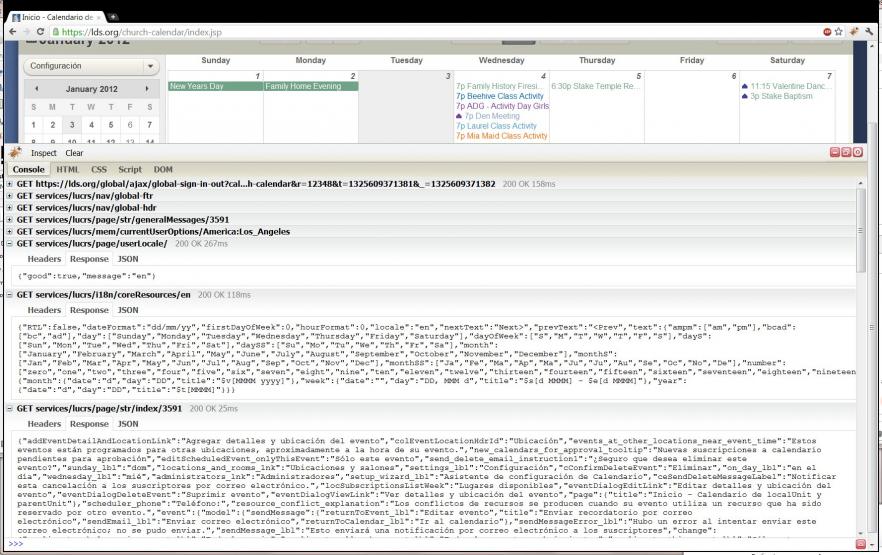
It just happened to me after I refreshed. Someone has clearly overwritten the services/lucrs/page/str/index file with the wrong language for "en" in the latest release. You can clearly see from my Firebug trace that the language is specified as "en", but the resulting output from services/lucrs/page/str/index/3591 is all in Spanish.
Calendar.jpg
(104.6 KiB) Downloaded 89 times
New Member
#10
I have the same problem. When the page is loading the “Today” button is labeled “!Today!”. Once the page load completes the label changes to “Hoy”. :confused:
New Member
#11

Calendar Language

My calendar is stuck in Spanish. Can't get it to change
Community Administrator
#12
Huh. Now it's doing it to me. The top area in blue is still English (sign out, Languages, menu, tools), but the calendar app is in Spanish. Trying to toggle to other languages and back fails to restore it.

I'm suspecting it's a bad server in the farm.

Edit: This is under IE9. It used to work fine.
Have you searched the Help Center? Try doing a Google search and adding "site:churchofjesuschrist.org/help" to the search criteria.

So we can better help you, please edit your Profile to include your general location.
Senior Member
#13
I should add that I'm only seeing this in Chrome. IE8 seems to be serving this up in English (at least for now).
Community Administrator
#14
mfmohlma wrote:I should add that I'm only seeing this in Chrome. IE8 seems to be serving this up in English (at least for now).

I'm the other way. IE9 is bad, Chrome is fine. As I say, I suspect a bad server in the farm. It's a luck of the draw which one you get. I don't see any way to ID which server you are on. The two IPs when I go to "header" are the same in both browsers.
Have you searched the Help Center? Try doing a Google search and adding "site:churchofjesuschrist.org/help" to the search criteria.

So we can better help you, please edit your Profile to include your general location.
Member
#15
It isn't happening for me, but it is happening to my bishop (he sent me a screenshot). Changing the language using the "Languages" link in the top right corner does nothing (the language of lds.org is showing up as English, but the calendar links are showing up in Spanish... "Configuracion" and "Imprimir" and "Ayuda".).
New Member
#16
Same problem here.

(Chrome and Firefox on OpenSUSE 11.4)
Community Administrator
#17
nathangg wrote:Changing the language using the "Languages" link in the top right corner does nothing (the language of lds.org is showing up as English, but the calendar links are showing up in Spanish... "Configuracion" and "Imprimir" and "Ayuda".).

In my case, changing the language to some other language does change things as expected. But changing it back only returns you to where you started.
Have you searched the Help Center? Try doing a Google search and adding "site:churchofjesuschrist.org/help" to the search criteria.

So we can better help you, please edit your Profile to include your general location.
Member
#18
RussellHltn wrote:In my case, changing the language to some other language does change things as expected. But changing it back only returns you to where you started.

Ah, good to know :-)
New Member
#19
I have the same problem. When I open the Calendar I get a notice "Se ha lanzando la Version 2.0" in a language other than English.
New Member
#20
Yep, same problem here. Above the calendar everything is in English (including where you can choose your language), and the entered items listed in the calendar are also in English; but everything else is in Spanish (including event details). If I change things to another language, for example Swedish, then everything (including above the calendar) is all in Swedish (obviously this does not include the entered items for the calendar).

EDIT: Also, when I choose another encoding option (ie. right-click on the area which includes "January 2012" and choose Encoding, and then something different) it will start to load in English, and then change to Spanish.
New Member
#21

Help with Spanish calendar

Yes, I'm having the same problem today of the calendar coming up in Spanish instead of English.
Church Employee
#22
If you see this issue, try clearing your cache and cookies.

If anyone can reproduce the issue after clearing their local cache, please let me know. I've confirmed that all the servers have the full set of language files, so that's not the problem.
Community Administrator
#23
jdcr256 wrote:I've confirmed that all the servers have the full set of language files, so that's not the problem.

The full set of filenames? Or the full, correct set of files? One theory expressed is that the English language file on one server is wrong.

Is there a way for us to ID the particular server when we experience the problem?
Have you searched the Help Center? Try doing a Google search and adding "site:churchofjesuschrist.org/help" to the search criteria.

So we can better help you, please edit your Profile to include your general location.
Community Administrator
#24
RussellHltn wrote:One theory expressed is that the English language file on one server is wrong.

Have you actually tried clearing your cache and cookies (as recommended by jdcr256) to see if that fixes the problem?
Questions that can benefit the larger community should be asked in a public forum, not a private message.
Church Employee
#25
RussellHltn wrote:The full set of filenames? Or the full, correct set of files? One theory expressed is that the English language file on one server is wrong.

Is there a way for us to ID the particular server when we experience the problem?

All the files are present on all servers and they are the correct files.

There is a single external vip that all outside traffic passes through, so there is no way to identify which server a response originated from.
Community Administrator
#26
aebrown wrote:Have you actually tried clearing your cache and cookies (as recommended by jdcr256) to see if that fixes the problem?

I'll have to wait until this evening when I get back to the computer that has the problem. But why would the cache cause a problem now? I was fine a day or two ago.
Have you searched the Help Center? Try doing a Google search and adding "site:churchofjesuschrist.org/help" to the search criteria.

So we can better help you, please edit your Profile to include your general location.
Community Administrator
#27
Now that I think about it, clearing my cache may have been what started the problem. I cleared it out over the weekend in a effort to snag a audio file I wanted but didn't have download option for.
Have you searched the Help Center? Try doing a Google search and adding "site:churchofjesuschrist.org/help" to the search criteria.

So we can better help you, please edit your Profile to include your general location.
Community Moderators
#28
My browser cache and cookies are all cleared upon closing the browser.
I tried that yesterday and the problem still showed up. A while after I reported it, it suddenly dissappeared.

As of this moment, it's still OK. Weird.
Have you read the Code of Conduct?
Senior Member
#29
jdcr256 wrote:If you see this issue, try clearing your cache and cookies.

This worked for me. Thanks for checking on it. Weird...
Community Administrator
#30
jdcr256 wrote:If you see this issue, try clearing your cache and cookies.

Now that I'm back on my affected machine, yes, it did fix it. But I'm still puzzled as to how it got out of whack in the first place.
Have you searched the Help Center? Try doing a Google search and adding "site:churchofjesuschrist.org/help" to the search criteria.

So we can better help you, please edit your Profile to include your general location.
Senior Member
#31
RussellHltn wrote:I'm still puzzled as to how it got out of whack in the first place.

As am I. My guess is that a cache somewhere in the server farm got a character wrong (through a soft memory error or such). The language code for English is "en" and for Spanish it's "es". That's just a guess, though.
New Member
#32

Same problem

I have just started having the same problem. I don't know when it started, but in September, 2012, my headings come up in Spanish (in Illinois, last I checked, our main language is English). Even when I click on the globe and select English, it will continue to default back over to Spanish.
Member
#33
This is a pretty old thread that was dealing with issues that most likely are only similar to this issue in symptom only. Try following the advice to clear given earlier in this thread to clear your browser cache. If that doesn't work please create a new thread to address this issue.